
OpenAgentd




A local-first cockpit for AI agents.
Run an agent team on your machine, see every tool call and diff, and keep your models, sessions, workspaces, and telemetry under your control.
Get started · Features · Discord · Facebook Group · Issues · Contribute
Why OpenAgentd
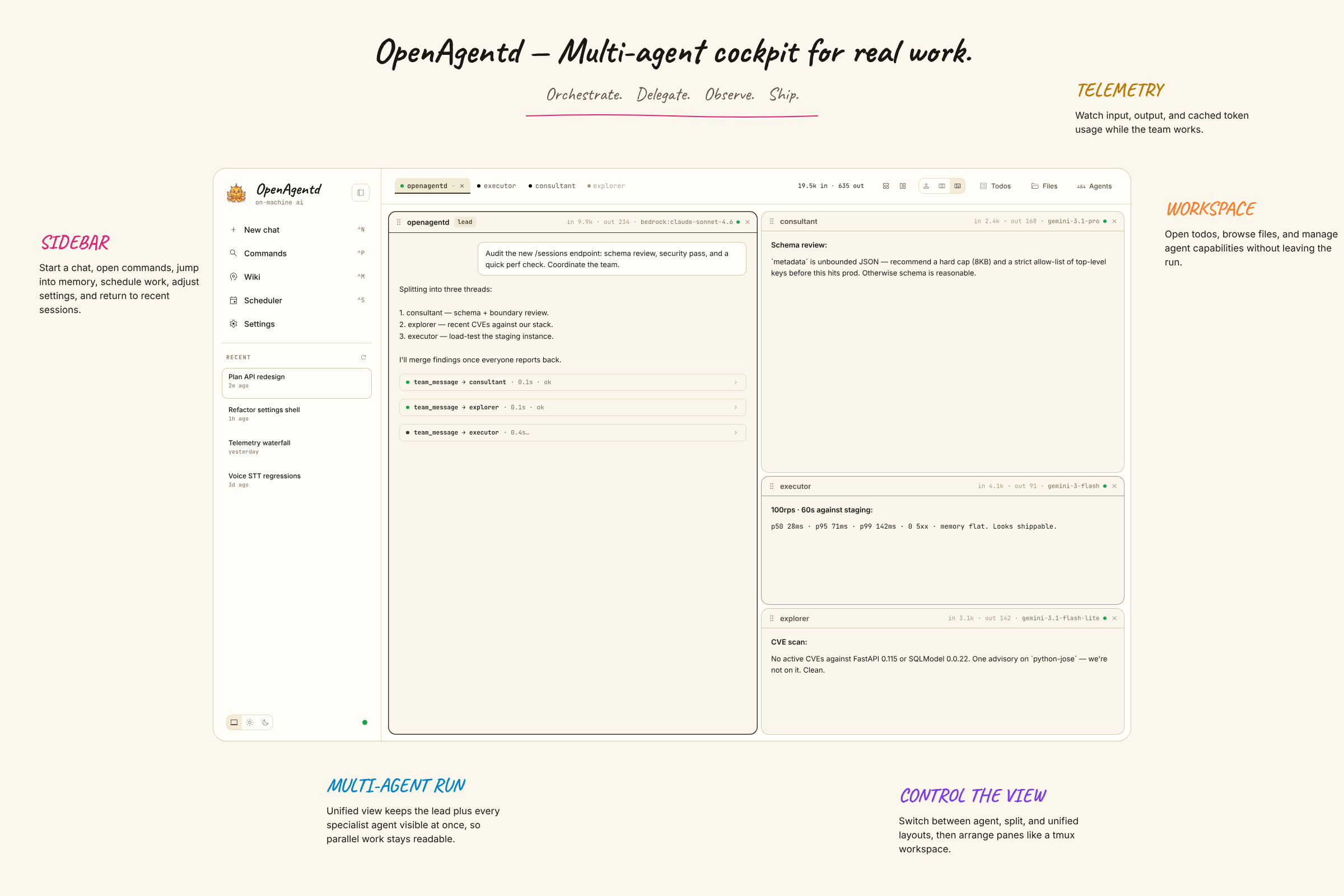
Most coding agents live in a terminal or an editor. OpenAgentd is the cockpit around them: a native desktop app and mobile companion where you can run a lead with specialists, follow work in real time, inspect what changed, and keep moving without losing context.
- See the work. Streamed replies, tool calls, arguments, results, timings, files, diffs, terminal output, and agent status are visible in one interface.
- Run a team. A lead can delegate to specialists, coordinate them through an async mailbox, and let you watch individual or unified timelines.
- Work in real repositories. Coding sessions open local folders, support isolated git worktrees, show changes and history, and return language-server diagnostics after edits.
- Choose your models. Use your own keys with major cloud and local providers, including Anthropic, OpenAI, Gemini, OpenRouter, Bedrock, Copilot, Codex, Ollama, and more.
- Stay local-first. Sessions, telemetry, configuration, and the API server run on your machine. Connect a mobile client or another desktop securely when you need to.
The versioned feature catalogue is the canonical record of shipped capabilities.
Get started
Desktop app
Install the current desktop release:
# macOS / Linux
curl -fsSL https://raw.githubusercontent.com/lthoangg/openagentd/main/install.sh | sh
# Windows PowerShell
irm https://raw.githubusercontent.com/lthoangg/openagentd/main/install.ps1 | iex
Open OpenAgentd from your applications folder or Start menu. The desktop app runs its bundled backend automatically; add a provider in Settings and start a conversation.
Release artifacts are available for macOS, Windows, and Linux on the latest release page. Unsigned desktop builds may require an explicit operating-system confirmation before first launch.
CLI server
Install the backend when you want to run it from a terminal, use a browser client, or connect another device:
uv tool install openagentd
openagentd
The server creates its default agents and configuration on first start. Open the printed local address and add a provider in Settings. For a phone or another computer on your network:
openagentd start --lan --key
openagentd address
openagentd health
--key protects non-loopback access. Use openagentd --help and <command> --help for the current command reference.
From source
git clone https://github.com/lthoangg/openagentd.git
cd openagentd
uv sync
bun install --cwd web
make run
For frontend development in a second terminal:
cd web && bun dev
What it feels like
| A conversation that can act | A workspace that stays in view |
|---|---|
 |
 |
| Inspect changes | Keep an eye on local usage |
|---|---|
 |
 |
Built for the whole loop
Plan and delegate. Ask for a plan before code changes, then let a lead split independent work across specialists. View the unified timeline when you want the story, or focus on one agent when you need detail.
Build and inspect. Attach files, browse a coding workspace, use @ mentions, run a direct shell command with !command, review a diff, and inspect structured tool output without leaving the conversation.
Operate with confidence. Manage providers, MCP servers, skills, sandbox permissions, scheduled tasks, todos, and local telemetry from the cockpit. OpenAgentd supports desktop, browser, and touch-first mobile clients against the same API.
For users and contributors
- Features — shipped, version-cited capabilities.
- Releases — download builds and read release notes.
- Discord — join the community server to chat and ask questions.
- Facebook Group — join the community group to connect and share.
- Issues — feature requests, bugs, roadmap discussion, and known issues.
- Security policy — report vulnerabilities privately.
- Contributing — set up a development checkout and submit changes.
OpenAgentd is licensed under Apache 2.0.
1 maintainer

Download files
Download the file for your platform. If you're not sure which to choose, learn more about installing packages.
Source Distribution
Built Distribution
Filter files by name, interpreter, ABI, and platform.
If you're not sure about the file name format, learn more about wheel file names.
Copy a direct link to the current filters
File details
Details for the file openagentd-1.123.2.tar.gz.
File metadata
- Download URL: openagentd-1.123.2.tar.gz
- Upload date:
- Size: 16.8 MB
- Tags: Source
- Uploaded using Trusted Publishing? Yes
- Uploaded via: uv/0.12.0 {"installer":{"name":"uv","version":"0.12.0","subcommand":["publish"]},"python":null,"implementation":{"name":null,"version":null},"distro":{"name":"Ubuntu","version":"24.04","id":"noble","libc":null},"system":{"name":null,"release":null},"cpu":null,"openssl_version":null,"setuptools_version":null,"rustc_version":null,"ci":true}
File hashes
| Algorithm | Hash digest | |
|---|---|---|
| SHA256 |
610f84d8ef07a8d3e3294629549843614456680b6759f6cdbe7a5e579d4ec4dd
|
|
| MD5 |
ccf6b2a9908ec810a26a0f9ad008f9cc
|
|
| BLAKE2b-256 |
e6b9dfec1d491659518af0cd632f8fe5781481988691e23231b0a05247b7cf40
|
File details
Details for the file openagentd-1.123.2-py3-none-any.whl.
File metadata
- Download URL: openagentd-1.123.2-py3-none-any.whl
- Upload date:
- Size: 693.2 kB
- Tags: Python 3
- Uploaded using Trusted Publishing? Yes
- Uploaded via: uv/0.12.0 {"installer":{"name":"uv","version":"0.12.0","subcommand":["publish"]},"python":null,"implementation":{"name":null,"version":null},"distro":{"name":"Ubuntu","version":"24.04","id":"noble","libc":null},"system":{"name":null,"release":null},"cpu":null,"openssl_version":null,"setuptools_version":null,"rustc_version":null,"ci":true}
File hashes
| Algorithm | Hash digest | |
|---|---|---|
| SHA256 |
4ce5eebfeca233d4dc31cbd724c66849cc7a82c48829daa538a969e7fced2a37
|
|
| MD5 |
e24ca34a282dada73fc913cea33e26d0
|
|
| BLAKE2b-256 |
e27fb75a6982ca86d5e819243cb926754a4a26a7b81dd50271dca5a6a56929ec
|







