
OpenAI Agents SDK 
The OpenAI Agents SDK is a lightweight yet powerful framework for building multi-agent workflows. It is provider-agnostic, supporting the OpenAI Responses and Chat Completions APIs, as well as 100+ other LLMs.
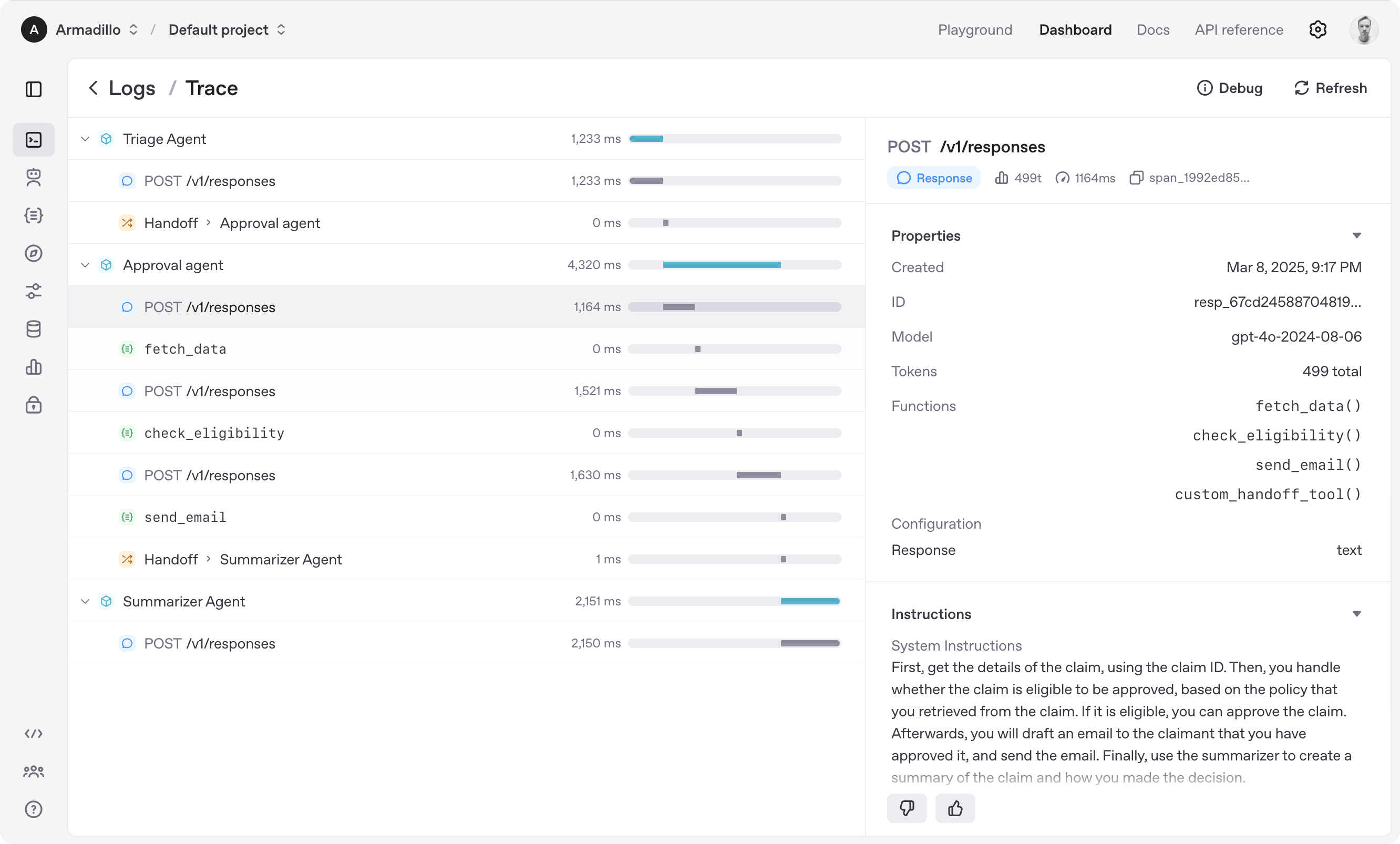
Core concepts:
- Agents: LLMs configured with instructions, tools, guardrails, and handoffs
- Sandbox agents: Agents preconfigured to work with a container to perform work over long time horizons.
- Realtime agents: Build powerful voice agents with
gpt-realtime-2.1and full agent features - Voice agents: Build voice pipelines that combine speech-to-text, an agent workflow, and text-to-speech
- Agents as tools / Handoffs: Delegating to other agents for specific tasks
- Tools: Various Tools let agents take actions (functions, MCP, hosted tools)
- Guardrails: Configurable safety checks for input and output validation
- Human in the loop: Built-in mechanisms for involving humans across agent runs
- Sessions: Automatic conversation history management across agent runs
- Tracing: Built-in tracking of agent runs, allowing you to view, debug and optimize your workflows
Explore the examples directory to see the SDK in action, and read our documentation for more details.
Get started
To get started, set up your Python environment (Python 3.10 or newer required), and then install OpenAI Agents SDK package.
venv
python -m venv .venv
source .venv/bin/activate  # On Windows: .venv\Scripts\activate
pip install openai-agents
For voice support, install with the optional voice group: pip install 'openai-agents[voice]'. For Redis session support, install with the optional redis group: pip install 'openai-agents[redis]'.
uv
If you're familiar with uv, installing the package would be even easier:
uv init
uv add openai-agents
For voice support, install with the optional voice group: uv add 'openai-agents[voice]'. For Redis session support, install with the optional redis group: uv add 'openai-agents[redis]'.
Run your first agents
The SDK supports four primary ways to run agents. Set the OPENAI_API_KEY environment variable before running any of these examples.
Run a text agent
Use a text Agent for workflows that do not need a persistent realtime connection or a sandbox workspace.
from agents import Agent, Runner

agent = Agent(name="Assistant", instructions="You are a helpful assistant")

result = Runner.run_sync(agent, "Write a haiku about recursion in programming.")
print(result.final_output)

# Code within the code,
# Functions calling themselves,
# Infinite loop's dance.
(For Jupyter notebook users, see hello_world_jupyter.ipynb)
Run a sandbox agent
Use a SandboxAgent when the agent needs to inspect files, run commands, apply patches, or preserve workspace state across longer tasks.
This example uses UnixLocalSandboxClient, which is supported on macOS and Linux. On Windows, use DockerSandboxClient with the openai-agents[docker] extra or a hosted sandbox client instead; see Sandbox clients for setup details.
from agents import Runner
from agents.run import RunConfig
from agents.sandbox import Manifest, SandboxAgent, SandboxRunConfig
from agents.sandbox.entries import GitRepo
from agents.sandbox.sandboxes import UnixLocalSandboxClient

agent = SandboxAgent(
    name="Workspace Assistant",
    instructions="Inspect the sandbox workspace before answering.",
    default_manifest=Manifest(
        entries={"repo": GitRepo(repo="openai/openai-agents-python", ref="main")}
    ),
)

result = Runner.run_sync(
    agent,
    "Inspect the repo README and summarize what this project does.",
    run_config=RunConfig(sandbox=SandboxRunConfig(client=UnixLocalSandboxClient())),
)
print(result.final_output)
Run a realtime agent
Use a RealtimeAgent for low-latency, server-side voice and multimodal experiences over WebSocket.
import asyncio
from agents.realtime import RealtimeAgent, RealtimeRunner


async def main() -> None:
    agent = RealtimeAgent(
        name="Assistant", instructions="You are a helpful voice assistant. Keep responses short."
    )
    runner = RealtimeRunner(starting_agent=agent)
    session = await runner.run()

    async with session:
        await session.send_message("Say hello in one short sentence.")
        async for event in session:
            if event.type == "audio":
                # Forward or play event.audio.data.
                pass
            elif event.type == "history_added":
                print(event.item)
            elif event.type == "agent_end":
                break


if __name__ == "__main__":
    asyncio.run(main())
Run a voice agent
Use a VoicePipeline to turn audio into text, run an agent workflow, and stream generated speech.
import asyncio

import numpy as np

from agents import Agent
from agents.voice import AudioInput, SingleAgentVoiceWorkflow, VoicePipeline


async def main() -> None:
    agent = Agent(name="Assistant", instructions="You are a helpful voice assistant.")
    pipeline = VoicePipeline(workflow=SingleAgentVoiceWorkflow(agent))
    audio_input = AudioInput(buffer=np.zeros(24000 * 3, dtype=np.int16))

    result = await pipeline.run(audio_input)
    async for event in result.stream():
        if event.type == "voice_stream_event_audio":
            # Forward or play event.data.
            pass


if __name__ == "__main__":
    asyncio.run(main())
Explore the examples directory to see the SDK in action, and read our documentation for more details.
Contributing
Please share bug reports and feature requests through GitHub issues. Pull requests are limited to repository collaborators; we do not accept pull requests from non-collaborators. See CONTRIBUTING.md for the contribution policy and development guide. For security vulnerabilities, follow SECURITY.md.
Acknowledgements
We'd like to acknowledge the excellent work of the open-source community, especially:
This library has these optional dependencies:
We also rely on the following tools to manage the project:
We're committed to continuing to build the Agents SDK as an open source framework so others in the community can expand on our approach.
3 maintainers


Metadata
3 maintainers
Release files for openai-agents 0.24.0
For a detailed explanation of source distributions (sdists) and built distributions (wheels), please see the package formats documentation.
Source distribution (sdist)
| File | Size | Uploaded | |
|---|---|---|---|
| openai_agents-0.24.0.tar.gz | 7.0 MB | Details |
Built distribution (wheel)
| File | Interpreter | ABI | Platform | Reset |
|---|---|---|---|---|
| openai_agents-0.24.0-py3-none-any.whl | Python 3 | none | any | Details |
Total release size: 8.3 MB
Release files / openai_agents-0.24.0.tar.gz
| Download URL | openai_agents-0.24.0.tar.gz |
|---|---|
| Size | 7.0 MB |
| Tags | Source |
|
SHA-256 checksum How to use checksums |
4b4b285f4fed81fdf1b4ac426a9101658d9cd29b4fb1aaeee18f639b77e704e3
|
|
BLAKE2b-256 checksum How to use checksums |
a536537006bc2a22f3aa232ce0907f52a333f831a6a2f525894ff43747a7abee
|
| Upload date | |
|
Uploaded using Trusted Publishing? What is trusted publishing? |
Yes |
| Uploaded via |
twine/7.0.0 CPython/3.13.14
|
Provenance
Provenance describes where a file came from. On PyPI, provenance is shared via attestations, which provide a verifiable record of the build or publishing details. View details, limitations and caveats.


PyPI Publish Attestation
PyPI verified that this artifact, at this checksum, originated from the publisher listed below.
Signed by GitHub Actions, verified by PyPI on Oct 15, 2026.
Transparency logRelease files / openai_agents-0.24.0-py3-none-any.whl
| Download URL | openai_agents-0.24.0-py3-none-any.whl |
|---|---|
| Size | 1.2 MB |
| Tags | Python 3 |
|
SHA-256 checksum How to use checksums |
18d4ac34e84ed937333ec8ce46395ed3521ffcbb0a521780a4c2eaa451467f49
|
|
BLAKE2b-256 checksum How to use checksums |
059301efc034d7011b89381f96a9fb8957c09a16e3c190f3a5de128e1d0a42e9
|
| Upload date | |
|
Uploaded using Trusted Publishing? What is trusted publishing? |
Yes |
| Uploaded via |
twine/7.0.0 CPython/3.13.14
|
Provenance
Provenance describes where a file came from. On PyPI, provenance is shared via attestations, which provide a verifiable record of the build or publishing details. View details, limitations and caveats.
PyPI Publish Attestation
PyPI verified that this artifact, at this checksum, originated from the publisher listed below.
Signed by GitHub Actions, verified by PyPI on Oct 15, 2026.
Transparency log













