
OpenAirClim
















Description
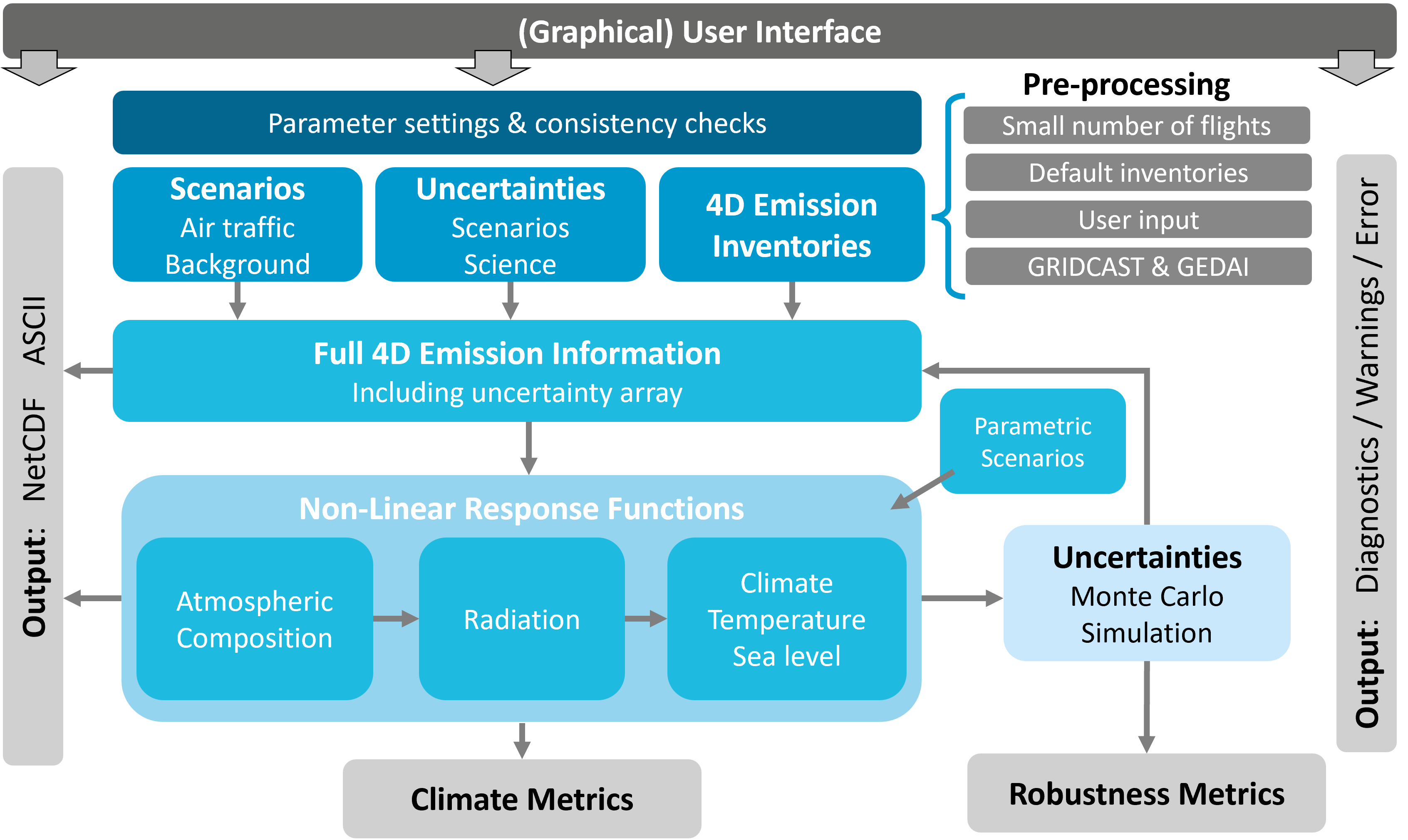
OpenAirClim is an open-source response model for quantifying the climate impact of air traffic emissions. Rather than explicitly simulating physical processes, it uses response functions derived from comprehensive climate-chemistry models. This makes OpenAirClim particularly fast and efficient, with individual runs taking seconds to minutes on a conventional computer.
Motivation
Aviation operations account for around 3.5% of Effective Radiative Forcing and its share is expected to grow. A large part of aviation's impact arises from non-CO2 effects, in particular nitrogen oxide emissions and the formation of contrails. The impact of non-CO2 effects is highly dependent on the location and time of the emission, as well as on the characteristics of the emitting aircraft. Emerging aircraft and fuels (e.g. SAF, hydrogen, hybrid-electric) demand new, open and efficient tools to quantify their climate impacts. However, existing models are either closed, too general or computationally intense.
OpenAirClim and its add-ons constitute an open-source framework to rapidly model aviation emissions and their climate response: supporting science, industry and policy. Development is being led by the German Aerospace Center (Deutsches Zentrum für Luft- und Raumfahrt, DLR) and includes various research and industry partners.
Highlights
OpenAirClim builds upon the previous AirClim framework. Compared to AirClim, the new OpenAirClim framework:
- Provides standardised, open formats for the simulation configuration file, emission inventories and results
- Provides a Graphical User Interface (GUI) for interactive configuration and results exploration
- Handles multiple emission inventories over time (4D dependence)
- Allows attribution of climate impact to specific aircraft or fleets
- Implements tagging for atmospheric chemistry
- Extends contrail calculations to novel aviation fuels
- Enables the calculation of parametric scenarios at post-processing level, e.g. climate optimised routing
- Provides uncertainty and robustness metrics (work in progress)
- Provides various outputs, including time series of radiative forcing and temperature change, various climate metrics and sea-level rise
Typical use cases
OpenAirClim is aimed both at research and industry. Typical research questions that can be answered by using OpenAirClim relate to:
- fleet-wide scenarios, e.g. the introduction of a new aircraft type; climate impact of operations from a specific airline or airport
- aviation industry scenarios, e.g. the introduction of a new fuel type; climate-optimal distribution of SAF
- operational procedures, e.g. intermediate stop operations; flying lower and slower
Layout
Documentation
Please refer to openairclim.org for the documentation of the OpenAirClim framework. The documentation includes installation manuals, quickstart, user and developer guides, example demonstrations, an API reference, as well as information on the scientific background and OpenAirClim governance.
Installation
OpenAirClim is available from PyPI, conda-forge and from source. OpenAirClim supports installation via pip, uv, conda and pixi.
For Users
If you are a user of OpenAirClim and are not planning on developing the model, use one of the following setups. See our user installation documentation for more details. If you are a developer, see the next section. All installation methods include both the core model and the GUI.
Install with pip
To install OpenAirClim from PyPI with pip (Python 3.11 or later required):
pip install openairclim
Install with uv
uv is a fast Python package and project manager. As a drop-in replacement for pip, it can install the published package the same way:
uv pip install openairclim
Install with conda
To install OpenAirClim with conda, make sure that either the conda or mamba package manager is installed on your system. Then, install from conda-forge:
conda install -c conda-forge openairclim
Install with pixi
To install using pixi:
# to add to a local project
pixi add openairclim

# to install globally
pixi global install openairclim
For Developers
If you are planning on developing OpenAirClim, you will need extra files and data not available in the releases on PyPI and conda-forge. Therefore, start by cloning the repository from GitHub:
cd path/to/working/dir
git clone https://github.com/dlr-pa/oac.git
We recommend using pixi for development. However, there are many other options, depending on your setup. See our developer guide for a more complete overview.
Install with pixi (recommended)
To install the dev environment from pixi.lock:
cd oac
pixi install -e dev
Run commands inside it with pixi run (e.g. pixi run -e dev test), or
activate it directly with pixi shell -e dev.
Install with conda
To create a conda environment and install an editable version of OpenAirClim:
cd oac
conda env create -f environment_dev.yaml
conda activate oac
pip install -e .
Install with venv
To create a virtual environment and install an editable version of OpenAirClim
with the dev dependency group, you will need Python 3.11+ and pip 25.1+:
cd oac
python -m venv .venv
source .venv/bin/activate  # or for Windows: .venv\Scripts\activate
pip install --upgrade pip
pip install -e . --group dev
Download repository data
OpenAirClim's response surfaces and background concentration scenarios are published separately, in dlr-pa/oac-data. This data is required by users and developers alike. To download the data to a shared cache, use:
oac-download-data
See the user guide for override options.
Getting started
See the quickstart guide for a simple OpenAirClim simulation setup.
Graphical User Interface
OpenAirClim ships with an optional GUI for creating, loading and editing
configuration files, inspecting input data, running simulations and exploring
results. Provided the gui dependencies have been installed, it can be
launched using:
oac-gui
Run OpenAirClim
OpenAirClim can be run from the command line using:
cd path/to/working/directory
oac-run <config-name>.toml
Note that if there are any relative links in the config file (e.g.
dir = input/), you must be in the right working directory for OpenAirClim to
run successfully.
Roadmap
The scheduling of major software releases and milestone planning are partially dependent on the contractual framework with our stakeholders. For the version history of the completed releases, see the changelog. The full development stage as currently planned is shown in the layout.
Contributing
Contributions are very welcome. Please read our contribution guidelines to get started. For more detailed information, see our developer guide.
License
OpenAirClim is licensed under Apache 2.0, a copy of which can be found here.
2 maintainers


Metadata
2 maintainers
Release files for openairclim 0.20.0
For a detailed explanation of source distributions (sdists) and built distributions (wheels), please see the package formats documentation.
Source distribution (sdist)
| File | Size | Uploaded | |
|---|---|---|---|
| openairclim-0.20.0.tar.gz | 155.1 kB | Details |
Built distribution (wheel)
| File | Interpreter | ABI | Platform | Reset |
|---|---|---|---|---|
| openairclim-0.20.0-py3-none-any.whl | Python 3 | none | any | Details |
Total release size: 328.3 kB
Release files / openairclim-0.20.0.tar.gz
| Download URL | openairclim-0.20.0.tar.gz |
|---|---|
| Size | 155.1 kB |
| Tags | Source |
|
SHA-256 checksum How to use checksums |
b0ccf7a0d3a427cc484222841dfaedbb8e3713e43a99ebcfbaa504cacd8c1159
|
|
BLAKE2b-256 checksum How to use checksums |
0df388ff0368924a41f87b47542551f02a4ea238f7ad5821900bcc3eb68f7dc8
|
| Upload date | |
|
Uploaded using Trusted Publishing? What is trusted publishing? |
Yes |
| Uploaded via |
twine/7.0.0 CPython/3.13.14
|
Provenance
Provenance describes where a file came from. On PyPI, provenance is shared via attestations, which provide a verifiable record of the build or publishing details. View details, limitations and caveats.


PyPI Publish Attestation
PyPI verified that this artifact, at this checksum, originated from the publisher listed below.
Signed by GitHub Actions, verified by PyPI on Oct 16, 2026.
Transparency logRelease files / openairclim-0.20.0-py3-none-any.whl
| Download URL | openairclim-0.20.0-py3-none-any.whl |
|---|---|
| Size | 173.1 kB |
| Tags | Python 3 |
|
SHA-256 checksum How to use checksums |
a771978f56f619a62f7588a66d4a0b490f60bb3c7980f52b97d4922ca176d4ed
|
|
BLAKE2b-256 checksum How to use checksums |
202ab6dd0bc1db725201c61054d1fd0c918579e6d3aa874baa96b73f9f5bcfac
|
| Upload date | |
|
Uploaded using Trusted Publishing? What is trusted publishing? |
Yes |
| Uploaded via |
twine/7.0.0 CPython/3.13.14
|
Provenance
Provenance describes where a file came from. On PyPI, provenance is shared via attestations, which provide a verifiable record of the build or publishing details. View details, limitations and caveats.
PyPI Publish Attestation
PyPI verified that this artifact, at this checksum, originated from the publisher listed below.
Signed by GitHub Actions, verified by PyPI on Oct 16, 2026.
Transparency log













