
A Python extension module powered by Rust Jieba and PyO3, providing fast and accurate Chinese text conversion.

Project description
opencc_jieba_pyo3





opencc_jieba_pyo3 is a Python extension module powered
by Rust, Jieba and PyO3, providing
fast and accurate conversion between different Chinese text variants
using opencc-jieba-rs and OpenCC
algorithms.
Features
- Convert between Simplified, Traditional, Hong Kong, Taiwan, and Japanese Kanji Chinese text.
- Fast and memory-efficient, leveraging Rust's performance.
- Easy-to-use Python API.
- Supports punctuation conversion and automatic text code detection.
- Chinese word (Both Traditional and Simplified) segmentation (Jieba).
- Keyword extraction (TF-IDF, TextRank).
- Utility functions for punctuation handling and language detection.
🔁 Supported Conversion Configs
| Code | Description |
|---|---|
s2t |
Simplified → Traditional |
t2s |
Traditional → Simplified |
s2tw |
Simplified → Traditional (Taiwan) |
tw2s |
Traditional (Taiwan) → Simplified |
s2twp |
Simplified → Traditional (Taiwan) with idioms |
tw2sp |
Traditional (Taiwan) → Simplified with idioms |
s2hk |
Simplified → Traditional (Hong Kong) |
hk2s |
Traditional (Hong Kong) → Simplified |
t2tw |
Traditional → Traditional (Taiwan) |
tw2t |
Traditional (Taiwan) → Traditional |
t2twp |
Traditional → Traditional (Taiwan) with idioms |
tw2tp |
Traditional (Taiwan) → Traditional with idioms |
t2hk |
Traditional → Traditional (Hong Kong) |
hk2t |
Traditional (Hong Kong) → Traditional |
t2jp |
Japanese Kyujitai → Shinjitai |
jp2t |
Japanese Shinjitai → Kyujitai |
Installation
Build and install the Python wheel using maturin:
# In project root
maturin build --release
pip install ./target/wheels/opencc_jieba_pyo3-<version>-cp<pyver>-abi3-<platform>.whl
Or for development:
maturin develop -r
See BUILD.md for detailed build and install instructions.
Usage
Python
from opencc_jieba_pyo3 import OpenCC

text = "“春眠不觉晓,处处闻啼鸟。”"
opencc = OpenCC("s2t")
converted = opencc.convert(text, punctuation=True)
print(converted)  # 「春眠不覺曉,處處聞啼鳥。」

# Segmentation
words = opencc.jieba_cut(text, hmm=True)
print(words)  # ['春眠', '不觉', '晓', ',', '处处', '闻', '啼鸟', '。']

# Segmentation and join
joined = opencc.jieba_cut_and_join(text, delimiter="/")
print(joined)  # 春眠/不觉/晓/,/处处/闻/啼鸟/。

# Keyword extraction (TextRank)
keywords = opencc.jieba_keyword_extract_textrank(text, top_k=3)
print(keywords)  # ['春眠', '啼鸟', '处处']

# Keyword extraction (TF-IDF)
keywords_tfidf = opencc.jieba_keyword_extract_tfidf(text, top_k=3)
print(keywords_tfidf)  # ['春眠', '啼鸟', '处处']

# Keyword weights (TextRank)
kw_weights = opencc.jieba_keyword_weight_textrank(text, top_k=3)
print(kw_weights)  # [('春眠', 1.23), ('啼鸟', 0.98), ('处处', 0.75)]

# Keyword weights (TF-IDF)
kw_weights_tfidf = opencc.jieba_keyword_weight_tfidf(text, top_k=3)
print(kw_weights_tfidf)  # [('春眠', 2.34), ('啼鸟', 1.56), ('处处', 1.12)]
CLI
You can also use the CLI interface via Python module or Python script:
Features are:
convert: Convert Chinese text using OpenCC + Jiebasegment: Segment Chinese text using Jiebaoffice: Convert Office document Chinese text using OpenCC + Jieba
convert
Module: python -m opencc_jieba_pyo3 convert --help
Script: opencc-jieba-pyo3 convert --help

usage: opencc_jieba_pyo3 convert [-h] [-i <file>] [-o <file>] [-c <conversion>] [-p] [--in-enc <encoding>] [--out-enc <encoding>]

options:
  -h, --help            show this help message and exit
  -i, --input <file>    Read original text from <file>.
  -o, --output <file>   Write converted text to <file>.
  -c, --config <conversion>
                        Conversion configuration: [s2t|s2tw|s2twp|s2hk|t2s|tw2s|tw2sp|hk2s|jp2t|t2jp]
  -p, --punct           Punctuation conversion
  --in-enc <encoding>   Encoding for input
  --out-enc <encoding>  Encoding for output
segment
python -m opencc_jieba_pyo3 segment --help
opencc-jieba-pyo3 convert segment --help

usage: opencc_jieba_pyo3 segment [-h] [-i <file>] [-o <file>] [-d <char>] [--in-enc <encoding>] [--out-enc <encoding>]

options:
  -h, --help            show this help message and exit
  -i, --input <file>    Read input text from <file>.
  -o, --output <file>   Write segmented text to <file>.
  -d, --delim <char>    Delimiter to join segments
  --in-enc <encoding>   Encoding for input
  --out-enc <encoding>  Encoding for output
office
python -m opencc_jieba_pyo3 office --help
usage: opencc_jieba_pyo3 office [-h] [-i <file>] [-o <file>] [-c <conversion>] [-p] [-f <format>] [--auto-ext] [--keep-font]

options:
  -h, --help            show this help message and exit
  -i, --input <file>    Input Office document from <file>.
  -o, --output <file>   Output Office document to <file>.
  -c, --config <conversion>
                        conversion: s2t|s2tw|s2twp|s2hk|t2s|tw2s|tw2sp|hk2s|jp2t|t2jp
  -p, --punct           Punctuation conversion
  -f, --format <format>
                        Target Office format (e.g., docx, xlsx, pptx, odt, ods, odp, epub)
  --auto-ext            Auto-append extension to output file
  --keep-font           Preserve font-family information in Office content)
python -m opencc_jieba_pyo3 convert -i input.txt -o output.txt -c s2t --punct
opencc-jieba-pyo3 convert -i input.txt -o output.txt -c s2t --punct

python -m opencc_jieba_pyo3 segment -i input.txt -o output.txt --delim "/"
opencc-jieba-pyo3 segment -i input.txt -o output.txt --delim "/"

python -m opencc_jieba_pyo3 office -i input.docx -o output.docx -c s2t --punct --keep-font
opencc-jieba-pyo3 office -i input.epub -o output.epub -c s2tw --punct
API
Class: OpenCC
Unified Python interface for OpenCC and Jieba functionalities.
Constructor
OpenCC(config: str = "s2t")config: Conversion configuration (see above). Defaults to"s2t".
Attributes
config: str- Current OpenCC conversion configuration.
Methods
-
convert(input: str, punctuation: bool = False) -> str- Convert Chinese text using the current OpenCC config.
input: Input text.punctuation: Whether to convert Chinese/Japanese punctuation to the target variant.- Returns: Converted text as a string.
-
zho_check(input: str) -> int- Detect the type of Chinese in the input text.
- Returns: Integer code (1: Traditional, 2: Simplified, 0: Others).
-
jieba_cut(input: str, hmm: bool = True) -> list[str]- Segment Chinese text using Jieba.
input: Input text.hmm: Whether to use HMM for new words.- Returns: List of segmented words.
-
jieba_cut_and_join(input: str, delimiter: str = "/") -> str- Segment and join Chinese text using Jieba.
input: Input text.delimiter: Delimiter for joining words.- Returns: Joined segmented string.
-
jieba_keyword_extract_textrank(input: str, top_k: int) -> list[str]- Extract keywords using the TextRank algorithm.
input: Input text.top_k: Number of keywords to extract.- Returns: List of keywords.
-
jieba_keyword_extract_tfidf(input: str, top_k: int) -> list[str]- Extract keywords using the TF-IDF algorithm.
input: Input text.top_k: Number of keywords to extract.- Returns: List of keywords.
-
jieba_keyword_weight_textrank(input: str, top_k: int) -> list[tuple[str, float]]- Extract keywords and their weights using TextRank.
input: Input text.top_k: Number of keywords to extract.- Returns: List of (keyword, weight) tuples.
-
jieba_keyword_weight_tfidf(input: str, top_k: int) -> list[tuple[str, float]]- Extract keywords and their weights using TF-IDF.
input: Input text.top_k: Number of keywords to extract.- Returns: List of (keyword, weight) tuples.
Development
- Rust source: src/lib.rs
- Python bindings: /opencc_jieba_pyo3/__init __.py, opencc_jieba_pyo3/opencc_jieba_pyo3.pyi
- CLI: opencc_jieba_pyo3/__main __.py
Rust Module Required
opencc-jieba-rs : A Rust implementation of Jieba + OpenCC
Benchmarks
Package: opencc_jieba_pyo3
Python 3.13.4 (tags/v3.13.4:8a526ec, Jun  3 2025, 17:46:04) [MSC v.1943 64 bit (AMD64)]
Platform: Windows-11-10.0.26100-SP0
Processor: Intel64 Family 6 Model 191 Stepping 2, GenuineIntel
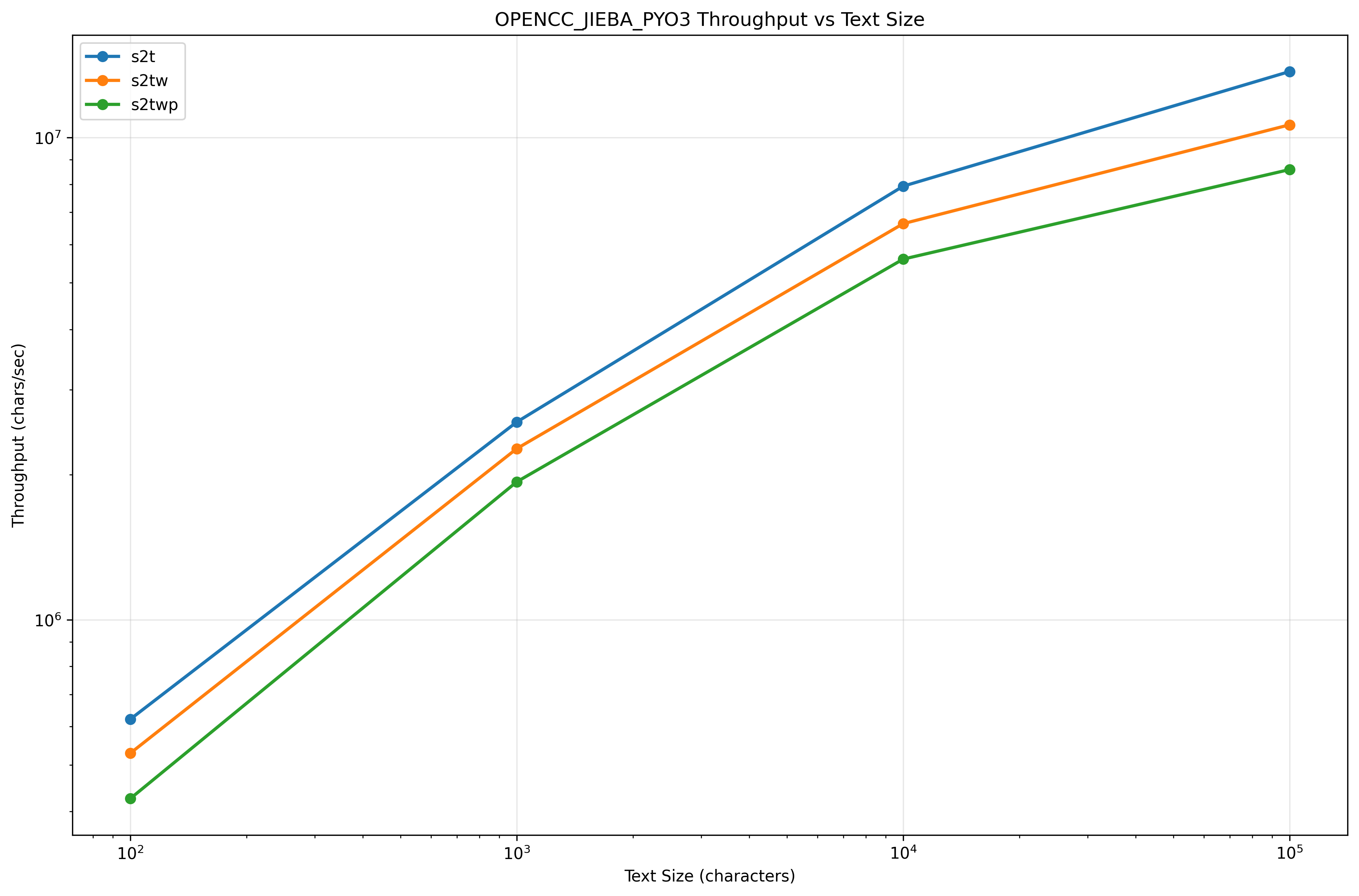
BENCHMARK RESULTS
| Method | Config | TextSize | Mean | StdDev | Min | Max | Ops/sec | Chars/sec |
|---|---|---|---|---|---|---|---|---|
| Convert_Small | s2t | 100 | 0.161 ms | 0.109 ms | 0.080 ms | 0.794 ms | 6,217 | 621,740 |
| Convert_Medium | s2t | 1,000 | 0.389 ms | 0.092 ms | 0.286 ms | 0.829 ms | 2,571 | 2,571,236 |
| Convert_Large | s2t | 10,000 | 1.261 ms | 0.314 ms | 1.072 ms | 2.580 ms | 793 | 7,932,120 |
| Convert_XLarge | s2t | 100,000 | 7.290 ms | 0.464 ms | 6.864 ms | 9.848 ms | 137 | 13,716,798 |
| Convert_Small | s2tw | 100 | 0.189 ms | 0.104 ms | 0.103 ms | 0.620 ms | 5,285 | 528,519 |
| Convert_Medium | s2tw | 1,000 | 0.442 ms | 0.152 ms | 0.322 ms | 1.084 ms | 2,264 | 2,264,206 |
| Convert_Large | s2tw | 10,000 | 1.508 ms | 0.200 ms | 1.367 ms | 2.371 ms | 663 | 6,631,682 |
| Convert_XLarge | s2tw | 100,000 | 9.403 ms | 0.585 ms | 9.009 ms | 13.320 ms | 106 | 10,635,363 |
| Convert_Small | s2twp | 100 | 0.235 ms | 0.113 ms | 0.129 ms | 0.648 ms | 4,256 | 425,586 |
| Convert_Medium | s2twp | 1,000 | 0.518 ms | 0.112 ms | 0.363 ms | 0.913 ms | 1,932 | 1,932,266 |
| Convert_Large | s2twp | 10,000 | 1.786 ms | 0.209 ms | 1.590 ms | 2.739 ms | 560 | 5,598,571 |
| Convert_XLarge | s2twp | 100,000 | 11.644 ms | 0.979 ms | 10.892 ms | 17.130 ms | 86 | 8,588,034 |
Throughput VS Size
License
Powered by Rust, Jieba, PyO3, OpenCC and opencc-jieba-rs.
Release history Release notifications | RSS feed


Download files
Download the file for your platform. If you're not sure which to choose, learn more about installing packages.
Source Distributions
Built Distributions
Filter files by name, interpreter, ABI, and platform.
If you're not sure about the file name format, learn more about wheel file names.
Copy a direct link to the current filters
File details
Details for the file opencc_jieba_pyo3-0.7.0-cp38-abi3-win_amd64.whl.
File metadata
- Download URL: opencc_jieba_pyo3-0.7.0-cp38-abi3-win_amd64.whl
- Upload date:
- Size: 7.0 MB
- Tags: CPython 3.8+, Windows x86-64
- Uploaded using Trusted Publishing? No
- Uploaded via: maturin/1.9.3
File hashes
| Algorithm | Hash digest | |
|---|---|---|
| SHA256 |
89fdda268548c47d1f63de5d0c4b9571c379d31d789e7c9d071b69b54c8a010f
|
|
| MD5 |
37920166e8ee97827852226705ee0e0b
|
|
| BLAKE2b-256 |
fe205339b4fbba5d065985a251ecdcebe08230f4d7031af43a0c7992a1c858f8
|
File details
Details for the file opencc_jieba_pyo3-0.7.0-cp38-abi3-manylinux_2_34_x86_64.whl.
File metadata
- Download URL: opencc_jieba_pyo3-0.7.0-cp38-abi3-manylinux_2_34_x86_64.whl
- Upload date:
- Size: 7.5 MB
- Tags: CPython 3.8+, manylinux: glibc 2.34+ x86-64
- Uploaded using Trusted Publishing? No
- Uploaded via: maturin/1.9.3
File hashes
| Algorithm | Hash digest | |
|---|---|---|
| SHA256 |
e42f917b2569a697a8026b975015db6288777a8a811a1f22e5fa7ad84c2c79f8
|
|
| MD5 |
50fccc4f90a9709e4dac24877b0b1810
|
|
| BLAKE2b-256 |
f34cdc5e491fd908bc0d9eb89742af8ab1a13d35559a9e1a4b54b1bd8cea9fa0
|
File details
Details for the file opencc_jieba_pyo3-0.7.0-cp38-abi3-macosx_11_0_arm64.whl.
File metadata
- Download URL: opencc_jieba_pyo3-0.7.0-cp38-abi3-macosx_11_0_arm64.whl
- Upload date:
- Size: 7.1 MB
- Tags: CPython 3.8+, macOS 11.0+ ARM64
- Uploaded using Trusted Publishing? No
- Uploaded via: maturin/1.9.3
File hashes
| Algorithm | Hash digest | |
|---|---|---|
| SHA256 |
5c3f1f3ff177ed57cb177ff68c9cd59eda155112e181f8ab003047683405191d
|
|
| MD5 |
3c448c6495a21d2eae584dedd116f54f
|
|
| BLAKE2b-256 |
eac1691469f11a5ea21e56d55d0cc54e9c95fd4924b7c401967a89569f05ae6b
|






