
A Python extension module powered by Rust and PyO3, providing fast and accurate Chinese text conversion.

Reason this release was yanked:
Broken PDFium native loading on Linux/macOS. Use 0.8.6+ instead.
Project description
opencc_pyo3





opencc_pyo3 is a Python extension module powered by Rust and PyO3,
providing fast and accurate conversion between different Chinese text variants
using OpenCC algorithms.
Features
- Convert between Simplified, Traditional, Hong Kong, Taiwan, and Japanese Kanji Chinese text.
- Fast and memory-efficient, leveraging Rust's performance.
- Easy-to-use Python API.
- Supports punctuation conversion and automatic text code detection.
Supported Conversion Configurations
s2t,t2s,s2tw,tw2s,s2twp,tw2sp,s2hk,hk2s,t2tw,tw2t,t2twp,tw2tp,t2hk,hk2t,t2jp,jp2t
Installation
1. Install from PyPI
pip install opencc-pyo3
2. Build and install the Python wheel using maturin:
# In project root
maturin build --release
pip install ./target/wheels/opencc_pyo3-<version>-cp<pyver>-abi3-<platform>.whl
Or for development (May require venv):
maturin develop -r
See build.txt for detailed build and install instructions.
Usage
Python
from opencc_pyo3 import OpenCC

text = "“春眠不觉晓,处处闻啼鸟。”"
opencc = OpenCC("s2t")
converted = opencc.convert(text, punctuation=True)
print(converted)  # 「春眠不覺曉,處處聞啼鳥。」
CLI
You can also use the CLI interface via Python module or Python script:
Sub-Commands are:
convert: Convert Chinese text using OpenCCoffice: Convert Office document Chinese text using OpenCCpdf: Convert extracted PDF document text using OpenCC
convert
python -m opencc_pyo3 convert --help
usage: opencc-pyo3 convert [-h] [-i <file>] [-o <file>] [-c <conversion>] [-p] [--in-enc <encoding>] [--out-enc <encoding>]

options:
  -h, --help            show this help message and exit
  -i, --input <file>    Read original text from <file>.
  -o, --output <file>   Write converted text to <file>.
  -c, --config <conversion>
                        Conversion configuration: s2t|s2tw|s2twp|s2hk|t2s|tw2s|tw2sp|hk2s|jp2t|t2jp
  -p, --punct           Enable punctuation conversion. (Default: False)
  --in-enc <encoding>   Encoding for input. (Default: UTF-8)
  --out-enc <encoding>  Encoding for output. (Default: UTF-8)
office
Support OpenOffice documents and Epub (.docx, .xlsx, .pptx, .odt, .ods, .odp, .epub)
python -m opencc_pyo3 office --help
usage: opencc-pyo3 office [-h] [-i <file>] [-o <file>] [-c <conversion>] [-p] [-f <format>] [--auto-ext] [--keep-font]

options:
  -h, --help            show this help message and exit
  -i, --input <file>    Input Office document from <file>.
  -o, --output <file>   Output Office document to <file>.
  -c, --config <conversion>
                        conversion: s2t|s2tw|s2twp|s2hk|t2s|tw2s|tw2sp|hk2s|jp2t|t2jp
  -p, --punct           Enable punctuation conversion. (Default: False)
  -f, --format <format>
                        Target Office format (e.g., docx, xlsx, pptx, odt, ods, odp, epub)
  --auto-ext            Auto-append extension to output file
  --keep-font           Preserve font-family information in Office content
Support PDF files as input, with built-in text extraction and OpenCC-based conversion powered by opencc-fmmseg
(available since v0.8.4).
This command allows you to extract Chinese text from PDF documents, optionally apply CJK-aware paragraph reflow, and convert the result using OpenCC configurations.
Note
Only text-embedded (searchable) PDF documents are supported.
Scanned or image-only PDFs without an embedded text layer are not currently supported.
python -m opencc_pyo3 pdf --help

usage: opencc-pyo3 pdf [-h] -i <file> [-o <file>] [-c <conversion>] [-p] [-H] [-r] [--compact] [--timing]
                       [-e <engine>] [-E]

options:
  -h, --help            Show this help message and exit.
  -i, --input <file>    Input PDF file.
  -o, --output <file>   Output text file (UTF-8). If omitted, defaults to "<input>_converted.txt".
  -c, --config <conversion>
                        Conversion configuration:
                        s2t | s2tw | s2twp | s2hk | t2s | tw2s | tw2sp | hk2s | jp2t | t2jp
  -p, --punct           Enable punctuation conversion (default: off).
  -H, --header          Preserve page-break-like gaps when reflowing CJK paragraphs
                        (passed as `add_pdf_page_header` to `reflow_cjk_paragraphs`).
  -r, --reflow          Enable CJK-aware paragraph reflow before conversion.
  --compact             Use compact paragraph mode (single newline between paragraphs).
  --timing              Show timing information for each processing stage.
  -e, --engine <engine>
                        PDF extraction engine:
                          auto    – Prefer PDFium; fall back to the Rust extractor if unavailable (recommended)
                          rust    – Pure-Rust extractor (no per-page progress)
                          pdfium  – PDFium backend with per-page progress; falls back if extraction fails
                        (default: auto)
  -E, --extract         Extract PDF text only (skip OpenCC conversion).
python -m opencc_pyo3 convert -i input.txt -o output.txt -c s2t --punct

python -m opencc_pyo3 office -c s2t --punct -i input.docx -o output.docx --keep-font

opencc-pyo3 office -c s2tw -p -i input.epub -o output.epub

opencc-pyo3 pdf -i input.pdf -o output.txt -c s2t -punct --reflow
API
Class: OpenCC
OpenCC(config: str = "s2t")config: Conversion configuration (see above).
set_config(config: str)- Set conversion config dynamically
convert(input: str, punctuation: bool = False) -> str- Convert text with optional punctuation conversion.
zho_check(input: str) -> int- Detects the code of the input text.
- 1 - Traditional, 2 - Simplified, 0 - others
Development
- Rust source: src/lib.rs
- Python bindings: opencc_pyo3/__init __.py, opencc_pyo3/opencc_pyo3.pyi
- CLI: opencc_pyo3/main.py
Benchmarks
Package: opencc_pyo3
Python 3.13.5 (tags/v3.13.5:6cb20a2, Jun 11 2025, 16:15:46) [MSC v.1943 64 bit (AMD64)]
Platform: Windows-11-10.0.26100-SP0
Processor: Intel64 Family 6 Model 191 Stepping 2, GenuineIntel
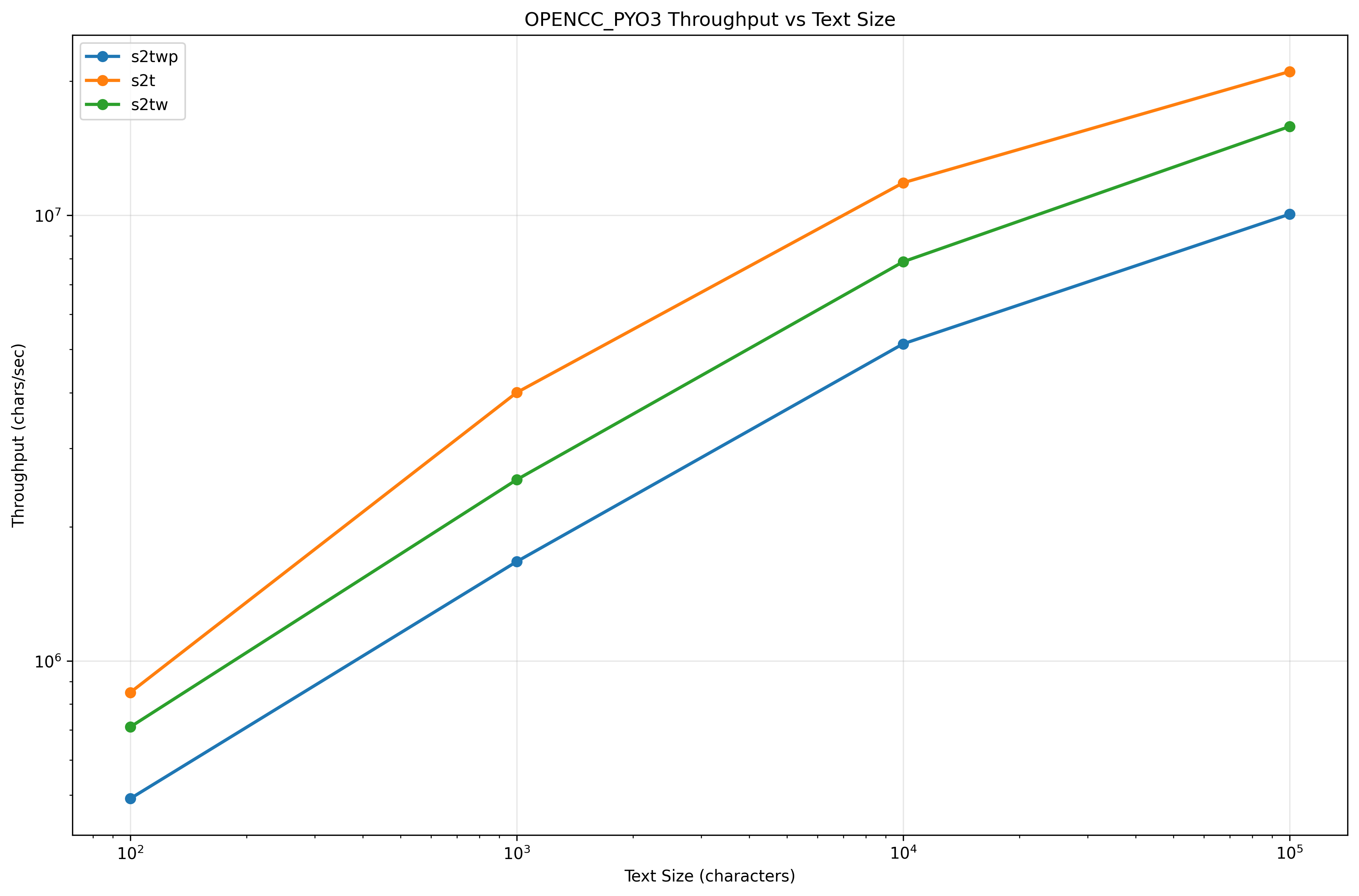
BENCHMARK RESULTS
| Method | Config | TextSize | Mean | StdDev | Min | Max | Ops/sec | Chars/sec |
|---|---|---|---|---|---|---|---|---|
| Convert_Small | s2t | 100 | 0.118 ms | 0.097 ms | 0.049 ms | 0.811 ms | 8,499 | 849,910 |
| Convert_Medium | s2t | 1,000 | 0.250 ms | 0.036 ms | 0.211 ms | 0.509 ms | 4,004 | 4,003,531 |
| Convert_Large | s2t | 10,000 | 0.845 ms | 0.060 ms | 0.775 ms | 1.420 ms | 1,184 | 11,835,419 |
| Convert_XLarge | s2t | 100,000 | 4.755 ms | 0.152 ms | 4.515 ms | 5.680 ms | 210 | 21,030,543 |
| Convert_Small | s2tw | 100 | 0.141 ms | 0.027 ms | 0.096 ms | 0.321 ms | 7,111 | 711,093 |
| Convert_Medium | s2tw | 1,000 | 0.392 ms | 0.030 ms | 0.355 ms | 0.623 ms | 2,552 | 2,552,127 |
| Convert_Large | s2tw | 10,000 | 1.271 ms | 0.044 ms | 1.191 ms | 1.474 ms | 787 | 7,869,452 |
| Convert_XLarge | s2tw | 100,000 | 6.317 ms | 0.139 ms | 6.004 ms | 7.250 ms | 158 | 15,831,322 |
| Convert_Small | s2twp | 100 | 0.204 ms | 0.028 ms | 0.132 ms | 0.380 ms | 4,911 | 491,118 |
| Convert_Medium | s2twp | 1,000 | 0.598 ms | 0.039 ms | 0.527 ms | 0.747 ms | 1,671 | 1,671,296 |
| Convert_Large | s2twp | 10,000 | 1.942 ms | 0.061 ms | 1.823 ms | 2.223 ms | 515 | 5,149,357 |
| Convert_XLarge | s2twp | 100,000 | 9.937 ms | 0.173 ms | 9.542 ms | 10.707 ms | 101 | 10,063,174 |
Throughput vs Size
License
Powered by Rust, PyO3, OpenCC, Pdfium and opencc-fmmseg.
Release history Release notifications | RSS feed


Download files
Download the file for your platform. If you're not sure which to choose, learn more about installing packages.
Source Distributions
Built Distributions
Filter files by name, interpreter, ABI, and platform.
If you're not sure about the file name format, learn more about wheel file names.
Copy a direct link to the current filters
File details
Details for the file opencc_pyo3-0.8.5-cp38-abi3-win_amd64.whl.
File metadata
- Download URL: opencc_pyo3-0.8.5-cp38-abi3-win_amd64.whl
- Upload date:
- Size: 5.3 MB
- Tags: CPython 3.8+, Windows x86-64
- Uploaded using Trusted Publishing? No
- Uploaded via: maturin/1.11.5
File hashes
| Algorithm | Hash digest | |
|---|---|---|
| SHA256 |
84dab7598cf057139863cbcc5d60040d41f78e0fc7eec6ba931c21efab1667d6
|
|
| MD5 |
acd84409c58d354590c45e9e49c44c97
|
|
| BLAKE2b-256 |
88c3f5b9f9e62f0247395f350c6859d82c13806e9e4158059928fe26bb78efb3
|
File details
Details for the file opencc_pyo3-0.8.5-cp38-abi3-manylinux_2_17_x86_64.manylinux2014_x86_64.whl.
File metadata
- Download URL: opencc_pyo3-0.8.5-cp38-abi3-manylinux_2_17_x86_64.manylinux2014_x86_64.whl
- Upload date:
- Size: 2.7 MB
- Tags: CPython 3.8+, manylinux: glibc 2.17+ x86-64
- Uploaded using Trusted Publishing? No
- Uploaded via: maturin/1.11.5
File hashes
| Algorithm | Hash digest | |
|---|---|---|
| SHA256 |
38a60ed004c7536fcbadd34233f38e7274bd20ec44f32aff6938eaf61e340d05
|
|
| MD5 |
393eae0b5982a6b9242b5e2c51a42635
|
|
| BLAKE2b-256 |
c542ad64996bbf496ead2313a946cd4b5cf9afc7614eeda6524eff84512c7f1f
|
File details
Details for the file opencc_pyo3-0.8.5-cp38-abi3-macosx_11_0_arm64.whl.
File metadata
- Download URL: opencc_pyo3-0.8.5-cp38-abi3-macosx_11_0_arm64.whl
- Upload date:
- Size: 5.1 MB
- Tags: CPython 3.8+, macOS 11.0+ ARM64
- Uploaded using Trusted Publishing? No
- Uploaded via: maturin/1.11.5
File hashes
| Algorithm | Hash digest | |
|---|---|---|
| SHA256 |
576ba26bc578584b16a2c38e1fc00cc89218f5979670256619bfb92d3f9b3449
|
|
| MD5 |
613d80816138bf6b1515eb06234b0689
|
|
| BLAKE2b-256 |
c94e8cb00135c506e9f8d01168398c6d6a7779c5dcd149dd7a24d050d30b4f47
|
File details
Details for the file opencc_pyo3-0.8.5-cp38-abi3-macosx_10_12_x86_64.whl.
File metadata
- Download URL: opencc_pyo3-0.8.5-cp38-abi3-macosx_10_12_x86_64.whl
- Upload date:
- Size: 5.3 MB
- Tags: CPython 3.8+, macOS 10.12+ x86-64
- Uploaded using Trusted Publishing? No
- Uploaded via: maturin/1.11.5
File hashes
| Algorithm | Hash digest | |
|---|---|---|
| SHA256 |
ca96c12c6c1c171b487aef2524faa00ae3ad2de393d8f3d0695c364f86918175
|
|
| MD5 |
3dd431061f3a25026f5c5c8c6fe69c48
|
|
| BLAKE2b-256 |
983b8b82d100520282b04ac4a20d098736efee27e152a2163d5214b8d8940121
|






