
🦾 OpenLLM: Self-Hosting LLMs Made Easy





OpenLLM allows developers to run any open-source LLMs (Llama 3.3, Qwen2.5, Phi3 and more) or custom models as OpenAI-compatible APIs with a single command. It features a built-in chat UI, state-of-the-art inference backends, and a simplified workflow for creating enterprise-grade cloud deployment with Docker, Kubernetes, and BentoCloud.
Understand the design philosophy of OpenLLM.
Get Started
Run the following commands to install OpenLLM and explore it interactively.
pip install openllm  # or pip3 install openllm
openllm hello
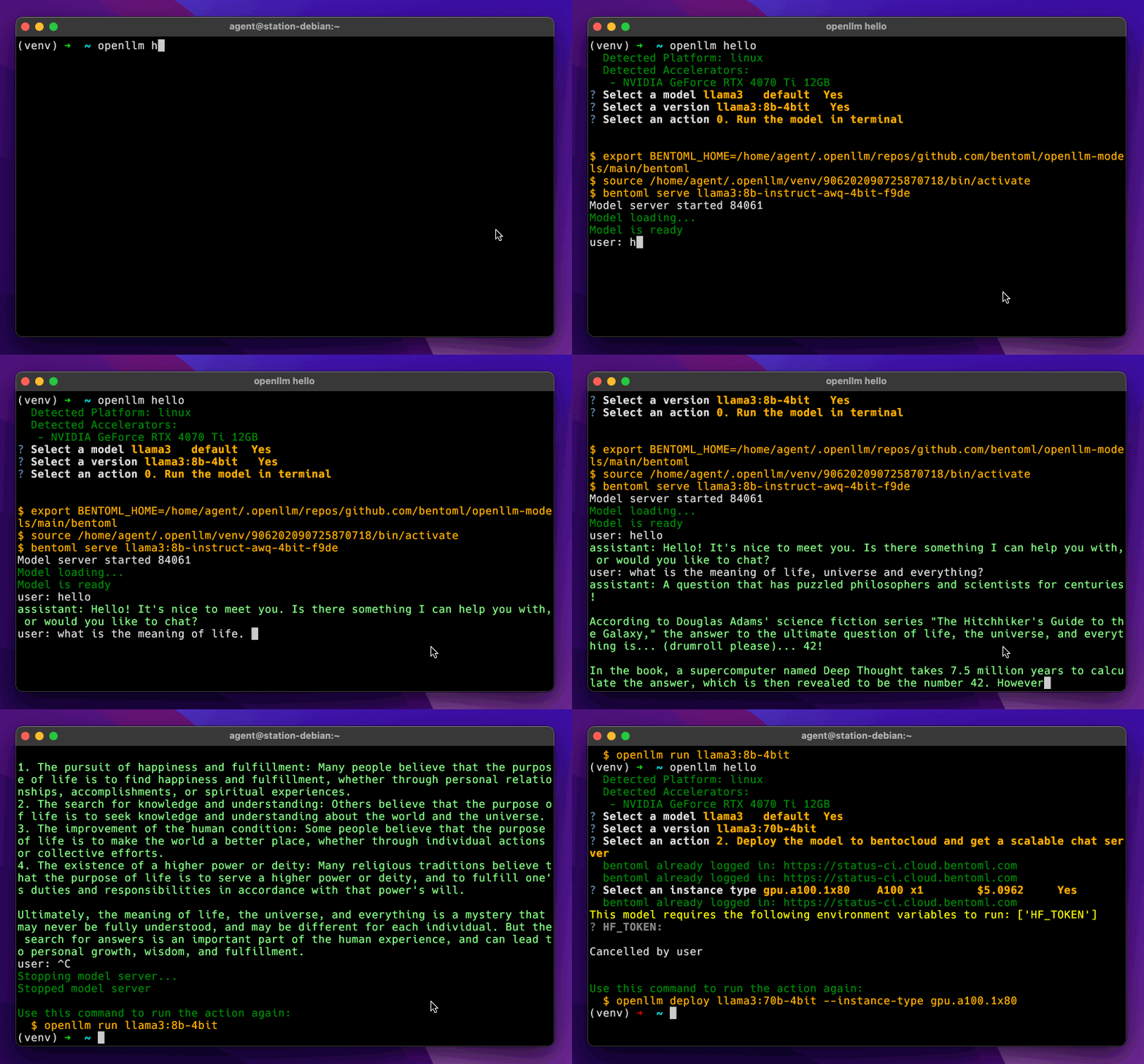
Supported models
OpenLLM supports a wide range of state-of-the-art open-source LLMs. You can also add a model repository to run custom models with OpenLLM.
| Model | Parameters | Required GPU | Start a Server |
|---|---|---|---|
| deepseek | r1-671b | 80Gx16 | openllm serve deepseek:r1-671b |
| gemma2 | 2b | 12G | openllm serve gemma2:2b |
| gemma3 | 3b | 12G | openllm serve gemma3:3b |
| jamba1.5 | mini-ff0a | 80Gx2 | openllm serve jamba1.5:mini-ff0a |
| llama3.1 | 8b | 24G | openllm serve llama3.1:8b |
| llama3.2 | 1b | 24G | openllm serve llama3.2:1b |
| llama3.3 | 70b | 80Gx2 | openllm serve llama3.3:70b |
| llama4 | 17b16e | 80Gx8 | openllm serve llama4:17b16e |
| mistral | 8b-2410 | 24G | openllm serve mistral:8b-2410 |
| mistral-large | 123b-2407 | 80Gx4 | openllm serve mistral-large:123b-2407 |
| phi4 | 14b | 80G | openllm serve phi4:14b |
| pixtral | 12b-2409 | 80G | openllm serve pixtral:12b-2409 |
| qwen2.5 | 7b | 24G | openllm serve qwen2.5:7b |
| qwen2.5-coder | 3b | 24G | openllm serve qwen2.5-coder:3b |
| qwq | 32b | 80G | openllm serve qwq:32b |
For the full model list, see the OpenLLM models repository.
Start an LLM server
To start an LLM server locally, use the openllm serve command and specify the model version.
[!NOTE] OpenLLM does not store model weights. A Hugging Face token (HF_TOKEN) is required for gated models.
- Create your Hugging Face token here.
- Request access to the gated model, such as meta-llama/Llama-3.2-1B-Instruct.
- Set your token as an environment variable by running:
export HF_TOKEN=<your token>
openllm serve llama3.2:1b
The server will be accessible at http://localhost:3000, providing OpenAI-compatible APIs for interaction. You can call the endpoints with different frameworks and tools that support OpenAI-compatible APIs. Typically, you may need to specify the following:
- The API host address: By default, the LLM is hosted at http://localhost:3000.
- The model name: The name can be different depending on the tool you use.
- The API key: The API key used for client authentication. This is optional.
Here are some examples:
OpenAI Python client
from openai import OpenAI

client = OpenAI(base_url='http://localhost:3000/v1', api_key='na')

# Use the following func to get the available models
# model_list = client.models.list()
# print(model_list)

chat_completion = client.chat.completions.create(
    model="meta-llama/Llama-3.2-1B-Instruct",
    messages=[
        {
            "role": "user",
            "content": "Explain superconductors like I'm five years old"
        }
    ],
    stream=True,
)
for chunk in chat_completion:
    print(chunk.choices[0].delta.content or "", end="")
LlamaIndex
from llama_index.llms.openai import OpenAI

llm = OpenAI(api_bese="http://localhost:3000/v1", model="meta-llama/Llama-3.2-1B-Instruct", api_key="dummy")
...
Chat UI
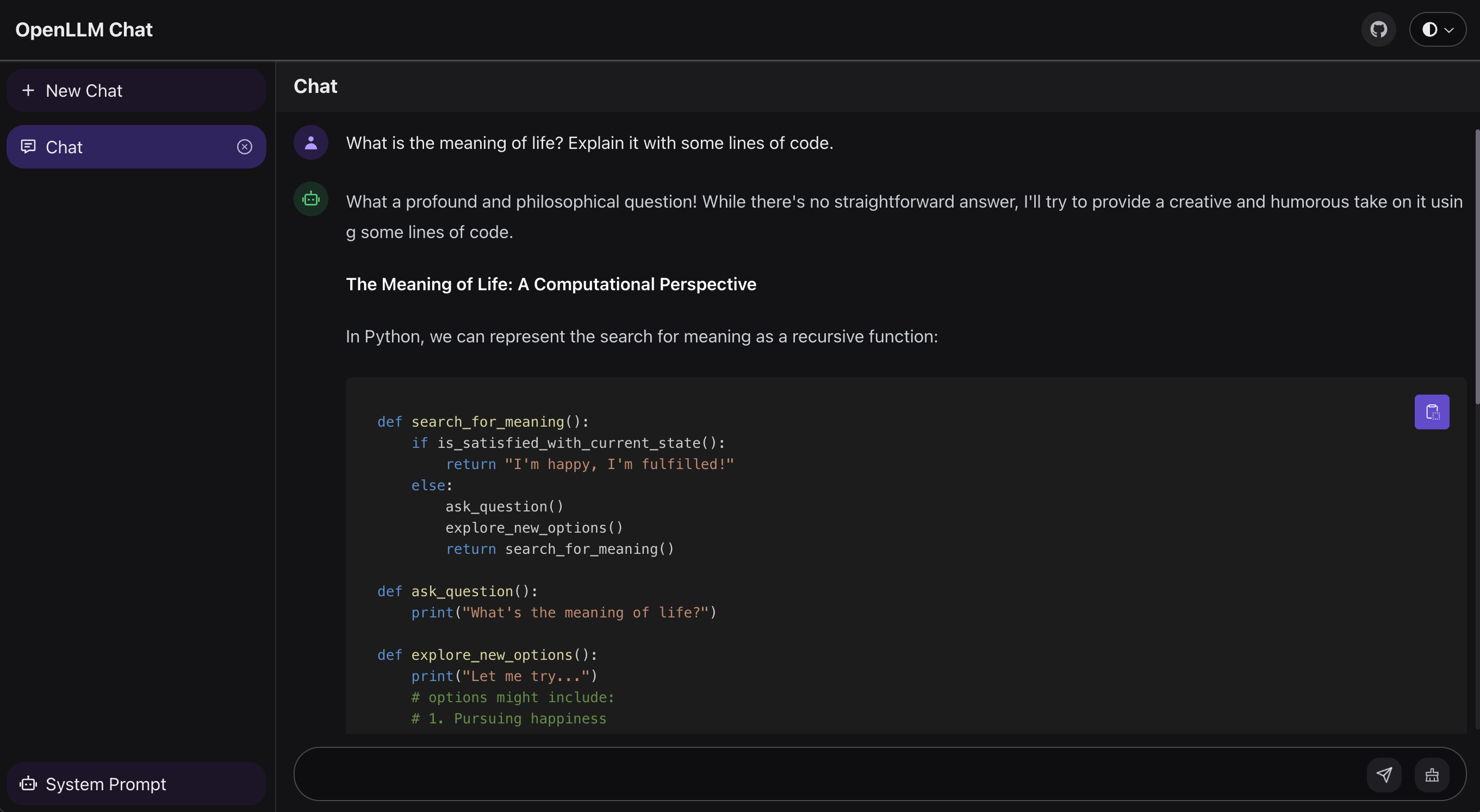
OpenLLM provides a chat UI at the /chat endpoint for the launched LLM server at http://localhost:3000/chat.
Chat with a model in the CLI
To start a chat conversation in the CLI, use the openllm run command and specify the model version.
openllm run llama3:8b
Model repository
A model repository in OpenLLM represents a catalog of available LLMs that you can run. OpenLLM provides a default model repository that includes the latest open-source LLMs like Llama 3, Mistral, and Qwen2, hosted at this GitHub repository. To see all available models from the default and any added repository, use:
openllm model list
To ensure your local list of models is synchronized with the latest updates from all connected repositories, run:
openllm repo update
To review a model’s information, run:
openllm model get llama3.2:1b
Add a model to the default model repository
You can contribute to the default model repository by adding new models that others can use. This involves creating and submitting a Bento of the LLM. For more information, check out this example pull request.
Set up a custom repository
You can add your own repository to OpenLLM with custom models. To do so, follow the format in the default OpenLLM model repository with a bentos directory to store custom LLMs. You need to build your Bentos with BentoML and submit them to your model repository.
First, prepare your custom models in a bentos directory following the guidelines provided by BentoML to build Bentos. Check out the default model repository for an example and read the Developer Guide for details.
Then, register your custom model repository with OpenLLM:
openllm repo add <repo-name> <repo-url>
Note: Currently, OpenLLM only supports adding public repositories.
Deploy to BentoCloud
OpenLLM supports LLM cloud deployment via BentoML, the unified model serving framework, and BentoCloud, an AI inference platform for enterprise AI teams. BentoCloud provides fully-managed infrastructure optimized for LLM inference with autoscaling, model orchestration, observability, and many more, allowing you to run any AI model in the cloud.
Sign up for BentoCloud for free and log in. Then, run openllm deploy to deploy a model to BentoCloud:
openllm deploy llama3.2:1b --env HF_TOKEN
[!NOTE] If you are deploying a gated model, make sure to set HF_TOKEN in enviroment variables.
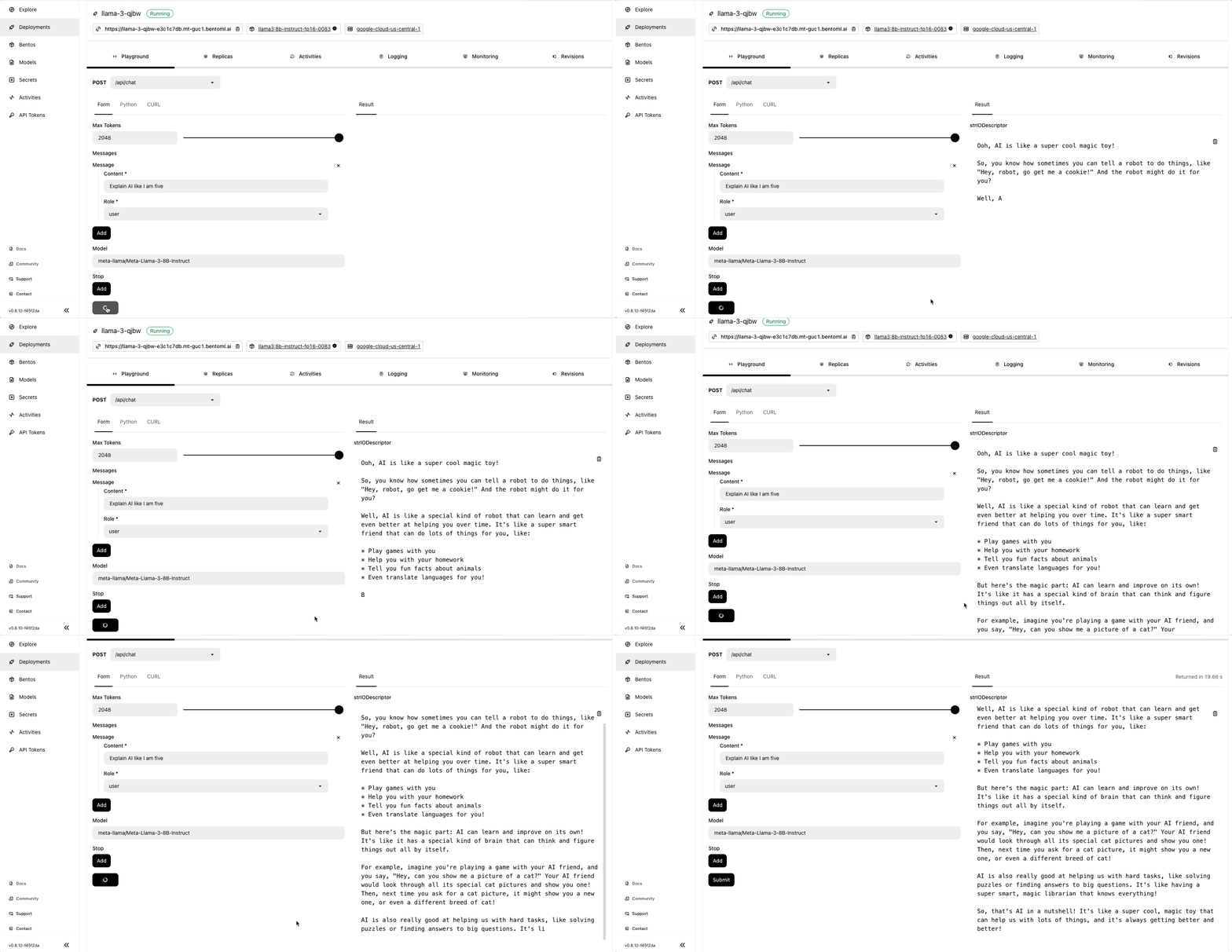
Once the deployment is complete, you can run model inference on the BentoCloud console:
Community
OpenLLM is actively maintained by the BentoML team. Feel free to reach out and join us in our pursuit to make LLMs more accessible and easy to use 👉 Join our Slack community!
Contributing
As an open-source project, we welcome contributions of all kinds, such as new features, bug fixes, and documentation. Here are some of the ways to contribute:
- Repost a bug by creating a GitHub issue.
- Submit a pull request or help review other developers’ pull requests.
- Add an LLM to the OpenLLM default model repository so that other users can run your model. See the pull request template.
- Check out the Developer Guide to learn more.
Acknowledgements
This project uses the following open-source projects:
- bentoml/bentoml for production level model serving
- vllm-project/vllm for production level LLM backend
- blrchen/chatgpt-lite for a fancy Web Chat UI
- astral-sh/uv for blazing fast model requirements installing
We are grateful to the developers and contributors of these projects for their hard work and dedication.


Release files for openllm 0.6.30
For a detailed explanation of source distributions (sdists) and built distributions (wheels), please see the package formats documentation.
Source distribution (sdist)
| File | Size | Uploaded | |
|---|---|---|---|
| openllm-0.6.30.tar.gz | 175.4 kB | Details |
Built distribution (wheel)
| File | Interpreter | ABI | Platform | Reset |
|---|---|---|---|---|
| openllm-0.6.30-py3-none-any.whl | Python 3 | none | any | Details |
Total release size: 207.2 kB
Release files / openllm-0.6.30.tar.gz
| Download URL | openllm-0.6.30.tar.gz |
|---|---|
| Size | 175.4 kB |
| Tags | Source |
|
SHA-256 checksum How to use checksums |
50f521ba49e50ea5c8d4092abcb651e52305128f0e3f3c012cf0dbb97429f1da
|
|
BLAKE2b-256 checksum How to use checksums |
4684ffab34e1fb4045001a007d1bfcd3917f73b6f2c769f3780525829ff54fb2
|
| Upload date | |
|
Uploaded using Trusted Publishing? What is trusted publishing? |
Yes |
| Uploaded via |
twine/6.1.0 CPython/3.12.9
|
Provenance
Provenance describes where a file came from. On PyPI, provenance is shared via attestations, which provide a verifiable record of the build or publishing details. View details, limitations and caveats.


PyPI Publish Attestation
PyPI verified that this artifact, at this checksum, originated from the publisher listed below.
Signed by GitHub Actions, verified by PyPI on Apr 21, 2025.
Transparency logRelease files / openllm-0.6.30-py3-none-any.whl
| Download URL | openllm-0.6.30-py3-none-any.whl |
|---|---|
| Size | 31.8 kB |
| Tags | Python 3 |
|
SHA-256 checksum How to use checksums |
5efbbcb19e23c4e3016737216f10ae0e15320b7e8db6967b2ff5f0dac87e8e38
|
|
BLAKE2b-256 checksum How to use checksums |
760f433247fc698b7a1fd28d31f7c31882d4210c064f3fa3ad82fb0ee6854ff4
|
| Upload date | |
|
Uploaded using Trusted Publishing? What is trusted publishing? |
Yes |
| Uploaded via |
twine/6.1.0 CPython/3.12.9
|
Provenance
Provenance describes where a file came from. On PyPI, provenance is shared via attestations, which provide a verifiable record of the build or publishing details. View details, limitations and caveats.
PyPI Publish Attestation
PyPI verified that this artifact, at this checksum, originated from the publisher listed below.
Signed by GitHub Actions, verified by PyPI on Apr 21, 2025.
Transparency log













