
OpenLLM: Operating LLMs in production


Project description

🦾 OpenLLM










An open platform for operating large language models (LLMs) in production.
Fine-tune, serve, deploy, and monitor any LLMs with ease.
📖 Introduction
With OpenLLM, you can run inference with any open-source large-language models, deploy to the cloud or on-premises, and build powerful AI apps.
🚂 State-of-the-art LLMs: built-in supports a wide range of open-source LLMs and model runtime, including Llama 2,StableLM, Falcon, Dolly, Flan-T5, ChatGLM, StarCoder and more.
🔥 Flexible APIs: serve LLMs over RESTful API or gRPC with one command, query via WebUI, CLI, our Python/Javascript client, or any HTTP client.
⛓️ Freedom To Build: First-class support for LangChain, BentoML and Hugging Face that allows you to easily create your own AI apps by composing LLMs with other models and services.
🎯 Streamline Deployment: Automatically generate your LLM server Docker Images or deploy as serverless endpoint via ☁️ BentoCloud.
🤖️ Bring your own LLM: Fine-tune any LLM to suit your needs with
LLM.tuning(). (Coming soon)
🏃 Getting Started
To use OpenLLM, you need to have Python 3.8 (or newer) and pip installed on
your system. We highly recommend using a Virtual Environment to prevent package
conflicts.
You can install OpenLLM using pip as follows:
pip install openllm
To verify if it's installed correctly, run:
$ openllm -h

Usage: openllm [OPTIONS] COMMAND [ARGS]...

   ██████╗ ██████╗ ███████╗███╗   ██╗██╗     ██╗     ███╗   ███╗
  ██╔═══██╗██╔══██╗██╔════╝████╗  ██║██║     ██║     ████╗ ████║
  ██║   ██║██████╔╝█████╗  ██╔██╗ ██║██║     ██║     ██╔████╔██║
  ██║   ██║██╔═══╝ ██╔══╝  ██║╚██╗██║██║     ██║     ██║╚██╔╝██║
  ╚██████╔╝██║     ███████╗██║ ╚████║███████╗███████╗██║ ╚═╝ ██║
   ╚═════╝ ╚═╝     ╚══════╝╚═╝  ╚═══╝╚══════╝╚══════╝╚═╝     ╚═╝

  An open platform for operating large language models in production.
  Fine-tune, serve, deploy, and monitor any LLMs with ease.
Starting an LLM Server
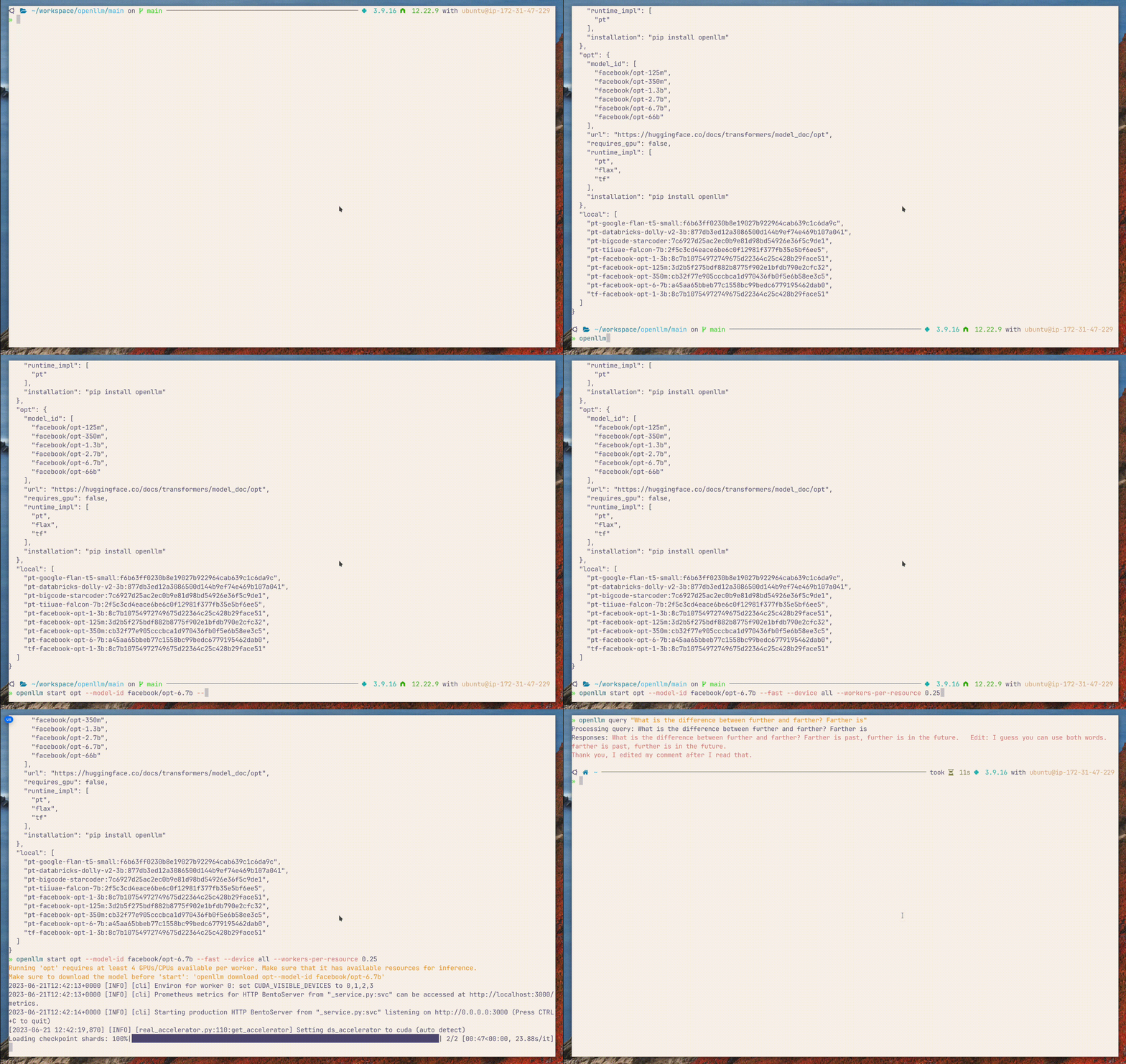
To start an LLM server, use openllm start. For example, to start a
OPT server, do the
following:
openllm start opt
Following this, a Web UI will be accessible at http://localhost:3000 where you can experiment with the endpoints and sample input prompts.
OpenLLM provides a built-in Python client, allowing you to interact with the model. In a different terminal window or a Jupyter Notebook, create a client to start interacting with the model:
import openllm
client = openllm.client.HTTPClient('http://localhost:3000')
client.query('Explain to me the difference between "further" and "farther"')
You can also use the openllm query command to query the model from the
terminal:
export OPENLLM_ENDPOINT=http://localhost:3000
openllm query 'Explain to me the difference between "further" and "farther"'
Visit http://localhost:3000/docs.json for OpenLLM's API specification.
OpenLLM seamlessly supports many models and their variants. Users can also
specify different variants of the model to be served, by providing the
--model-id argument, e.g.:
openllm start flan-t5 --model-id google/flan-t5-large
[!NOTE]
openllmalso supports all variants of fine-tuning weights, custom model path as well as quantized weights for any of the supported models as long as it can be loaded with the model architecture. Refer to supported models section for models' architecture.
Use the openllm models command to see the list of models and their variants
supported in OpenLLM.
🧩 Supported Models
The following models are currently supported in OpenLLM. By default, OpenLLM doesn't include dependencies to run all models. The extra model-specific dependencies can be installed with the instructions below:
Runtime Implementations (Experimental)
Different LLMs may have multiple runtime implementations. For instance, they
might use Pytorch (pt), Tensorflow (tf), or Flax (flax).
If you wish to specify a particular runtime for a model, you can do so by
setting the OPENLLM_{MODEL_NAME}_FRAMEWORK={runtime} environment variable
before running openllm start.
For example, if you want to use the Tensorflow (tf) implementation for the
flan-t5 model, you can use the following command:
OPENLLM_FLAN_T5_FRAMEWORK=tf openllm start flan-t5
[!NOTE] For GPU support on Flax, refers to Jax's installation to make sure that you have Jax support for the corresponding CUDA version.
Quantisation
OpenLLM supports quantisation with bitsandbytes and GPTQ
openllm start mpt --quantize int8
To run inference with gptq, simply pass --quantize gptq:
openllm start falcon --model-id TheBloke/falcon-40b-instruct-GPTQ --quantize gptq --device 0
[!NOTE] In order to run GPTQ, make sure to install with
pip install "openllm[gptq]". The weights of all supported models should be quantized before serving. See GPTQ-for-LLaMa for more information on GPTQ quantisation.
Fine-tuning support (Experimental)
One can serve OpenLLM models with any PEFT-compatible layers with
--adapter-id:
openllm start opt --model-id facebook/opt-6.7b --adapter-id aarnphm/opt-6-7b-quotes
It also supports adapters from custom paths:
openllm start opt --model-id facebook/opt-6.7b --adapter-id /path/to/adapters
To use multiple adapters, use the following format:
openllm start opt --model-id facebook/opt-6.7b --adapter-id aarnphm/opt-6.7b-lora --adapter-id aarnphm/opt-6.7b-lora:french_lora
By default, the first adapter-id will be the default Lora layer, but optionally
users can change what Lora layer to use for inference via /v1/adapters:
curl -X POST http://localhost:3000/v1/adapters --json '{"adapter_name": "vn_lora"}'
Note that for multiple adapter-name and adapter-id, it is recommended to update to use the default adapter before sending the inference, to avoid any performance degradation
To include this into the Bento, one can also provide a --adapter-id into
openllm build:
openllm build opt --model-id facebook/opt-6.7b --adapter-id ...
[!NOTE] We will gradually roll out support for fine-tuning all models. The following models contain fine-tuning support: OPT, Falcon, LlaMA.
Integrating a New Model
OpenLLM encourages contributions by welcoming users to incorporate their custom LLMs into the ecosystem. Check out Adding a New Model Guide to see how you can do it yourself.
Embeddings
OpenLLM tentatively provides embeddings endpoint for supported models. This can
be accessed via /v1/embeddings.
To use via CLI, simply call openllm embed:
openllm embed --endpoint http://localhost:3000 "I like to eat apples" -o json
{
  "embeddings": [
    0.006569798570126295,
    -0.031249752268195152,
    -0.008072729222476482,
    0.00847396720200777,
    -0.005293501541018486,
    ...<many embeddings>...
    -0.002078012563288212,
    -0.00676426338031888,
    -0.002022686880081892
  ],
  "num_tokens": 9
}
To invoke this endpoint, use client.embed from the Python SDK:
import openllm

client = openllm.client.HTTPClient("http://localhost:3000")

client.embed("I like to eat apples")
[!NOTE] Currently, the following model family supports embeddings: Llama, T5 (Flan-T5, FastChat, etc.), ChatGLM
⚙️ Integrations
OpenLLM is not just a standalone product; it's a building block designed to integrate with other powerful tools easily. We currently offer integration with BentoML, LangChain, and Transformers Agents.
BentoML
OpenLLM models can be integrated as a
Runner in your
BentoML service. These runners have a generate method that takes a string as a
prompt and returns a corresponding output string. This will allow you to plug
and play any OpenLLM models with your existing ML workflow.
import bentoml
import openllm

model = "opt"

llm_config = openllm.AutoConfig.for_model(model)
llm_runner = openllm.Runner(model, llm_config=llm_config)

svc = bentoml.Service(
    name=f"llm-opt-service", runners=[llm_runner]
)

@svc.api(input=Text(), output=Text())
async def prompt(input_text: str) -> str:
    answer = await llm_runner.generate(input_text)
    return answer
LangChain
To quickly start a local LLM with langchain, simply do the following:
from langchain.llms import OpenLLM

llm = OpenLLM(model_name="llama", model_id='meta-llama/Llama-2-7b-hf')

llm("What is the difference between a duck and a goose? And why there are so many Goose in Canada?")
[!IMPORTANT] By default, OpenLLM use
safetensorsformat for saving models. If the model doesn't support safetensors, make sure to passserialisation="legacy"to use the legacy PyTorch bin format.
langchain.llms.OpenLLM has the capability to interact with remote OpenLLM
Server. Given there is an OpenLLM server deployed elsewhere, you can connect to
it by specifying its URL:
from langchain.llms import OpenLLM

llm = OpenLLM(server_url='http://44.23.123.1:3000', server_type='grpc')
llm("What is the difference between a duck and a goose? And why there are so many Goose in Canada?")
To integrate a LangChain agent with BentoML, you can do the following:
llm = OpenLLM(
    model_name='flan-t5',
    model_id='google/flan-t5-large',
    embedded=False,
    serialisation="legacy"
)
tools = load_tools(["serpapi", "llm-math"], llm=llm)
agent = initialize_agent(
    tools, llm, agent=AgentType.ZERO_SHOT_REACT_DESCRIPTION
)
svc = bentoml.Service("langchain-openllm", runners=[llm.runner])
@svc.api(input=Text(), output=Text())
def chat(input_text: str):
    return agent.run(input_text)
[!NOTE] You can find out more examples under the examples folder.
Transformers Agents
OpenLLM seamlessly integrates with Transformers Agents.
[!WARNING] The Transformers Agent is still at an experimental stage. It is recommended to install OpenLLM with
pip install -r nightly-requirements.txtto get the latest API update for HuggingFace agent.
import transformers

agent = transformers.HfAgent("http://localhost:3000/hf/agent")  # URL that runs the OpenLLM server

agent.run("Is the following `text` positive or negative?", text="I don't like how this models is generate inputs")
[!IMPORTANT] Only
starcoderis currently supported with Agent integration. The example above was also run with four T4s on EC2g4dn.12xlarge
If you want to use OpenLLM client to ask questions to the running agent, you can also do so:
import openllm

client = openllm.client.HTTPClient("http://localhost:3000")

client.ask_agent(
    task="Is the following `text` positive or negative?",
    text="What are you thinking about?",
)

🚀 Deploying to Production
There are several ways to deploy your LLMs:
🐳 Docker container
-
Building a Bento: With OpenLLM, you can easily build a Bento for a specific model, like
dolly-v2, using thebuildcommand.:openllm build dolly-v2
A Bento, in BentoML, is the unit of distribution. It packages your program's source code, models, files, artefacts, and dependencies.
-
Containerize your Bento
bentoml containerize <name:version>
This generates a OCI-compatible docker image that can be deployed anywhere docker runs. For best scalability and reliability of your LLM service in production, we recommend deploy with BentoCloud。
☁️ BentoCloud
Deploy OpenLLM with BentoCloud, the serverless cloud for shipping and scaling AI applications.
-
Create a BentoCloud account: sign up here for early access
-
Log into your BentoCloud account:
bentoml cloud login --api-token <your-api-token> --endpoint <bento-cloud-endpoint>
[!NOTE] Replace
<your-api-token>and<bento-cloud-endpoint>with your specific API token and the BentoCloud endpoint respectively.
-
Bulding a Bento: With OpenLLM, you can easily build a Bento for a specific model, such as
dolly-v2:openllm build dolly-v2
-
Pushing a Bento: Push your freshly-built Bento service to BentoCloud via the
pushcommand:bentoml push <name:version>
-
Deploying a Bento: Deploy your LLMs to BentoCloud with a single
bentoml deployment createcommand following the deployment instructions.
👥 Community
Engage with like-minded individuals passionate about LLMs, AI, and more on our Discord!
OpenLLM is actively maintained by the BentoML team. Feel free to reach out and join us in our pursuit to make LLMs more accessible and easy to use 👉 Join our Slack community!
🎁 Contributing
We welcome contributions! If you're interested in enhancing OpenLLM's capabilities or have any questions, don't hesitate to reach out in our discord channel.
Checkout our Developer Guide if you wish to contribute to OpenLLM's codebase.
🍇 Telemetry
OpenLLM collects usage data to enhance user experience and improve the product. We only report OpenLLM's internal API calls and ensure maximum privacy by excluding sensitive information. We will never collect user code, model data, or stack traces. For usage tracking, check out the code.
You can opt out of usage tracking by using the --do-not-track CLI option:
openllm [command] --do-not-track
Or by setting the environment variable OPENLLM_DO_NOT_TRACK=True:
export OPENLLM_DO_NOT_TRACK=True
📔 Citation
If you use OpenLLM in your research, we provide a citation to use:
@software{Pham_OpenLLM_Operating_LLMs_2023,
author = {Pham, Aaron and Yang, Chaoyu and Sheng, Sean and  Zhao, Shenyang and Lee, Sauyon and Jiang, Bo and Dong, Fog and Guan, Xipeng and Ming, Frost},
license = {Apache-2.0},
month = jun,
title = {{OpenLLM: Operating LLMs in production}},
url = {https://github.com/bentoml/OpenLLM},
year = {2023}
}
Release Information
Features
-
OpenLLM now include a community-maintained ClojureScript UI, Thanks @GutZuFusss
See this README.md for more information
OpenLLM will also include a
--corsto enable start with cors enabled. #89 -
Nightly wheels now can be installed via
test.pypi.org:pip install -i https://test.pypi.org/simple/ openllm
-
Running vLLM with Falcon is now supported #223
Release history Release notifications | RSS feed


Download files
Download the file for your platform. If you're not sure which to choose, learn more about installing packages.
Source Distribution
Built Distributions
Filter files by name, interpreter, ABI, and platform.
If you're not sure about the file name format, learn more about wheel file names.
Copy a direct link to the current filters
File details
Details for the file openllm-0.2.25.tar.gz.
File metadata
- Download URL: openllm-0.2.25.tar.gz
- Upload date:
- Size: 172.2 kB
- Tags: Source
- Uploaded using Trusted Publishing? Yes
- Uploaded via: twine/4.0.2 CPython/3.11.4
File hashes
| Algorithm | Hash digest | |
|---|---|---|
| SHA256 |
5435d1cf54ad8689a481946b4680c1316be05f3c79b05b32f0f9ae87d2b647c5
|
|
| MD5 |
d83ccff45d35920d3ed7b192fb2d167f
|
|
| BLAKE2b-256 |
ecd36bf26793855e5b19048ac59041db9bad3a9c98504c901b140a70c8ac629b
|
File details
Details for the file openllm-0.2.25-py3-none-any.whl.
File metadata
- Download URL: openllm-0.2.25-py3-none-any.whl
- Upload date:
- Size: 224.1 kB
- Tags: Python 3
- Uploaded using Trusted Publishing? Yes
- Uploaded via: twine/4.0.2 CPython/3.11.4
File hashes
| Algorithm | Hash digest | |
|---|---|---|
| SHA256 |
09afb2ba1a62081b0105ed49e75df045e89520e8451e7ec18f4ab510aaf893d4
|
|
| MD5 |
bc7d8bd4ae677d6ca5006aef99865ff0
|
|
| BLAKE2b-256 |
9d3175fd76ca95f128ca8a484ff2d61065a4edf464bb3162bf6a34ba68911642
|
File details
Details for the file openllm-0.2.25-cp311-cp311-manylinux_2_17_x86_64.manylinux2014_x86_64.whl.
File metadata
- Download URL: openllm-0.2.25-cp311-cp311-manylinux_2_17_x86_64.manylinux2014_x86_64.whl
- Upload date:
- Size: 1.1 MB
- Tags: CPython 3.11, manylinux: glibc 2.17+ x86-64
- Uploaded using Trusted Publishing? Yes
- Uploaded via: twine/4.0.2 CPython/3.11.4
File hashes
| Algorithm | Hash digest | |
|---|---|---|
| SHA256 |
f10840a67fe337bbc7aebdc9d4223a5aa1de83344a3241836a5d2cf01f2813b1
|
|
| MD5 |
9e1df0b8021c0d47a51a6c0c56275f0d
|
|
| BLAKE2b-256 |
282146fc039fe49d13b63e3bce3c77bda9abc7415d0e9aef0d9a6a9ac3f243c8
|
File details
Details for the file openllm-0.2.25-cp311-cp311-macosx_10_16_x86_64.whl.
File metadata
- Download URL: openllm-0.2.25-cp311-cp311-macosx_10_16_x86_64.whl
- Upload date:
- Size: 533.1 kB
- Tags: CPython 3.11, macOS 10.16+ x86-64
- Uploaded using Trusted Publishing? Yes
- Uploaded via: twine/4.0.2 CPython/3.11.4
File hashes
| Algorithm | Hash digest | |
|---|---|---|
| SHA256 |
97e51b74e5ee691863288d24cc48867cd92f7cb9461f563faadb551ce7593501
|
|
| MD5 |
104d57dfd359e1285244dc6b6c80eb06
|
|
| BLAKE2b-256 |
8e1b49278419f532db60260d8ba5e2dffc654388f48356621fbc228fe39afa36
|
File details
Details for the file openllm-0.2.25-cp311-cp311-macosx_10_16_universal2.whl.
File metadata
- Download URL: openllm-0.2.25-cp311-cp311-macosx_10_16_universal2.whl
- Upload date:
- Size: 831.7 kB
- Tags: CPython 3.11, macOS 10.16+ universal2 (ARM64, x86-64)
- Uploaded using Trusted Publishing? Yes
- Uploaded via: twine/4.0.2 CPython/3.11.4
File hashes
| Algorithm | Hash digest | |
|---|---|---|
| SHA256 |
1e7481d9732681ba1c447104f4a36b2b084fc07c3a538f58ed98a7cff5c4560e
|
|
| MD5 |
84dc0e9feb0c17f53a6fe55e1ca00ec9
|
|
| BLAKE2b-256 |
dc73ef59312331542f7aa77839b442a88d6a66c12e16be2cecc788f49c9f7c05
|
File details
Details for the file openllm-0.2.25-cp311-cp311-macosx_10_16_arm64.whl.
File metadata
- Download URL: openllm-0.2.25-cp311-cp311-macosx_10_16_arm64.whl
- Upload date:
- Size: 525.7 kB
- Tags: CPython 3.11, macOS 10.16+ ARM64
- Uploaded using Trusted Publishing? Yes
- Uploaded via: twine/4.0.2 CPython/3.11.4
File hashes
| Algorithm | Hash digest | |
|---|---|---|
| SHA256 |
cbc0d2b1b9d7a9c6745e9e6476dfcd9f315d77b18677c6b7cacc131681691c21
|
|
| MD5 |
fbc54c4a0f82853df5e1ed999eed2fc0
|
|
| BLAKE2b-256 |
928092c3c0334e73279780f0d3ea8c00e81c5cce0cee8e2b80dc83d49eaa1a15
|
File details
Details for the file openllm-0.2.25-cp310-cp310-manylinux_2_17_x86_64.manylinux2014_x86_64.whl.
File metadata
- Download URL: openllm-0.2.25-cp310-cp310-manylinux_2_17_x86_64.manylinux2014_x86_64.whl
- Upload date:
- Size: 1.2 MB
- Tags: CPython 3.10, manylinux: glibc 2.17+ x86-64
- Uploaded using Trusted Publishing? Yes
- Uploaded via: twine/4.0.2 CPython/3.11.4
File hashes
| Algorithm | Hash digest | |
|---|---|---|
| SHA256 |
ca7fbed0fa97a4f5da8a7a17b134575ca84558572dfbe45b01b99032b7f172d2
|
|
| MD5 |
a17a1b4f88ca4b4ec15210b65a1daa96
|
|
| BLAKE2b-256 |
7155abf21e7456b3a4e71da61dd2033bfa166cc224cf23ffd07dc7dd74406bf1
|
File details
Details for the file openllm-0.2.25-cp310-cp310-macosx_10_16_x86_64.whl.
File metadata
- Download URL: openllm-0.2.25-cp310-cp310-macosx_10_16_x86_64.whl
- Upload date:
- Size: 540.8 kB
- Tags: CPython 3.10, macOS 10.16+ x86-64
- Uploaded using Trusted Publishing? Yes
- Uploaded via: twine/4.0.2 CPython/3.11.4
File hashes
| Algorithm | Hash digest | |
|---|---|---|
| SHA256 |
32df69072e828b2fb117131af4c7f5d5061c6e89db4345c2330c4338721de7e1
|
|
| MD5 |
c0609f38408145873c4231c0821e6b98
|
|
| BLAKE2b-256 |
5336b331ca662f79744b8f0a3422bfb2e9ce2a96296a17cdd6a53231995f794e
|
File details
Details for the file openllm-0.2.25-cp310-cp310-macosx_10_16_universal2.whl.
File metadata
- Download URL: openllm-0.2.25-cp310-cp310-macosx_10_16_universal2.whl
- Upload date:
- Size: 847.7 kB
- Tags: CPython 3.10, macOS 10.16+ universal2 (ARM64, x86-64)
- Uploaded using Trusted Publishing? Yes
- Uploaded via: twine/4.0.2 CPython/3.11.4
File hashes
| Algorithm | Hash digest | |
|---|---|---|
| SHA256 |
bcf46ac8d1f7a2af538f1ea27f1e45bc7580acad8012a43724e3b01c66208521
|
|
| MD5 |
86e57d8ef634a284d2ee1b42ac64384e
|
|
| BLAKE2b-256 |
804abc6b33d13227224ca0f8f611ca97187d85b51438a72b743abda685a3a602
|
File details
Details for the file openllm-0.2.25-cp310-cp310-macosx_10_16_arm64.whl.
File metadata
- Download URL: openllm-0.2.25-cp310-cp310-macosx_10_16_arm64.whl
- Upload date:
- Size: 533.0 kB
- Tags: CPython 3.10, macOS 10.16+ ARM64
- Uploaded using Trusted Publishing? Yes
- Uploaded via: twine/4.0.2 CPython/3.11.4
File hashes
| Algorithm | Hash digest | |
|---|---|---|
| SHA256 |
21a59fd37a84f9157e43178101184001612deb1e8be54bd694d82b99b48ea989
|
|
| MD5 |
fbb2035a206b064bce30ef6721797178
|
|
| BLAKE2b-256 |
08c1ce987e018d6e2957fbfce447778ddd7d5d6245f16f05c816dbfb6d07f823
|
File details
Details for the file openllm-0.2.25-cp39-cp39-manylinux_2_17_x86_64.manylinux2014_x86_64.whl.
File metadata
- Download URL: openllm-0.2.25-cp39-cp39-manylinux_2_17_x86_64.manylinux2014_x86_64.whl
- Upload date:
- Size: 1.2 MB
- Tags: CPython 3.9, manylinux: glibc 2.17+ x86-64
- Uploaded using Trusted Publishing? Yes
- Uploaded via: twine/4.0.2 CPython/3.11.4
File hashes
| Algorithm | Hash digest | |
|---|---|---|
| SHA256 |
47777a46eaa0f9ec4dc83c1a9e52d69a8b6935c5d48a3322694ba795847e2304
|
|
| MD5 |
7e4b23ac688dcbdfce2579cd8dd07174
|
|
| BLAKE2b-256 |
e927a59e264e4d8122f6b6032fb3a6412d591f18397fadb77deea9087b586c96
|
File details
Details for the file openllm-0.2.25-cp39-cp39-macosx_10_16_x86_64.whl.
File metadata
- Download URL: openllm-0.2.25-cp39-cp39-macosx_10_16_x86_64.whl
- Upload date:
- Size: 540.2 kB
- Tags: CPython 3.9, macOS 10.16+ x86-64
- Uploaded using Trusted Publishing? Yes
- Uploaded via: twine/4.0.2 CPython/3.11.4
File hashes
| Algorithm | Hash digest | |
|---|---|---|
| SHA256 |
4eec8b6f695b53853331ce458f5fa7ad1610ba7035da2e08043f91ac55c3df0e
|
|
| MD5 |
cd11a3d4995a0faae42eb8f71ba9bfb5
|
|
| BLAKE2b-256 |
b917337f7e75d6305610efa9cd12b9ba3ea54f8f80bb38ca1fbf04b527a35905
|
File details
Details for the file openllm-0.2.25-cp39-cp39-macosx_10_16_universal2.whl.
File metadata
- Download URL: openllm-0.2.25-cp39-cp39-macosx_10_16_universal2.whl
- Upload date:
- Size: 846.8 kB
- Tags: CPython 3.9, macOS 10.16+ universal2 (ARM64, x86-64)
- Uploaded using Trusted Publishing? Yes
- Uploaded via: twine/4.0.2 CPython/3.11.4
File hashes
| Algorithm | Hash digest | |
|---|---|---|
| SHA256 |
3a4b33db2d629712b3d82cba98568675ae7976a55dcf95c71db5bc82c94c9c61
|
|
| MD5 |
83a6f7e31e9013016bc55c0dbae42235
|
|
| BLAKE2b-256 |
02fbe841bce738e50a491e3bc264cd2e2e9afebe77150fa603a3b2e672f40c81
|
File details
Details for the file openllm-0.2.25-cp39-cp39-macosx_10_16_arm64.whl.
File metadata
- Download URL: openllm-0.2.25-cp39-cp39-macosx_10_16_arm64.whl
- Upload date:
- Size: 532.9 kB
- Tags: CPython 3.9, macOS 10.16+ ARM64
- Uploaded using Trusted Publishing? Yes
- Uploaded via: twine/4.0.2 CPython/3.11.4
File hashes
| Algorithm | Hash digest | |
|---|---|---|
| SHA256 |
b26c4c30ec5aa7cf148799a615f82bd8262a3a7de37b88c0e33bb68dc83206d6
|
|
| MD5 |
8014d883718f01e47354829be4dad453
|
|
| BLAKE2b-256 |
807b5de1207daddcd55383990c92a85059fb9289a97262106b6aee013419b02b
|
File details
Details for the file openllm-0.2.25-cp38-cp38-manylinux_2_17_x86_64.manylinux2014_x86_64.whl.
File metadata
- Download URL: openllm-0.2.25-cp38-cp38-manylinux_2_17_x86_64.manylinux2014_x86_64.whl
- Upload date:
- Size: 1.2 MB
- Tags: CPython 3.8, manylinux: glibc 2.17+ x86-64
- Uploaded using Trusted Publishing? Yes
- Uploaded via: twine/4.0.2 CPython/3.11.4
File hashes
| Algorithm | Hash digest | |
|---|---|---|
| SHA256 |
1d752e8b10e34f152236946d2f0bb0a9314df3b9904cee717db910ebb3e099f6
|
|
| MD5 |
ec95853bd1bcbc81155be2ced54b709c
|
|
| BLAKE2b-256 |
7fbcfe9982b4b35253cab144ac01452ab2375b2441240c08766e965a701beb0c
|
File details
Details for the file openllm-0.2.25-cp38-cp38-macosx_10_16_x86_64.whl.
File metadata
- Download URL: openllm-0.2.25-cp38-cp38-macosx_10_16_x86_64.whl
- Upload date:
- Size: 532.5 kB
- Tags: CPython 3.8, macOS 10.16+ x86-64
- Uploaded using Trusted Publishing? Yes
- Uploaded via: twine/4.0.2 CPython/3.11.4
File hashes
| Algorithm | Hash digest | |
|---|---|---|
| SHA256 |
adac5cab5b8b1d248ed8052fa7c6248cf09943552d49c258e355debbd1272ac9
|
|
| MD5 |
aedb2e2bfbcc6417d7e8968108460c0d
|
|
| BLAKE2b-256 |
b9b90913dffd8480c42e6ef024888627e71650648acbf213deb7ce1b4213885f
|
File details
Details for the file openllm-0.2.25-cp38-cp38-macosx_10_16_universal2.whl.
File metadata
- Download URL: openllm-0.2.25-cp38-cp38-macosx_10_16_universal2.whl
- Upload date:
- Size: 832.9 kB
- Tags: CPython 3.8, macOS 10.16+ universal2 (ARM64, x86-64)
- Uploaded using Trusted Publishing? Yes
- Uploaded via: twine/4.0.2 CPython/3.11.4
File hashes
| Algorithm | Hash digest | |
|---|---|---|
| SHA256 |
6fdc97697710ec504b8297bd9158447caa17bc7b3400972f200296510834b657
|
|
| MD5 |
8fa85223430c7ce90a0600caa7ee6c72
|
|
| BLAKE2b-256 |
8b7dfae242263e68b51299af17f4eb4a7b21d5b6109fe438c998652d33fdfbbe
|
File details
Details for the file openllm-0.2.25-cp38-cp38-macosx_10_16_arm64.whl.
File metadata
- Download URL: openllm-0.2.25-cp38-cp38-macosx_10_16_arm64.whl
- Upload date:
- Size: 527.3 kB
- Tags: CPython 3.8, macOS 10.16+ ARM64
- Uploaded using Trusted Publishing? Yes
- Uploaded via: twine/4.0.2 CPython/3.11.4
File hashes
| Algorithm | Hash digest | |
|---|---|---|
| SHA256 |
3ace0fda41392d0d9d735e80f97460346eae4758c2221c3376a3363cc71dffaf
|
|
| MD5 |
5b86f68d91c7c09b589c3d79d52d6949
|
|
| BLAKE2b-256 |
4f9db0bdf0df157c9a7cc80da0f9e27044ea966d9c82861551bbb38a26bd99f0
|






