

OpenRing
Self-hosted voice AI agents with a Vapi-compatible API. No platform fee.






Quick start · How it works · Compare · API guide · Providers · Roadmap · Português
Hosted voice platforms charge a fee for every minute of every call, on top of what you already pay for speech-to-text, the model, the voice and the phone line. OpenRing does the same job on your own computer or server, with your own provider keys, and speaks the same JSON as Vapi.
- 💸 No platform fee, ever. You pay Deepgram, OpenAI, Twilio or whoever you pick, directly, at their price.
- 🔁 Vapi-compatible. Same assistant JSON, provider names, tool calls and webhooks: a Vapi client moves over by changing its base URL, and Import copies an account in one click.
- 🖥️ Yours. Keys, calls and transcripts stay on your machine. No telemetry.
- 🆓 Free to try. A free local voice (Kokoro) is built in, so your first test call costs nothing.
⚡ Quick start
You need Node.js 18 or later. Everything else, Python included, installs itself:
npx openring
The dashboard opens at http://localhost:8000. From there:
- Choose a password. The first visit asks for one (only from this computer).
- Connect providers on the Providers page: Deepgram for speech (new accounts get US$200 of credit) and a model, for example Groq's free tier or one-click sign-in with OpenRouter. Each key is checked with the provider before it's saved.
- Create an assistant on Assistants: a greeting, instructions, a model and a voice.
- Talk to it. Press Test and speak into your microphone. No phone number needed.
- Give it a number when you're ready: see Phone calls.
Settings live in ~/.openring/.env, created on the first run with a generated API key for apps that call
the API (it's under Settings). The free Kokoro voice downloads itself on the first start (about 120 MB).
🧭 How it works
flowchart LR
  caller["Caller<br/>phone or browser"] <-->|audio| line["Twilio or WebRTC"]
  line <--> openring
  subgraph openring["OpenRing, on your server"]
    direction LR
    stt["Speech-to-text<br/>Deepgram, AssemblyAI, ..."] --> llm["Model<br/>OpenAI, Groq, Ollama, ..."] --> tts["Voice<br/>ElevenLabs, Kokoro, ..."]
  end
  llm <-->|"tools and webhooks, in Vapi's format"| app["Your app"]
Each call runs a Pipecat pipeline: the caller's speech becomes text, the model answers (and can call your tools), and the voice speaks the answer back. Every turn's latency is recorded, step by step, and shown in the dashboard.
📊 How it compares
| OpenRing | Vapi | Retell | Dograh | |
|---|---|---|---|---|
| Source code | ✅ Open (MIT) | ❌ Closed | ❌ Closed | ✅ Open core (BSD-2) |
| Platform fee | ✅ None | US$0.05/min | Per-minute pricing | None self-hosted, US$0.01/min in its cloud |
| Vapi-compatible API | ✅ | (it's Vapi) | ❌ | ❌ |
| Run it yourself | ✅ npx openring, no Docker needed (Docker works too) |
Sign up for their cloud | Sign up for their cloud | ✅ With Docker |
On every platform you also pay for speech-to-text, the model, the voice and the phone line. Prices are from each company's public pricing page in October 2026; check them before you decide. OpenRing isn't affiliated with any of them.
✨ What works today
| Works today | Next |
|---|---|
| Browser test calls from the dashboard (WebRTC) | Automatic provider fallback and cost routing |
| Phone calls in and out through Twilio (beta: tell us how it goes) | Outbound calls through Telnyx; Plivo |
| Incoming calls through Telnyx (beta, see Telnyx) | |
Vapi-style /assistant, /phone-number, /call and /tool APIs |
Cost per call in dollars |
Vapi tools: function, endCall, transferCall |
Outbound campaigns from a list |
Vapi webhooks: status-update, conversation-update, end-of-call-report, assistant-request |
Calls over WhatsApp |
| Import assistants, tools and numbers from a Vapi account | |
| 16 models, 6 speech-to-text and 9 voice providers, with Vapi's names | |
| Per-turn latency, time to first word, tokens and voice characters per call, with traffic lights | |
| Credit left on OpenRouter, Deepgram, ElevenLabs, Twilio and Telnyx, on the Providers page | |
| Call history with transcripts, light and dark themes |
The full plan is in the roadmap.
🔁 Moving from Vapi
Copy every assistant, tool and Twilio number of an account in one request, or press Import on the Assistants page. The key is used once and never stored; importing again updates what came in before.
curl -X POST http://localhost:8000/import \
  -H "Authorization: Bearer $OPENRING_API_KEY" -H "Content-Type: application/json" \
  -d '{"baseUrl": "https://api.vapi.ai", "apiKey": "YOUR_VAPI_PRIVATE_KEY"}'
The answer lists each assistant with anything that keeps it from taking calls here yet (for example a
provider OpenRing doesn't support yet). Documents keep their full JSON, so nothing is lost. Then point your
client's base URL at your server, and each imported Twilio number's voice webhook at
$PUBLIC_URL/twilio/voice.
📖 API guide
Every request takes Authorization: Bearer $OPENRING_API_KEY.
Assistants
Same shape as Vapi:
curl -X POST http://localhost:8000/assistant \
  -H "Authorization: Bearer $OPENRING_API_KEY" -H "Content-Type: application/json" \
  -d '{
    "name": "Front desk",
    "firstMessage": "Hi! How can I help you today?",
    "model": {"provider": "openai", "model": "gpt-4.1-mini",
              "messages": [{"role": "system", "content": "You are a friendly receptionist."}]},
    "voice": {"provider": "11labs", "voiceId": "YOUR_VOICE_ID"},
    "transcriber": {"provider": "deepgram", "model": "nova-3", "language": "en"}
  }'
Phone calls
Twilio has to reach your server, so it needs a public https URL. On your own computer, start a tunnel
(cloudflared tunnel --url http://localhost:8000), put its URL in PUBLIC_URL in ~/.openring/.env and
restart. Then attach your Twilio number and point its Voice webhook (HTTP POST) at
$PUBLIC_URL/twilio/voice:
curl -X POST http://localhost:8000/phone-number \
  -H "Authorization: Bearer $OPENRING_API_KEY" -H "Content-Type: application/json" \
  -d '{"number": "+15551234567", "assistantId": "ASSISTANT_ID"}'
Call the number. Transcripts are at GET /call and on the Calls page.
To have the assistant call someone, send the same body as Vapi's POST /call (or use Call a phone in
the dashboard). Only call people who expect it: automated calls are regulated (the TCPA in the US, Anatel's
rules in Brazil). A Twilio trial account can only call numbers verified in its console.
curl -X POST http://localhost:8000/call \
  -H "Authorization: Bearer $OPENRING_API_KEY" -H "Content-Type: application/json" \
  -d '{"phoneNumberId": "PHONE_NUMBER_ID", "customer": {"number": "+5511912345678"}}'
Tools
Tools use Vapi's format, so a server written for Vapi works unchanged. Put them in model.tools, or save
them once with POST /tool and list their ids in model.toolIds:
"model": {
  "provider": "groq", "model": "openai/gpt-oss-20b",
  "tools": [
    {"type": "function",
     "function": {"name": "book_appointment", "description": "Book a cleaning",
                  "parameters": {"type": "object", "properties": {"day": {"type": "string"}}, "required": ["day"]}},
     "server": {"url": "https://your-app.com/tools"},
     "messages": [{"type": "request-start", "content": "One moment, let me check."}]},
    {"type": "endCall"},
    {"type": "transferCall", "destinations": [{"type": "number", "number": "+15551230000",
      "description": "front desk", "message": "Transferring you now."}]}
  ]
}
When the model calls book_appointment, OpenRing POSTs {"message": {"type": "tool-calls", "toolCallList": [...], "call": {...}}} to the tool's server.url (or the assistant's) and reads back
{"results": [{"toolCallId": "...", "result": "..."}]}. server.headers, server.secret
(sent as X-Vapi-Secret), server.timeoutSeconds, async and the request-start / request-failed
messages work as on Vapi. endCall hangs up after the goodbye; transferCall moves a phone call to the
chosen number (Twilio) once the assistant stops talking. Tool calls and results show up in the call's
transcript.
Server messages
Your assistant's server.url gets Vapi's messages in Vapi's shape ({"message": {"type": ..., "call": {...}}}),
with server.headers and server.secret (as X-Vapi-Secret):
status-updatewhen the call starts (in-progress), is transferred (forwarding) and ends (ended, withendedReason);conversation-updateafter each answer, with the transcript so far;end-of-call-reportwith the transcript and per-turn latency.
Pick which ones with serverMessages, as on Vapi. A phone number without an assistant but with its own
server.url asks it on each incoming call (assistant-request) and uses the assistantId or the transient
assistant it answers. POST /call also takes a transient assistant instead of an assistantId.
Telnyx (beta)
Incoming calls through Telnyx are new and not yet confirmed on a real Telnyx call. In the Telnyx portal,
create a TeXML Application whose voice URL is $PUBLIC_URL/telnyx/voice (HTTP POST) and assign your
number to it. Add the number in OpenRing with "provider": "telnyx", and set TELNYX_API_KEY and
TELNYX_PUBLIC_KEY (Keys & Credentials > Public Key), or connect Telnyx from the Providers page. Every
webhook is checked against that public key. Outbound calls and transfers go through Twilio for now.
🆓 The free stack
| Layer | Free option |
|---|---|
| Speech-to-text | Deepgram: US$200 credit for new accounts |
| Model | "provider": "groq" (free tier), "provider": "omniroute" (free local gateway to 150+ free providers) or "provider": "ollama" (local) |
| Voice | "provider": "kokoro": runs on your CPU, no key |
| Phone line | A Twilio trial account, for testing |
🔌 Providers
Provider names are Vapi's, so an assistant JSON moves between the two unchanged. Connect each one from the
dashboard's Providers page, or put its key in ~/.openring/.env.
| Layer | provider values |
Key |
|---|---|---|
| Model | openai, anthropic, google (Gemini), groq, openrouter, deepseek / deep-seek, xai, cerebras, together-ai, deepinfra, perplexity-ai, mistral, fireworks |
OPENAI_API_KEY, ANTHROPIC_API_KEY, GOOGLE_API_KEY, GROQ_API_KEY, ... (the provider's name) |
| Model, local | ollama, omniroute, or custom-llm with model.url (any OpenAI-compatible endpoint) |
none |
| Speech-to-text | deepgram, assembly-ai, gladia, soniox, cartesia, 11labs |
DEEPGRAM_API_KEY, ASSEMBLYAI_API_KEY, GLADIA_API_KEY, SONIOX_API_KEY, CARTESIA_API_KEY, ELEVENLABS_API_KEY |
| Voice | 11labs / elevenlabs, cartesia, deepgram (Aura), openai, rime-ai, neuphonic, smallest-ai, inworld |
the provider's key (RIME_API_KEY, NEUPHONIC_API_KEY, SMALLEST_API_KEY, INWORLD_API_KEY, ...) |
| Voice, local | kokoro (free, runs on CPU) |
none |
Use "language": "multi" on Deepgram for calls in several languages. With a Deepgram key you already have a
fast cloud voice: {"provider": "deepgram", "voiceId": "thalia"}.
Requests to OpenRouter carry OpenRing's name, so OpenRouter can list it among the apps that use it;
OPENRING_ATTRIBUTION=false leaves that out.
🐳 Docker
cp .env.example .env          # fill in your keys and OPENRING_PASSWORD
docker compose up --build     # dashboard and API on http://localhost:8000
On a server, set PUBLIC_URL to its https address so Twilio can reach it.
🧱 Principles
OpenRing never charges per minute, keeps your keys and data on your machine, stays compatible with Vapi clients, runs with one command and says plainly what works and what doesn't. The whole list, and how we decide what to build, is in PRINCIPLES.md.
🤝 Contributing
git clone https://github.com/elifalanrocha/openring && cd openring
pip install -e ".[dev,kokoro]"
pytest                 # about 20 s, no paid services needed
python -m openring
Small pull requests get merged fastest. Start with CONTRIBUTING.md and the good first issues; see CHANGELOG.md for what shipped.
🔒 Security
Set OPENRING_API_KEY before exposing the server. The dashboard has its own password: the first one can
only be chosen from the server's own computer (http://localhost) or with OPENRING_PASSWORD, so a stranger
who finds your tunnel URL cannot claim it first. Sessions are HttpOnly, SameSite=Strict cookies, and
repeated wrong passwords are slowed down. Forgot it? openring --reset-password. Incoming calls need
TWILIO_AUTH_TOKEN: every Twilio webhook is checked against its X-Twilio-Signature, and calls are refused
while the token is missing (VALIDATE_TWILIO_SIGNATURE=false turns the check off, for local tests only).
Each call accepts a single media stream, so a replayed or second connection is dropped. Found a
vulnerability? Please report it privately: see SECURITY.md.
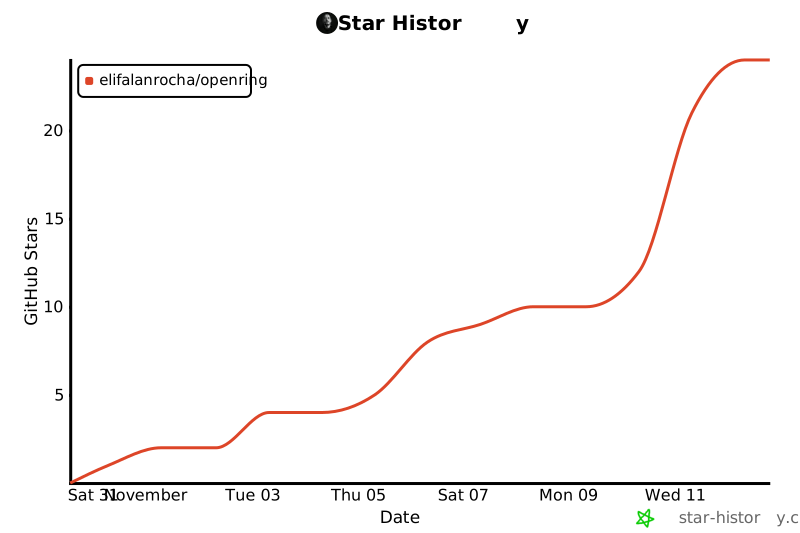
⭐ Star history
📄 License
MIT. Not affiliated with Vapi, Retell, Dograh or Twilio. OpenRing builds on Pipecat and other open-source projects, credited in THIRD_PARTY.md.
1 maintainer

Metadata
1 maintainer
Release files for openring 0.1.2
For a detailed explanation of source distributions (sdists) and built distributions (wheels), please see the package formats documentation.
Source distribution (sdist)
| File | Size | Uploaded | Provenance | Actions |
|---|---|---|---|---|
| openring-0.1.2.tar.gz | 122.7 kB | With provenance | Details for openring-0.1.2.tar.gz |
Built distribution (wheel)
| File | Interpreter | ABI | Platform | Actions Reset |
|---|---|---|---|---|
| openring-0.1.2-py3-none-any.whl | Python 3 | none | any | Details for openring-0.1.2-py3-none-any.whl |
Total release size: 205.2 kB
Release files / openring-0.1.2.tar.gz
| Download URL | openring-0.1.2.tar.gz |
|---|---|
| Size | 122.7 kB |
| Tags | Source |
|
SHA-256 checksum How to use checksums |
834b7beedca9727ed7b477ecf7840b828cc3bb77d3bb1ad396f077ace7fc91fc
|
|
BLAKE2b-256 checksum How to use checksums |
1dbfa41c855e662d440d59f53f8a44dd8ebd65aa392f5c30cedd8d88c2d67f5f
|
| Upload date | |
|
Uploaded using Trusted Publishing? What is trusted publishing? |
Yes |
| Uploaded via |
twine/7.0.0 CPython/3.13.16
|
Provenance
Provenance describes where a file came from. On PyPI, provenance is shared via attestations, which provide a verifiable record of the build or publishing details. View details, limitations and caveats.


PyPI Publish Attestation
PyPI verified that this artifact, at this checksum, originated from the publisher listed below.
Signed by GitHub Actions, verified by PyPI on Oct 30, 2026.
Transparency logRelease files / openring-0.1.2-py3-none-any.whl
| Download URL | openring-0.1.2-py3-none-any.whl |
|---|---|
| Size | 82.5 kB |
| Tags | Python 3 |
|
SHA-256 checksum How to use checksums |
a1e5713b15bff5f69d1056580c8419973acc77e6d8975d6291e55c7d23467f68
|
|
BLAKE2b-256 checksum How to use checksums |
ca8f28ce2eeeead057f1861bbef6ab8ba969ea4b347a521e77712222d56df4c6
|
| Upload date | |
|
Uploaded using Trusted Publishing? What is trusted publishing? |
Yes |
| Uploaded via |
twine/7.0.0 CPython/3.13.16
|
Provenance
Provenance describes where a file came from. On PyPI, provenance is shared via attestations, which provide a verifiable record of the build or publishing details. View details, limitations and caveats.
PyPI Publish Attestation
PyPI verified that this artifact, at this checksum, originated from the publisher listed below.
Signed by GitHub Actions, verified by PyPI on Oct 30, 2026.
Transparency logSecurity for openring 0.1.2
Provenance
Provenance describes where a file came from. On PyPI, provenance is shared via attestations, which provide a verifiable record of the build or publishing details. View details, limitations and caveats.
Full provenance
Both files in this release have been uploaded with provenance metadata.
Attestation for openring-0.1.2.tar.gz
PyPI Publish Attestation
PyPI verified that this artifact, at this checksum, originated from the publisher listed below.
Signed by GitHub Actions, verified by PyPI on Oct 30, 2026.
Transparency logA note on package security
PyPI is a repository for distributing packages, not a service for auditing them. While third-party security researchers and our staff do their best to detect and remove malicious packages, PyPI cannot guarantee the quality, security or suitability of any given package.
To learn more about protecting yourself from malicious actors, visit our package security documentation.














