
ESA OpenSR Diffusion model package for Super-Resolution of Senintel-2 Imagery


Project description

Latent Diffusion Super-Resolution - Sentinel 2 (LDSR-S2)
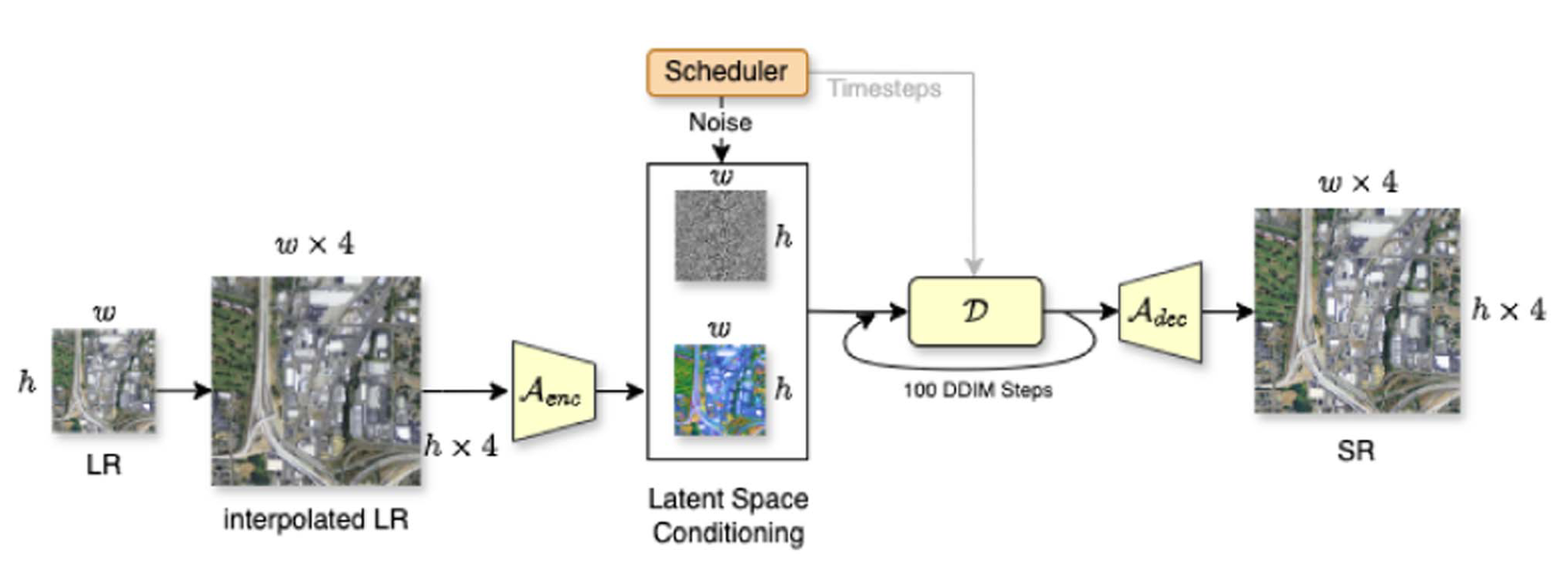
Description: This repository contains the code of the paper Trustworthy Super-Resolution of Multispectral Sentinel-2 Imagery with Latent Diffusion. This package contains the latent-diffusion model and weights to super-resolute the RGB-NIR bands of Sentinel-2. It can be embedded in the "opensr-utils" package in order to create a data pipeline for SR products.
🧪 Status: LDSR-S2 has exited the experimental phase as of v1.0.0
📌 For super-resolving 20m bands, check out SEN2SR, or use it alongside LDSR-S2 in the third notebook.
Table of Contents
- 🚀 1. Interactive Notebooks - Google Colab
- 🛠️ 2. Install and Usage - Local
- 🖼️ 3. Super-Resolution Examples
- 🗺️ 4. Inference on S2 Tiles: Data Pipeline
- 📝 5. Notes
1. 🚀 Interactive Notebooks - Google Colab
Run LDSR-S2 directly in Google Colab within seconds! These notebooks let you fetch Sentinel-2 imagery, apply super-resolution, and save results — with or without going through the code. The no-code version even implements a user interface to select and process data.
| Notebook Name | Description | Link |
|---|---|---|
| LDSR-S2 No-Code | 🔘 No coding required — chose point on a map and download SR results as GeoTIFFs |  |
| LDSR-S2 Walkthrough | 🧪 Code-level walkthrough with uncertainty estimation and advanced plotting | |
| LDSR-S2 & SEN2SR | 🔄 Use LDSR-S2 alongside SEN2SR to compare results on 10m + 20m bands | |
2. 🛠️ Install and Usage - Local
pip install opensr-model
Minimal Example
# Get Config
from io import StringIO
import requests
from omegaconf import OmegaConf
config_url = "https://raw.githubusercontent.com/ESAOpenSR/opensr-model/refs/heads/main/opensr_model/configs/config_10m.yaml"
response = requests.get(config_url)
config = OmegaConf.load(StringIO(response.text))

# Get Model
import torch
device = "cuda" if torch.cuda.is_available() else "cpu" # set device
import opensr_model # import pachage
model = opensr_model.SRLatentDiffusion(config, device=device) # create model
model.load_pretrained(config.ckpt_version) # load checkpoint
sr = model.forward(torch.rand(1,4,128,128), sampling_steps=100) # run SR
2.1 🧱 Weights and Checkpoints
The model should load automatically with the model.load_pretrained command. Alternatively, the checkpoints can be found on HuggingFace.
2.2 🖥️ HPC and Slurm Launcher
For cluster workflows, this repository now also ships an installable HPC launcher built around cubo, opensr-model, opensr-utils, and Slurm.
Install the optional extras:
pip install -e .[hpc]
This exposes the opensr-hpc CLI:
opensr-hpc validate-config --config deployment/configs/runtime.default.yaml

opensr-hpc submit patch \
  --config deployment/configs/runtime.default.yaml \
  --lat 52.5200 \
  --lon 13.4050 \
  --start-date 2025-07-01 \
  --end-date 2025-07-03 \
  --dry-run

opensr-hpc submit aoi \
  --config deployment/configs/runtime.default.yaml \
  --aoi-path /data/berlin_aoi \
  --start-date 2025-07-01 \
  --end-date 2025-07-03 \
  --dry-run
See deployment/README.md for the full run layout, config schema, AOI settings, and Slurm entrypoint details.
3. 🖼️ Super-Resolution Examples
3.1 🛰️ Example SR Image

3.2 🔎 Demo File and Uncertainty Calculation
Run the demo.py file to see how the package works. It super-resolves an example tensor and saves the corresponding uncertainty map.


4. 🗺️ Inference on S2 Tiles: Data Pipeline
This repository itself exposes the raw model for tensor‑level inference. By default it performs 128→512 super‑resolution on 4‑channel tensors (B×4×128×128 → B×4×512×512). It does not handle geospatial IO, tiling, or metadata.
For real‑world workflows on Sentinel‑2 data, please use opensr-utils:
- Run inference over 4‑band GeoTIFFs (e.g., RGB‑NIR) or full Sentinel‑2
.SAFEfolders (including.SAFE.zip). - Handles tiling, overlap blending, stitching, and preserves CRS/transform.
- Works with every model (including this one), define LR‑space
window_size=128,factor=4, overlap, and border trimming. - Writes georeferenced outputs (e.g., GeoTIFF/COG), plus basic logs/metadata.
Minimal example (pseudocode; see opensr-utils for details):
import opensr_utils
sr_job = opensr_utils.large_file_processing(
    root="/path/to/S2_tile.SAFE",  # also supports GeoTIFFs and .SAFE.zip
    model=model,                   # your SRLatentDiffusion instance
    window_size=(128, 128),        # LR patch size → 512px SR at factor=4
    factor=4,                      # 10m → 2.5m
    overlap=12,                    # LR‑space overlap to reduce seams
    eliminate_border_px=2,         # trim LR‑space border per tile
    device=device,                 # "cuda"/"cpu"
    gpus=0,                        # single GPU id or list for multi‑GPU
)
Use the notebooks and demo.py for quick starts; for full‑tile processing and proper georeferencing, prefer opensr-utils.
5. 📝 Notes
5.1 🎓 Training
Training is not supported by default in this repository due to time and resource constraints. The provided models are implemented as PyTorch Lightning modules and ship ready for inference. If you want to train or fine‑tune them, you can extend the module(s) by adding the standard Lightning hooks (e.g., training_step, validation_step, configure_optimizers, and any callbacks or loggers you prefer). If you build a clean, reproducible training pipeline, please consider opening a Pull Request (PR). We’re happy to review community contributions.
5.2 📚 Citation
If you use this model in your work, please cite
@ARTICLE{ldsrs2,
  author={Donike, Simon and Aybar, Cesar and Gómez-Chova, Luis and Kalaitzis, Freddie},
  journal={IEEE Journal of Selected Topics in Applied Earth Observations and Remote Sensing},
  title={Trustworthy Super-Resolution of Multispectral Sentinel-2 Imagery With Latent Diffusion},
  year={2025},
  volume={18},
  number={},
  pages={6940-6952},
  doi={10.1109/JSTARS.2025.3542220}}
5.3 📈 Status
This repository has left the experimental stage with the publication of v1.0.0.

Release history Release notifications | RSS feed


Download files
Download the file for your platform. If you're not sure which to choose, learn more about installing packages.
Source Distribution
Built Distribution
Filter files by name, interpreter, ABI, and platform.
If you're not sure about the file name format, learn more about wheel file names.
Copy a direct link to the current filters
File details
Details for the file opensr_model-1.1.1.tar.gz.
File metadata
- Download URL: opensr_model-1.1.1.tar.gz
- Upload date:
- Size: 70.5 kB
- Tags: Source
- Uploaded using Trusted Publishing? No
- Uploaded via: twine/6.2.0 CPython/3.14.4
File hashes
| Algorithm | Hash digest | |
|---|---|---|
| SHA256 |
799679f62b5301f601fddc0727d68419fd1a847ca5c0ad8610265a387218f330
|
|
| MD5 |
67c95e7bf4ca4e636f2b1d48c0bf0ab9
|
|
| BLAKE2b-256 |
f26ac05588c9801f62efc3c5cd1c4cd591aa4e57ea16e752bc07206828652a92
|
File details
Details for the file opensr_model-1.1.1-py3-none-any.whl.
File metadata
- Download URL: opensr_model-1.1.1-py3-none-any.whl
- Upload date:
- Size: 78.0 kB
- Tags: Python 3
- Uploaded using Trusted Publishing? No
- Uploaded via: twine/6.2.0 CPython/3.14.4
File hashes
| Algorithm | Hash digest | |
|---|---|---|
| SHA256 |
6168336d800d24976751bba46dd6cb129906109608b8c6003354c89a7a5b72e0
|
|
| MD5 |
4234ec8511771aaf503305f63d71ee2f
|
|
| BLAKE2b-256 |
819837c6136b82f5006cda41438f02d40b1292cdc253f4b2b33f72ff5d07ee24
|






