
OpenStack-Ansible Wizard TUI

A user-friendly Textual-based configuration manager for OpenStack-Ansible.
Features
-
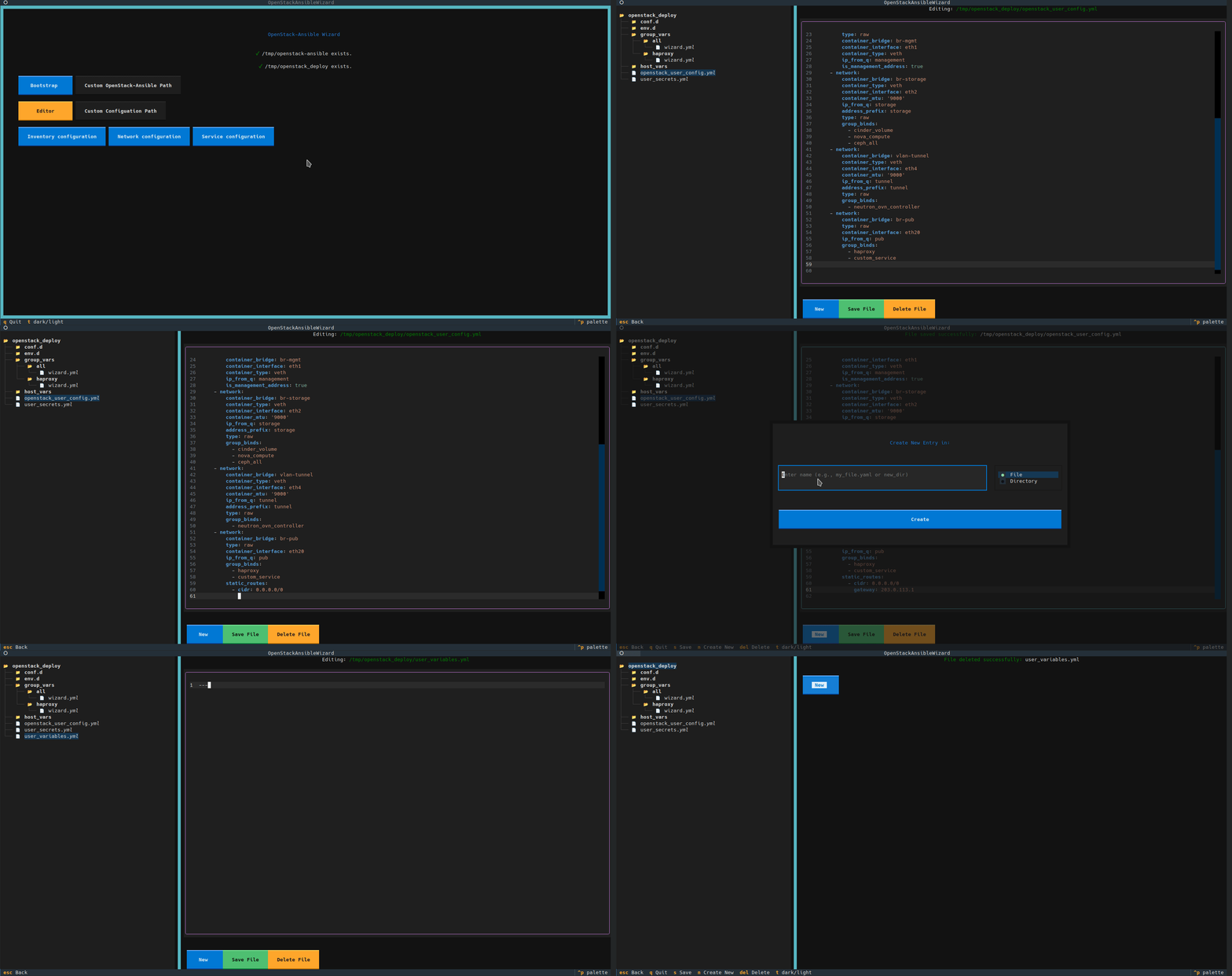
Interactive TUI: A modern terminal interface for managing your OpenStack-Ansible deployment, from initial setup to detailed configuration.
-
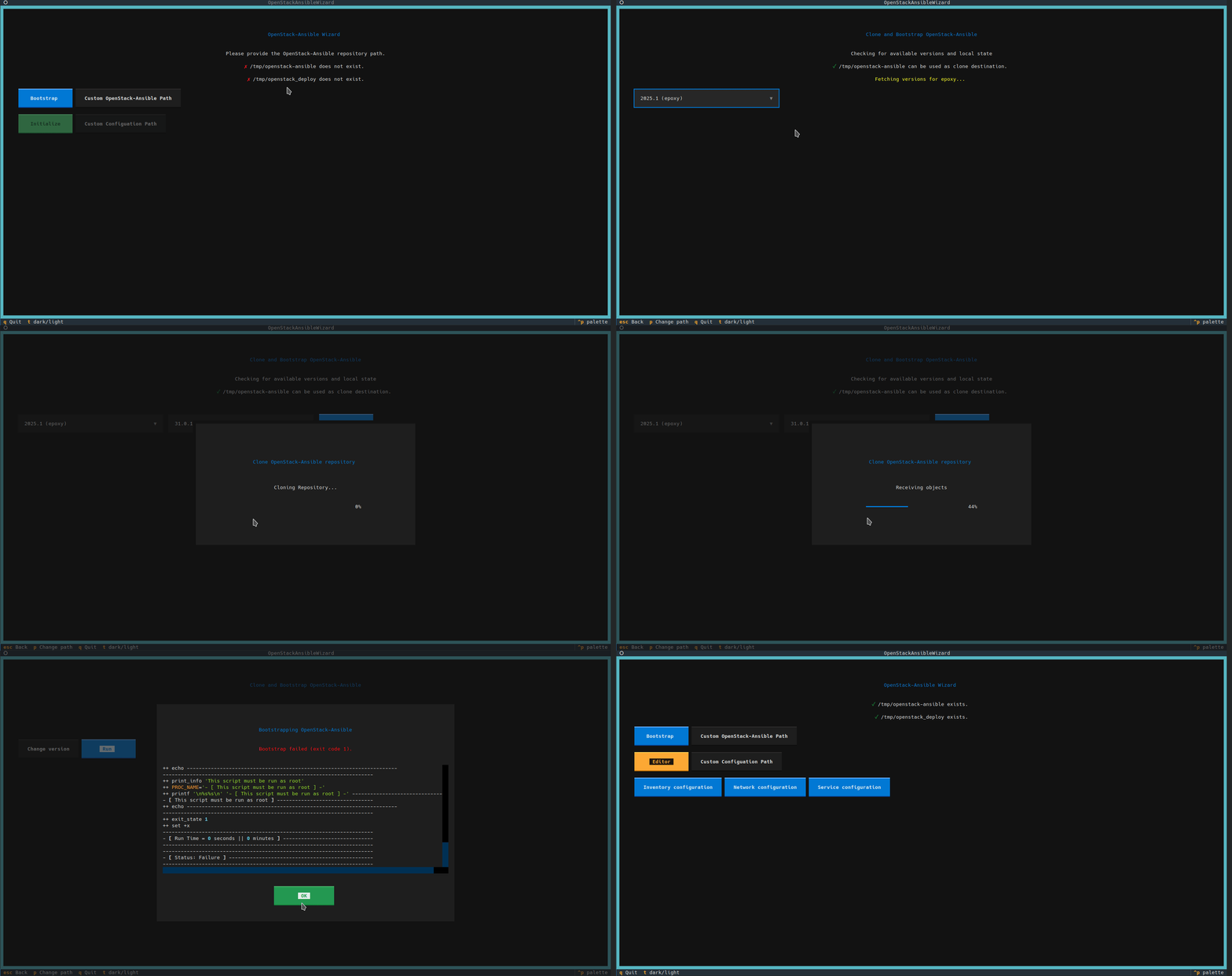
Guided Setup: Automatically checks for your OpenStack-Ansible repository and configuration directories, guiding you through the first steps.
-
Guided Bootstrapping:
- Fetches available OpenStack releases and corresponding OpenStack-Ansible versions directly from OpenDev.
- Clones the exact version of the OpenStack-Ansible repository you need.
- Runs the
bootstrap-ansible.shscript and displays live log output.
-
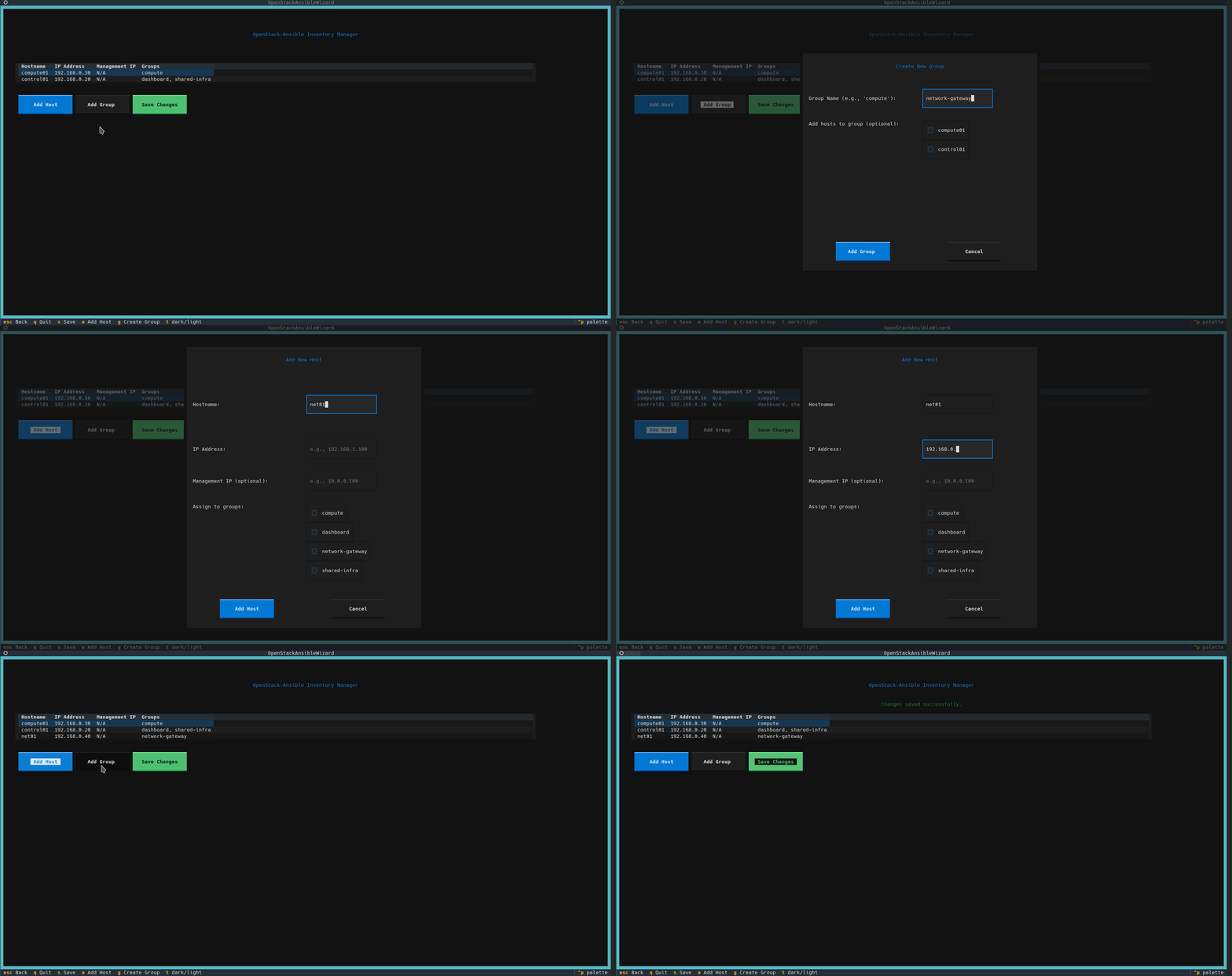
Inventory Management:
- Visually manage your inventory hosts and groups in an interactive table.
- Easily add, edit, and assign hosts to groups through intuitive forms.
- Saves changes back to your configuration files, automatically organizing groups into standardized files under
conf.d/.
-
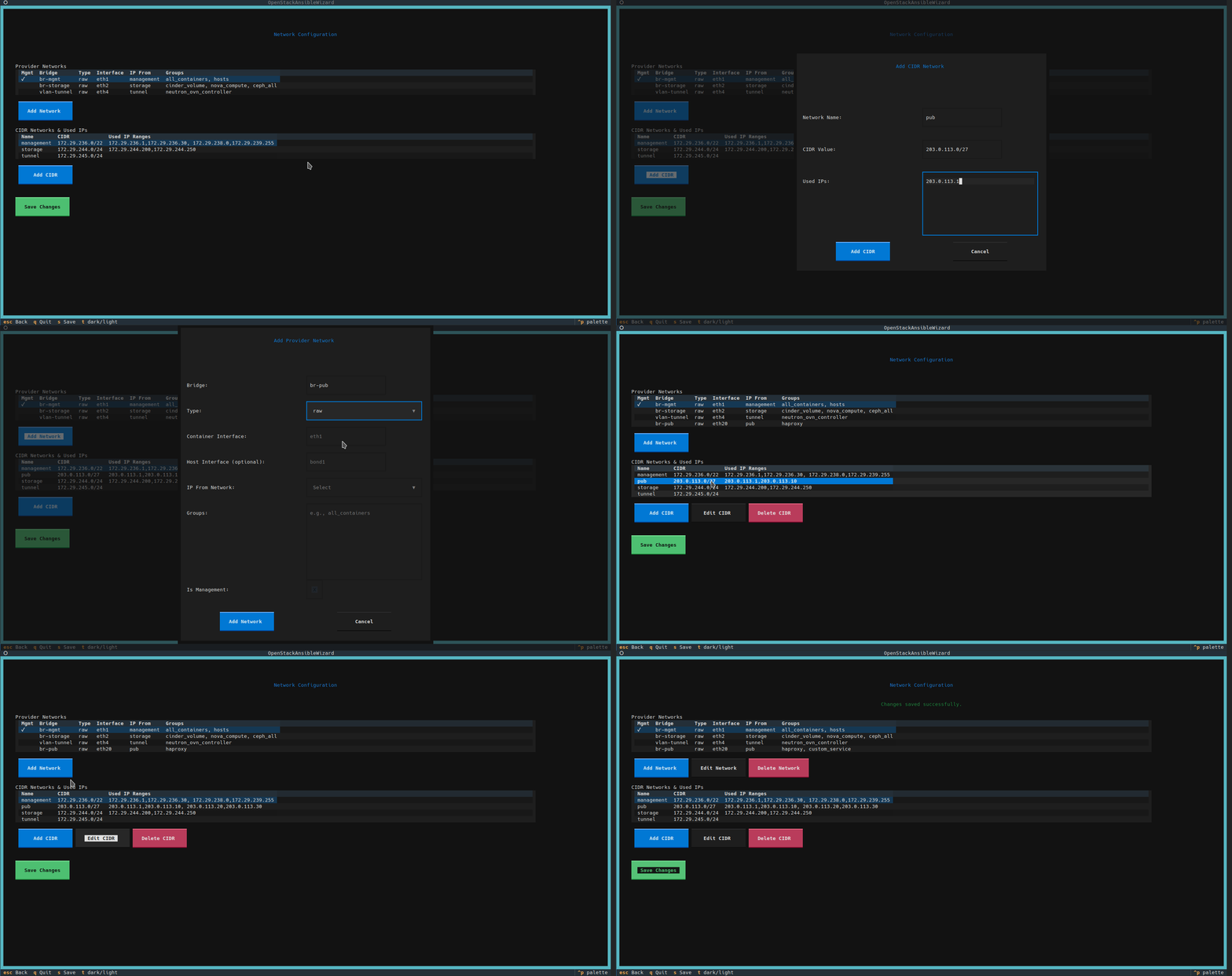
Network Configuration:
- Create, edit and delete CIDR definitions together with used subnets
- Manage provider networks definitions
-
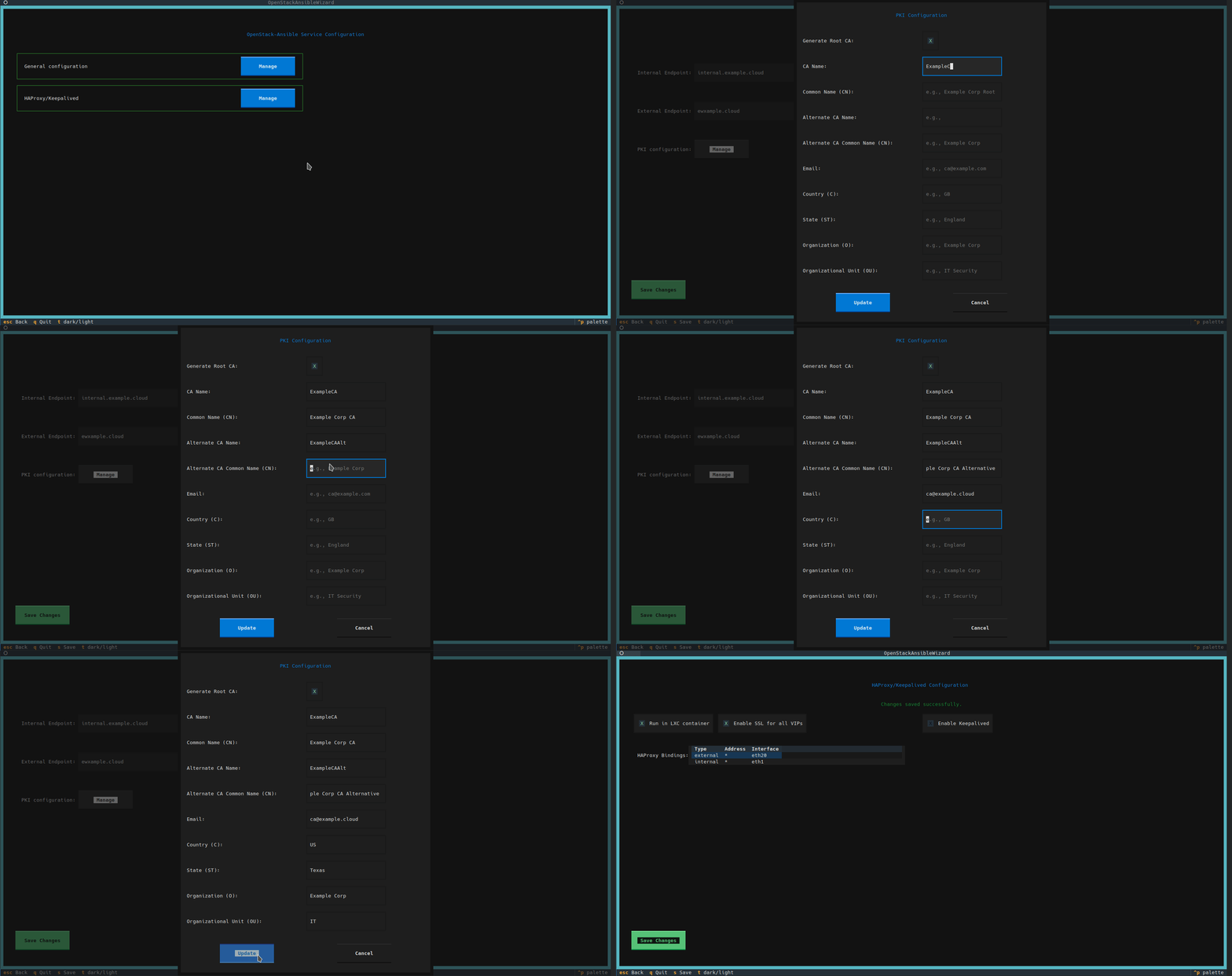
Services Configuration: Manage most common settings and scenarios in (almost) intuitive way
- Configure Public/Private endpoint names
- Define details for issued self-signed Certificate Authority
- Configure HAProxy and Keepalived details
- More to come soon!
-
Built-in Configuration Editor:
- A powerful side-by-side file browser and YAML editor for direct manipulation of all configuration files.
- Supports creating, deleting, and editing files and directories within your configuration path.
-
Web TUI Mode: Serve the entire application as a web-based TUI, accessible from any modern browser.
-
Can be used with existing deployments: At your own risk, of course! We are trying our best to have compatibility and do not break existing environments, but this is not always guaranteed.

Installation
-
Create a Python Virtual Environment (Recommended)
python3 -m venv .venv
source .venv/bin/activate
-
Install the Package
Install the application and its dependencies using
pip.# For standard TUI usage pip install openstack-ansible-wizard # To include web server capabilities pip install openstack-ansible-wizard[serve]
You can also run the application without installation, which might be convenient during development:
# Install requirements manually
pip install -r requirements.txt
# Run application
python3 run.py
Usage
Once installed, you can run the application using the console script created during installation:
openstack-ansible-wizard
Environment Variables
The application uses the following environment variables to determine default paths. You can set them to point to your existing setup before running the app.
OSA_CLONE_DIR: The path to youropenstack-ansiblerepository. (Default:/opt/openstack-ansible)OSA_CONFIG_DIR: The path to your OpenStack-Ansible configuration directory. (Default:/etc/openstack_deploy)
Example:
export OSA_CONFIG_DIR=~/openstack-configs
openstack-ansible-wizard
Web TUI Mode
The application can also be served as a web-based TUI that you can access from your browser. This is useful for running the wizard on a remote server.
First, ensure you have installed the application with the serve extras (see Installation section).
Then, run the serve command:
openstack-ansible-wizard serve --host localhost --port 8080
You can then access the application by navigating to http://localhost:8080 in your web browser.
License
This project is licensed under the Apache License 2.0. See the LICENSE file for details.
1 maintainer

Metadata
1 maintainer
Release files for openstack-ansible-wizard 0.1.1
For a detailed explanation of source distributions (sdists) and built distributions (wheels), please see the package formats documentation.
Source distribution (sdist)
| File | Size | Uploaded | Provenance | |
|---|---|---|---|---|
| openstack_ansible_wizard-0.1.1.tar.gz | 50.6 kB | With provenance | Details |
Built distribution (wheel)
| File | Interpreter | ABI | Platform | Reset |
|---|---|---|---|---|
| openstack_ansible_wizard-0.1.1-py3-none-any.whl | Python 3 | none | any | Details |
Total release size: 114.0 kB
Release files / openstack_ansible_wizard-0.1.1.tar.gz
| Download URL | openstack_ansible_wizard-0.1.1.tar.gz |
|---|---|
| Size | 50.6 kB |
| Tags | Source |
|
SHA-256 checksum How to use checksums |
dc79c70f4f1e0176233c85e451c920deb4f928243dfef33b6db2b2d0db16fef7
|
|
BLAKE2b-256 checksum How to use checksums |
2d3db7bed17feb002d163d49656c1e44b9f484634092e2f94f7fea537a150175
|
| Upload date | |
|
Uploaded using Trusted Publishing? What is trusted publishing? |
Yes |
| Uploaded via |
twine/6.1.0 CPython/3.13.7
|
Provenance
Provenance describes where a file came from. On PyPI, provenance is shared via attestations, which provide a verifiable record of the build or publishing details. View details, limitations and caveats.


PyPI Publish Attestation
PyPI verified that this artifact, at this checksum, originated from the publisher listed below.
Signed by GitHub Actions, verified by PyPI on Nov 15, 2025.
Transparency logRelease files / openstack_ansible_wizard-0.1.1-py3-none-any.whl
| Download URL | openstack_ansible_wizard-0.1.1-py3-none-any.whl |
|---|---|
| Size | 63.4 kB |
| Tags | Python 3 |
|
SHA-256 checksum How to use checksums |
bf83ca110066e3f9272c355c164a451ce5bd7b1c6a7050cea786ceedd2726ca2
|
|
BLAKE2b-256 checksum How to use checksums |
72518cb7e04315507dfd7c1fa777be84be1dd15934c7944ea1c56299e14f3cf5
|
| Upload date | |
|
Uploaded using Trusted Publishing? What is trusted publishing? |
Yes |
| Uploaded via |
twine/6.1.0 CPython/3.13.7
|
Provenance
Provenance describes where a file came from. On PyPI, provenance is shared via attestations, which provide a verifiable record of the build or publishing details. View details, limitations and caveats.
PyPI Publish Attestation
PyPI verified that this artifact, at this checksum, originated from the publisher listed below.
Signed by GitHub Actions, verified by PyPI on Nov 15, 2025.
Transparency logSecurity for openstack-ansible-wizard 0.1.1
Provenance
Provenance describes where a file came from. On PyPI, provenance is shared via attestations, which provide a verifiable record of the build or publishing details. View details, limitations and caveats.
Full provenance
All 2 files in this release have been uploaded with provenance metadata.
Attestation for openstack_ansible_wizard-0.1.1.tar.gz
PyPI Publish Attestation
PyPI verified that this artifact, at this checksum, originated from the publisher listed below.
Signed by GitHub Actions, verified by PyPI on Nov 15, 2025.
Transparency logA note on package security
PyPI is a repository for distributing packages, not a service for auditing them. While third-party security researchers and our staff do their best to detect and remove malicious packages, PyPI cannot guarantee the quality, security or suitability of any given package.














