
A Textual-based Wizard for OpenStack-Ansible.
Verified details
These details have been verified by PyPIProject links
GitHub Statistics
Maintainers

Project description
OpenStack-Ansible Wizard TUI

A user-friendly Textual-based configuration manager for OpenStack-Ansible.
Features
-
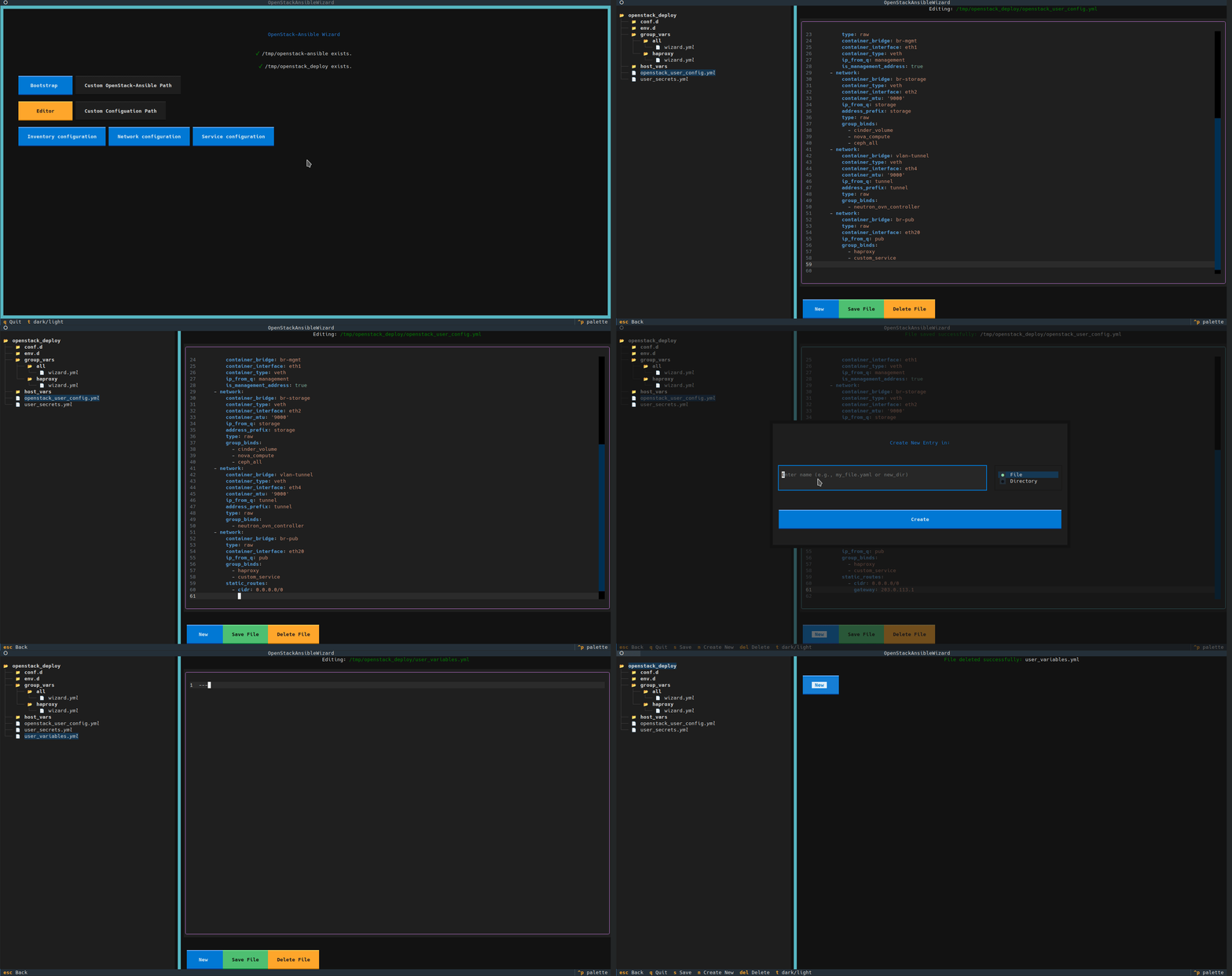
Interactive TUI: A modern terminal interface for managing your OpenStack-Ansible deployment, from initial setup to detailed configuration.
-
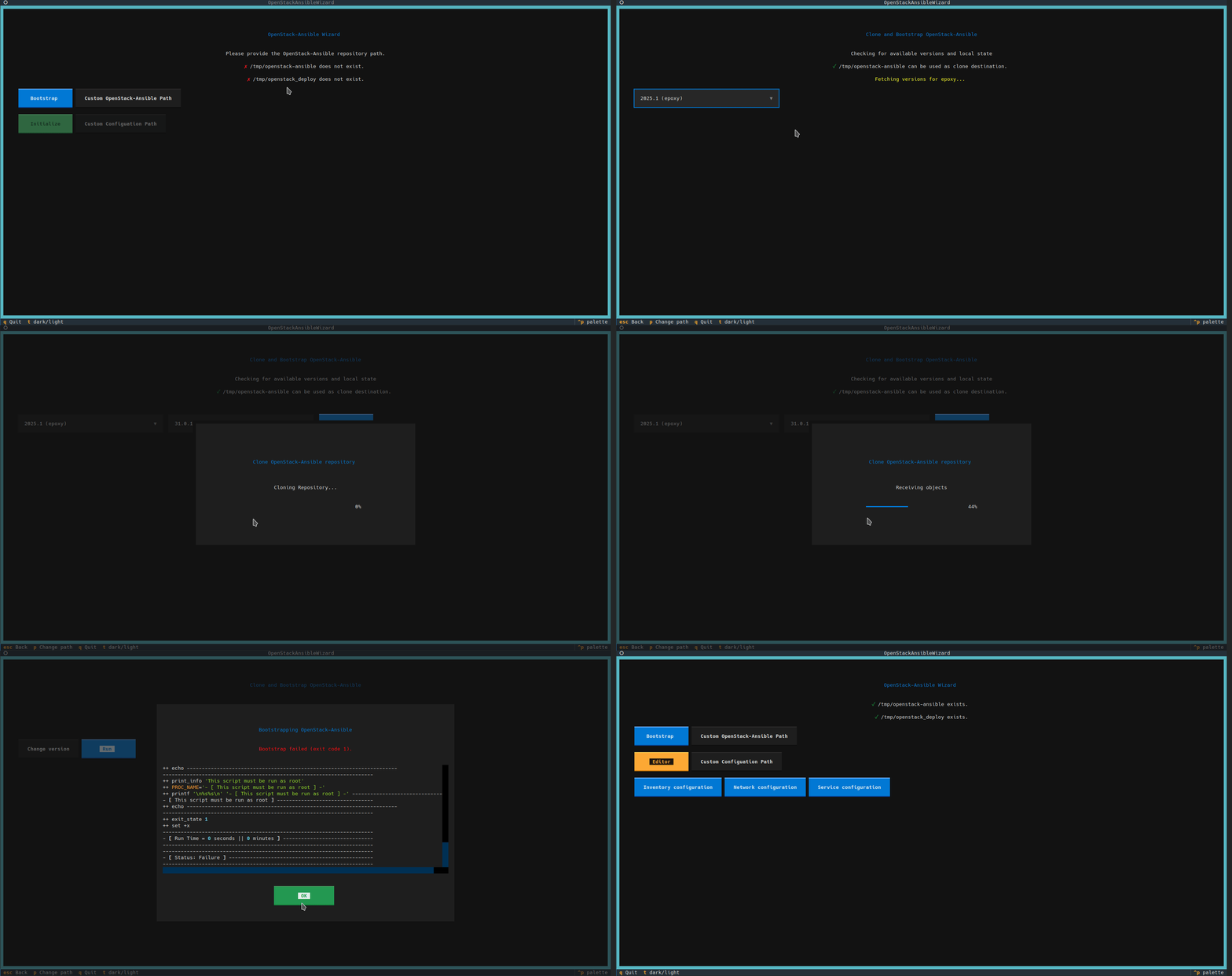
Guided Setup: Automatically checks for your OpenStack-Ansible repository and configuration directories, guiding you through the first steps.
-
Guided Bootstrapping:
- Fetches available OpenStack releases and corresponding OpenStack-Ansible versions directly from OpenDev.
- Clones the exact version of the OpenStack-Ansible repository you need.
- Runs the
bootstrap-ansible.shscript and displays live log output.
-
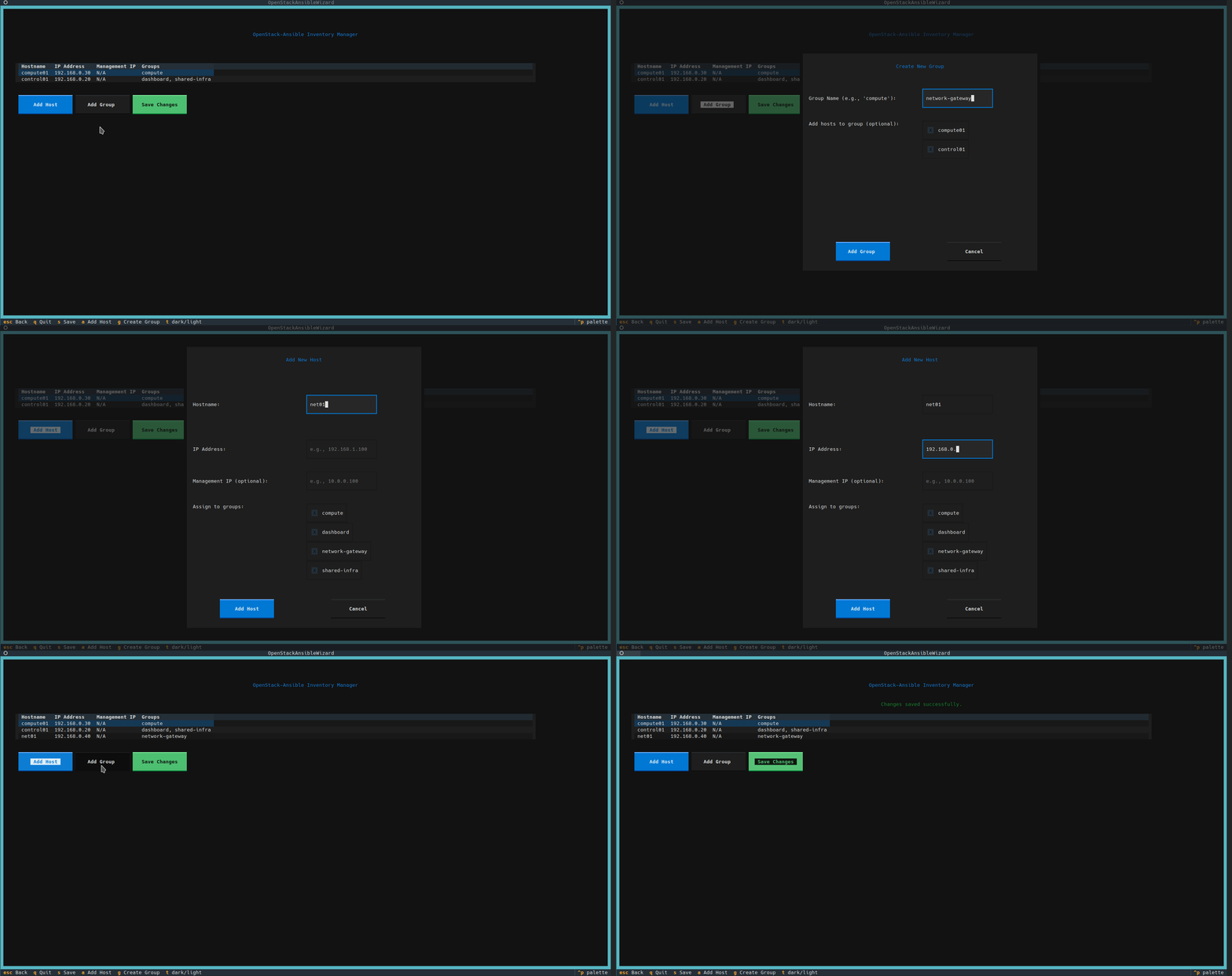
Inventory Management:
- Visually manage your inventory hosts and groups in an interactive table.
- Easily add, edit, and assign hosts to groups through intuitive forms.
- Saves changes back to your configuration files, automatically organizing groups into standardized files under
conf.d/.
-
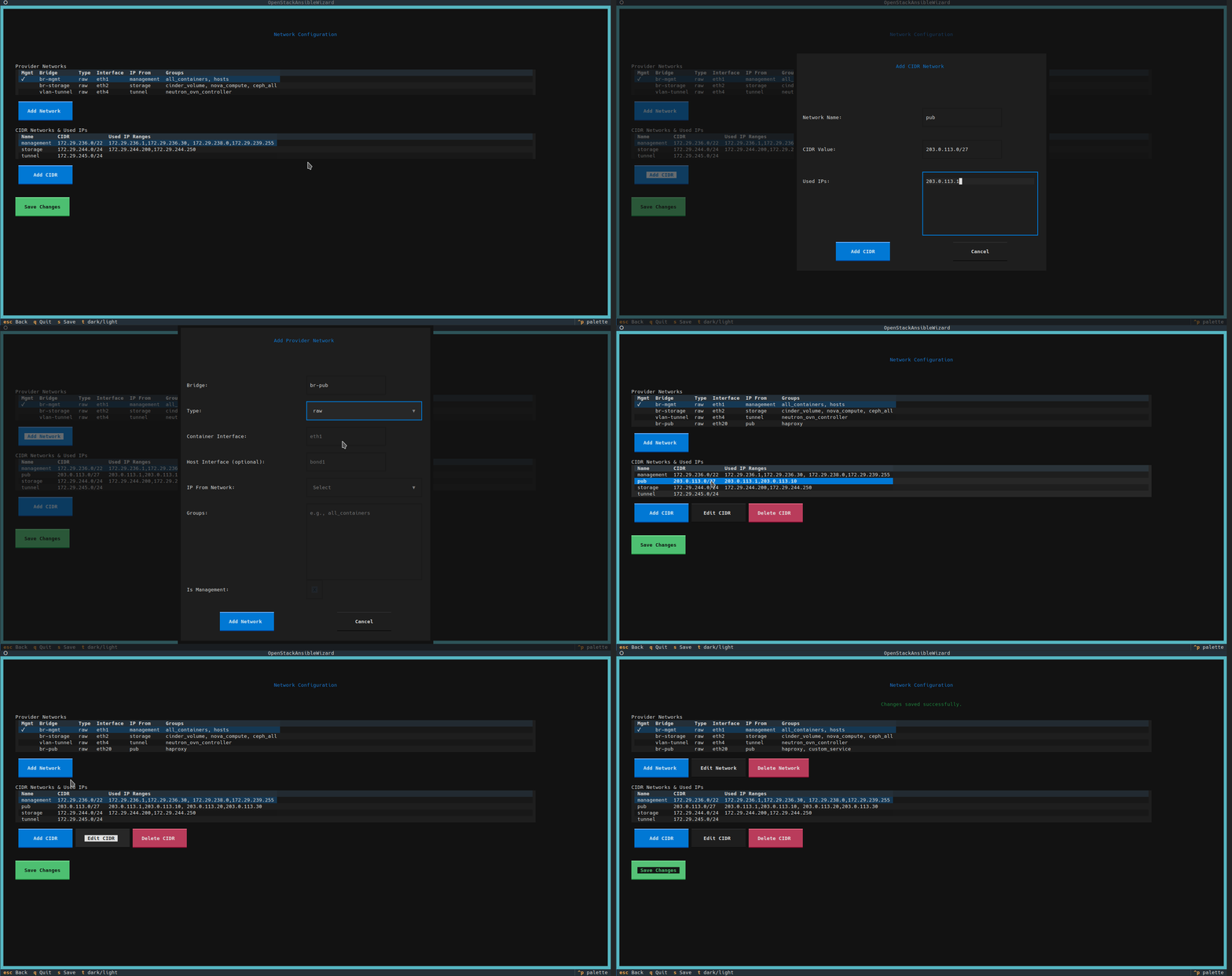
Network Configuration:
- Create, edit and delete CIDR definitions together with used subnets
- Manage provider networks definitions
-
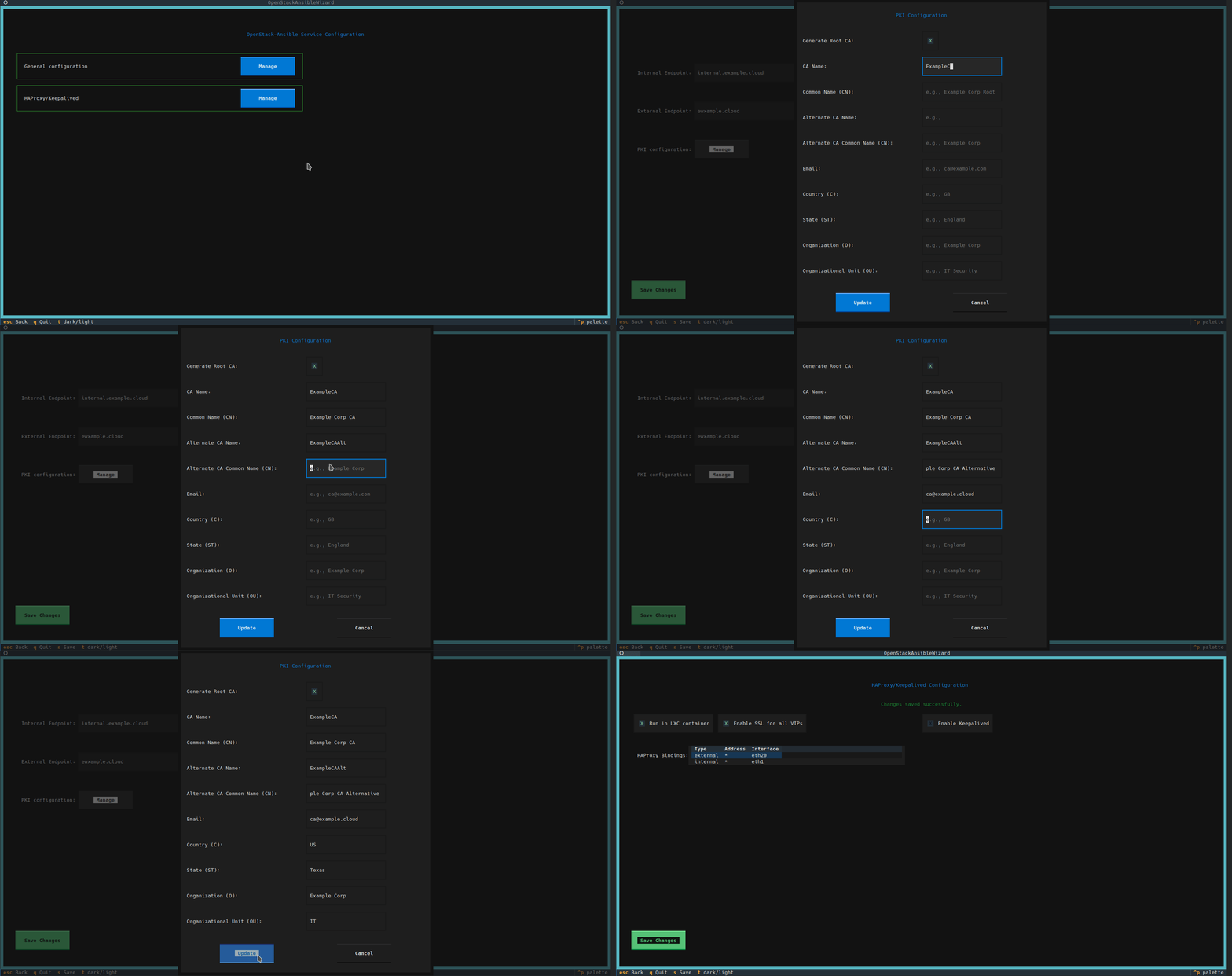
Services Configuration: Manage most common settings and scenarios in (almost) intuitive way
- Configure Public/Private endpoint names
- Define details for issued self-signed Certificate Authority
- Configure HAProxy and Keepalived details
- More to come soon!
-
Built-in Configuration Editor:
- A powerful side-by-side file browser and YAML editor for direct manipulation of all configuration files.
- Supports creating, deleting, and editing files and directories within your configuration path.
-
Web TUI Mode: Serve the entire application as a web-based TUI, accessible from any modern browser.
-
Can be used with existing deployments: At your own risk, of course! We are trying our best to have compatibility and do not break existing environments, but this is not always guaranteed.

Installation
-
Create a Python Virtual Environment (Recommended)
python3 -m venv .venv
source .venv/bin/activate
-
Install the Package
Install the application and its dependencies using
pip.# For standard TUI usage pip install openstack-ansible-wizard # To include web server capabilities pip install openstack-ansible-wizard[serve]
You can also run the application without installation, which might be convenient during development:
# Install requirements manually
pip install -r requirements.txt
# Run application
python3 run.py
Usage
Once installed, you can run the application using the console script created during installation:
openstack-ansible-wizard
Environment Variables
The application uses the following environment variables to determine default paths. You can set them to point to your existing setup before running the app.
OSA_CLONE_DIR: The path to youropenstack-ansiblerepository. (Default:/opt/openstack-ansible)OSA_CONFIG_DIR: The path to your OpenStack-Ansible configuration directory. (Default:/etc/openstack_deploy)
Example:
export OSA_CONFIG_DIR=~/openstack-configs
openstack-ansible-wizard
Web TUI Mode
The application can also be served as a web-based TUI that you can access from your browser. This is useful for running the wizard on a remote server.
First, ensure you have installed the application with the serve extras (see Installation section).
Then, run the serve command:
openstack-ansible-wizard serve --host localhost --port 8080
You can then access the application by navigating to http://localhost:8080 in your web browser.
License
This project is licensed under the Apache License 2.0. See the LICENSE file for details.
Project details
Verified details
These details have been verified by PyPIProject links
GitHub Statistics
Maintainers
Release history Release notifications | RSS feed


Download files
Download the file for your platform. If you're not sure which to choose, learn more about installing packages.
Source Distribution
Built Distribution
Filter files by name, interpreter, ABI, and platform.
If you're not sure about the file name format, learn more about wheel file names.
Copy a direct link to the current filters
File details
Details for the file openstack_ansible_wizard-0.1.1.tar.gz.
File metadata
- Download URL: openstack_ansible_wizard-0.1.1.tar.gz
- Upload date:
- Size: 50.6 kB
- Tags: Source
- Uploaded using Trusted Publishing? Yes
- Uploaded via: twine/6.1.0 CPython/3.13.7
File hashes
| Algorithm | Hash digest | |
|---|---|---|
| SHA256 |
dc79c70f4f1e0176233c85e451c920deb4f928243dfef33b6db2b2d0db16fef7
|
|
| MD5 |
ddd74f2a4d4363ad43a06ef83a71e899
|
|
| BLAKE2b-256 |
2d3db7bed17feb002d163d49656c1e44b9f484634092e2f94f7fea537a150175
|
Provenance
The following attestation bundles were made for openstack_ansible_wizard-0.1.1.tar.gz:
Publisher:
publish.yml on adriacloud/openstack-ansible-wizard
-
Statement:
-
Statement type:
https://in-toto.io/Statement/v1 -
Predicate type:
https://docs.pypi.org/attestations/publish/v1 -
Subject name:
openstack_ansible_wizard-0.1.1.tar.gz -
Subject digest:
dc79c70f4f1e0176233c85e451c920deb4f928243dfef33b6db2b2d0db16fef7 - Sigstore transparency entry: 702061483
- Sigstore integration time:
-
Permalink:
adriacloud/openstack-ansible-wizard@1269c0ccdb5a8fcd7d26617446a21c25e7db3ac0 -
Branch / Tag:
refs/tags/0.1.1 - Owner: https://github.com/adriacloud
-
Access:
public
-
Token Issuer:
https://token.actions.githubusercontent.com -
Runner Environment:
github-hosted -
Publication workflow:
publish.yml@1269c0ccdb5a8fcd7d26617446a21c25e7db3ac0 -
Trigger Event:
push
-
Statement type:
File details
Details for the file openstack_ansible_wizard-0.1.1-py3-none-any.whl.
File metadata
- Download URL: openstack_ansible_wizard-0.1.1-py3-none-any.whl
- Upload date:
- Size: 63.4 kB
- Tags: Python 3
- Uploaded using Trusted Publishing? Yes
- Uploaded via: twine/6.1.0 CPython/3.13.7
File hashes
| Algorithm | Hash digest | |
|---|---|---|
| SHA256 |
bf83ca110066e3f9272c355c164a451ce5bd7b1c6a7050cea786ceedd2726ca2
|
|
| MD5 |
9ee606c3ddabf4a4719c28ae697ec98a
|
|
| BLAKE2b-256 |
72518cb7e04315507dfd7c1fa777be84be1dd15934c7944ea1c56299e14f3cf5
|
Provenance
The following attestation bundles were made for openstack_ansible_wizard-0.1.1-py3-none-any.whl:
Publisher:
publish.yml on adriacloud/openstack-ansible-wizard
-
Statement:
-
Statement type:
https://in-toto.io/Statement/v1 -
Predicate type:
https://docs.pypi.org/attestations/publish/v1 -
Subject name:
openstack_ansible_wizard-0.1.1-py3-none-any.whl -
Subject digest:
bf83ca110066e3f9272c355c164a451ce5bd7b1c6a7050cea786ceedd2726ca2 - Sigstore transparency entry: 702061484
- Sigstore integration time:
-
Permalink:
adriacloud/openstack-ansible-wizard@1269c0ccdb5a8fcd7d26617446a21c25e7db3ac0 -
Branch / Tag:
refs/tags/0.1.1 - Owner: https://github.com/adriacloud
-
Access:
public
-
Token Issuer:
https://token.actions.githubusercontent.com -
Runner Environment:
github-hosted -
Publication workflow:
publish.yml@1269c0ccdb5a8fcd7d26617446a21c25e7db3ac0 -
Trigger Event:
push
-
Statement type:






