
OpenTab
Your AI coding tools keep a tab. OpenTab opens it.
Anonymized demo data — click the reel for the full-quality video.
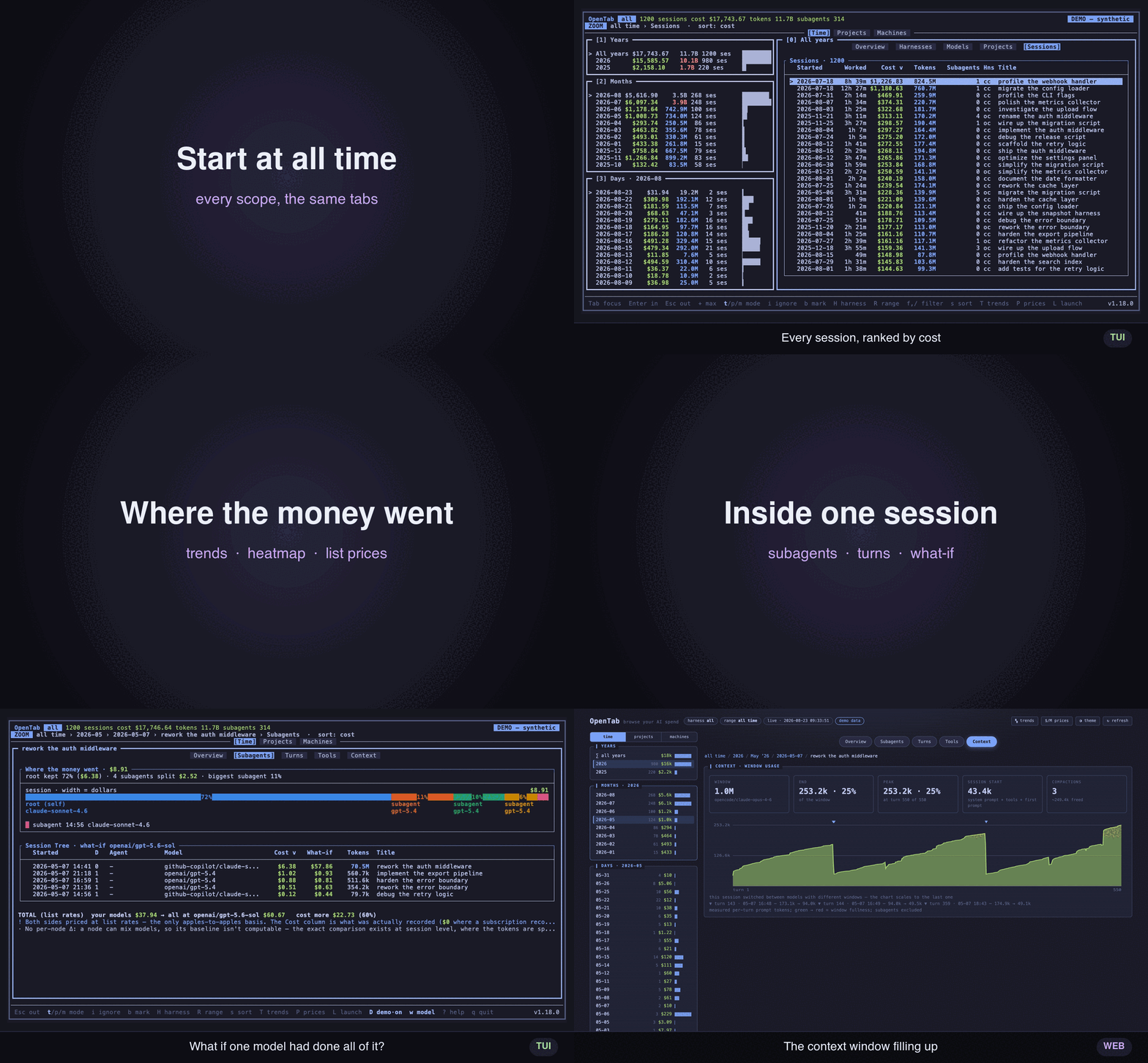
One reel, every view — trends, a calendar spend heatmap, drill from a month down to a single session, and live theming
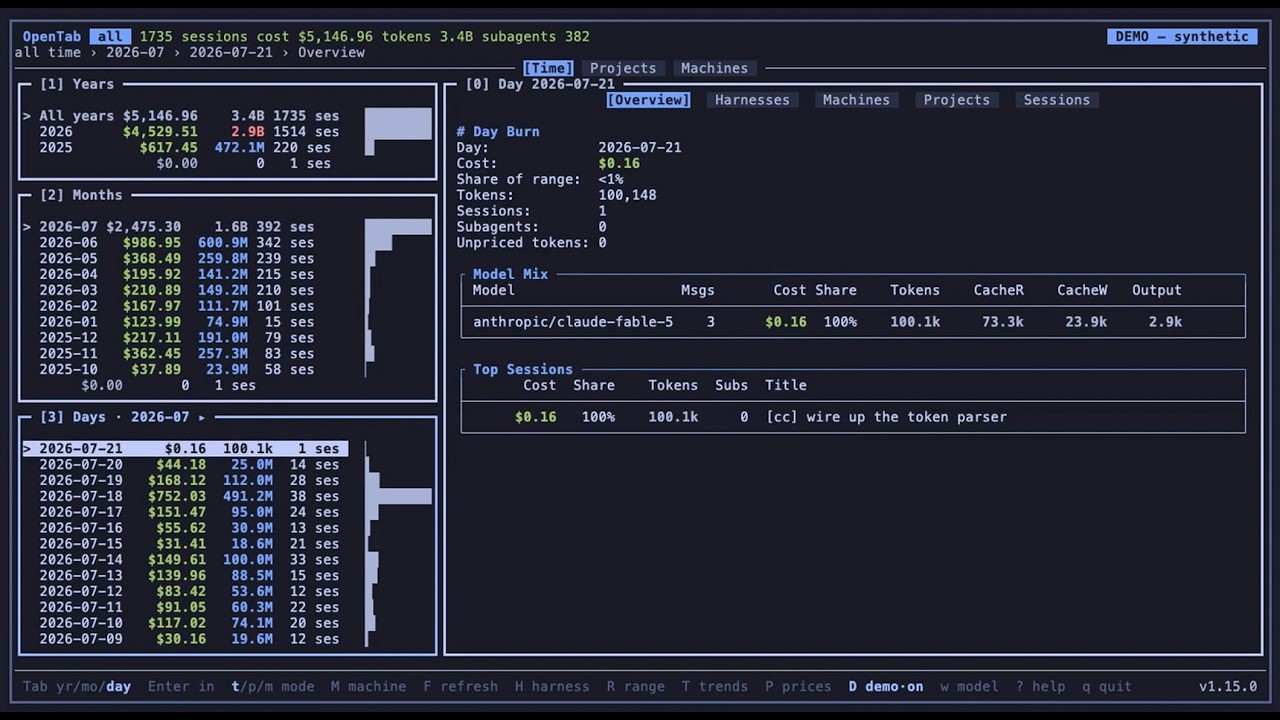
▶ The full tour on YouTube — every view, walked through

Also a web browser — opentab --web renders the same data as one self-contained, shareable page
A terminal browser for your AI coding spend. It reads the records your tools already keep on disk — a dozen of them, from OpenCode and Claude Code to Codex and Copilot — and shows where the tokens and the money went: by month, day, project, session, and model, all the way down the subagent tree. One tool at a time, or all of them merged.
Plenty of things will print you a token total. This one is built to be poked at: drill
in, filter as you type, rescope the dates, sort, keyboard or mouse. And it's just a
reader — no backend, no telemetry, no account, every file opened read-only. The
runtime is the Python standard library, so pipx install opentab-ai pulls in nothing else.
Install
Python 3.9+ and a terminal — macOS, Linux, WSL, and native Windows. The PyPI package
is opentab-ai; the command it installs is opentab.
pipx install opentab-ai                     # recommended
brew install hamidi-dev/tap/opentab         # Homebrew (macOS / Linux)
pip install --user opentab-ai               # pip
curl -fsSL https://raw.githubusercontent.com/hamidi-dev/opentab/main/install.sh | bash
Upgrade with pipx upgrade opentab-ai, brew upgrade opentab, or
pip install -U --user opentab-ai.
Usage
opentab                          # the browser, all time
opentab web                      # the same browser, in your web browser
opentab --demo                   # anonymized — safe for screenshots and live demos
opentab doctor                   # what's found, what isn't, and why
opentab pull laptop workstation  # every machine, merged into one tab
? shows the full keymap in-app; it's also in docs/keys.md, along with
the rest of the reference in docs/.
What you get
- Drill, don't scroll — month → day → project → session → model, down the recursive subagent tree, with a live fzf-style filter and live date-range scoping.
- Trends — daily / weekly / monthly charts, a calendar spend heatmap, and model / provider / harness rankings. Every one of them navigable down to a single session.
- Inside a session — Turns: what each prompt cost, in order, with the tool calls it made. Tools: token attribution per tool and MCP server, over a treemap where area is total spend and shade is cost per call. Context: the window filling up over time, compaction markers included, plus an estimate of what filled it.
- Honest money — subscription usage shows its true
$0;$reprices it at API list rates andPshows the per-model table behind the estimate.warms a what-if model: what if the expensive one had done the subagents' work too? - Every machine, one tab —
opentab pullgathers each box's spend over SSH and merges it into one browser you can filter by machine. - A web twin —
opentab webserves the same browser live,--htmlwrites it as one self-contained file: same keys, same overlays, every view a shareable deep link. docs/web.md - Yours to drive — lazygit-style keyboard and mouse, 30 bundled themes shared by the
TUI and the web page, every key remappable, CSV export of any view, and your harness,
range, sort and
$view remembered between runs. - Private by construction — local-only, read-only, no telemetry, no accounts.
The tools it reads
OpenCode · Claude Code · Codex CLI · GitHub Copilot (its CLI and Copilot Chat in VS Code) · pi-agent · omp · OpenClaw · zaly · Hermes · and CSV/JSONL logs of your own API requests.
Point it at nothing and --harness auto merges every tool it finds; --harness NAME
narrows to one, H switches live. You can also just hand it a file — opentab requests.csv, opentab path/to/opencode.db — and the harness is inferred.
What each tool's records support on top — cost, subagent tree, Turns, Tools, Context
| Harness | Cost | Subagent tree | Turns | Tools | Context |
|---|---|---|---|---|---|
| OpenCode | real recorded | ✓ | ✓ | ✓ | ✓ |
| Claude Code | tokens only — $ estimates |
✓ | ✓ | ✓ | ✓ |
| Codex CLI | tokens only — $ estimates |
✓ | ✓ | ✓ | — |
| Hermes Agent | mixed — metered real, rest estimated | ✓ | ✓ | ✓ | ✓ |
| GitHub Copilot CLI | tokens only — $ estimates |
— | ✓ | — | ✓ |
| Copilot Chat in VS Code | tokens only — $ estimates |
— | ✓ | — | ✓ |
| pi-agent | mixed — metered real, rest estimated | — | ✓ | ✓ | ✓ |
| omp | mixed — metered real, rest estimated | ✓ | ✓ | ✓ | ✓ |
| OpenClaw | mixed — metered real, rest estimated | — | ✓ | ✓ | ✓ |
| zaly | mixed — metered real, rest estimated | — | ✓ | ✓ | ✓ |
| CSV / JSONL request logs | mixed — per-row cost column | — | ✓ | ✓ | ✓ |
Subagent tree — recursive per-subagent cost under the session that delegated ·
Turns — the per-turn cost timeline · Tools — token attribution per tool call and
MCP server · Context — the context-window growth curve (it rides on Turns). A — is
data the tool itself doesn't record, never a feature skipped; sources.md says which, and
why, for each one.
docs/sources.md has the rest: where every tool's records live, its flags and env vars, how its cost is derived, the quirks (Copilot's opt-in export, Codex's cumulative counters, the metered-vs-subscription split), the CSV/JSONL schema you can write against, and the merged view.
Every machine, one tab
Code on more than one box? opentab pull gathers each machine's spend over SSH — all in
parallel — and opens them merged into one browser, filterable and drillable by machine.
opentab pull laptop workstation gpu-box   # fetch all three, open the fleet
opentab pull                              # later: refresh every machine you've saved
No agent, nothing to install, nothing listening — the remote only needs opentab on
its PATH.
How the pull works, and what the fleet adds
Pull runs opentab export - on the far side, which prints that box's spend summary —
totals, per-model breakdown, Turns / Tools / Context, but no transcripts — and streams
it back over the SSH pipe. Each host is remembered, so a bare opentab pull refreshes the
lot; a host is any ssh target (box, user@host, name=user@host to label it) or a
http://host:port box already running opentab web.
Once pulled, the fleet is just another harness: M filters every view to one machine,
L reopens a session on the box it ran on over SSH, opentab remote reopens the
last pull with no SSH round-trip, and opentab forget <machine> drops one. Pair any of
it with --demo for a shareable fleet snapshot.
Live prices in your sidebar
herdr-opentab puts what each running agent has spent right next to it in the Herdr sidebar — that pane's own session, subagents included, kept up to date while it works.
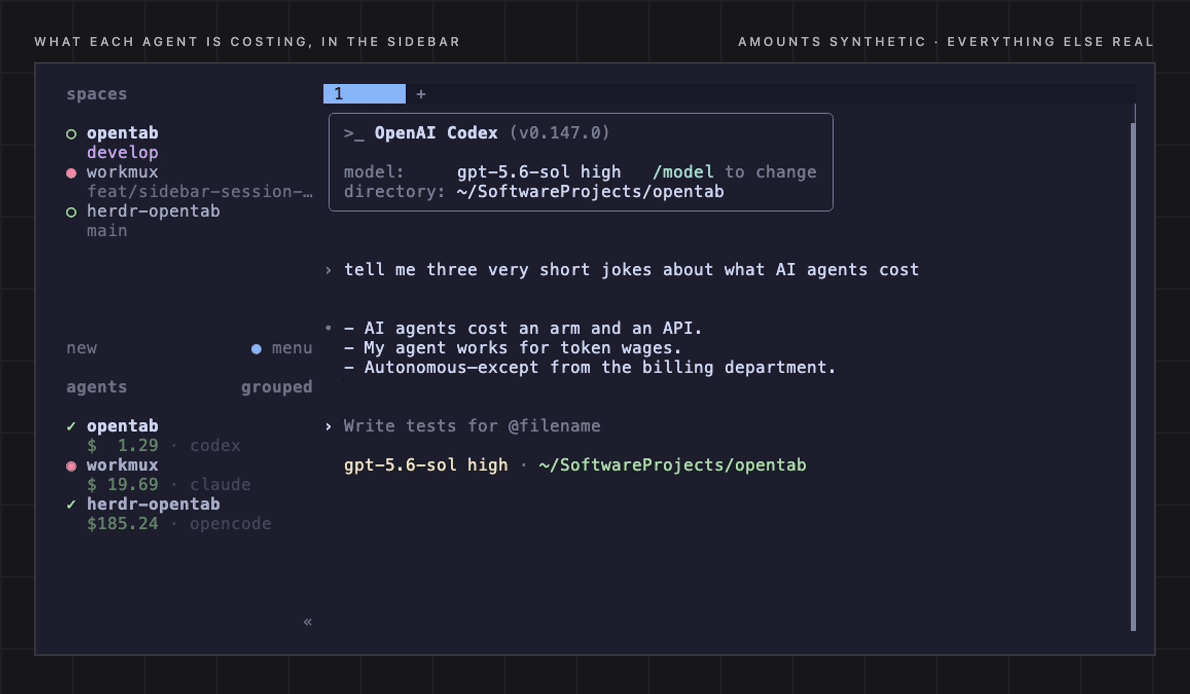
Amounts synthetic, everything else real.
About the money
A session that shows tokens against $0.00 isn't a bug: usage was recorded without a
per-token price, which is what a subscription or credit plan looks like from the outside.
That money isn't missing, it's billed elsewhere — so OpenTab reports unpriced tokens
rather than guessing. Press $ and it reprices them at published API list rates, from
a models.dev snapshot bundled with each release (nothing is fetched at runtime); P
shows the rates behind the estimate. docs/pricing.md
Something looks off?
opentab doctor
Which copy of OpenTab is talking, every harness (found — or not found and why, with the fix), your terminal's colour and glyph support, the price catalog, its own files. It reports and never repairs, and it reads no transcript, so the output is safe to paste into an issue as-is. docs/troubleshooting.md
FAQ
Does any of this leave my machine?
No. No backend, no telemetry, no accounts, and nothing is fetched at runtime — the price catalog ships bundled with each release. OpenTab opens your tools' files read-only and writes only its own (prefs, notes, caches, plus the exports you ask for). External programs run only on the key you press. The full list of everything it reads, writes and runs: docs/privacy.md.
Will the numbers match my provider's invoice?
Only where your tool recorded real metered cost. Everything else is local attribution —
what your tools wrote down, rolled up per session — plus, under $, a list-price estimate
for unpriced tokens. An estimate is a yardstick, not a bill: it knows nothing of whatever
discount, plan or routing markup sits between you and the vendor.
docs/pricing.md
Can it damage my agents' history?
It can't write to it. Every harness file — the OpenCode SQLite DB included — is opened read-only; the only things OpenTab writes are its own config, prefs, notes, warm-start cache and the CSV/HTML exports you explicitly ask for.
My tool isn't supported. Anything I can do?
If it can log its API requests, yes: point OpenTab at a CSV or JSONL of them
(opentab requests.csv) and you get the whole browser — Turns and Tools included, if your
log carries the optional columns. The schema is in
docs/sources.md. Otherwise, open an issue with a sample
transcript; each backend is one small parser against a fixed contract.
Can I screenshot it without leaking client work?
--demo (or D in-app) replaces titles, paths and absolute numbers with deterministic
fakes in memory, keeping the shape of the data real. Scramble only part of it with
--demo titles,spend — project paths are their own scope, so --demo titles,turns,spend
keeps your real project names on screen while everything else stays anonymous. Nothing is written back, and demo mode never persists state —
opentab --demo --html demo.html gives you a shareable page.
Does it work on Windows?
Yes. Native Windows Python doesn't bundle curses, so opentab-ai declares
windows-curses as a Windows-only dependency and pipx pulls it in for you. Under WSL a
plain opentab works — and it can read the Windows-side OpenCode database and VS Code
store through /mnt/c. docs/windows.md
I switch themes with C and nothing changes.
Your terminal is accepting palette writes and quietly ignoring them. Known hosts are
detected automatically; anywhere else, export OPENTAB_NO_INIT_COLOR=1 for the nearest
256-colour fallback (matched in CIE Lab, so hues survive). Why it's an env var and not a
flag: docs/troubleshooting.md.
Development
CI runs Ruff, unit tests, and ShellCheck. CONTRIBUTING.md has the local setup, test/lint commands, hooks and commit conventions; docs/architecture.md has how the code is put together.
License
MIT — see LICENSE.
1 maintainer

Release files for opentab-ai 1.19.0
For a detailed explanation of source distributions (sdists) and built distributions (wheels), please see the package formats documentation.
Source distribution (sdist)
| File | Size | Uploaded | |
|---|---|---|---|
| opentab_ai-1.19.0.tar.gz | 801.0 kB | Details |
Built distribution (wheel)
| File | Interpreter | ABI | Platform | Reset |
|---|---|---|---|---|
| opentab_ai-1.19.0-py3-none-any.whl | Python 3 | none | any | Details |
Total release size: 1.3 MB
Release files / opentab_ai-1.19.0.tar.gz
| Download URL | opentab_ai-1.19.0.tar.gz |
|---|---|
| Size | 801.0 kB |
| Tags | Source |
|
SHA-256 checksum How to use checksums |
c955ca067424ea4b31a2569b9ff28c8c9ab8693e470e221402c976ad38f00277
|
|
BLAKE2b-256 checksum How to use checksums |
20a0baf4d13fedc0c42f41424abaf673061f9eb5760c08cab05b9fb35df1c68c
|
| Upload date | |
|
Uploaded using Trusted Publishing? What is trusted publishing? |
Yes |
| Uploaded via |
twine/7.0.0 CPython/3.13.14
|
Provenance
Provenance describes where a file came from. On PyPI, provenance is shared via attestations, which provide a verifiable record of the build or publishing details. View details, limitations and caveats.


PyPI Publish Attestation
PyPI verified that this artifact, at this checksum, originated from the publisher listed below.
Signed by GitHub Actions, verified by PyPI on Aug 29, 2026.
Transparency logRelease files / opentab_ai-1.19.0-py3-none-any.whl
| Download URL | opentab_ai-1.19.0-py3-none-any.whl |
|---|---|
| Size | 536.3 kB |
| Tags | Python 3 |
|
SHA-256 checksum How to use checksums |
7fbf07437bd18e28a3f703d064c9d179be625bfa3e94b87deed728c60cedd620
|
|
BLAKE2b-256 checksum How to use checksums |
e03aa00c44ed3c7853ee68ba8d893663ba84bd38840a908e4037f8c70c3a2734
|
| Upload date | |
|
Uploaded using Trusted Publishing? What is trusted publishing? |
Yes |
| Uploaded via |
twine/7.0.0 CPython/3.13.14
|
Provenance
Provenance describes where a file came from. On PyPI, provenance is shared via attestations, which provide a verifiable record of the build or publishing details. View details, limitations and caveats.
PyPI Publish Attestation
PyPI verified that this artifact, at this checksum, originated from the publisher listed below.
Signed by GitHub Actions, verified by PyPI on Aug 29, 2026.
Transparency log













