

Open-source AI toolkit for fashion technology: virtual try-on, image/video generation & editing, multimodal understanding, background removal, preprocessing, datasets, and TryOnDiffusion research code.




Current release: v0.0.8 — Clad body measurement (measure), FLUX 3 Image Klein and FLUX 3 Video, NVIDIA LipSync and TRELLIS (audio-to-video, generate-3d), Nemotron 3.5 Super VL, VideoJev, and Gemini Embedding 2; 163 models, 13 services.
📚 Full documentation: https://tryonlabs.github.io/opentryon/
API tutorials, configuration, examples, and agent guides live there — not in this README.
What you get
| Category | Highlights |
|---|---|
| Virtual try-on | FLUX VTO, Google Vertex VTO, OutfitAnyone-Plus, Photoroom (try-on + virtual model), Nova Canvas, Kling AI, Segmind, Pruna P-Image-Try-On, FASHN, Nano Banana 2 Lite, Qwen-Image (API + local), Leffa / CatVTON (local weights), Muse Image (composition) |
| Generate / edit | Nano Banana family, FLUX.2, GPT Image (1.5 + 2.5 Flare/Sunburst), Luma Photon, Seedream 5.0 Pro, Ideogram 4.0, Grok Imagine Image, Pruna P-Image / P-Image-Ideogram / Edit / Upscale, Qwen-Image (API + local), Muse Image; local FLUX.2-dev Turbo |
| Understand | Claude Haiku 5.5, Kimi K2.6 / K2.7 Code / K3 (API), Kimi-VL & LLaVA-NeXT (local), Qwen3.8-Max (API) + Qwen3.8-27B (local), NVIDIA Nemotron Omni / Cosmos 3 Reasoner, Hy4 preview (TokenHub + local vLLM) |
| Video | Veo 3.1, Sora (deprecated), Luma Ray 2 + Ray 3.2, Seedance 2.5, Kling 3.0 / Omni / Turbo, Grok Imagine Video 1.5, Gemini Omni 1.1 Flash, Pruna P-Video / Replace / Avatar / Animate, LTX-2.5 (API + local), Hailuo 2.3, MiniMax H3 / H3 Max (API + local H3 + Fal H3 Max + Relight), Wan (API + 3.0 + local 2.2), Runway Gen-4.5, NVIDIA Cosmos 3 (API + local) |
| Other | BEN2 background removal, garment/human preprocessing, fashion datasets, planner agent (registry invoke_model) |
Four ways to use it
- CLI —
opentryon <service> --model <model> [params...] - MCP server — expose every registry model as tools for Claude, Cursor, or TryOn Studio. Guide: MCP Server ·
mcp-server/README.md - TryOn Studio — Next.js UI (Agent, Connect, Image, VTON, Understand, Video, BG Remove) over MCP HTTP. Setup: TryOn Studio
- Python —
from tryon.api import ...(andtryon.cli.runner.invoke_model)
Install
git clone https://github.com/tryonlabs/opentryon.git
cd opentryon
conda env create -f environment.yml
conda activate opentryon
pip install -e .
# Optional local/GPU models: pip install -e ".[local]"
Or with pip: pip install -r requirements.txt && pip install -e .
cp env.template .env # add the API keys you need
Details: Installation · Configuration
Quick start
# Dry-run (no API call) — verifies CLI + registry wiring
opentryon vton --model flux-vto \
  --person-image data/model-1.jpg --garment-image data/garment.png --dry-run

# Real call (needs BFL_API_KEY in .env)
opentryon vton --model flux-vto \
  --person-image data/model-1.jpg --garment-image data/garment.png \
  --garment-description "olive green bomber jacket"

# Multimodal understanding (needs MOONSHOT_API_KEY)
opentryon understand --model kimi-k3 --image data/model-1.jpg \
  --prompt "Describe this outfit for a product listing." --reasoning-effort high
from tryon.api import KimiUnderstandAdapter

adapter = KimiUnderstandAdapter(model="kimi-k3")
result = adapter.understand_image(
    "data/model-1.jpg",
    prompt="Describe this outfit.",
    reasoning_effort="high",
)
print(result["text"])
More examples: Quickstart · CLI · API Reference
CLI services
opentryon <service> --model <model> [params...]
opentryon understand --help                    # list models
opentryon understand --model kimi-k3 --help    # list that model's flags
| Service | Purpose | Example models |
|---|---|---|
vton |
Virtual try-on | flux-vto, p-image-tryon, fashn-tryon-max, … |
generate |
Text-to-image | nano-banana-pro, flux2-pro, gpt-image-2.5, … |
edit |
Image editing | nano-banana-2, flux2-flex, gpt-image-2.5-sunburst, … |
understand |
Image/video understanding | kimi-k2.6, kimi-k3, kimi-vl, … |
video-generate |
Text/image-to-video | veo, sora, flux3-video, … |
audio-to-video |
Lip-sync / dubbing | nvidia-lipsync |
generate-3d |
Image or text to a mesh | trellis |
bg-remove |
Background removal | ben2 |
tts |
Text-to-speech | eleven-v4, eleven-v4-turbo |
decide |
Calibrated yes/no, choice, score decisions | jev, d1-3b, d1-omni-600m |
classify |
Try-on safety gating (fixed-label classifier) | tryon-safety-classifier |
embed |
Multimodal embeddings (.npz) |
gemini-embedding-2, embeddinggemma-2, … |
measure |
ISO 8559-1 body measurements | clad-body-photo, clad-body-questionnaire, clad-body-local |
Models marked local need pip install opentryon[local]. Full table and flags: Unified CLI.
MCP server
cd mcp-server
pip install -r requirements.txt
python server.py                                    # stdio (Claude Desktop / Cursor)
python server.py --transport http --host 127.0.0.1 --port 8000   # TryOn Studio
Tools are generated from tryon/cli/registry.py — the same registry as the CLI. Guide: MCP Server · full tool table: mcp-server/README.md. Web UI: TryOn Studio.
Demos & notebooks
This package ships Gradio demos and Jupyter notebooks only:
python run_demo.py --name extract_garment # also: model_swap, outfit_generator
Notebooks: notebooks/. Web UI: TryOn Studio.
Layout
opentryon/
├── tryon/           # Package: api/, cli/, models/, agents/, datasets/, preprocessing/
├── tryondiffusion/  # Research diffusion training / inference
├── mcp-server/      # FastMCP server (registry → tools)
├── openapi/         # OpenAPI / Swagger snapshot (upstream media APIs)
├── postman/         # Postman collection for media providers
├── demo/            # Gradio demos
├── notebooks/       # Jupyter examples
├── docs/            # Docusaurus documentation site
├── tests/           # CLI / adapter smoke checks
└── env.template     # API key template
Documentation map
| Topic | Where |
|---|---|
| Install & config | Getting Started |
| CLI | CLI guide |
| MCP | MCP server · mcp-server/README.md |
| TryOn Studio | Setup and screens · tryon-studio |
| OpenAPI / Postman | Swagger guide · openapi/ · postman/ |
| Per-provider APIs | API Reference |
| Local / GPU models | Local Models |
| Agents | Agents |
| Roadmap | Roadmap · ROADMAP.md |
| Add a new model | New model checklist |
| TryOnDiffusion | Overview · paper |
When contributing docs or APIs: put long tutorials in docs/, not this README. Keep README as the project front door only.
Contributing
See CONTRIBUTING.md. Open an issue before large changes; prefer PRs that update the registry, tests, and docs together.
License
Creative Commons BY-NC 4.0. Non-commercial use with attribution to this repository; indicate any changes you make.
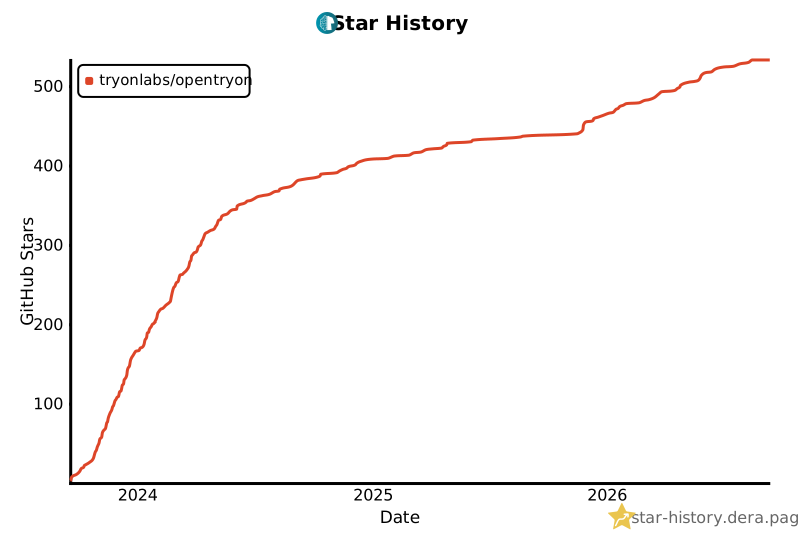
Star History
Made with ❤️ by TryOn Labs · Discord
1 maintainer

Metadata
1 maintainer
Release files for opentryon 0.0.8
For a detailed explanation of source distributions (sdists) and built distributions (wheels), please see the package formats documentation.
Source distribution (sdist)
| File | Size | Uploaded | Provenance | |
|---|---|---|---|---|
| opentryon-0.0.8.tar.gz | 398.2 kB | Without provenance | Details |
Built distribution (wheel)
| File | Interpreter | ABI | Platform | Reset |
|---|---|---|---|---|
| opentryon-0.0.8-py3-none-any.whl | Python 3 | none | any | Details |
Total release size: 905.0 kB
Release files / opentryon-0.0.8.tar.gz
| Download URL | opentryon-0.0.8.tar.gz |
|---|---|
| Size | 398.2 kB |
| Tags | Source |
|
SHA-256 checksum How to use checksums |
d2a39a5cbf2081cc24df367f71c87a9dafaa10ea96c6d51586368630a7c61412
|
|
BLAKE2b-256 checksum How to use checksums |
2da16ed9f471bdf298f681475fc471c620a7f70f0cbdcda6c17e359c8cd5cb82
|
| Upload date | |
|
Uploaded using Trusted Publishing? What is trusted publishing? |
No |
| Uploaded via |
twine/6.2.0 CPython/3.11.13
|
Release files / opentryon-0.0.8-py3-none-any.whl
| Download URL | opentryon-0.0.8-py3-none-any.whl |
|---|---|
| Size | 506.8 kB |
| Tags | Python 3 |
|
SHA-256 checksum How to use checksums |
710fa972de8d62fe799a79dcba617236b9f67d22553574a5255534a338aa85dc
|
|
BLAKE2b-256 checksum How to use checksums |
31c672cb0b9b1566411ff04075fb204c1407e0c75fd7e0de0091cf49939d2f4d
|
| Upload date | |
|
Uploaded using Trusted Publishing? What is trusted publishing? |
No |
| Uploaded via |
twine/6.2.0 CPython/3.11.13
|
Security for opentryon 0.0.8
Provenance
Provenance describes where a file came from. On PyPI, provenance is shared via attestations, which provide a verifiable record of the build or publishing details. View details, limitations and caveats.
No provenance found
None of the files in this release were uploaded with provenance metadata.
A note on package security
PyPI is a repository for distributing packages, not a service for auditing them. While third-party security researchers and our staff do their best to detect and remove malicious packages, PyPI cannot guarantee the quality, security or suitability of any given package.
To learn more about protecting yourself from malicious actors, visit our package security documentation.














