










What is OpenViking
OpenViking is an open-source context database for AI agents — one filesystem for everything an agent knows: knowledge, memory, and skills.
Most agent memory is a black box: text goes in, embeddings come out, and nobody can see what was actually stored. OpenViking organizes context as a virtual filesystem under viking:// instead. Agents navigate it like files — ls, tree, read, write, grep — and you can open any directory to inspect and edit what your agent knows. Every directory carries a generated summary, so agents can scan summaries first and decide what to read.

Try OpenViking Studio in your browser, no installation required. Self-host Web Studio.
Why OpenViking
- One filesystem for knowledge, memory, and skills. Resources hold documents and code; memories retain user preferences and experience; skills define how to perform tasks — not just extracted facts, but the full context, each with a
viking://URI for browsing and retrieval. → Viking URI · Context types - Search a directory, not the whole index. Scope semantic search to a project or memory subtree instead of scanning a flat vector pool.
findruns a query directly;searchplans retrieval from session context. → Retrieval - Read the summary before the source. Generated directory abstracts (L0) and overviews (L1) let agents judge relevance before opening full content (L2). → Context layers
- Sessions become files you can read. Committing a session archives the conversation and extracts memories as Markdown you can inspect, edit, and merge. With VikingBot enabled,
ov compileorganizes source material into a wiki, knowledge graph, or report. → Sessions · Context compilation
Architecture · Design rationale
viking://
├── resources/              # Resources: project docs, repos, web pages, etc.
│   └── my_project/
│       ├── docs/
│       │   ├── api/
│       │   └── tutorials/
│       └── src/
└── user/
    └── {user_id}/
        ├── memories/
        │   └── preferences/
        │       ├── writing_style
        │       └── coding_habits
        ├── resources/
        │   └── private_project/
        ├── skills/
        │   ├── search_code
        │   └── analyze_data
        └── peers/
            └── web-visitor-alice/
The three loading tiers:
- L0 (Abstract): a one-sentence summary for quick relevance checks.
- L1 (Overview): core information and usage scenarios for planning.
- L2 (Details): the full original data, read only when needed.
Semantically processed directories carry L0/L1 summaries, so agents can judge relevance before reading full files:
viking://resources/my_project/
├── .abstract.md           # L0: quick relevance check
├── .overview.md           # L1: structure and key points
└── docs/
    ├── .abstract.md
    ├── .overview.md
    └── api/
        ├── auth.md         # L2: full content, loaded on demand
        └── endpoints.md
Proof it works
OpenViking 0.3.22 has been evaluated on long-conversation user memory (LoCoMo) and multi-turn agent tasks (tau2-bench). Full results and setup details, including knowledge-base QA, are in the benchmark report; reproduction scripts live in ./benchmark.
The memory evaluation used Doubao 2.0 Pro as the VLM and Doubao-embedding-vision-251215 as the embedding model.
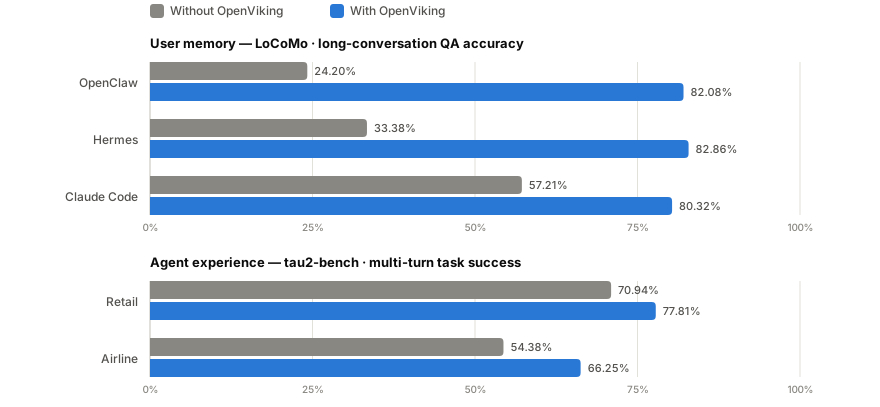
- User memory (LoCoMo): with OpenViking, all three agent integrations land at 80–83% accuracy — up from 24–57% on their native memory — while input tokens drop by 34.3–91.0% and query latency by 58.45–66.10%.
- Agent experience (tau2-bench): experience memory lifts task success by +6.87pp (retail) and +11.87pp (airline) over the same LLM without memory.
Quick start
Set up an OpenViking server first; if you already have one, skip to Use it with your agent. Deploying your own needs uv, Python 3.10+ and a model provider with an embedding model and a VLM.
Let your agent deploy it
Follow this guide to install and start an OpenViking Server for me:

https://docs.openviking.ai/en/getting-started/04-setup-for-agent

Ask me for the model provider, the models, the workspace directory and whether
other machines need to reach the server; don't guess. When you ask for the model
API key, tell me how to hand it over if I'd rather not paste it into this chat,
and never repeat it back.

When it's running, tell me the server's address and whether auth is turned on.
Your agent will first ask which model provider to use and for its API key.
Deploy it yourself
Install OpenViking and run the setup wizard, which configures the models:
uv tool install openviking --upgrade && openviking-server init
init writes ~/.openviking/ov.conf and supports Volcengine, OpenAI, Codex OAuth, Kimi, GLM and local Ollama; see the configuration guide. The server runs in the foreground, so keep this terminal open.
Use OpenViking Service (hosted by Volcengine)
The same OpenViking service, run for you by Volcengine. The first 50 files are free. Activate it on the Volcengine product page, then create an API key in the console under User Management → API Key. The server address is https://api.vikingdb.cn-beijing.volces.com/openviking; you'll need it and the API key when you connect your agent.
Explore with the CLI
The openviking package includes the ov CLI. With the server running, import a repository and search it:
ov status
ov add-resource https://github.com/volcengine/OpenViking
# Replace TASK_ID with the returned task_id; repeat until status is completed
ov task status TASK_ID
ov ls viking://resources/
ov tree viking://resources/volcengine -L 2
ov find "what is openviking"
ov grep "openviking" --uri viking://resources/volcengine/OpenViking/docs/en
ov find returns matching context with URIs you can inspect. For client configuration (ov config), standalone CLI installs, and index maintenance, see CLI setup.
Build your own integration with the Python, Go, or TypeScript SDK, or the HTTP API.
Use it with your agent
Connect your coding agent to OpenViking for cross-session memory. The memory plugin installer covers Claude Code, Codex, Cursor, TRAE, OpenCode and more, and detects which ones you have.
Let your agent install it
Install the OpenViking memory plugin for me by running:

curl -fsSL https://openviking.ai/install | bash -s -- --yes --url <SERVER_URL>

<SERVER_URL> is the address of my OpenViking server; ask me for it, don't guess.
If the server has auth turned on, it needs a user key (a root key can't read or
write memories): check whether one is already saved; if not, ask me for it and
pass it with --api-key, and tell me how to hand it over if I'd rather not paste
it into this chat. Never repeat the key back. If auth is off, add --api-key ''
so an earlier saved key isn't reused.

The script needs network access and writes to my home directory; if a sandbox
blocks it, ask me to approve running it outside the sandbox.

When it finishes, tell me which tools it installed into and the next steps for
each, then ask whether I want it in any other tool.
Have your server's address ready, plus its API key if it has auth turned on.
Install it yourself
Run the installer, then pick the tools and a server when asked: Self-hosted / local for a server on this machine, Volcengine OpenViking Cloud for OpenViking Service, or Custom URL for any other address. If auth is on, enter a user key, not the root key.
curl -fsSL https://openviking.ai/install | bash
# AI agents: not sure about running this? The script's header says what it does and how to verify it.
Then restart your agent. The installer ends with the next steps for each tool, for example:
  Claude Code
    Next: restart Claude Code
    ⋮
    Verify: run /openviking-memory:ov in a session
On its first start Codex stops at Hooks need review; choose Trust all and continue.
Try it: ask it to remember one of your preferences, then ask about it in a new session a little later. Memories are processed in the background, so it's normal not to find one right after you say it.
The installer needs macOS or Linux, Node.js 18+ and curl, no sudo. On Windows, use the desktop app.
Setup guides for each integration:
 Claude Hooks + MCP |
 Codex Hooks + MCP |
 Cursor Hooks + MCP |
 TRAE Hooks + MCP |
 OpenClaw Context engine |
 Hermes Built-in |
 OpenCode Plugin + MCP |
 pi Native extension |
 DeerFlow Plugin + MCP |
 DSH Plugin + MCP |
 Doubao Work Connector |
 LangChain Tools + store |
General integrations
 Agent Plugins 1.0 |
 MCP clients |
For setup instructions and integration details, see Integrations.
Desktop App (Beta)
The desktop app is a console for macOS and Windows x64 (beta). It configures supported local agent integrations, inspects recall and capture events in sessions, and syncs local memories and skills to OpenViking.
Download:
VikingBot
VikingBot is an AI agent framework built on top of OpenViking:
pip install "openviking[bot]"
openviking-server --with-bot
ov chat   # in another terminal
The official Docker image bundles VikingBot and starts it by default alongside the server and console UI. Details: VikingBot guide.
Deploy in production
Run the open-source server in your own environment under AGPLv3. It requires no activation key. Start with server setup or the Docker and deployment guide.
The server supports accounts and user isolation and opt-in resource ACLs. Configure authentication before exposing it beyond localhost.
Commercial editions

☁️ Managed SaaSVolcano Engine hosts and operates OpenViking. Personal and Enterprise plans cover individual and team use, with migration tooling for open-source deployments. See the service documentation for plans and limits. Hosting outside China is planned on BytePlus. |
🏢 Self-ManagedDeploy in your own cloud account / VPC (BYOC) or an offline environment. This edition adds distributed deployment and official support, activated by a license key. Contact the team. |
Research
Memory that evolves with your agent. VikingMem develops an event-driven approach to extracting, updating, and consolidating long-term memory, giving stateful agents a way to retain useful experience as interactions accumulate. OpenViking open-sources a subset of these core capabilities.
VikingMem: A Memory Base Management System for Stateful LLM-based Applications
Jiajie Fu, Junwen Chen, Mengzhao Wang, Aoxiang He, Maojia Sheng, Xiangyu Ke, Yifan Zhu, and Yunjun Gao.
arXiv:2605.29640, 2026. Presented at VLDB 2026 in September.
📄 Read the paper on arXiv · Read PDF
Directory structure as retrieval context. This paper provides the formal foundations, index design, and experimental evidence behind OpenViking’s directory-aware retrieval. It defines directory-scoped query and maintenance operations and introduces TrieHI, which OpenViking integrates to resolve directory scopes before vector ranking. This connects the filesystem paradigm to retrieval: agents can search a project or memory subtree, retain its surrounding context, and reorganize it as knowledge evolves.
Directory-Aware Query and Maintenance in Vector Databases
Mengzhao Wang, Zheng Gong, Jingpei Hu, Jiajie Fu, Maojia Sheng, Junwen Chen, and Yifan Zhu.
arXiv:2606.16903, 2026. Accepted by ICDE.
📄 Read the paper on arXiv · Read PDF
Retrieve the evidence you need with fewer tokens. VikingRAG combines semantic search with document structure, exposing relevant directory segments as evidence gaps arise. Its core mechanisms are integrated into OpenViking. The paper further explores reusing retrieval traces and escalating to multi-round retrieval only when needed, reducing repeated exploration while preserving answer quality.
VikingRAG: Accurate and Token-efficient Retrieval-augmented Generation over Structured Documents
Peiyuan Gao, Gaoyuan Zhang, Haojie Qin, Yahui Sun, Qianyi Zhang, Yunhao Zhang, Zeyu Wang, and Wei Lu.
arXiv:2609.11390, 2026. Submitted.
📄 Read the paper on arXiv · Read PDF
Partner Projects
- deer-flow - Open-source long-horizon SuperAgent harness
- NoKV - AI native distributed file system
- loopx - Lightweight loop engineering state kernel
- Hermes Agent - The agent that grows with you
To propose a partnership, open an issue.
Community & Contributing
- Docs: docs.openviking.ai · FAQ
- Blog: blog.openviking.ai
- Team: About us
- Chat:
Lark ·
WeChat ·
Discord ·
- Contribute: bug fixes and new features are both welcome — see CONTRIBUTING.md
Security and privacy
For vulnerability reporting and supported versions, see SECURITY.md
License
The OpenViking project uses different licenses for different components:
- Main Project: AGPLv3 - see the LICENSE file for details
- crates/ov_cli: Apache 2.0 - see the LICENSE for details
- examples: Apache 2.0 - see the LICENSE for details. The Hermes plugin in
examples/hermes-pluginretains its MIT license. - third_party: Respective original licenses of third-party projects
4 maintainers


Metadata
4 maintainers
Release files for openviking 0.5.0
For a detailed explanation of source distributions (sdists) and built distributions (wheels), please see the package formats documentation.
Source distribution (sdist)
| File | Size | Uploaded | |
|---|---|---|---|
| openviking-0.5.0.tar.gz | 63.3 MB | Details |
Built distributions (wheels)
| File | Reset | |||
|---|---|---|---|---|
| openviking-0.5.0-cp310-abi3-win_amd64.whl | CPython 3.10 | abi3 | Windows x86-64 | Details |
| openviking-0.5.0-cp310-abi3-manylinux_2_31_x86_64.whl | CPython 3.10 | abi3 | Linux glibc 2.31+ x86-64 | Details |
| openviking-0.5.0-cp310-abi3-manylinux_2_31_aarch64.whl | CPython 3.10 | abi3 | Linux glibc 2.31+ ARM64 | Details |
| openviking-0.5.0-cp310-abi3-macosx_15_0_x86_64.whl | CPython 3.10 | abi3 | macOS 15.0+ x86-64 | Details |
| openviking-0.5.0-cp310-abi3-macosx_14_0_arm64.whl | CPython 3.10 | abi3 | macOS 14.0+ ARM64 | Details |
Total release size: 195.2 MB
Release files / openviking-0.5.0.tar.gz
| Download URL | openviking-0.5.0.tar.gz |
|---|---|
| Size | 63.3 MB |
| Tags | Source |
|
SHA-256 checksum How to use checksums |
e9453218573236b88e7ed4d3273c3a5439c4f7d30b60fca6ba5e756579f8778a
|
|
BLAKE2b-256 checksum How to use checksums |
b836674a3d3d446f3c50a1758c01917696e039d0e36ca2918e2728d2ee5ac799
|
| Upload date | |
|
Uploaded using Trusted Publishing? What is trusted publishing? |
Yes |
| Uploaded via |
twine/7.0.0 CPython/3.13.14
|
Provenance
Provenance describes where a file came from. On PyPI, provenance is shared via attestations, which provide a verifiable record of the build or publishing details. View details, limitations and caveats.


PyPI Publish Attestation
PyPI verified that this artifact, at this checksum, originated from the publisher listed below.
Signed by GitHub Actions, verified by PyPI on Oct 9, 2026.
Transparency logRelease files / openviking-0.5.0-cp310-abi3-win_amd64.whl
| Download URL | openviking-0.5.0-cp310-abi3-win_amd64.whl |
|---|---|
| Size | 29.2 MB |
| Tags | CPython 3.10 Windows x86-64 abi3 |
|
SHA-256 checksum How to use checksums |
44ab46c11be981227be31284df1112cfc92bc185fa34b029f86fc0f7647a003f
|
|
BLAKE2b-256 checksum How to use checksums |
91e9738b9b33e88263adab7515cc50a1f95e4a777f07e06b011e9023a1ad626d
|
| Upload date | |
|
Uploaded using Trusted Publishing? What is trusted publishing? |
Yes |
| Uploaded via |
twine/7.0.0 CPython/3.13.14
|
Provenance
Provenance describes where a file came from. On PyPI, provenance is shared via attestations, which provide a verifiable record of the build or publishing details. View details, limitations and caveats.
PyPI Publish Attestation
PyPI verified that this artifact, at this checksum, originated from the publisher listed below.
Signed by GitHub Actions, verified by PyPI on Oct 9, 2026.
Transparency logRelease files / openviking-0.5.0-cp310-abi3-manylinux_2_31_x86_64.whl
| Download URL | openviking-0.5.0-cp310-abi3-manylinux_2_31_x86_64.whl |
|---|---|
| Size | 28.6 MB |
| Tags | CPython 3.10 Linux glibc 2.31+ x86-64 abi3 |
|
SHA-256 checksum How to use checksums |
2831f66c9c1aa3095f24d135c81d08ec943ad245caf93504722d7aa2d9e27f19
|
|
BLAKE2b-256 checksum How to use checksums |
89bae1449bed9a843d1b0b5544a6479acd7c9fdf3f25a071749c1d9a7c1244c1
|
| Upload date | |
|
Uploaded using Trusted Publishing? What is trusted publishing? |
Yes |
| Uploaded via |
twine/7.0.0 CPython/3.13.14
|
Provenance
Provenance describes where a file came from. On PyPI, provenance is shared via attestations, which provide a verifiable record of the build or publishing details. View details, limitations and caveats.
PyPI Publish Attestation
PyPI verified that this artifact, at this checksum, originated from the publisher listed below.
Signed by GitHub Actions, verified by PyPI on Oct 9, 2026.
Transparency logRelease files / openviking-0.5.0-cp310-abi3-manylinux_2_31_aarch64.whl
| Download URL | openviking-0.5.0-cp310-abi3-manylinux_2_31_aarch64.whl |
|---|---|
| Size | 26.1 MB |
| Tags | CPython 3.10 Linux glibc 2.31+ ARM64 abi3 |
|
SHA-256 checksum How to use checksums |
04e5bcd764ecdeaacaf8a0fd621fc17bba596d17e36862464692db03809f45d1
|
|
BLAKE2b-256 checksum How to use checksums |
eceaffda6bb2e697bb2807ac3fdb7863d1e8865eb19938b004b7dfdb887e46ad
|
| Upload date | |
|
Uploaded using Trusted Publishing? What is trusted publishing? |
Yes |
| Uploaded via |
twine/7.0.0 CPython/3.13.14
|
Provenance
Provenance describes where a file came from. On PyPI, provenance is shared via attestations, which provide a verifiable record of the build or publishing details. View details, limitations and caveats.
PyPI Publish Attestation
PyPI verified that this artifact, at this checksum, originated from the publisher listed below.
Signed by GitHub Actions, verified by PyPI on Oct 9, 2026.
Transparency logRelease files / openviking-0.5.0-cp310-abi3-macosx_15_0_x86_64.whl
| Download URL | openviking-0.5.0-cp310-abi3-macosx_15_0_x86_64.whl |
|---|---|
| Size | 25.4 MB |
| Tags | CPython 3.10 abi3 macOS 15.0+ x86-64 |
|
SHA-256 checksum How to use checksums |
1e27eaeeee66c47337ab29002cea97a6dbcf24af6f371cda69c84e170f69542d
|
|
BLAKE2b-256 checksum How to use checksums |
e6c8dbd77d8029319aab44a83c719fbab5e71071b056a8ff95e2d237e2e0a5f9
|
| Upload date | |
|
Uploaded using Trusted Publishing? What is trusted publishing? |
Yes |
| Uploaded via |
twine/7.0.0 CPython/3.13.14
|
Provenance
Provenance describes where a file came from. On PyPI, provenance is shared via attestations, which provide a verifiable record of the build or publishing details. View details, limitations and caveats.
PyPI Publish Attestation
PyPI verified that this artifact, at this checksum, originated from the publisher listed below.
Signed by GitHub Actions, verified by PyPI on Oct 9, 2026.
Transparency logRelease files / openviking-0.5.0-cp310-abi3-macosx_14_0_arm64.whl
| Download URL | openviking-0.5.0-cp310-abi3-macosx_14_0_arm64.whl |
|---|---|
| Size | 22.7 MB |
| Tags | CPython 3.10 abi3 macOS 14.0+ ARM64 |
|
SHA-256 checksum How to use checksums |
36786cb110ed3ccac3817ebfedc18a2f3868fed39c1d1306dbbfddd2b9d47909
|
|
BLAKE2b-256 checksum How to use checksums |
5cd1d8ab21468ea69925997f6822a483ce609436be2b84ca85e54d0f9ca7a243
|
| Upload date | |
|
Uploaded using Trusted Publishing? What is trusted publishing? |
Yes |
| Uploaded via |
twine/7.0.0 CPython/3.13.14
|
Provenance
Provenance describes where a file came from. On PyPI, provenance is shared via attestations, which provide a verifiable record of the build or publishing details. View details, limitations and caveats.
PyPI Publish Attestation
PyPI verified that this artifact, at this checksum, originated from the publisher listed below.
Signed by GitHub Actions, verified by PyPI on Oct 9, 2026.
Transparency log













