
This script converts the OpenVINO IR model to Tensorflow's saved_model, tflite, h5 and pb. in (NCHW) format

Project description
openvino2tensorflow
This script converts the OpenVINO IR model to Tensorflow's saved_model, tflite, h5 and pb.
Work in progress now.
I'm continuing to add more layers of support and bug fixes on a daily basis. If you have a model that you are having trouble converting, please share the .bin and .xml with the issue. I will try to convert as much as possible.



1. Environment
- TensorFlow v2.3.1
- OpenVINO 2021.1.110
- Python 3.6+
2. Use case
- PyTorch (NCHW) -> ONNX (NCHW) -> OpenVINO (NCHW) ->
- ->
openvino2tensorflow-> Tensorflow/Keras (NHWC) -> TFLite (NHWC) - ->
openvino2tensorflow-> Tensorflow/Keras (NHWC) -> TFJS (NHWC) - ->
openvino2tensorflow-> Tensorflow/Keras (NHWC) -> TF-TRT (NHWC) - ->
openvino2tensorflow-> Tensorflow/Keras (NHWC) -> EdgeTPU (NHWC) - ->
openvino2tensorflow-> Tensorflow/Keras (NHWC) -> CoreML (NHWC)
- ->
3. Supported Layers
- Currently, only 4D tensors are supported as input tensors.
- Currently, there are problems with the Reshape operation of 5D Tensor.
| No. | OpenVINO Layer | TF Layer | Remarks |
|---|---|---|---|
| 1 | Parameter | Input | Input (4D tensor only) |
| 2 | Const | Constant, Bias | |
| 3 | Convolution | Conv2D | |
| 4 | Add | Add | |
| 5 | ReLU | ReLU | |
| 6 | PReLU | PReLU | |
| 7 | MaxPool | MaxPool2D | |
| 8 | AvgPool | AveragePooling2D | |
| 9 | GroupConvolution | DepthwiseConv2D, Conv2D/Split/Concat | |
| 10 | ConvolutionBackpropData | Conv2DTranspose | |
| 11 | Concat | Concat | |
| 12 | Multiply | Multiply | |
| 13 | Tan | Tan | |
| 14 | Tanh | Tanh | |
| 15 | Elu | Elu | |
| 16 | Sigmoid | Sigmoid | |
| 17 | HardSigmoid | hard_sigmoid | |
| 18 | SoftPlus | SoftPlus | |
| 19 | Swish | Swish | You can replace swish and hard-swish with each other by using the "--replace_swish_and_hardswish" option |
| 20 | Interpolate | ResizeNearestNeighbor, ResizeBilinear | |
| 21 | ShapeOf | Shape | |
| 22 | Convert | Cast | |
| 23 | StridedSlice | Strided_Slice | WIP |
| 24 | Pad | Pad, MirrorPad | |
| 25 | Clamp | ReLU6, Clip | |
| 26 | TopK | ArgMax, top_k | |
| 27 | Transpose | Transpose | |
| 28 | Squeeze | Squeeze | |
| 29 | Unsqueeze | Identity, expand_dims | WIP |
| 30 | ReduceMean | reduce_mean | |
| 31 | ReduceMax | reduce_max | |
| 32 | ReduceMin | reduce_min | |
| 33 | ReduceSum | reduce_sum | |
| 34 | ReduceProd | reduce_prod | |
| 35 | Subtract | Subtract | |
| 36 | MatMul | MatMul | |
| 37 | Reshape | Reshape | |
| 38 | Range | Range | WIP |
| 39 | Exp | Exp | |
| 40 | Abs | Abs | |
| 41 | SoftMax | SoftMax | |
| 42 | Negative | Negative | |
| 43 | Maximum | Maximum | No broadcast |
| 44 | Minimum | Minimum | No broadcast |
| 45 | Acos | Acos | |
| 46 | Acosh | Acosh | |
| 47 | Asin | Asin | |
| 48 | Asinh | Asinh | |
| 49 | Atan | Atan | |
| 50 | Atanh | Atanh | |
| 51 | Ceiling | Ceil | |
| 52 | Cos | Cos | |
| 53 | Cosh | Cosh | |
| 54 | Sin | Sin | |
| 55 | Sinh | Sinh | |
| 56 | Gather | Gather | |
| 57 | Divide | Divide, FloorDiv | |
| 58 | Erf | Erf | |
| 59 | Floor | Floor | |
| 60 | FloorMod | FloorMod | |
| 61 | HSwish | HardSwish | x*ReLU6(x+3)*0.16666667, You can replace swish and hard-swish with each other by using the "--replace_swish_and_hardswish" option |
| 62 | Log | Log | |
| 63 | Power | Pow | No broadcast |
| 64 | Mish | Mish | x*Tanh(softplus(x)) |
| 65 | Selu | Selu | |
| 66 | Equal | equal | |
| 67 | NotEqual | not_equal | |
| 68 | Greater | greater | |
| 69 | GreaterEqual | greater_equal | |
| 70 | Less | less | |
| 71 | LessEqual | less_equal | |
| 72 | Select | Select | No broadcast |
| 73 | LogicalAnd | logical_and | |
| 74 | LogicalNot | logical_not | |
| 75 | LogicalOr | logical_or | |
| 76 | LogicalXor | logical_xor | |
| 77 | Broadcast | broadcast_to, ones, Multiply | numpy / bidirectional mode, WIP |
| 78 | Split | Split | |
| 79 | VariadicSplit | Split | |
| 80 | Result | Identity | Output |
4. Setup
To install using the Python Package Index (PyPI), use the following command.
pip install openvino2tensorflow --upgrade
To install with the latest source code of the main branch, use the following command.
pip install git+https://github.com/PINTO0309/openvino2tensorflow --upgrade
5. Usage
usage: openvino2tensorflow [-h] --model_path MODEL_PATH
                           [--model_output_path MODEL_OUTPUT_PATH]
                           [--output_saved_model OUTPUT_SAVED_MODEL]
                           [--output_h5 OUTPUT_H5]
                           [--output_weight_and_json OUTPUT_WEIGHT_AND_JSON]
                           [--output_pb OUTPUT_PB]
                           [--output_no_quant_float32_tflite OUTPUT_NO_QUANT_FLOAT32_TFLITE]
                           [--output_weight_quant_tflite OUTPUT_WEIGHT_QUANT_TFLITE]
                           [--output_float16_quant_tflite OUTPUT_FLOAT16_QUANT_TFLITE]
                           [--replace_swish_and_hardswish REPLACE_SWISH_AND_HARDSWISH]
                           [--debug]
                           [--debug_layer_number DEBUG_LAYER_NUMBER]

optional arguments:
  -h, --help            show this help message and exit
  --model_path MODEL_PATH
                        input IR model path (.xml)
  --model_output_path MODEL_OUTPUT_PATH
                        The output folder path of the converted model file
  --output_saved_model OUTPUT_SAVED_MODEL
                        saved_model output switch
  --output_h5 OUTPUT_H5
                        .h5 output switch
  --output_weight_and_json OUTPUT_WEIGHT_AND_JSON
                        weight of h5 and json output switch
  --output_pb OUTPUT_PB
                        .pb output switch
  --output_no_quant_float32_tflite OUTPUT_NO_QUANT_FLOAT32_TFLITE
                        float32 tflite output switch
  --output_weight_quant_tflite OUTPUT_WEIGHT_QUANT_TFLITE
                        weight quant tflite output switch
  --output_float16_quant_tflite OUTPUT_FLOAT16_QUANT_TFLITE
                        float16 quant tflite output switch
  --replace_swish_and_hardswish REPLACE_SWISH_AND_HARDSWISH
                        Replace swish and hard-swish with each other.
  --debug               debug mode switch
  --debug_layer_number DEBUG_LAYER_NUMBER
                        The last layer number to output when debugging. Used
                        only when --debug=True.
usage: pb_to_saved_model [-h] --pb_file_path PB_FILE_PATH
                         --inputs INPUTS
                         --outputs OUTPUTS
                         [--model_output_path MODEL_OUTPUT_PATH]

optional arguments:
  -h, --help            show this help message and exit
  --pb_file_path PB_FILE_PATH
                        Input .pb file path (.pb)
  --inputs INPUTS       (e.g.1) input:0,input:1,input:2 / (e.g.2)
                        images:0,input:0,param:0
  --outputs OUTPUTS     (e.g.1) output:0,output:1,output:2 / (e.g.2)
                        Identity:0,Identity:1,output:0
  --model_output_path MODEL_OUTPUT_PATH
                        The output folder path of the converted model file
6. Execution sample
6-1. Conversion of OpenVINO IR to Tensorflow models
OutOfMemory may occur when converting to saved_model or h5 when the file size of the original model is large, please try the conversion to a pb file alone.
$ openvino2tensorflow \
  --model_path=openvino/448x448/FP32/Resnet34_3inputs_448x448_20200609.xml \
  --output_saved_model True \
  --output_pb True \
  --output_weight_quant_tflite True \
  --output_float16_quant_tflite True \
  --output_no_quant_float32_tflite True
6-2. Convert Protocol Buffer (.pb) to saved_model
This tool is useful if you want to check the internal structure of pb files, tflite files, .h5 files, coreml files and IR (.xml) files. https://lutzroeder.github.io/netron/
$ pb_to_saved_model \
  --pb_file_path model_float32.pb \
  --inputs inputs:0 \
  --outputs Identity:0
6-3. Converts saved_model to OpenVINO IR
$ python3 ${INTEL_OPENVINO_DIR}/deployment_tools/model_optimizer/mo_tf.py \
  --saved_model_dir saved_model \
  --output_dir openvino/reverse
6-4. Checking the structure of saved_model
$ saved_model_cli show \
  --dir saved_model \
  --tag_set serve \
  --signature_def serving_default
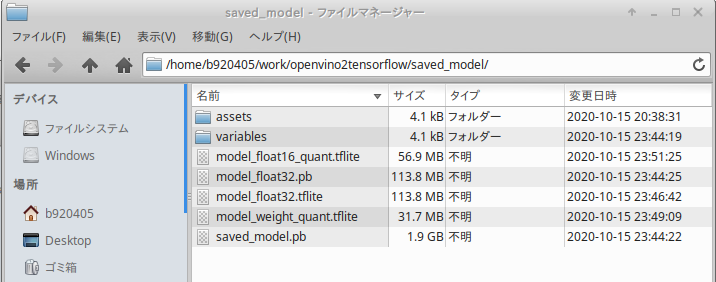
7. Output sample
8. Model Structure
https://digital-standard.com/threedpose/models/Resnet34_3inputs_448x448_20200609.onnx
| ONNX | OpenVINO | TFLite |
|---|---|---|
 |
 |
 |
9. My article
Release history Release notifications | RSS feed


Download files
Download the file for your platform. If you're not sure which to choose, learn more about installing packages.
Source Distribution
Built Distribution
Filter files by name, interpreter, ABI, and platform.
If you're not sure about the file name format, learn more about wheel file names.
Copy a direct link to the current filters
File details
Details for the file openvino2tensorflow-0.2.10.tar.gz.
File metadata
- Download URL: openvino2tensorflow-0.2.10.tar.gz
- Upload date:
- Size: 18.3 kB
- Tags: Source
- Uploaded using Trusted Publishing? No
- Uploaded via: twine/3.2.0 pkginfo/1.6.0 requests/2.22.0 setuptools/47.1.1 requests-toolbelt/0.9.1 tqdm/4.40.2 CPython/3.6.9
File hashes
| Algorithm | Hash digest | |
|---|---|---|
| SHA256 |
a9e78a655e0d1f5ded3801af217a22bd8f8790e1f7e8ebd0ccd26449bbe48ec8
|
|
| MD5 |
3d5eca9e6881e6c79d5023090ce909a3
|
|
| BLAKE2b-256 |
28d6d8e850674f1a8f1c81d1c6aa88bc6fbb963d7eea99b2d75a5947b4302647
|
File details
Details for the file openvino2tensorflow-0.2.10-py3-none-any.whl.
File metadata
- Download URL: openvino2tensorflow-0.2.10-py3-none-any.whl
- Upload date:
- Size: 16.8 kB
- Tags: Python 3
- Uploaded using Trusted Publishing? No
- Uploaded via: twine/3.2.0 pkginfo/1.6.0 requests/2.22.0 setuptools/47.1.1 requests-toolbelt/0.9.1 tqdm/4.40.2 CPython/3.6.9
File hashes
| Algorithm | Hash digest | |
|---|---|---|
| SHA256 |
a1344855b9f51ee1101e59b9919576923b8044ed8fbe31dbfb021a15aeb6a10e
|
|
| MD5 |
1a3a96daedd01d1f45a58c8e65d6f58d
|
|
| BLAKE2b-256 |
7060cbb811e1f1b65515a60ae817dbb3c6c7088e92a230ef1ccb4f7f78285ebf
|






