
Ordifile




Batch-convert and consolidate scientific instrument results into one clean, ordered and auditable Excel workbook.
Ordifile's proprietary-format direction is result-first: evidence-backed retention
time and area tables from Agilent, Shimadzu and YoungIn should converge on the same
Peaks / Peak_Matrix workbook model. Raw signals are an optional, independently
validated capability: a result export does not require its raw file to be present.
Each Agilent, Shimadzu, or YoungIn result adapter remains a separate exact-format
reader, but its verified peak rows behave identically after canonical conversion. No
vendor result parser is claimed before an actual result fixture proves its field
boundaries and semantics.
Verified stable formats: CSV, TSV, semicolon-delimited TXT, and audited non-macro XLSX using Ordifile's documented schema. The current development source tree also includes six narrowly bounded Experimental proprietary readers described below; this is not general vendor-format support. Published availability is shown by the PyPI badge.
sample_1.csv   sample_2.tsv   exported_peaks.xlsx
          \          |          /
           ordifile convert ...
                    |
                    v
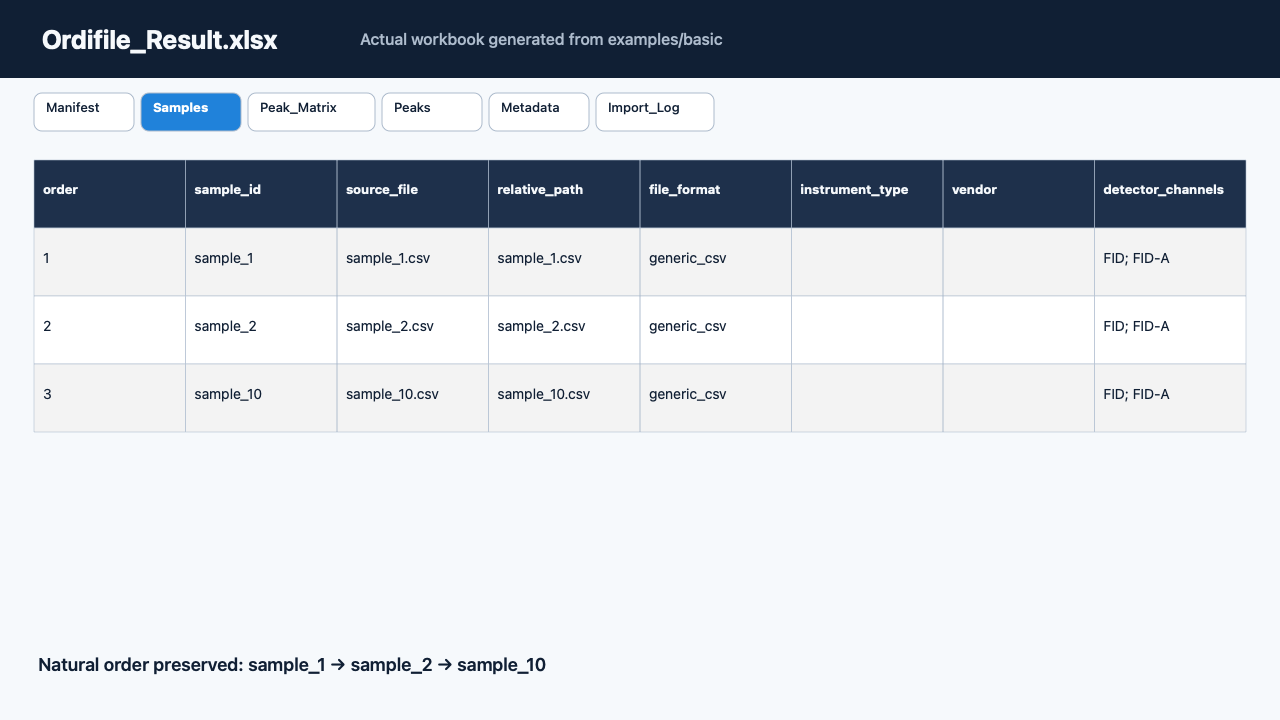
          Ordifile_Result.xlsx
          ├── Manifest
          ├── Samples
          ├── Peak_Matrix
          ├── Peaks
          ├── Metadata
          └── Import_Log
Install
Install the latest published Ordifile release from PyPI. The PyPI badge above shows the currently available version.
python -m pip install --no-cache-dir ordifile
Quick start
python -c "from pathlib import Path; p=Path('ordifile_demo'); p.mkdir(exist_ok=True); [(p / f'sample_{n}.csv').write_text(f'sample_id,retention_time,area,compound\nsample_{n},{n / 10:.1f},{n * 10},demo\n', encoding='utf-8') for n in (1, 2, 10)]"
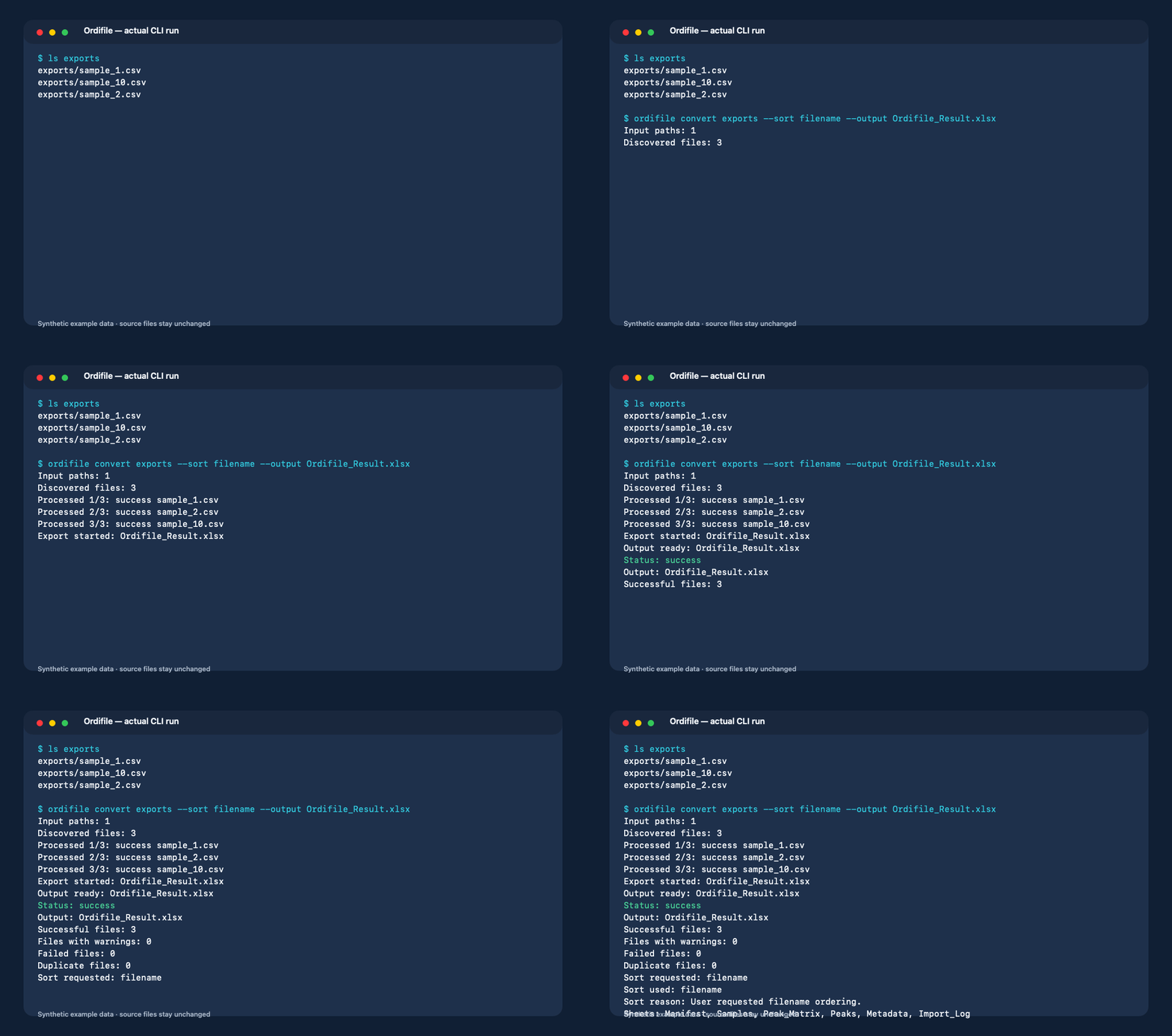
ordifile convert ordifile_demo --sort filename --output Ordifile_Result.xlsx
This package-independent synthetic example produces:
Input paths: 1
Discovered files: 3
Processed 1/3: success sample_1.csv
Processed 2/3: success sample_2.csv
Processed 3/3: success sample_10.csv
Export started: Ordifile_Result.xlsx
Output ready: Ordifile_Result.xlsx
Status: success
Output: Ordifile_Result.xlsx
Successful files: 3
Files with warnings: 0
Failed files: 0
Duplicate files: 0
Sort requested: filename
Sort used: filename
Sort reason: User requested filename ordering.
Sheets: Manifest, Samples, Peak_Matrix, Peaks, Metadata, Import_Log
The source files remain unchanged. Natural filename ordering keeps sample_2 before
sample_10.
Verified formats
| Built-in format | Metadata | Peaks | Signals | Status | Synthetic fixture |
|---|---|---|---|---|---|
| Generic comma-delimited CSV | Yes | Explicit columns | Explicit time + signal rows |
Verified | Yes |
| Generic tab-delimited TSV | Yes | Explicit columns | Explicit time + signal rows |
Verified | Yes |
| Generic semicolon-delimited TXT | Yes | Explicit columns | Explicit time + signal rows |
Verified | Yes |
| Generic non-macro XLSX table | Yes | Explicit columns | Explicit time + signal rows |
Verified | Yes |
“Generic” means the first row uses the documented column
schema. It does not mean arbitrary vendor exports.
An extension is supporting evidence only; Ordifile also checks content and schema.
Run ordifile formats to see the adapters installed in the current environment.
Experimental proprietary adapters
| Format boundary | Metadata | Peaks | Output | Status | Real fixture |
|---|---|---|---|---|---|
Agilent ChemStation .CH internal version 181, exact GC-FID profile |
Field-specific | No | All structural decoded records | Experimental | One external BSEE file |
Agilent ChemStation Result XML, exact C.01.10 [201] single FID1/A Percent/Area profile |
Scientific allowlist | ResultsGroup peaks | RT (min) + area (pA*s) + height (pA); no raw signal | Experimental | One external CeCILL-2.1 fixture |
Shimadzu LabSolutions 5.82 .GCD, GC-2014 / single SFID1 profile |
Field-specific | No | Retention time (min) + signal (uV) | Experimental | One external CC0-declared file + paired same-run ASCII reference |
Shimadzu LabSolutions result ASCII, exact 5.82 GC-2014 / single SFID1 Ch1 profile |
Scientific allowlist | Peak Table rows | RT/start/end (min) + area + height (units unresolved); no raw signal | Experimental | One external controlled-CI fixture + paired same-run GCD |
Shimadzu GCMSsolution .QGD, exact 4.00 TIC profile |
Field-specific | No | Retention time (min) + raw TIC (unit unknown); MS1 not exported | Experimental | One external Dryad CC0 file |
YoungIn YL-Clarity .PRM, exact observed 9.0.1.19 profile |
Structural allowlist | No | Stored-label channels + ordered raw binary32 records; no time axis or unit | Experimental | 23 owner-supplied local-only files |
These Experimental adapters have the exact capability boundaries below. Unsupported profiles are rejected rather than interpreted broadly.
The Agilent .CH adapter retains every
decoded record in source order. Its x values are decoded_record_index, not retention
time; its y values are decoded_raw_integer, not physically scaled intensity. Units,
scientific point count, and the final record's role remain unresolved. It does not
claim other .CH versions, .D directories, TCD, MS, peaks, calibrated values, or
write support. See the exact capability and safety boundary.
The separate Agilent Result XML adapter reads one exact ChemStation
C.01.10 [201], single FID1/A, Percent/Area report profile without requiring a
raw sibling. It maps the canonical ResultsGroup/Peak rows to source-order peaks,
retains explicit min, pA*s and pA units, and checks every RT/area/height decimal string
against its duplicate integration row. Peak boundaries are preserved, calibrated
nonblank Name values map to compound, and source labels FID1/A map separately
to canonical detector/channel FID/FID1A. Other revisions, multiple signals,
detectors, quantitation modes, raw chromatograms and write support are rejected or
unsupported. The external fixture remains controlled-CI only because it includes
privacy-bearing run metadata. See the exact capability and safety boundary.
The Shimadzu adapter is limited to an exact LabSolutions 5.82, GC-2014,
single-channel SFID1, uV, identity-factor profile. Its 66,255-point retention-time
and signal series were compared point by point with a same-run LabSolutions ASCII
reference. It does not claim other LabSolutions or GCsolution versions, detectors,
channels, factors, GCD profiles, peaks, .QGD, .LCD, or write support. See the
exact capability and safety boundary.
The separate Shimadzu result ASCII adapter reads one exact LabSolutions 5.82,
GC-2014, single SFID1 / Ch1 export without requiring a raw sibling. It preserves
all source Peak# values and independent source observation order, maps R.Time,
I.Time, and F.Time to retention/start/end time in minutes, and retains area and
height without inventing physical units. The exact fixture has no compound IDs or
names, so no compound identity is emitted. Its embedded private metadata is omitted
and its public source is a SHA-256 alias. Other software versions, instruments,
detectors, channels, identified-compound tables, multiple peak sections and arbitrary
LabSolutions text exports are unsupported. See the
exact capability and safety boundary.
The separate QGD adapter is limited to one exact GCMSsolution 4.00 compound-file
profile. It preserves all 16,800 TIC integers and the verified millisecond-derived
retention-time axis. The physical TIC unit is unknown. MS1 blocks are checked for
bounded scan structure and exact TIC-sum agreement, but spectra are not exported and
encoded mass values are not called m/z. It does not claim other QGD versions,
SIM/MRM, identifications, quantitation, or write support. See the
exact capability and safety boundary.
The YoungIn adapter is a structural converter for one observed YL-Clarity 9.0.1.19
PRM profile. It preserves 563,240 finite stored binary32 records from 43 current blocks
across 23 local-only files and separates the allowlisted FID/TCD labels stored in those
files, while leaving the canonical detector field unset. Its x coordinate is record
ordinal, not retention time. No physical scaling or unit is applied, and peaks are not
exported. Runtime sample IDs are content-derived, and no filename-derived grouping is
exported. It does not claim other PRM generations, recovery .RAW, Autochro, calibrated
chromatograms, or write support. See the exact capability and safety boundary.
CLI
Inspect one file without writing output:
ordifile inspect sample.csv
ordifile inspect exported.xlsx --sheet PeakTable --verbose
Convert files or folders:
ordifile convert sample_1.csv sample_2.tsv --output Ordifile_Result.xlsx
ordifile convert ./exports --recursive --sort acquired_at --include-signals \
  --output Ordifile_Result.xlsx
ordifile convert ./exports --extension .csv --extension .xlsx \
  --sheet-mode sidecar-csv --output Ordifile_Result.xlsx
Important behavior:
- existing output is not replaced unless
--overwriteis present; - folder discovery is non-recursive unless
--recursiveis present; --on-error continuepreserves valid files and reports partial success;--on-error stopstops after the first file failure and writes no workbook;--adapterforces one installed adapter;--sheetselects one XLSX worksheet;- signals are parsed when present but written only with
--include-signals; --verboseadds detection evidence and detailed structured diagnostics.
Exit codes are stable for automation:
| Code | Meaning |
|---|---|
| 0 | Workbook created; no file failed |
| 1 | Fatal error or no successful input |
| 2 | Usage or configuration error |
| 3 | Valid workbook created with one or more failed files |
| 130 | Interrupted |
Sorting
--sort auto uses acquisition time only when every successful file has a reliable,
timezone-aware timestamp. Otherwise it uses a complete sequence number, then natural
filename order. Explicit modes are acquired_at, sequence, filename, and
input_order. Missing or unreliable values receive a recorded filename fallback.
The effective mode, requested mode, reason, and per-file sort key are written to the workbook.
Workbook layout
| Sheet | Contents |
|---|---|
Manifest |
Version, UTC generation time, counts, options, sorting, limits, warnings, and sidecars |
Samples |
One row per discovered input, status, public source reference (relative path by default or core hash alias), adapter facts, peak count, and SHA-256 |
Peak_Matrix |
One row per sample only for explicit compound names; duplicate peaks remain separate |
Peak_Order_Matrix |
Conditional source-order RT/area pairs with sample, source, manufacturer, detector, channel and units; pairs split atomically before Excel limits |
Peaks |
All explicit peaks in long form, including manufacturer and evidence-backed units/boundaries, without retention-time identity inference |
Metadata |
Unknown fields, invalid raw lexemes, and provenance without invented semantics |
Import_Log |
Every public source reference, success, warning, failure, duplicate, skipped artifact, sort key, and hash |
Signals_<channel> |
Original uninterpolated x/y values, only when requested and actually parsed |
Signals_Records_<channel> |
Experimental structural decoded records, explicitly not a retention-time signal |
Rows and columns are split into deterministic numbered sheets before Excel limits are
reached. Data is never silently truncated. If workbook storage is impractical,
--sheet-mode sidecar-csv can create explicit CSV sidecars; the Manifest records each
relative path, row count, formula-escape count, and SHA-256.
Python API
The CLI calls the same public API intended for future interfaces:
from ordifile.api import convert, inspect_file, list_formats

inspection = inspect_file("sample.csv")
result = convert(
    ["sample_1.csv", "sample_2.tsv"],
    "Ordifile_Result.xlsx",
    sort="auto",
    include_signals=False,
)

print(result.success_count, result.failure_count, result.sort.effective)
convert() also accepts folders, recursion, extension filters, explicit adapters and
XLSX sheets, error policy, overwrite policy, CSV sidecars, and a presentation-neutral
progress callback.
Add an adapter
External packages can register a typed adapter through the
ordifile.adapters Python entry-point group. Adapters detect and parse; they do not
write worksheets or duplicate CLI logic. A new format needs bounded detection, format
evidence, structured errors, a redistributable or synthetic fixture, capability-specific
tests, and license review.
Start with Adding a format adapter. Installed third-party adapters execute Python code and must be treated as trusted software.
Good first contributions include an additional synthetic delimiter fixture, a clearer error-message test, a documentation translation, or a small adapter proposal backed by an openly redistributable fixture.
Under investigation: the Experimental YoungIn raw adapter does not expose a peak
result table. The 23 current PRM fixtures contain no proven RT+area result structure;
a same-run export_results companion is required before a YoungIn result adapter is
implemented. This does not block the separately bounded raw-record converter.
Integrity and security boundaries
- Inputs are opened read-only, SHA-256 is recorded, and content is checked again after parsing.
- Symbolic links are rejected. Duplicate paths and hard links are recorded instead of parsed twice; equal content hashes alone are not deduplicated.
- One ordinary parse failure is isolated from other inputs. Successful data can still
produce a workbook and the failed file remains visible in
Import_Log. - Formula-like strings are written as literal text with formula and URL conversion disabled.
- Values that the verified XLSX writer/reader combination cannot represent exactly are rejected for that file instead of being silently changed.
- Generic source identities in XLSX audit cells use a reversible display encoder:
unsafe code points become
~uXXXXXX;and a literal~is doubled. Privacy-sensitive adapters can instead request a core-ownedsource-<full SHA-256>alias; this also applies to API/CLI/progress and malformed-file issues. Input paths, bytes and hashes remain unchanged. See the source identity policy. - CLI output renders terminal control and bidirectional-format characters as visible, single-line escapes while preserving normal Unicode and Windows paths.
- XLSX packages pass ZIP, relationship, Content-Type, XML namespace, coordinate, dimension, cell-type, and resource audits before openpyxl reads a selected sheet.
- Normal conversion is offline and does not upload instrument data.
Limits
- One input file represents one sample.
- Text input is UTF-8 or UTF-8 with BOM. Delimiters are fixed per adapter; guessing is not supported.
- Extension filters are normalized to lowercase dotted ASCII before discovery. At most 32 unique filters are accepted; each has at most 32 ASCII characters after the leading dot, and the Manifest form is capped at 1,024 characters.
- Only exact documented headers are mapped. Units are copied, not converted.
- Compound identity is never inferred from retention time. RT-tolerance matching and duplicate-compound aggregation are not enabled.
- XLSX support is limited to an audited transitional, non-macro
.xlsxworkbook with explicit uppercase row and cell coordinates. Templates, macros, implicit coordinates, and other OOXML variants are rejected. - XLSX formula text is preserved, but cached formula results are never treated as measured values.
- Numeric Excel date-style cells have no timezone and remain unreliable for automatic
acquisition-time sorting. An OOXML
t="d"ISO timestamp is parsed from its audited raw lexeme; an explicit offset can make that timestamp reliable. - OOXML numeric lexemes must use ASCII sign, decimal, and exponent characters without whitespace. A cell type incompatible with its documented field is preserved as raw Metadata with a warning, not converted through Python stringification.
- Files at or above 256 MiB receive a warning; files above 2 GiB are hashed but not parsed. Delimited inputs and declared XLSX uncompressed content are capped at 512 MiB.
- The XLSX audit additionally caps 10,000 archive members, 8 MiB control XML parts,
250,000 physical rows, 1,000,000 physical cells, a 250,000 logical row, 5,000,000
projected cells, XML depth 128, and raw cell lexemes at 32,767 characters. Raw
formula text is capped at 32,766 because the exported literal includes a leading
=. - Canonical integers are limited to 1,000 decimal digits; integer source lexemes are limited to 4,096 characters. Excel numbers beyond 15 exact integer digits are written as literal strings and counted.
- Mandatory audit cells are limited to 32,767 characters. A file that cannot fit its
own
Samples/Import_Logidentity or issue summary is isolated before workbook planning; batch summaries are bounded and report omitted-code counts. - The practical workbook cap is 512 sheets and the conservative portable output-path cap is 218 Unicode code points.
- Proprietary readers are limited to the exact Experimental profiles above. No GUI is included.
These practical bounds are Ordifile safety policies, not claims about every valid Excel file. See the exact generic format contract and the architecture decision.
Development
Ordifile targets Python 3.11–3.14. Required tests, release builds, wheel smoke tests, and external real-fixture workflows target Python 3.14 on a shared Linux DGX self-hosted runner. TestPyPI/PyPI publishing, byte verification, attestations, and GitHub Release publication use GitHub-hosted Ubuntu. There is no current Windows or macOS CI matrix. Public-fork workflows require maintainer approval before they run on that machine and receive read-only repository permission without publishing secrets or OIDC permission. Runner availability is an operational setting visible in GitHub Actions; this describes the configured target, not a guarantee that the runner is currently online.
python -m pip install -e ".[dev]"
ruff format --check .
ruff check .
mypy
pytest
python -m build
ordifile --help
pip-audit
See CONTRIBUTING.md, SECURITY.md, the release runbook, GC fixture research, external-fixture policy, and the evidence register. Do not attach proprietary raw files or fixtures without confirmed redistribution permission to a public issue.
Project name and trademarks
Ordifile was selected after a technical collision screen on 2026-08-16. No exact-name record was found in the checked GitHub and package-registry searches at that time, but search absence is not a reservation or legal trademark clearance. See the renaming research. Vendor names, if mentioned in future compatibility notes, remain the property of their owners and do not imply affiliation or endorsement.
Agilent, ChemStation, Shimadzu, LabSolutions, GCsolution, YOUNG IN Chromass, ChroZen, YL-Clarity, AUTOCHRO, and related product names are trademarks or product names of their respective owners. Ordifile is not affiliated with or endorsed by Agilent, Shimadzu, or YOUNG IN Chromass.
License
Ordifile is licensed under Apache License 2.0. See LICENSE, NOTICE, and THIRD_PARTY_NOTICES.md.
1 maintainer

Download files
Download the file for your platform. If you're not sure which to choose, learn more about installing packages.
Source Distribution
Built Distribution
Filter files by name, interpreter, ABI, and platform.
If you're not sure about the file name format, learn more about wheel file names.
Copy a direct link to the current filters
File details
Details for the file ordifile-0.3.1.tar.gz.
File metadata
- Download URL: ordifile-0.3.1.tar.gz
- Upload date:
- Size: 570.9 kB
- Tags: Source
- Uploaded using Trusted Publishing? Yes
- Uploaded via:
twine/7.0.0 CPython/3.13.14
File hashes
| Algorithm | Hash digest | |
|---|---|---|
| SHA256 |
c66804343f2ff91d57e8e0ed9cb2ae357af1ea81f98e970195978a51290ccf40
|
|
| MD5 |
2d4a4b0fd2446acd53cb33253b904fd9
|
|
| BLAKE2b-256 |
1ed19b7a264741633821f5d258ad7182ea12722595a958ee9826857dfa54801f
|
Provenance
The following attestation bundles were made for ordifile-0.3.1.tar.gz:
Publisher:
release.yml on hdkim99/ordifile
-
Statement:
-
Statement type:
https://in-toto.io/Statement/v1 -
Predicate type:
https://docs.pypi.org/attestations/publish/v1 -
Subject name:
ordifile-0.3.1.tar.gz -
Subject digest:
c66804343f2ff91d57e8e0ed9cb2ae357af1ea81f98e970195978a51290ccf40 - Sigstore transparency entry: 2500046711
- Sigstore integration time:
-
Permalink:
hdkim99/ordifile@fa3e35fad6669794f6dbb8f0ed427624cfc93168 -
Branch / Tag:
refs/tags/v0.3.1 - Owner: https://github.com/hdkim99
-
Access:
public
-
Token Issuer:
https://token.actions.githubusercontent.com -
Runner Environment:
github-hosted -
Publication workflow:
release.yml@fa3e35fad6669794f6dbb8f0ed427624cfc93168 -
Trigger Event:
push
-
Statement type:
File details
Details for the file ordifile-0.3.1-py3-none-any.whl.
File metadata
- Download URL: ordifile-0.3.1-py3-none-any.whl
- Upload date:
- Size: 142.3 kB
- Tags: Python 3
- Uploaded using Trusted Publishing? Yes
- Uploaded via:
twine/7.0.0 CPython/3.13.14
File hashes
| Algorithm | Hash digest | |
|---|---|---|
| SHA256 |
8a3befb15a6a82a99673f3aa7f1cedbc7d87e67f1c1ee3c135882c8e8baba123
|
|
| MD5 |
97cdd79ae1787353dfa351b30512bf16
|
|
| BLAKE2b-256 |
2247d1170589fa454df1f279128895ac4657f83a1f1a3694f883029b2796d8ee
|
Provenance
The following attestation bundles were made for ordifile-0.3.1-py3-none-any.whl:
Publisher:
release.yml on hdkim99/ordifile
-
Statement:
-
Statement type:
https://in-toto.io/Statement/v1 -
Predicate type:
https://docs.pypi.org/attestations/publish/v1 -
Subject name:
ordifile-0.3.1-py3-none-any.whl -
Subject digest:
8a3befb15a6a82a99673f3aa7f1cedbc7d87e67f1c1ee3c135882c8e8baba123 - Sigstore transparency entry: 2500046754
- Sigstore integration time:
-
Permalink:
hdkim99/ordifile@fa3e35fad6669794f6dbb8f0ed427624cfc93168 -
Branch / Tag:
refs/tags/v0.3.1 - Owner: https://github.com/hdkim99
-
Access:
public
-
Token Issuer:
https://token.actions.githubusercontent.com -
Runner Environment:
github-hosted -
Publication workflow:
release.yml@fa3e35fad6669794f6dbb8f0ed427624cfc93168 -
Trigger Event:
push
-
Statement type:







