
Org Social TUI
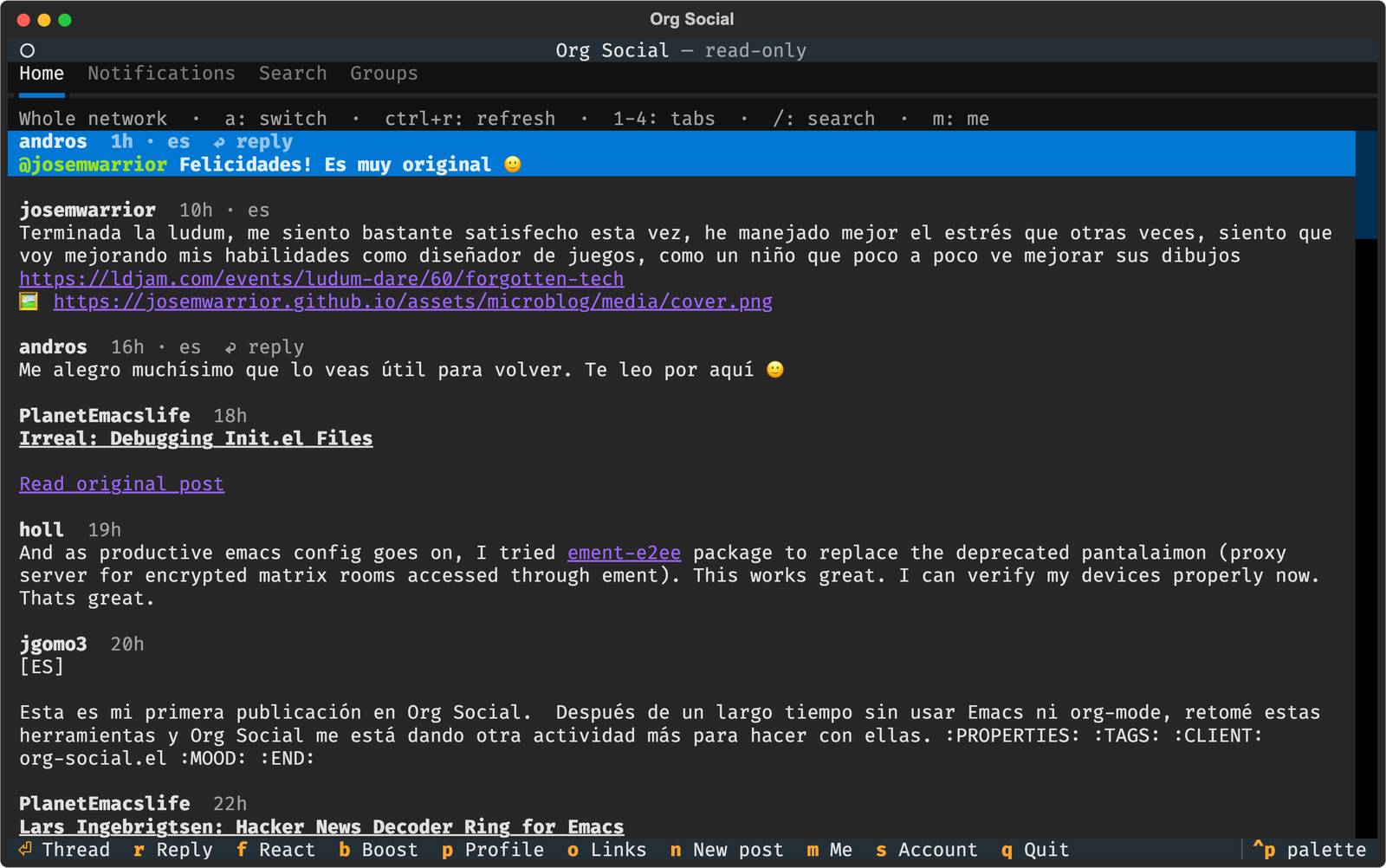
A terminal client for Org Social, a decentralized social network based on plain-text social.org files served over HTTP.
🚀 Quick Start
New to Org Social?
Follow this quick tutorial to get started without needing to know all the technical details:
Quick Tutorial to Get Started on Org Social
Install and run
You need Python 3.12+. Install the client from PyPI; the engine comes inside the package for macOS 14+ (Apple Silicon and Intel) and Linux (x86_64 and ARM64, any distribution).
With uv (recommended, installs it in its own environment):
uv tool install org-social-tui
With pip:
pip install org-social-tui
Then run it:
org-social
Or try it without installing anything:
uvx --from org-social-tui org-social
To update later: uv tool upgrade org-social-tui or pip install --upgrade org-social-tui.
On other platforms the package installs without the engine. Build it with a Swift 6 toolchain and put it on your $PATH:
git clone https://git.andros.dev/org-social/client-core.git
swift build -c release --package-path client-core --product orgsocial-engine
cp client-core/.build/release/orgsocial-engine ~/.local/bin/
The first time it opens read-only, showing the whole network. Press s to set up your account, or write the configuration file by hand (see Configuration below).
✨ Features
- Timeline: the people you follow, or the whole network (
ato switch), with infinite scroll. - Threads with nested replies, reply and boost counts, reactions and poll results.
- Notifications: mentions, replies, reactions and boosts, with an unread counter on the tab.
- Search by text or
#tag. - Profiles: follow or unfollow (
F), and edit your own (E). - Groups: browse them, join or leave (
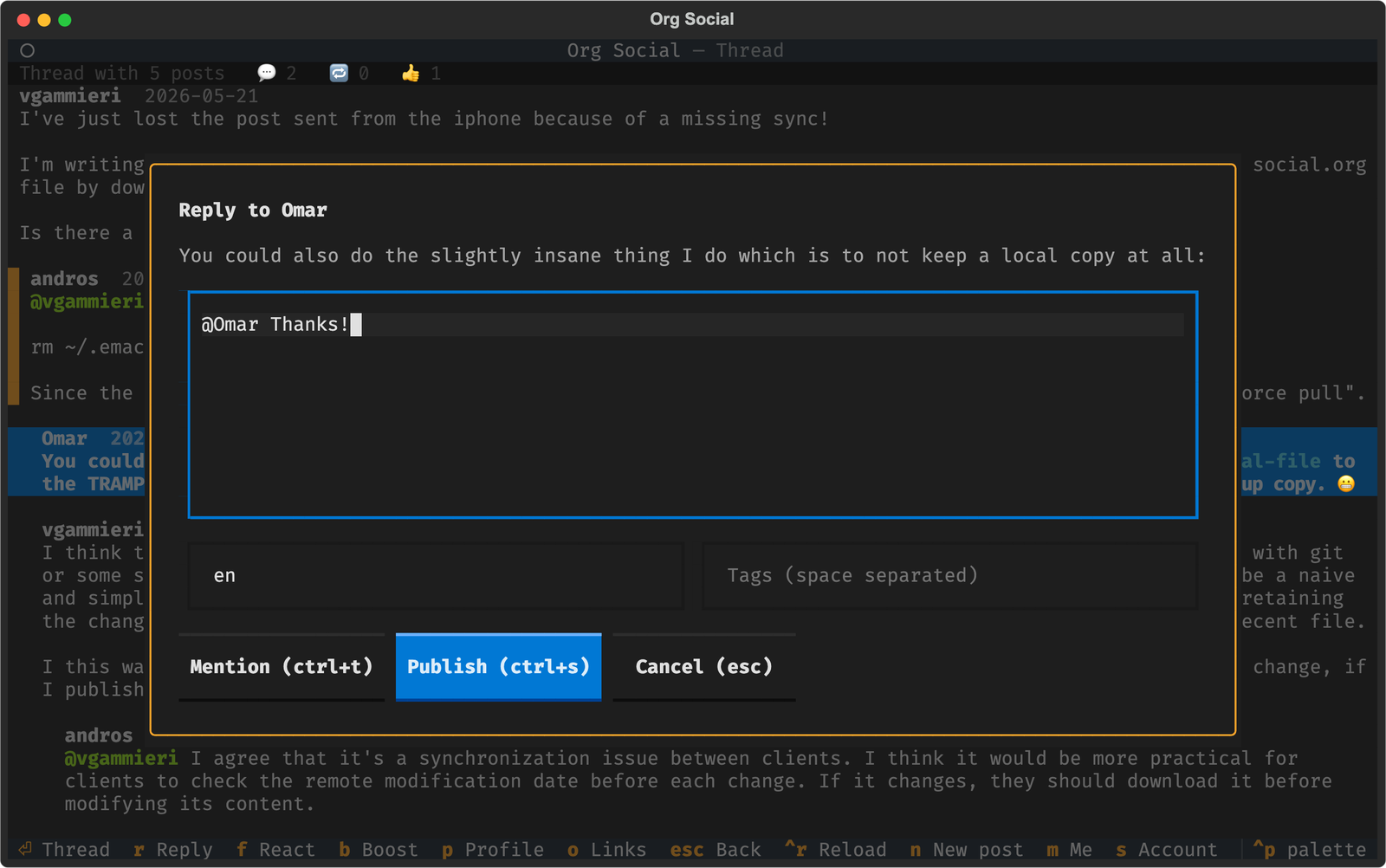
J) and post to a group (n). - Write: new posts, polls, replies (they start with a mention of the author), reactions, boosts and votes. Your posts can be edited (
e), pinned (P) or deleted (d). Reacting, boosting or voting again on a post undoes it. - Mentions:
ctrl+tin the composer lists the people you follow and inserts@nickat the cursor. - Moderation: block an author (
x) or mute words. Hidden posts disappear from every list. - Org rendering: bold, italic, code, strikethrough, headings, links (clickable in terminals that support them), source and quote blocks, images and tags.
- Your feed as a local file (like org-social.el), or uploaded to a host, GitHub, Codeberg or WebDAV.
- Read-only mode without an account.
⚙️ Configuration
The configuration lives in ~/.config/org-social-tui/config.toml ($XDG_CONFIG_HOME/org-social-tui/config.toml if that variable is set). Use another file with --config:
org-social --config ~/work/org-social.toml
You don't need to write it by hand: press s inside the app, fill in the form and save with ctrl+s. The file is created with 0600 permissions because it may contain your upload credentials.
Complete example
mirror = "https://mirror.org-social.org/api"
feed = "https://example.com/social.org"
file = "~/social.org"
lang = "en"
blocked = ["https://spam.example.com/social.org"]
muted_words = ["crypto", "giveaway"]
| Key | Description |
|---|---|
feed |
Public URL of your social.org: where others read it, and your identity in mentions and replies. Leave it empty to browse read-only. |
file |
Path of your social.org on this machine (~ allowed). When set, the client reads and writes it directly and [upload] is optional. |
mirror |
Org Social mirror API used for every read. The default works for everyone. |
lang |
Default language of new posts (ISO 639-1 code). |
blocked |
Feed URLs whose posts are hidden. x on a post adds its author. |
muted_words |
Words or phrases; posts containing any of them (body or tags, case-insensitive) are hidden. |
[upload] |
How the client uploads your social.org after every change. See below. |
Where your feed lives
Every action that changes your feed (posting, reacting, following, editing your profile...) reads your social.org, modifies it and saves it again. Choose one of these options.
Local file (recommended if you already publish your social.org yourself, for example with org-social.el): the client works on the file on your disk, and your own hosting publishes it at feed (a web server serving that folder, Syncthing or Dropbox, a Git hook, rsync...).
feed = "https://example.com/social.org"
file = "~/social.org"
- Nothing is downloaded or uploaded: changes are saved to the file at once (atomically; symlinks and permissions are kept), so you can also keep editing it in Emacs or any editor.
- Your own posts in Home and your profile (
m) are read from the file, so you see your changes immediately. Threads, notifications and search come from the mirror, which only sees your changes once your hosting publishes them. feedis still required: others find you, mention you and reply to you through that URL.- Add an
[upload]section (any method below) if you want the client to also upload the file after saving it.
vfile: your feed is hosted on an Org Social host. This is the easiest option: sign up at host.org-social.org/signup and you will get a public URL (for feed) and a vfile URL (for upload.url).
feed = "https://host.org-social.org/alice/social.org"

[upload]
method = "vfile"
url = "https://host.org-social.org/vfile?token=...&ts=...&sig=..."
GitHub: your social.org lives in a GitHub repository. The token needs write access to the repository contents.
feed = "https://raw.githubusercontent.com/alice/social/main/social.org"

[upload]
method = "github"
token = "github_pat_..."
owner = "alice"
repo = "social"
path = "social.org"   # optional, default social.org
branch = "main"       # optional, default main
Codeberg (or any Forgejo/Gitea instance):
feed = "https://codeberg.org/alice/social/raw/branch/main/social.org"

[upload]
method = "codeberg"
token = "..."
owner = "alice"
repo = "social"
path = "social.org"                     # optional, default social.org
branch = "main"                         # optional, default main
instance = "https://codeberg.org"       # optional, for other Forgejo/Gitea hosts
WebDAV: any server accepting PUT uploads (Nextcloud, Apache mod_dav, nginx...).
feed = "https://example.com/social.org"

[upload]
method = "webdav"
url = "https://dav.example.com/files/alice/social.org"
username = "alice"    # optional
password = "..."      # optional
State
Notifications you have already seen are remembered in state.json, next to config.toml. Delete it to mark everything as unread again.
⌨️ Keys
| Key | Action |
|---|---|
1 2 3 4 |
Home, Notifications, Search, Groups |
/ |
Search (esc leaves the search field, so digits switch tabs again) |
a |
Following / whole network |
ctrl+r |
Refresh |
n |
New post (inside a group: post to the group) |
m |
Your profile |
s |
Account settings |
esc |
Back |
q |
Quit |
On a post:
| Key | Action |
|---|---|
enter |
Open the thread |
r |
Reply |
f |
React (again: remove the reaction) |
b |
Boost (again: undo the boost) |
v |
Vote on a poll (again: remove the vote) |
p |
Author's profile |
o |
Open a link |
x |
Block the author |
e |
Edit (your posts) |
P |
Pin or unpin (your posts) |
d |
Delete (your posts) |
On a profile: F follows or unfollows, E edits your own profile. In the Groups tab and on a group: J joins or leaves.
In the composer: ctrl+t inserts a mention, ctrl+s publishes, esc cancels. To create a poll, write the question as the text and fill in the options separated by | (Emacs | Vim | Nano) and how many days it stays open.
🧩 How it works
The interface is written in Python with Textual. All the logic (parsing, writing posts, rendering Org, the mirror API, uploads, the write queue) comes from orgsocial-engine, the engine of the shared Swift client core, the same code the iOS app uses.
┌──────────────────────────┐    JSON-RPC 2.0     ┌─────────────────────────────┐
│ Python + Textual (UI)    │ ◄─────────────────► │ orgsocial-engine (Swift)    │
│ src/org_social_tui/      │    stdin/stdout     │ bundled, or ../client-core  │
└──────────────────────────┘                     └─────────────────────────────┘
The app looks for the engine in ../client-core/.build/release, then ../client-core/.build/debug, then the binary bundled in the package, then $PATH. Set ORG_SOCIAL_ENGINE to use another binary. The protocol is documented in the client core's ENGINE.md; any program able to spawn a process and read JSON can use it.
🛠️ Development
You need Python 3.12+, uv and a Swift 6 toolchain (Xcode on macOS 14+, or swift.org on Linux). Clone both repositories side by side; the app finds the engine in ../client-core without installing it:
git clone https://git.andros.dev/org-social/client-core.git
git clone https://git.andros.dev/org-social/tui-app.git
swift build -c release --package-path client-core --product orgsocial-engine
cd tui-app
uv sync
uv run org-social
uv run pytest                       # all tests (integration ones need the engine built)
uv run pytest -m "not integration"  # without the engine
uv run ruff check && uv run ruff format --check
The integration tests run the real engine against a local HTTP server that acts as feed host and mirror, so nothing is published.
If you change client-core, rebuild the engine with the same swift build command; the app always uses the build in ../client-core before anything installed.
⚠️ A run with a configured account writes to your real feed. To try changes safely, use a read-only configuration: uv run org-social --config /tmp/readonly.toml with a file that has no feed.
Releasing
For maintainers. It needs macOS with Xcode, Docker and ../client-core (or CLIENT_CORE=/path).
- Update the version in
pyproject.toml, commit (Bump version to X.Y.Z) and push. - Tag it:
git tag -a vX.Y.Z -m "Release vX.Y.Z"andgit push origin vX.Y.Z. - Build every distribution into
dist/withscripts/release.sh: the sdist, a pure wheel that uses the engine from$PATH, and wheels with the engine bundled for macOS (universal2) and Linux (x86_64 and aarch64). The Linux engines are fully static, cross-compiled in Docker with the Swift static Linux SDK. - Check the Linux wheels on a clean Debian (x86_64 and aarch64) with
scripts/check-linux.sh: it installs them with pip and uv, runs the tests against the bundled engine and opens the TUI read-only. - Publish:
uv publish --token <token>. - Verify:
uvx --isolated --refresh --from "org-social-tui==X.Y.Z" org-social --help.
Contributing
Contributions are welcome! Please see the contribution guidelines for instructions on how to submit issues or pull requests.
License
GPL-3.0
1 maintainer

Metadata
1 maintainer
Release files for org-social-tui 1.2.1
For a detailed explanation of source distributions (sdists) and built distributions (wheels), please see the package formats documentation.
Source distribution (sdist)
| File | Size | Uploaded | Provenance | |
|---|---|---|---|---|
| org_social_tui-1.2.1.tar.gz | 52.8 kB | Without provenance | Details |
Built distributions (wheels)
| File | Reset | |||
|---|---|---|---|---|
| org_social_tui-1.2.1-py3-none-manylinux_2_17_x86_64.manylinux2014_x86_64.musllinux_1_1_x86_64.whl | Python 3 | none | Linux musl 1.1+ x86-64, Linux glibc 2.17+ x86-64 | Details |
| org_social_tui-1.2.1-py3-none-manylinux_2_17_aarch64.manylinux2014_aarch64.musllinux_1_1_aarch64.whl | Python 3 | none | Linux musl 1.1+ ARM64, Linux glibc 2.17+ ARM64 | Details |
| org_social_tui-1.2.1-py3-none-macosx_14_0_universal2.whl | Python 3 | none | macOS 14.0+ universal2 (ARM64, x86-64) | Details |
| org_social_tui-1.2.1-py3-none-any.whl | Python 3 | none | any | Details |
Total release size: 48.5 MB
Security for org-social-tui 1.2.1
Provenance
Provenance describes where a file came from. On PyPI, provenance is shared via attestations, which provide a verifiable record of the build or publishing details. View details, limitations and caveats.
No provenance found
None of the files in this release were uploaded with provenance metadata.
A note on package security
PyPI is a repository for distributing packages, not a service for auditing them. While third-party security researchers and our staff do their best to detect and remove malicious packages, PyPI cannot guarantee the quality, security or suitability of any given package.














