

OrionBelt® Chat
AI-powered chat interface for OrionBelt Analytics & Semantic Layer











A production-ready chat application that connects to OrionBelt Analytics and OrionBelt Semantic Layer MCP servers, providing a conversational interface for database analysis, semantic modeling, and interactive data visualization. Built with Chainlit and Pydantic AI, supporting multiple LLM providers (cloud and local).
Better Together: Works seamlessly with OrionBelt Analytics and OrionBelt Semantic Layer. Connect to both MCP servers simultaneously for schema-aware ontology generation, semantic modeling, guaranteed-correct SQL compilation, and interactive chart rendering.
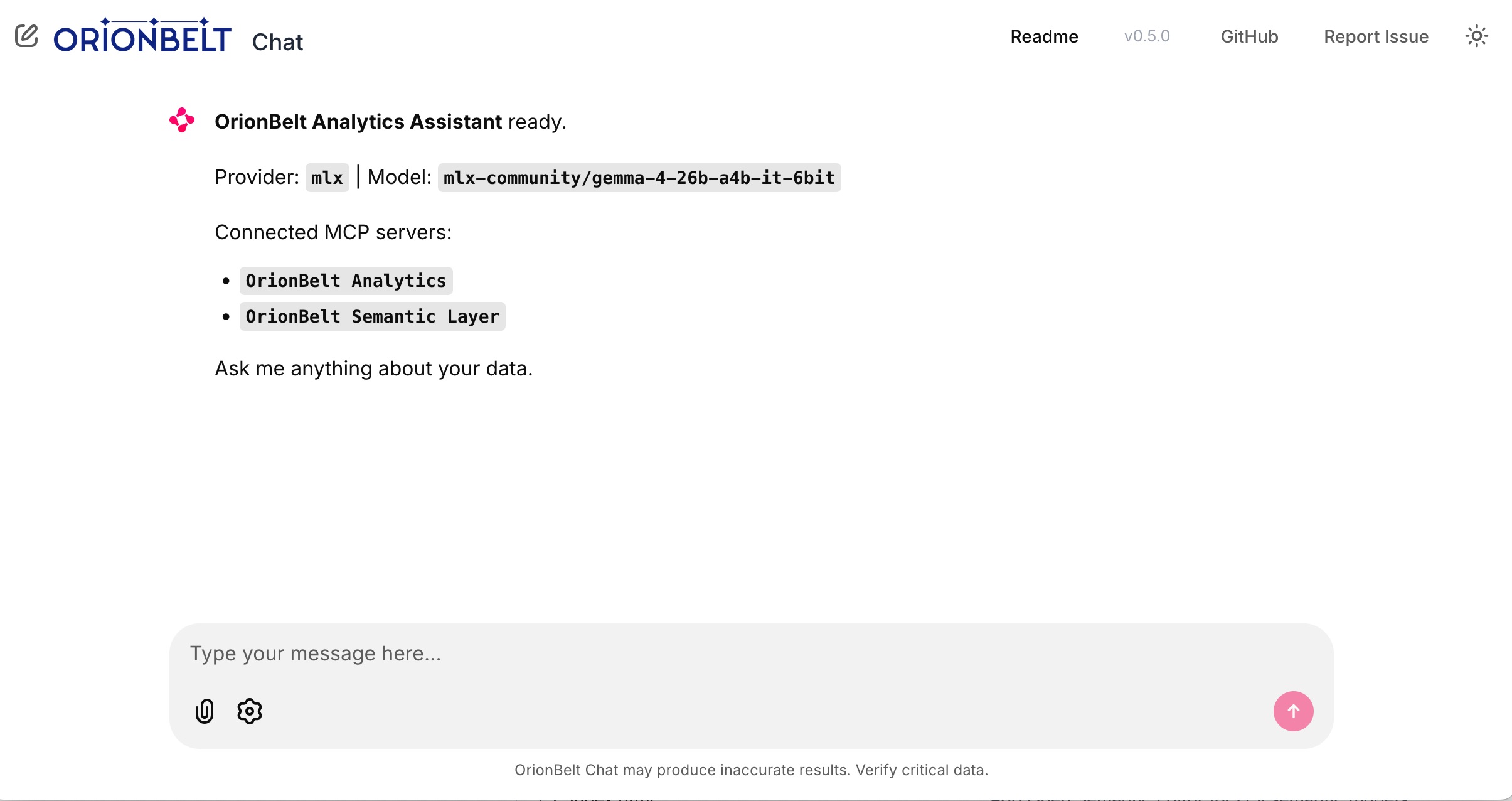
Startup — connected MCP servers, provider & model selection
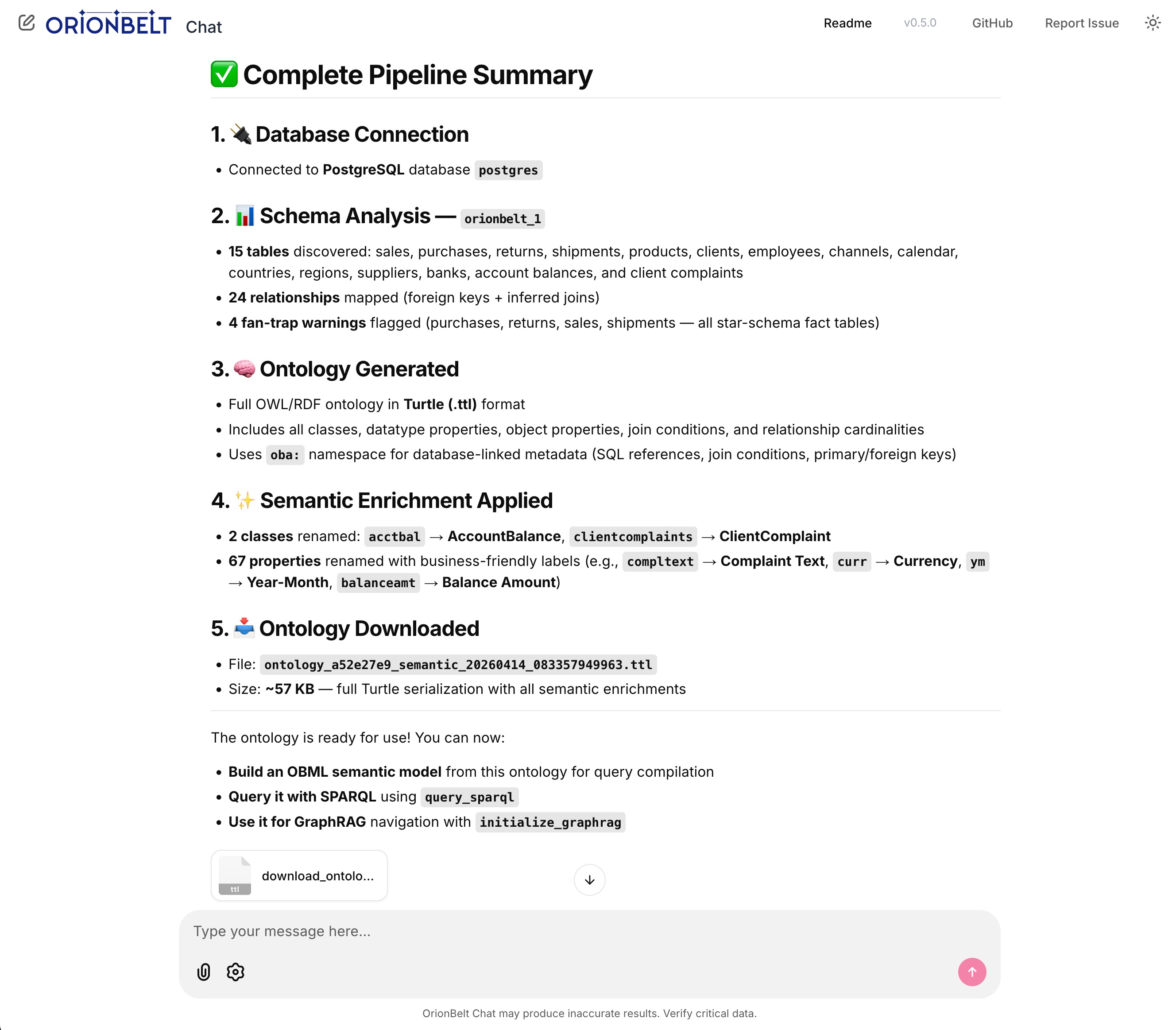
Full pipeline — schema analysis, ontology generation, semantic enrichment & file download
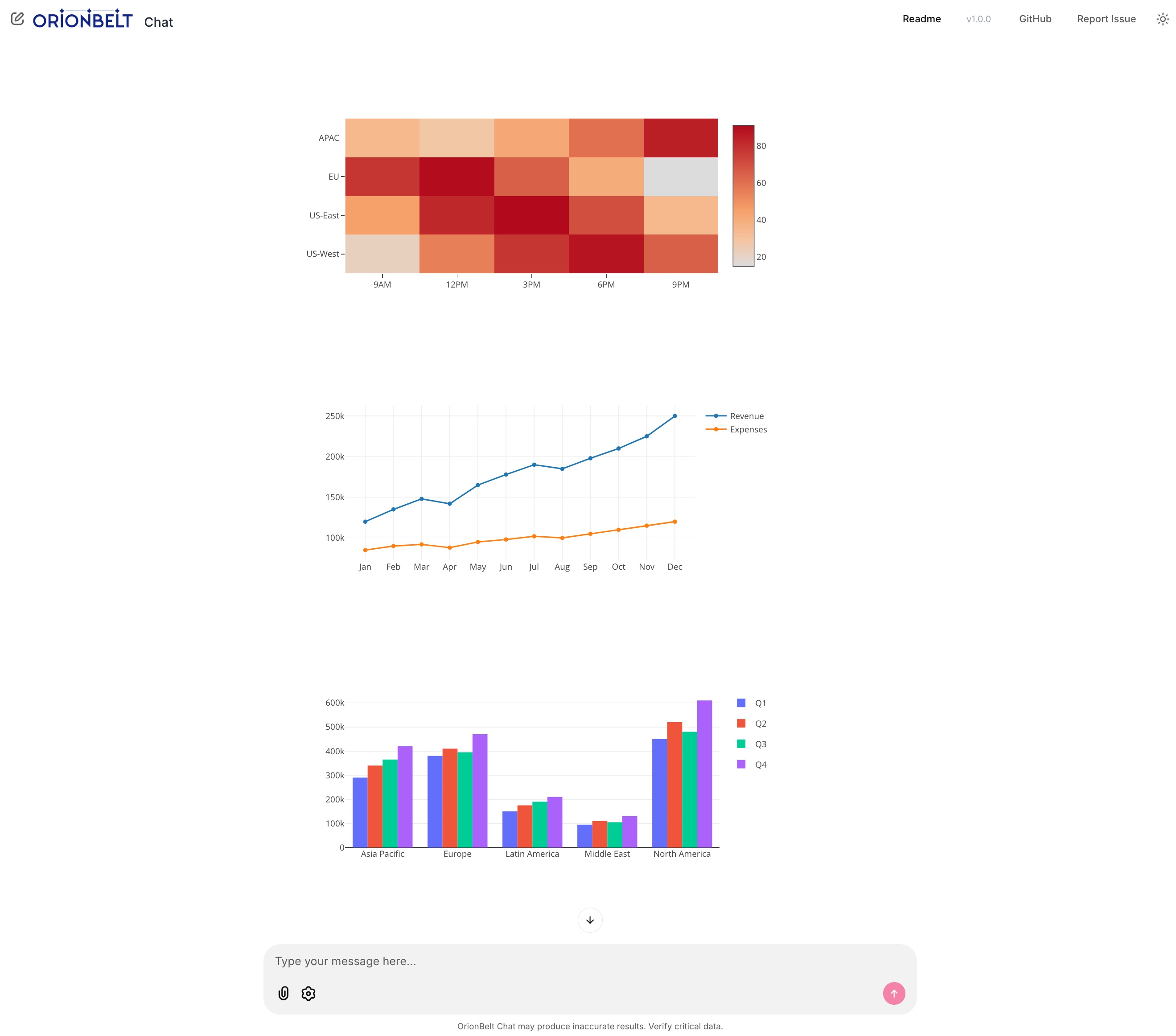
Interactive charts — heatmap, line & grouped bar rendered natively via Plotly.js
Key Features
Multi-Provider LLM Support
- OpenRouter - Access 300+ models via single API (recommended for production)
- MLX - Local inference on Apple Silicon with mlx-openai-server
- Ollama - Cross-platform local inference with easy setup
- Anthropic - Direct API access (bypass OpenRouter)
- OpenAI - Direct API access (bypass OpenRouter)
MCP Integration
- Dual MCP server support - Connect to Analytics and Semantic Layer simultaneously
- Graceful degradation - One unreachable server won't block the app; agent starts with available servers
- Auto-reconnection - Detects MCP session loss and reconnects automatically
- Tool call resilience - Retries failed tool calls up to 3 times; preserves conversation context on errors
- Flexible transport - Stdio (local subprocess) or Streamable HTTP (remote) per server
- MCP sampling (with tools) - Servers can delegate LLM calls back to the chat client via
sampling/createMessage. The client advertises thesampling.toolssub-capability so servers can include tool definitions; sampling requests are handled by the env-configured default model (DEFAULT_PROVIDER+ the matching*_DEFAULT_MODEL) - Tool visibility - Collapsible steps show tool calls with arguments and results
- Multi-turn context - Full conversation history management with Pydantic AI
Interactive Charts
- Native Plotly rendering - Charts render inline via Chainlit's bundled Plotly.js (no Python plotly package needed)
- FastMCP Apps integration - Fetches chart data from
ui://resource URIs returned by MCP tools - Multiple chart types - Bar, line, scatter, heatmap with auto-detection
- Multiple extraction strategies - Handles Plotly figure dicts,
Plotly.newPlot()in HTML, and bare trace arrays
Mermaid Diagrams
- Client-side rendering - Mermaid.js loaded from CDN renders
erDiagram,flowchart,sequenceDiagram, and other diagram types inline - Auto-detection - Mermaid syntax in MCP tool results is automatically surfaced as a rendered diagram
- Theme-aware - Diagrams re-render when switching between light and dark mode
File Uploads
- Upload button in the composer - An Upload button sits next to the message input for the whole session, so a model or ontology can be attached at any point in the conversation; the paperclip works too
- Handle-based injection - The file is stored in the session under a handle (
@upload:model.yaml); the model passes the handle as a tool argument and the client substitutes the real content just before the MCP call - No context cost - A 200 KB model never enters the prompt and never has to be re-emitted by the LLM, so nothing is truncated by
max_tokens - Format detection - Extension plus content sniffing tells an OBML model from plain YAML and Turtle from RDF/XML, so the assistant routes it to the right tool (
load_model,load_my_ontology) - YAML → JSON on demand - Appending
#jsonto a handle (@upload:model.yaml#json) converts the file on the way through, so a native OBML YAML upload works with arguments that take a JSON object, such asload_model(model=…) - Session-scoped - Handles stay valid for the whole conversation; small files (<4 KB) are also inlined so the model can reason about them directly
- Accepted formats -
.yaml,.yml,.obml,.obsl,.json,.jsonld,.ttl,.turtle,.n3,.nt,.rdf,.owl(UTF-8 text, up to 8 MB)
File Downloads
- Auto-detection - Recognizes downloadable content in tool results and LLM response code blocks
- Supported formats - Turtle/RDF (.ttl), JSON, CSV, SQL, SPARQL, YAML, XML
- Smart extraction - Handles dict-shaped tool returns (e.g.
{'success': True, 'content': '@prefix ...'}) - Inline attachments - Download buttons appear directly in the response message
Real-Time Streaming
- Token-by-token streaming - Smooth response rendering as the model generates
- Thinking indicator - Visual spinner while the model processes before responding
- Tool call tracking - Visual feedback for each MCP tool invocation with correct result matching
- Stop generation - Click the stop button or press Escape to cancel
- Error handling - Graceful failures with clear error messages
Chainlit UI
- Settings panel - Switch providers and models on the fly; header updates live
- Custom model input - Override default models with specific versions
- Customizable system prompt - Edit
system_prompt.mdor setSYSTEM_PROMPT_FILEenv var - Message recall - Press Arrow Up/Down in the input to navigate message history
- Responsive design - Works on desktop and mobile browsers
Quick Start
Prerequisites
- Python 3.11+ (3.13 recommended)
- uv package manager (install)
- OrionBelt Analytics and Semantic Layer repos cloned alongside this one
Installation
# Clone the repository
cd orionbelt-chat

# Install dependencies
uv sync

# Copy environment template
cp .env.example .env

# Edit .env and add your API keys
Configuration
Edit .env and configure your LLM provider:
Option 1: OpenRouter (recommended for cloud)
OPENROUTER_API_KEY=sk-or-v1-...
OPENROUTER_DEFAULT_MODEL=anthropic/claude-sonnet-4-5
DEFAULT_PROVIDER=openrouter
Option 2: Anthropic direct
ANTHROPIC_API_KEY=sk-ant-...
ANTHROPIC_DEFAULT_MODEL=claude-sonnet-4-6   # or claude-opus-4-6
DEFAULT_PROVIDER=anthropic
Option 3: OpenAI direct
OPENAI_API_KEY=sk-...
OPENAI_DEFAULT_MODEL=gpt-4o
DEFAULT_PROVIDER=openai
Option 4: MLX local (Apple Silicon)
# Start mlx-openai-server first:
mlx-openai-server launch \
  --model-path mlx-community/Qwen2.5-14B-Instruct-4bit \
  --model-type lm \
  --enable-auto-tool-choice \
  --port 8000

MLX_DEFAULT_MODEL=mlx-community/Qwen2.5-14B-Instruct-4bit
DEFAULT_PROVIDER=mlx
Option 5: Ollama local (cross-platform)
# Start Ollama first: ollama serve
OLLAMA_DEFAULT_MODEL=qwen2.5:14b
DEFAULT_PROVIDER=ollama
MCP Server Paths:
# Each can be a local directory (stdio) or HTTP(S) URL (Streamable HTTP):
ANALYTICS_SERVER_DIR=../orionbelt-analytics
SEMANTIC_LAYER_SERVER_DIR=../orionbelt-semantic-layer-mcp
# Remote example: ANALYTICS_SERVER_DIR=https://analytics.example.com/mcp
Adding other MCP servers:
The two variables above cover the OrionBelt servers. Any other MCP server —
someone else's, or your own — is declared in a YAML file. Copy
mcp_servers.example.yaml to mcp_servers.yaml
in the directory you launch from (or the app root, or anywhere with
MCP_SERVERS_FILE=<path>). The example file ships with working demos; the
three remote ones need no key and no install, so copying it as-is gives you
something to try on the next restart:
servers:
  # ── Remote, over Streamable HTTP: no install, no API key ──
  - name: DeepWiki                       # ask questions about any public repo
    endpoint: https://mcp.deepwiki.com/mcp

  - name: Context7                       # current docs for most libraries
    endpoint: https://mcp.context7.com/mcp

  - name: World Bank Data360             # public indicators and time series
    endpoint: https://maimcpext.worldbank.org/ext/data360/mcp

  # ── Web search, remote: key lives in .env, not in this file ──
  # - name: Tavily
  #   endpoint: https://mcp.tavily.com/mcp/
  #   headers:
  #     Authorization: Bearer ${TAVILY_API_KEY}

  # ── Web search, local subprocess over stdio ──
  # - name: Brave Search
  #   command: npx
  #   args: ["-y", "@brave/brave-search-mcp-server"]
  #   env:
  #     BRAVE_API_KEY: ${BRAVE_API_KEY}

  # ── Public data, remote: key lives in .env, not in this file ──
  # - name: Data Commons
  #   endpoint: https://api.datacommons.org/mcp
  #   headers:
  #     X-API-Key: ${DATACOMMONS_API_KEY}

  # ── Fetch any URL as markdown (needs uvx on PATH) ──
  # - name: Fetch
  #   command: uvx
  #   args: ["mcp-server-fetch"]

  # ── Your own Python project, run as
  #    `uv run --directory <endpoint> python -m <module>` ──
  # - name: My Analytics
  #   endpoint: ../my-analytics
  #   module: my_analytics
  #   sampling: false      # opt in before the server may call back for LLM sampling
The demos in the example file, and where their keys come from:
| Server | Transport | Key |
|---|---|---|
| DeepWiki — Q&A over any public GitHub repo | HTTP | none |
| Context7 — up-to-date library documentation | HTTP | none |
| World Bank Data360 — development indicators, metadata, time series | HTTP | none |
| Tavily — web search, extract, crawl | HTTP | TAVILY_API_KEY (free tier) |
| Brave Search — web, news, image, local | stdio (npx) |
BRAVE_API_KEY (free tier) |
| Data Commons — public statistical knowledge graph | HTTP | DATACOMMONS_API_KEY (free key) |
| Fetch — a URL as markdown | stdio (uvx) |
none |
| Filesystem — files under a directory you name | stdio (npx) |
none |
${VAR} in an endpoint, headers, command, args or env value is
replaced by that environment variable — or by the matching line in a .env.
So an API key is named in mcp_servers.yaml and stored in .env, and the
config file stays safe to commit. Keys that are not settings of this app are
fine there; .env is read for ${VAR} as well as for the settings below.
.env is looked for beside mcp_servers.yaml and in the app root as well as
in the directory you launch from, so a config and its keys can travel together;
a real environment variable always wins over a file. The placeholder must be
exactly ${NAME} with letters, digits and underscores — ${MY-KEY},
${ KEY } and ${KEY:-default} are rejected rather than passed through as
literal text, and a variable that is not set anywhere is reported in the
servers panel rather than quietly sent as an empty string.
| File is searched for | ./mcp_servers.yaml, then <app root>/mcp_servers.yaml |
| Override the path | MCP_SERVERS_FILE |
| Relationship to the env vars | Added to them — one new server is one entry |
| Repoint a built-in | Reuse its name (OrionBelt Analytics, OrionBelt Semantic Layer) — the file entry replaces it |
| Disable a built-in | Unset its environment variable; there is no enabled: field, and an entry still needs a working endpoint or command |
Each entry needs exactly one of endpoint (a URL, or a directory plus
module) or command (plus optional args/env). Credentials go where the
transport can carry them: headers: on an HTTP endpoint, env: on a
subprocess. The wrong one for the transport is an error rather than a silently
ignored line — an unauthenticated server that reports itself connected is the
harder failure to spot. A malformed entry does not take the working servers
down with it: the servers panel shows what was rejected and why, and the other
entries still load.
env: is additive: it is layered over the small set of variables an MCP
subprocess inherits by default (PATH, HOME, …), so naming one variable does
not take the rest away. That baseline is not the parent process's full
environment — a third-party server sees what you name plus the baseline, never
the rest of your keys.
The first launch of a uvx or npx server downloads it, which can outrun the
connection timeout; the server then connects normally on the next restart.
System Prompt (optional):
# Override the prompt file (defaults to the system_prompt.md inside the package)
# SYSTEM_PROMPT_FILE=~/my_custom_prompt.md
All settings
Every setting, with its default. All are read from the environment or a .env
file; see .env.example for a copyable starting point.
LLM providers
| Variable | Default | Purpose |
|---|---|---|
DEFAULT_PROVIDER |
openrouter |
Provider selected on startup: openrouter, mlx, ollama, anthropic, openai |
DEFAULT_MODEL |
(empty) | Model selected on startup; falls back to the provider default below |
OPENROUTER_API_KEY |
(empty) | OpenRouter credential |
OPENROUTER_DEFAULT_MODEL |
anthropic/claude-sonnet-4-5 |
Model used when the provider is OpenRouter |
ANTHROPIC_API_KEY |
(empty) | Anthropic credential, bypassing OpenRouter |
ANTHROPIC_DEFAULT_MODEL |
claude-sonnet-4-6 |
Model used when the provider is Anthropic |
OPENAI_API_KEY |
(empty) | OpenAI credential, bypassing OpenRouter |
OPENAI_DEFAULT_MODEL |
gpt-4o |
Model used when the provider is OpenAI |
MLX_BASE_URL |
http://localhost:8000/v1 |
Where mlx-openai-server is listening |
MLX_DEFAULT_MODEL |
mlx-community/Qwen2.5-14B-Instruct-4bit |
Model used when the provider is MLX |
OLLAMA_BASE_URL |
http://localhost:11434/v1 |
Where Ollama is listening |
OLLAMA_DEFAULT_MODEL |
qwen2.5:14b |
Model used when the provider is Ollama |
MCP servers
| Variable | Default | Purpose |
|---|---|---|
ANALYTICS_SERVER_DIR |
(empty) | OrionBelt Analytics: a local directory (stdio) or an HTTP(S) URL. Empty disables it |
SEMANTIC_LAYER_SERVER_DIR |
(empty) | OrionBelt Semantic Layer, same forms |
MCP_SERVERS_FILE |
(empty) | YAML file declaring any other servers. When empty, mcp_servers.yaml is searched for in the working directory, then the app root |
MCP_ALLOW_SAMPLING |
true |
Whether servers may make LLM calls back through this client, answered with the default model. Set false as a cost/privacy kill switch |
Behaviour
| Variable | Default | Purpose |
|---|---|---|
SYSTEM_PROMPT_FILE |
(empty) | Prompt file to load; defaults to the system_prompt.md shipped in the package |
TOOL_CALL_TIMEOUT_SECONDS |
300 |
Budget for the whole tool-call phase of one agent turn, including any sampling round-trips |
MCP_REQUEST_TIMEOUT_SECONDS |
300 |
Per-request MCP transport timeout. Must be at least as large as your slowest single tool call |
App root (not a Settings field — read by Chainlit and the launcher):
| Variable | Default | Purpose |
|---|---|---|
CHAINLIT_APP_ROOT |
~/.orionbelt-chat |
Where public/, chainlit.md, .chainlit/config.toml are seeded and runtime state is written |
ORIONBELT_CHAT_HOME |
(unset) | Alternative spelling of the same thing, used when CHAINLIT_APP_ROOT is unset |
Run
uv run orionbelt-chat --watch
Open http://localhost:8080 in your browser.
orionbelt-chat is a thin wrapper around chainlit run — every Chainlit flag
(--port, --host, --headless, -w) passes straight through. It also seeds
a writable app root with the UI assets the package ships, because Chainlit
resolves public/, chainlit.md and .chainlit/config.toml relative to that
directory and writes runtime state (.files/) into it:
| Default app root | ~/.orionbelt-chat |
| Override | CHAINLIT_APP_ROOT or ORIONBELT_CHAT_HOME |
| Refreshed each launch | public/ (versioned UI assets) |
| Created once, then yours to edit | chainlit.md, .chainlit/config.toml |
Install from PyPI
To run the client without cloning the repo:
uv tool install orionbelt-chat     # or: pipx install orionbelt-chat
orionbelt-chat
Configuration is read from the environment, so put your keys in the shell or in
a .env file in the directory you launch from — see Configuration.
Run with Docker
The app ships with a Dockerfile and docker-compose.yml so you can run it
without a local Python/uv toolchain.
Using Docker Compose (recommended):
# Configure your API keys first
cp .env.example .env   # then edit .env

docker compose up --build
Using plain Docker:
docker build -t orionbelt-chat .
docker run --rm -p 8080:8080 --env-file .env orionbelt-chat
Using the published image from Docker Hub:
docker run --rm -p 8080:8080 --env-file .env ralforion/orionbelt-chat:latest
Open http://localhost:8080 in your browser. Configuration is read from the
environment (see .env.example); pass it via --env-file .env or individual
-e KEY=value flags.
Usage Examples
Connect to database:
Connect to my PostgreSQL database at localhost
Schema analysis:
Analyze the schema and show me all tables with their relationships
Query with charts:
Show me revenue by product category as a bar chart
Download an ontology:
Generate an ontology for the schema and download it as Turtle
Explore semantic models:
What OBML models are available in the semantic layer?
Generate OBML model:
Create an OBML model for customer analytics with metrics for revenue, order count, and average order value
Architecture
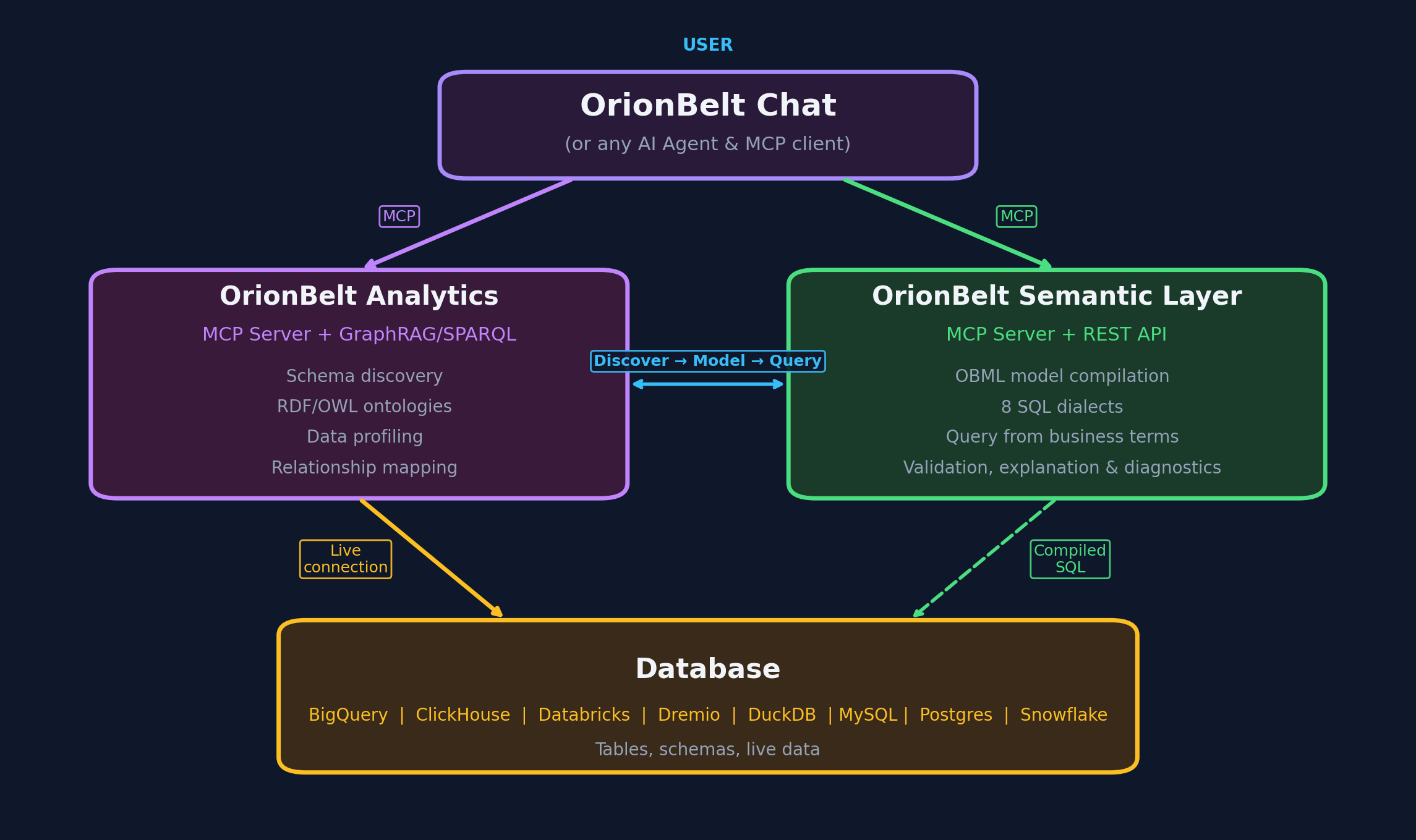
┌──────────────────────────────────────────────────────────────┐
│          OrionBelt Chat (Chainlit + Pydantic AI)             │
│                                                              │
│  ┌──────────┐         ┌──────────────────────────────────┐   │
│  │  Chat UI │         │  Pydantic AI Agent + MCP Client  │   │
│  │          │────────>│  - Multi-turn context            │   │
│  │ Chainlit │         │  - Streaming events              │   │
│  │  2.10+   │         │  - Tool orchestration            │   │
│  └──────────┘         └──────────────────────────────────┘   │
└──────────────────────────────────────────────────────────────┘
         │                      │
         │                      ├──> orionbelt-analytics (MCP stdio or HTTP)
         │                      │    - Schema analysis
         │                      │    - Ontology generation & download
         │                      │    - SQL execution
         │                      │    - Interactive Plotly charts
         │                      │
         │                      └──> orionbelt-semantic-layer (MCP stdio or HTTP)
         │                           - OBML model management
         │                           - Semantic query compilation
         │                           - Guaranteed-correct SQL
         │
         └──> LLM Provider (OpenRouter/MLX/Ollama/Anthropic/OpenAI)
Key Components:
- Chainlit 2.10+ - Chat UI framework with streaming, steps, and settings
- Pydantic AI 2.10+ - Agent framework with node-by-node iteration (
agent.iter()) - MCP Transport - Stdio (local subprocess) or Streamable HTTP (remote) per server
- Chart Renderer - Native Plotly rendering from FastMCP Apps
ui://resources - Mermaid Renderer - Client-side diagram rendering via Mermaid.js CDN
- File Downloads - Auto-detect downloadable content (TTL, JSON, CSV, SQL) in tool results
- File Uploads - Session registry for uploaded models/ontologies;
@upload:handles are expanded into tool arguments via pydantic-ai'sprocess_tool_callhook
Development
# Install dev dependencies
uv sync --group dev

# Run tests (when available)
uv run pytest

# Format code
uv run ruff format

# Lint
uv run ruff check --fix

# After editing a workflow (see below)
./scripts/check-action-pins.sh
Every GitHub Action the workflows use is pinned to a commit SHA rather than a
version tag, because a tag is a movable label and its owner can repoint it at
new code at any time. A SHA is unreadable, though, so the # vX.Y.Z comment
beside it is the only part a reviewer actually reads, and nothing makes the two
agree. That gap is what ./scripts/check-action-pins.sh closes: it resolves
each comment's tag upstream and fails when the SHA pinned in the workflow is
not the commit that tag names, so a hash quietly swapped for one from a fork
stops looking like a routine Dependabot bump. It also rejects any Action that
is not SHA-pinned, any owner outside the script's ALLOWED_OWNERS allowlist,
and any container action not pinned by digest, since an image tag such as
:latest moves just as a git tag does.
The comments must name exact patch releases. A major tag such as v7 moves
with every upstream release, so checking against it would turn CI red the
moment v7.0.2 ships, for a pin that is still perfectly good. CI runs the
check in its pins job, and the three publishing workflows run it as their
first step after checkout, so no tag can publish a release, a wheel or an image
built by steps whose pins were never checked. The privileged publish jobs in
release.yml and pypi-publish.yml need no copy of their own: they cannot
start until the job that ran the check has passed, so their actions are
verified before they exist as running code. --offline skips the upstream
lookups when you have no network, checking only the SHA and comment format.
To bump an Action, resolve the release you want and paste both halves:
git ls-remote https://github.com/actions/checkout 'refs/tags/v7.0.1^{}'
Provider Details
OpenRouter
- Access: 300+ models via single API
- Reliability: Best tool-calling support across vendors
- Recommended models:
anthropic/claude-sonnet-4-5- Best balance of speed and reasoninganthropic/claude-opus-4-5- Maximum intelligencegoogle/gemini-2.5-pro- Fast and cost-effective
- Setup: Get API key at openrouter.ai
Anthropic (direct)
- Access: Direct API, no intermediary
- Available models:
claude-sonnet-4-6- Fast, excellent tool use (default)claude-opus-4-6- Maximum intelligenceclaude-haiku-4-5-20251001- Fastest, lowest cost
- Setup: Get API key at console.anthropic.com
OpenAI (direct)
- Access: Direct API, no intermediary
- Available models:
gpt-4o- Best balance (default)gpt-4o-mini- Fast and cost-effectiveo3-mini- Reasoning model
- Setup: Get API key at platform.openai.com
MLX (Apple Silicon)
- Platform: Mac with Apple Silicon (M1/M2/M3/M4)
- Requirements:
mlx-openai-server - Recommended models:
mlx-community/Qwen2.5-14B-Instruct-4bit- Excellent tool usemlx-community/Qwen2.5-32B-Instruct-4bit- Better reasoning (requires 32GB+ RAM)
- Setup: Install with
pip install mlx-openai-server - Notes: Must use
--enable-auto-tool-choiceflag for tool calling
Ollama
- Platform: Cross-platform (Mac/Linux/Windows)
- Ease of use: Simplest local setup
- Recommended models:
qwen2.5:14b- Good balance of speed and accuracyqwen2.5:32b- Better reasoning (requires 32GB+ RAM)
- Setup: Download from ollama.com
- Notes: Built-in tool calling support with instruct models
Troubleshooting
MCP servers not connecting
Symptom: Status message shows "Failed to connect" for one or more servers
The app starts even when some servers are unreachable — it will show which connected and which failed. If a session drops mid-conversation, the app automatically reconnects.
Solutions:
- Ensure
ANALYTICS_SERVER_DIRandSEMANTIC_LAYER_SERVER_DIRpoint to correct paths - For local (stdio): check that repos have dependencies installed (
uv sync) - For remote (HTTP): verify the URL is reachable and the server is running
- Verify MCP servers can start independently (
uv run server.py)
Charts not rendering
Symptom: Charts don't appear after generate_chart tool call
Solutions:
- Verify
orionbelt-analyticshas MCP Apps support (v1.2.0+) - Check server logs for
Chart URI detectedandPlotly JSON extractedmessages - Ensure the analytics server returns a
ui://resource URI in the tool result - Verify the resource content contains parseable Plotly figure data
MLX model not calling tools
Symptom: Model ignores tools and tries to answer directly
Solutions:
- Ensure
--enable-auto-tool-choiceflag is set when starting mlx-openai-server - Use an instruct-tuned model (with
-Instructsuffix) - Try a different model (Qwen2.5 series has best tool support)
- Check mlx-openai-server logs for errors
Streaming stops or hangs
Symptom: Response stops mid-generation or "Thinking" indicator stays visible
Solutions:
- Press Escape or click the stop button to cancel, then retry
- Check MCP server logs for errors
- Verify tool calls are completing successfully (expand steps in the UI)
- Increase timeout settings if using slow local models
- Check the server console for detailed logs (each node transition is logged)
AI Transparency
OrionBelt Chat is an AI system, and meets both transparency obligations of Article 50 of the EU AI Act out of the box. Full reasoning, including who carries responsibility when you self-host, is in docs/AI_ACT.md.
Art. 50(1) — you are told it is an AI
- UI chrome — the assistant is named "OrionBelt Chat – AI Assistant"
(
orionbelt_chat/chainlit_config.toml,orionbelt_chat/public/header.js) - Welcome screen — the notice in
chainlit.md - First interaction — a message sent at the start of every session, before
any agent work, so it appears even when the agent or its MCP servers fail to
start (
AI_DISCLOSUREinapp.py)
Art. 50(2) — generated output is marked
Every channel by which content leaves the app carries a machine-readable
provenance record built in
orionbelt_chat/provenance.py, using the
IPTC digitalSourceType term trainedAlgorithmicMedia:
- Downloads — comment header for TTL/SPARQL/SQL/YAML/XML, a
_provenancekey for JSON, and the absolute PROV IRI…prov#wasGeneratedByfor JSON-LD, which expands correctly whatever form the document's@contexttakes - CSV/TSV — an adjacent
.prov.jsonsidecar, since a comment line would break strict parsers - Images — an XMP packet embedded in the PNG, no extra dependency
- Charts — a Plotly
metablock plus a visible caption, which is the only marking that survives the modebar's client-side PNG export - Rendered page —
<meta name="ai-generated">anddata-ai-generatedattributes on non-user steps
Marking is never applied where it would corrupt the payload, and C2PA signing is left to deployers with their own certificate — no signing key ships here.
tests/test_ai_disclosure.py and tests/test_ai_provenance.py pin every
channel so a refactor cannot silently drop the marking.
License
Licensed under the Business Source License 1.1 (SPDX: BUSL-1.1).
- Production use allowed for internal/personal use
- Commercial embedding/SaaS restrictions - contact licensing@ralforion.com
- Change Date: 2030-04-05
- Change License: Apache 2.0
See LICENSE for full terms.
Third-party dependencies
The published container image redistributes ~180 open-source packages, so their
attribution notices ship with it as /app/THIRD_PARTY_LICENSES.md. The same
file is committed here as
THIRD_PARTY_LICENSES.md, so the attribution is
readable without downloading anything, and CI fails if it drifts from what the
locked environment produces. It is generated, not written — regenerate it
rather than editing it. That file, plus a CycloneDX SBOM (sbom.cdx.json), is
attached to every GitHub Release; the image additionally carries an SBOM and
build-provenance attestation. The dependency tree is permissive throughout — Apache-2.0, MIT,
BSD, ISC and MPL-2.0, with no GPL/LGPL/AGPL — so nothing there constrains the
BSL terms above.
Attribution texts are read out of each installed distribution, including ones
vendored into a package tree rather than its .dist-info. The handful of
projects that ship no text at all in either their wheel or their sdist are
covered by curated copies in licenses/, taken verbatim
from upstream; --fail-on-missing-notice (which CI and the image build both
pass) stops a release if a new dependency needs one and hasn't got it.
Regenerate locally with:
uv sync --frozen --no-dev
.venv/bin/python scripts/gen_third_party_licenses.py \
  --venv .venv \
  --overrides licenses \
  --fail-on-missing-notice \
  --version "$(grep -m1 '^version = ' pyproject.toml | cut -d'"' -f2)"
Links
OrionBelt Platform
- OrionBelt Analytics - MCP server for database analysis and ontology generation
- OrionBelt Semantic Layer - MCP server for OBML models and semantic SQL compilation
- OrionBelt Ontology Builder - Visual ontology editor (Streamlit app)
Frameworks
- Chainlit - Chat UI framework
- Pydantic AI - Agent framework with MCP support
- Model Context Protocol - Tool integration standard
LLM Providers
- OpenRouter - Unified API for 300+ models
- MLX - Apple Silicon inference
- Ollama - Local LLM runtime

Copyright © 2026 RALFORION d.o.o.
OrionBelt® is a registered trademark of RALFORION d.o.o.
1 maintainer

Metadata
1 maintainer
Release files for orionbelt-chat 1.6.2
For a detailed explanation of source distributions (sdists) and built distributions (wheels), please see the package formats documentation.
Source distribution (sdist)
| File | Size | Uploaded | |
|---|---|---|---|
| orionbelt_chat-1.6.2.tar.gz | 141.9 kB | Details |
Built distribution (wheel)
| File | Interpreter | ABI | Platform | Reset |
|---|---|---|---|---|
| orionbelt_chat-1.6.2-py3-none-any.whl | Python 3 | none | any | Details |
Total release size: 252.6 kB
Release files / orionbelt_chat-1.6.2.tar.gz
| Download URL | orionbelt_chat-1.6.2.tar.gz |
|---|---|
| Size | 141.9 kB |
| Tags | Source |
|
SHA-256 checksum How to use checksums |
f66279b34e4ad02b4a460c5022f0acc9b0d83cbb7315fa026ebbe32d729bd9e5
|
|
BLAKE2b-256 checksum How to use checksums |
a33d655964b983057cbf1deaeee5172a774e044ec689c26f50fef76dca9b7b08
|
| Upload date | |
|
Uploaded using Trusted Publishing? What is trusted publishing? |
Yes |
| Uploaded via |
twine/7.0.0 CPython/3.13.14
|
Provenance
Provenance describes where a file came from. On PyPI, provenance is shared via attestations, which provide a verifiable record of the build or publishing details. View details, limitations and caveats.


PyPI Publish Attestation
PyPI verified that this artifact, at this checksum, originated from the publisher listed below.
Signed by GitHub Actions, verified by PyPI on Aug 31, 2026.
Transparency logRelease files / orionbelt_chat-1.6.2-py3-none-any.whl
| Download URL | orionbelt_chat-1.6.2-py3-none-any.whl |
|---|---|
| Size | 110.7 kB |
| Tags | Python 3 |
|
SHA-256 checksum How to use checksums |
86863be619352d62b2215e2e53d0066676e8c4ff13c1202c3e33358f03654b91
|
|
BLAKE2b-256 checksum How to use checksums |
821b26539edd3a2befc78799c40f5c866282d2f32793c2231156d9e99857be43
|
| Upload date | |
|
Uploaded using Trusted Publishing? What is trusted publishing? |
Yes |
| Uploaded via |
twine/7.0.0 CPython/3.13.14
|
Provenance
Provenance describes where a file came from. On PyPI, provenance is shared via attestations, which provide a verifiable record of the build or publishing details. View details, limitations and caveats.
PyPI Publish Attestation
PyPI verified that this artifact, at this checksum, originated from the publisher listed below.
Signed by GitHub Actions, verified by PyPI on Aug 31, 2026.
Transparency log













