

OrionBelt Ontology Builder
A browser-based ontology workbench built with Streamlit and rdflib
Build and explore OWL ontologies directly in your browser.
✔ Visual graph editor
✔ OWL RL reasoning & consistency checks
✔ OWL + SKOS in one workbench
✔ RDF/OWL import & export
✔ Pure Python











Try it now: orionbelt.streamlit.app
What is this?
OrionBelt lets you build, edit, and maintain OWL ontologies and SKOS vocabularies in your browser. No Java, no desktop install - just pip install and go.
It works with OWL ontologies (classes as owl:Class, properties as owl:ObjectProperty / owl:DatatypeProperty). Pure RDFS vocabularies like schema.org that use rdfs:Class and rdf:Property are not currently surfaced in the Classes / Properties panels.
It's not trying to be Protégé. It's meant for people who want something lighter: a workbench that's easy to pick up, hard to break things with, and good enough for real ontology work.
What it's good at
Not losing your work. Every change creates an undo checkpoint. Deletes show you what will break before you confirm. Imports show a diff so you can review before applying.
Keeping your ontology clean. Validation catches orphan classes, duplicate labels, domain/range mismatches, missing annotations, and SKOS-specific issues like broader/narrower cycles. Not just "you have warnings" but "here's what's wrong and where."
Moving fast in large ontologies. Global search across everything. Usage/backlink views for any resource. Click a node in the graph and jump straight to the editor. Bulk add/edit/delete so you're not filling out forms one entity at a time.
Working with others. Merge-aware imports with three strategies (replace, merge, merge-overwrite). Conflict detection. Prefix reconciliation. Change reports you can download. You can actually review what an import would do before committing it.
Features
Ontology editing
Full CRUD for classes, object/data properties, individuals, restrictions, relations, and annotations. Hierarchy management, rename with reference updates, and tabbed editing per entity type.
Bulk operations
Every entity page has a Bulk Operations tab:
- Add - paste names (one per line) or CSV with headers like
Name, Label, Parent - Edit - spreadsheet view of all entities with editable labels, comments, parents
- Delete - multi-select and remove in one go
Annotations have their own bulk editor with per-row add/delete actions, and an Annotation Types tab that renames a type you invented — every annotation using it is rewritten, so no values are lost.
Language codes
Every Language field is a searchable list of codes with the language they name
(eng · English), so a tag can be found by either half. Two packs ship with the
app — ISO 639-3 (alpha-3, including the historical languages ISO 639-1 has no
code for) and ISO 639-1 (alpha-2). A Language Packs tab under Annotations builds
packs of your own: the short list of languages one ontology actually uses, or
private codes for a language no standard names, importable and exportable as
JSON. The pack picked there is the pack every Language field draws from, on
every page, and the sidebar carries the same choice so it can be switched
without leaving the page you are on. Any BCP 47 tag can still be typed straight
into the field, pack or no pack.
SKOS vocabularies
A dedicated page for building controlled vocabularies:
- Concept schemes with concept counts
- Concepts with labels and notes in any number of languages:
prefLabel,altLabel,hiddenLabel,definition,scopeNoteand the rest notation, top concepts, and poly-hierarchy (a concept may have several parents)- Full SKOS relation support (broader, narrower, related, all match types), with mapping properties able to point at an external IRI such as Wikidata
- An edge that would make a concept its own ancestor is refused as you save it
- Hierarchy tree view, filterable by scheme
Concept scheme metadata
A published vocabulary carries Dublin Core terms on its ConceptScheme, and
consumers rely on them: AGROVOC, EuroVoc and LCSH all do this. The Concept
Schemes page edits them, and set_scheme_metadata() writes them from Python.
| Field | Property | Written as |
|---|---|---|
title |
dcterms:title |
language-tagged text, one per language |
description |
dcterms:description |
language-tagged text, one per language |
creator |
dcterms:creator |
a name, or an IRI identifying one; repeatable |
publisher |
dcterms:publisher |
a name, or an IRI identifying one; repeatable |
contributor |
dcterms:contributor |
a name, or an IRI identifying one; repeatable |
created |
dcterms:created |
YYYY, YYYY-MM or YYYY-MM-DD, typed by precision |
issued |
dcterms:issued |
YYYY, YYYY-MM or YYYY-MM-DD, typed by precision |
modified |
dcterms:modified |
YYYY, YYYY-MM or YYYY-MM-DD, typed by precision |
license |
dcterms:license |
an absolute IRI |
source |
dcterms:source |
an absolute IRI |
rights |
dcterms:rights |
language-tagged text, one per language |
versionInfo |
owl:versionInfo |
plain text |
The shapes matter. A date is typed by how much of it was given, so a
vocabulary that records only 2019 is not forced to invent a month and a
day. A licence is stored as a resource rather than as text about one, so a
consumer can follow it. A creator may be either a name or an identifier such
as an ORCID, and is stored as whichever it is.
versionInfo is owl:versionInfo rather than a Dublin Core term: nothing in
DC is used for a vocabulary version in practice.
What SKOS validation checks
22 checks in three tiers. The page groups results by check and lets you
switch either advisory tier off, which is what makes it usable on a large
imported vocabulary. validate_skos() returns the same list to Python callers,
each issue carrying a stable type, a severity, the subject concept and its
subject_uri.
Errors. Broken data, or a condition the SKOS Reference states outright. Always checked.
| Check | What it means | Source |
|---|---|---|
missing_prefLabel |
The concept has no skos:prefLabel in any language. | Practice |
multi_prefLabel_per_lang |
More than one skos:prefLabel shares a language tag. | SKOS Reference S14 |
empty_label |
A label literal is empty or only whitespace. | Practice |
self_relation |
The concept is its own broader, narrower or related. | Practice |
dangling_relation |
A broader, narrower or related link points at something that is not a Concept here. Mapping properties are exempt: reaching outside the vocabulary is what they are for. | Practice |
relation_clash |
Two concepts are skos:related and also connected up or down the hierarchy. | SKOS Reference S27 |
broader_cycle |
A chain of skos:broader links returns to its start. | qSKOS |
Conventions. Thesaurus practice rather than broken data. Switch off with check_conventions=False.
| Check | What it means | Source |
|---|---|---|
missing_lang |
A label carries no language tag. | Practice |
label_overlap |
One concept uses the same text in the same language as two of prefLabel, altLabel and hiddenLabel. | SKOS Reference S13 |
duplicate_prefLabel |
Two concepts in one scheme share a prefLabel in the same language. | qSKOS |
ambiguous_prefLabel |
Two concepts anywhere in the vocabulary share a prefLabel in the same language, without sharing a scheme. | qSKOS |
orphan |
The concept has no broader, narrower or related concept and is not a top concept, so nothing reaches it. | qSKOS |
top_with_broader |
A top concept of a scheme also has a broader concept in that same scheme. Having one in another scheme is fine. | Practice |
hierarchy_redundancy |
A direct broader concept is already reachable through another parent, so the edge says nothing new. | qSKOS |
mapping_within_scheme |
A mapping property links two concepts of the same scheme; it is meant for links between vocabularies. | Practice |
notation_lang_tagged |
A skos:notation carries a language tag. A notation is a code in a symbol scheme and takes a datatype instead. | SKOS Reference 6.5 |
Editorial. Completeness and vocabulary shape. Switch off with check_editorial=False.
| Check | What it means | Source |
|---|---|---|
no_scheme |
The concept belongs to no ConceptScheme. | Practice |
scheme_untitled |
A ConceptScheme has neither a dcterms:title nor an rdfs:label, leaving a consumer only its URI. | Practice |
undocumented |
The concept has neither a definition nor a scopeNote. | Practice |
valueless_association |
Two concepts are skos:related and already share a parent, which relates them anyway. | qSKOS |
skos_xl_labels |
The vocabulary uses SKOS-XL labels, which this editor shows but does not edit. | SKOS-XL |
disconnected_components |
A cluster of concepts has no link to the main body of the vocabulary. | qSKOS |
Fixing what it finds
7 of the checks can be repaired automatically. Each is its own button on the validation panel, and each lands in the undo stack as a checkpoint.
| Check | The fix |
|---|---|
missing_lang |
Stamp a language tag on labels that carry none. |
self_relation |
Remove the self-referential relation, and its inverse. |
dangling_relation |
Remove relations pointing at something that is not a Concept here. |
top_with_broader |
Retract topConceptOf where the concept has a broader in that scheme. |
label_overlap |
Remove the duplicate of a label held under two kinds. |
hierarchy_redundancy |
Remove a broader edge already implied by another parent. |
broader_cycle |
Break each hierarchy cycle by removing one edge. |
There is deliberately no "fix everything" button. Breaking a hierarchy cycle and dropping a redundant edge both discard something the author may have meant, so the choice belongs to them, one class at a time. The rest of the checks describe things only an author can settle, such as what a concept means or which scheme it belongs to, and guessing would be worse than reporting. SKOS-XL labels are never modified, since this editor writes plain SKOS and repairing one would mean editing a label resource it cannot author.
From Python: autofix_skos("missing_lang", lang="en") returns how many
issues it resolved.
Sources cite the SKOS Reference integrity condition where the condition is stated there, qSKOS where the check comes from that tool's published quality criteria, and say "practice" where it is thesaurus convention rather than anything normative.
Templates
Five starter templates you can merge into or replace your current ontology: Organization, Product Catalog, Event, Person/Contact, and SKOS Thesaurus. Each is a valid Turtle snippet with a preview before you apply it.
The SKOS Thesaurus template validates clean at every tier, so it is a starting point rather than a first batch of warnings, and it demonstrates the parts of SKOS worth copying: language-tagged labels, an altLabel and a scopeNote, notations, a top concept, and an exactMatch to Wikidata. For more than a template has room for, orionbelt_ontology_builder/samples/skos-showcase.ttl adds poly-hierarchy, membership of two schemes, labels in three languages, a hiddenLabel, and mappings to Wikidata and AGROVOC.
Upper Ontologies
Start from a professionally built upper ontology instead of redefining foundational concepts for every project. Two options ship in the box:
- gist by Semantic Arts — a minimalist upper ontology covering ~100 classes (Event, Person, Organization, Agreement, Specification, etc.) and ~100 properties. Select which modules to load (Core, RDFS Annotations, SubClass Assertions, Media Types) and merge or replace your current ontology.
- gUFO (gentle UFO) — a lightweight OWL implementation of the Unified Foundational Ontology, suitable for OntoUML-style conceptual modeling with kinds, roles, phases, events, situations, qualities, and relators.
Reference Ontologies
A separate tab for importing widely-used domain and reference vocabularies. The loader supports both bundled vocabularies (instant) and on-demand downloads (verified against a pinned SHA256 and cached on disk). Currently ships with PROV-O, FOAF, and GoodRelations — all bundled.
Import & export
| Format | Extension | Import | Export |
|---|---|---|---|
| Turtle | .ttl | ✅ | ✅ |
| RDF/XML | .owl, .rdf | ✅ | ✅ |
| N-Triples | .nt | ✅ | ✅ |
| N3 | .n3 | ✅ | ✅ |
| JSON-LD | .jsonld | ✅ | ✅ |
Imports on an empty ontology go straight through. Otherwise you get a review panel: diff summary, conflict table, prefix changes, import mode selector, and a downloadable change report.
Validation & reasoning
- Missing labels, domains, ranges
- Orphan classes, duplicate labels, domain/range mismatches
- Untyped individuals
- SKOS checks (see above)
- RDFS and OWL-RL reasoning via owlrl
Visualization
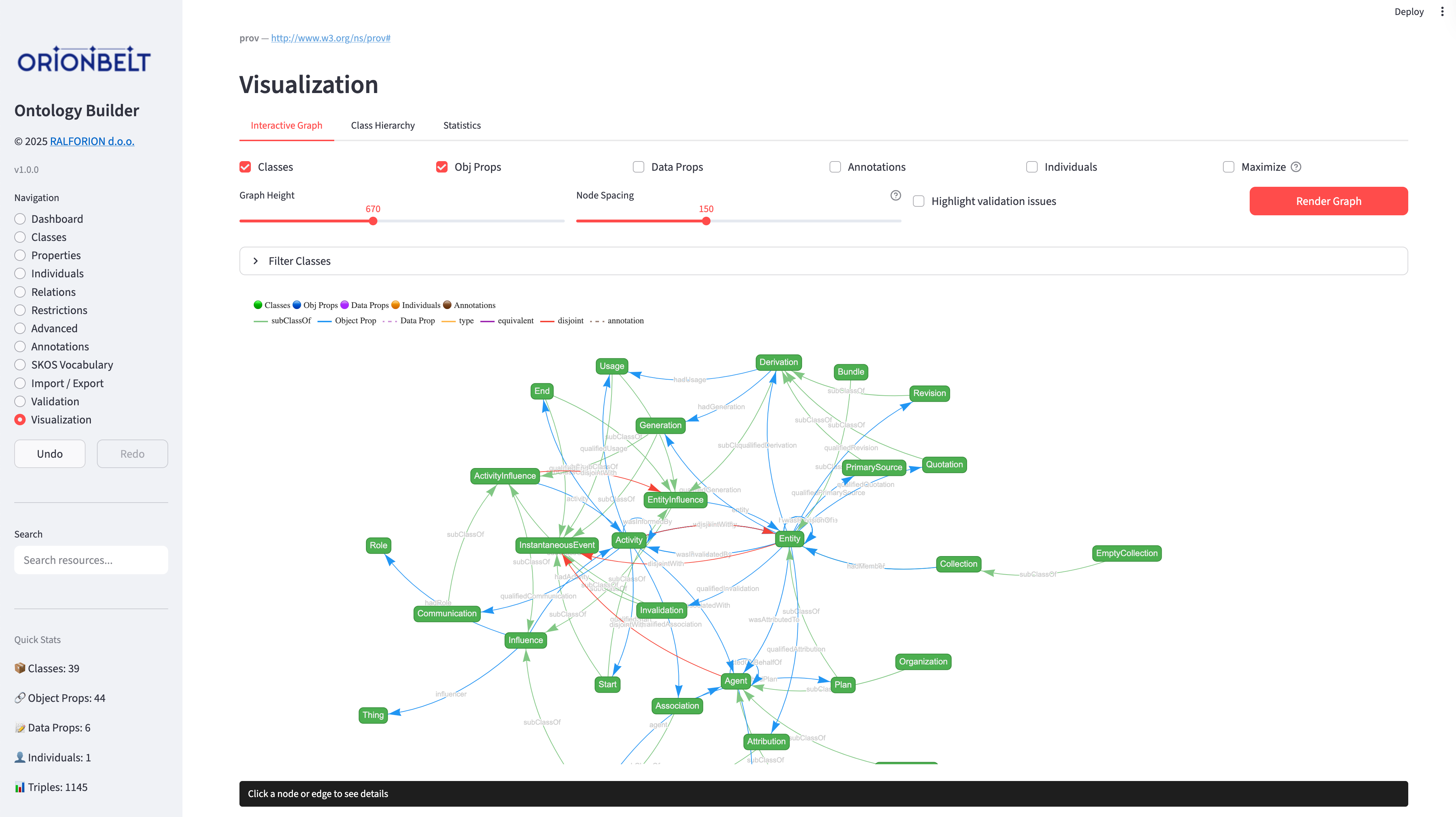
Interactive vis-network graph with class filtering, configurable node limits, click-to-navigate into the editor, Ctrl/Cmd-click a node to add it to the "Focus on one node" selection (narrowing the graph to its neighbourhood) or Alt-click to focus on it alone, hierarchy tree view, and statistics charts.
Safety
- Full undo/redo with labeled checkpoints
- Delete impact analysis before confirmation
- Bulk operations create a single undo point
- Namespace prefix management from the Dashboard
Quick Start
# Clone and install
git clone https://github.com/ralforion/orionbelt-ontology-builder.git
cd orionbelt-ontology-builder
uv sync                                  # or: pip install .

# Or install from PyPI
pip install orionbelt-ontology-builder

# Run
streamlit run app.py
Open http://localhost:8501
Run as a command
Installing the package also provides an orionbelt-ontology-builder command that
launches the app for you, so there is no need to call streamlit run yourself:
# Install as an isolated tool and run it (uv or pipx)
uv tool install orionbelt-ontology-builder
orionbelt-ontology-builder            # boots the app, opens the browser

# Or run it one-off without installing
uvx orionbelt-ontology-builder
pipx run orionbelt-ontology-builder
Any extra arguments are forwarded to Streamlit, e.g.
orionbelt-ontology-builder --server.port 8502.
Use as a Python library
The app is a thin wrapper over OntologyManager, the rdflib-backed engine. It
needs no Streamlit runtime, so you can build ontologies from a script, a
notebook, or a CI job:
from orionbelt_ontology_builder.ontology_manager import OntologyManager

ont = OntologyManager()
ont.add_class("Question")

# The same text format the Bulk Operations page accepts: name,label,parent
entries = ont.parse_bulk_text(
    "1,,Question\n1a,,1",
    default_columns=["name", "label", "parent"],
)
result = ont.bulk_add_classes(entries)
print(result["errors"])  # bulk methods report per entry, they do not raise

ont.save_to_file("out.ttl")  # format inferred from the extension, written atomically
Three things that are easy to trip over:
- Bulk methods return
{"created": [...], "errors": [...], "skipped": [...]}rather than raising, so a script that ignoreserrorswill look like it succeeded on input it silently rejected. - A parent referenced by a row but never given a row of its own is declared as a
bare
owl:Class, so therdfs:subClassOftarget is a real node. Twenty rows can legitimately produce twenty-one classes. parse_bulk_textis a@staticmethod, soOntologyManager.parse_bulk_text(...)works without an instance.
The same applies to the rest of the app: classes, properties, individuals, class
expressions, SKOS, reasoning and export are all OntologyManager methods. See
orionbelt_ontology_builder/ontology_manager.py
for the full surface.
There is no REST/HTTP API, and the orionbelt-ontology-builder command only
launches the app. In-process Python is the way to automate it.
Run as a native desktop app
Prefer a native window over a browser tab? Install the optional desktop extra
and use the orionbelt-ontology-builder-desktop command. It runs the app in a
native window (via streamlit-desktop-app,
pywebview + a real Streamlit server), so there is no browser tab to manage and no
manual start/stop of the server:
pip install "orionbelt-ontology-builder[desktop]"
orionbelt-ontology-builder-desktop    # opens a native window
On Linux and Windows the extra also installs PySide6 and qtpy to give pywebview a native Qt rendering backend (macOS uses the system WebKit backend, so they are not needed there).
The desktop window follows your OS light/dark appearance by default. Once you
pick a specific theme in the toolbar's Settings menu, that choice is remembered
across launches. To go back to following the system, clear the stored setting
(delete theme_base from ~/.orionbelt_ontology_builder/config.json).
Choosing a rendering backend
The desktop extra uses the Qt backend, which works out of the box. On Linux you
can use GTK instead with the gtk extra (qt is an explicit alias for the Qt
default):
pip install "orionbelt-ontology-builder[gtk]"
GTK needs system packages that pip cannot install. On Debian/Ubuntu:
sudo apt install python3-gi gir1.2-gtk-3.0 gir1.2-webkit2-4.1 \
    libgirepository1.0-dev
The launcher auto-selects whichever backend is installed; set PYWEBVIEW_GUI=qt
or PYWEBVIEW_GUI=gtk to override.
This is fully opt-in: the plain install and the orionbelt-ontology-builder
command above are unchanged.
Upgrading
uv tool upgrade can occasionally leave the tool's environment inconsistent
(for example the app's Streamlit server quitting when you switch to a tab). If
the app misbehaves after an upgrade, do a clean reinstall, keeping your backend
extra (issue #95):
uv tool uninstall orionbelt-ontology-builder
uv tool install "orionbelt-ontology-builder[qt]"   # or [gtk]; omit the extra for the browser-only command
orionbelt-ontology-builder-desktop                 # start it once
Local file storage
When you launch the app locally (the orionbelt-ontology-builder command or the
native desktop window), it persists to disk instead of browser storage:
- Crash recovery. With no linked file set, your working ontology is saved to
a recovery file under
~/.orionbelt_ontology_builder/on every change, so an unexpected close (crash, freeze) is recovered automatically on the next launch. When a linked file is set it becomes the store (below), and the recovery file is only written as a fallback if a linked-file write fails — so each change is one write, not two. - Linked working file. Use the sidebar's "Linked working file" control to
point the app at any file path. If the file already exists, you choose whether
to load it into the workspace (the default, so pointing at an existing
ontology opens it) or overwrite it with the current ontology; a new path is
created from your current work. Once linked, the file tracks your working
ontology and is loaded again on startup. Point it at a synced folder
(Nextcloud, Dropbox, ...) for fully automatic off-machine backups. The format
follows the file extension (
.ttl,.owl/.rdf,.nt,.n3,.jsonld; Turtle if unknown).
Autosave is gated on actual edits and debounced, so normal clicking around does no work even for large ontologies — the graph is serialized straight to a temp file and atomically swapped in only after edits settle (and immediately after an import or a new-ontology action). The sidebar shows "Saved to disk" only once that write completes, so a crash can lose at most the last second or two of edits. If a linked or recovery file can't be read or parsed on startup, disk autosave is paused (with a sidebar notice) so the unreadable file is never overwritten. The hosted demo on Streamlit Cloud has no local filesystem, so it keeps using per-browser autosave instead — which shares the same dirty/debounced scheduling and disables itself (until the graph shrinks) when an ontology exceeds the browser storage quota.
Run with Docker
A prebuilt image is published to Docker Hub. No local Python setup required:
docker run --rm -p 8501:8501 ralforion/orionbelt-ontology-builder
Then open http://localhost:8501. Use :1.24.0 to pin a specific version instead of latest.
To build the image yourself from a checkout:
docker build -t ralforion/orionbelt-ontology-builder .
docker run --rm -p 8501:8501 ralforion/orionbelt-ontology-builder
The container runs Streamlit headless on 0.0.0.0:8501 as a non-root user.
Upload size limit
Imported files are capped at 200 MB by default (Streamlit's maxUploadSize).
To import larger ontologies, raise the limit in .streamlit/config.toml:
[server]
maxUploadSize = 1000   # MB
or pass it at launch:
streamlit run app.py --server.maxUploadSize 1000
Parsing happens in memory, so the practical ceiling is the host machine's available RAM rather than this setting. The hosted demo is RAM-limited and keeps the 200 MB default; raise the value only when self-hosting with enough memory.
Pages
| Page | What it does |
|---|---|
| Dashboard | Metadata, base URI, statistics, prefix management, validation |
| Classes | Class hierarchy, CRUD, bulk operations |
| Properties | Object & data properties, CRUD, bulk operations |
| Individuals | Instance management, property assertions, bulk operations |
| Relations | Class, property, and individual relations |
| Restrictions | OWL restrictions and cardinality constraints |
| Advanced | Advanced OWL features |
| Annotations | RDFS, SKOS, DC and custom annotations, language packs, bulk edit, rename |
| SKOS Vocabulary | Concept schemes, concepts, hierarchy, SKOS validation |
| Import / Export | File import with merge review, export, new ontology, templates |
| Source | Live Turtle source view of the ontology |
| Validation | Ontology validation and OWL reasoning |
| Visualization | Interactive graph (OWL + SKOS), hierarchy tree, statistics |
Project structure
orionbelt-ontology-builder/
├── app.py                              # Streamlit Cloud entry point (delegates to package)
├── ontology_manager.py                 # Backward-compat shim
├── templates.py                        # Backward-compat shim
├── orionbelt_ontology_builder/         # The actual installable package
│   ├── app.py                          # Streamlit UI
│   ├── ontology_manager.py             # Core OWL/SKOS engine (rdflib)
│   ├── templates.py                    # Built-in templates / upper / reference ontologies
│   ├── samples/                        # Bundled gist, gUFO, FOAF, PROV-O, GoodRelations, …
│   ├── lib/                            # Frontend libraries (vis-network, Tom Select)
│   ├── assets/                         # Logos and screenshots
│   └── favicon.png
├── pyproject.toml                      # Project metadata
└── tests/                              # pytest suite
Dependencies: streamlit, rdflib, owlrl, networkx, pyvis.
Roadmap
Not implemented yet, listed here so it is clear what the workbench does not do today:
- SHACL validation. Validation is currently structural (orphan classes, duplicate labels, domain/range mismatches, SKOS cycles) plus OWL RL reasoning. Shape-based validation against SHACL constraints is not supported.
- SPARQL queries. There is no query console; exploration is through search, usage/backlink views and the graph.
Companion Project
OrionBelt Analytics
An ontology-based MCP server that analyzes relational database schemas (PostgreSQL, Snowflake, Dremio) and generates RDF/OWL ontologies with embedded SQL mappings. Together with the Ontology Builder, they form a toolkit for ontology-driven data modeling.
License
Copyright 2025–2026 RALFORION d.o.o.
Licensed under the Business Source License 1.1. The Licensed Work will convert to Apache License 2.0 on 2030-03-30.
By contributing to this project, you agree to the Contributor License Agreement.

Copyright © 2026 RALFORION d.o.o.
OrionBelt® is a registered trademark of RALFORION d.o.o.
1 maintainer

Download files
Download the file for your platform. If you're not sure which to choose, learn more about installing packages.
Source Distribution
Built Distribution
Filter files by name, interpreter, ABI, and platform.
If you're not sure about the file name format, learn more about wheel file names.
Copy a direct link to the current filters
File details
Details for the file orionbelt_ontology_builder-1.24.0.tar.gz.
File metadata
- Download URL: orionbelt_ontology_builder-1.24.0.tar.gz
- Upload date:
- Size: 1.7 MB
- Tags: Source
- Uploaded using Trusted Publishing? Yes
- Uploaded via:
twine/7.0.0 CPython/3.13.14
File hashes
| Algorithm | Hash digest | |
|---|---|---|
| SHA256 |
bea4e35385418ccbdad4520bae4ccc14853d5f14e985a920d0d23226cbfd9f95
|
|
| MD5 |
f97fbdbfe3c92541c10aaa78d06e4a84
|
|
| BLAKE2b-256 |
f451e10e76e50cded62eeb4a9b3d04965b5af5cbc423a6cd0ed0a55d76e23024
|
Provenance
The following attestation bundles were made for orionbelt_ontology_builder-1.24.0.tar.gz:
Publisher:
pypi-publish.yml on ralforion/orionbelt-ontology-builder
-
Statement:
-
Statement type:
https://in-toto.io/Statement/v1 -
Predicate type:
https://docs.pypi.org/attestations/publish/v1 -
Subject name:
orionbelt_ontology_builder-1.24.0.tar.gz -
Subject digest:
bea4e35385418ccbdad4520bae4ccc14853d5f14e985a920d0d23226cbfd9f95 - Sigstore transparency entry: 2583042579
- Sigstore integration time:
-
Permalink:
ralforion/orionbelt-ontology-builder@5ddb7a386cc4fe84b97592af3de49ccc02e07f95 -
Branch / Tag:
refs/tags/v1.24.0 - Owner: https://github.com/ralforion
-
Access:
public
-
Token Issuer:
https://token.actions.githubusercontent.com -
Runner Environment:
github-hosted -
Publication workflow:
pypi-publish.yml@5ddb7a386cc4fe84b97592af3de49ccc02e07f95 -
Trigger Event:
push
-
Statement type:
File details
Details for the file orionbelt_ontology_builder-1.24.0-py3-none-any.whl.
File metadata
- Download URL: orionbelt_ontology_builder-1.24.0-py3-none-any.whl
- Upload date:
- Size: 1.5 MB
- Tags: Python 3
- Uploaded using Trusted Publishing? Yes
- Uploaded via:
twine/7.0.0 CPython/3.13.14
File hashes
| Algorithm | Hash digest | |
|---|---|---|
| SHA256 |
749774d19ce3ee99e07bde951d5808143fa0d29721a39d92e949537584acb1f3
|
|
| MD5 |
8037c87d521064f1bfde9ae9956bb810
|
|
| BLAKE2b-256 |
2e48464b03efee9275a12ed31ac7696ffa88f8e30fefac5dc8ce3b49128fe25a
|
Provenance
The following attestation bundles were made for orionbelt_ontology_builder-1.24.0-py3-none-any.whl:
Publisher:
pypi-publish.yml on ralforion/orionbelt-ontology-builder
-
Statement:
-
Statement type:
https://in-toto.io/Statement/v1 -
Predicate type:
https://docs.pypi.org/attestations/publish/v1 -
Subject name:
orionbelt_ontology_builder-1.24.0-py3-none-any.whl -
Subject digest:
749774d19ce3ee99e07bde951d5808143fa0d29721a39d92e949537584acb1f3 - Sigstore transparency entry: 2583042588
- Sigstore integration time:
-
Permalink:
ralforion/orionbelt-ontology-builder@5ddb7a386cc4fe84b97592af3de49ccc02e07f95 -
Branch / Tag:
refs/tags/v1.24.0 - Owner: https://github.com/ralforion
-
Access:
public
-
Token Issuer:
https://token.actions.githubusercontent.com -
Runner Environment:
github-hosted -
Publication workflow:
pypi-publish.yml@5ddb7a386cc4fe84b97592af3de49ccc02e07f95 -
Trigger Event:
push
-
Statement type:














