

OrionBelt® Semantic Layer MCP
Thin MCP server that delegates to the OrionBelt® Semantic Layer REST API









A thin MCP server that delegates all business logic to the OrionBelt® Semantic Layer REST API via HTTP. No embedded engine — pure API pass-through.
Architecture
The OrionBelt® Semantic Layer platform has two deployment modes. This MCP server supports both:
- Standalone — Deploy the OrionBelt® Semantic Layer API anywhere (Cloud Run, Docker, localhost) and point this MCP server at it via
API_BASE_URL. - Hosted — Connect to the public Cloud Run deployment with zero local setup (see Hosted MCP Server below).
┌────────────┐       ┌──────────────────────────────────────────────────────┐
│ LLM Client │       │                OrionBelt® Platform                   │
│            │       │                                                      │
│  Claude,   │──MCP──│──> server.py  ──HTTP /v1──>  Semantic Layer REST API │
│  Cursor,   │       │    (FastMCP                   (FastAPI: parse OBML,  │
│  any MCP   │       │     + httpx)                   validate, compile     │
│  client    │       │                                to SQL)               │
└────────────┘       └──────────────────────────────────────────────────────┘
- No business logic — all tool calls delegate to the REST API (v1 endpoints)
- Dual-mode — auto-detects single-model or multi-model API mode at startup
- Auto-session management — creates an API session on first tool call, caches the ID (multi-model mode)
- 25 tools (single-model mode) or 29 tools (multi-model mode) for querying (QueryObject), execution, batch, discovery, composability (ACR), examples, diagrams, RDF/SPARQL, lineage of artefacts and queries, business rules (list, explain, evaluate), ontology links (concept mappings, namespaces, unmapped artefacts), OSI export, model validation (offline or against the live datasource), and OBML reference + function catalog + JSON schemas. (30 distinct tools exist in total; the API mode selects which subset is active — they overlap in 24 — and no client ever sees all 30 at once.) The visible surface is narrowed further in the design-time phase and when query execution is disabled (see Design-time vs run-time tool switching)
- 5 prompts + 2 resources for OBML / OBSQL reference, business rules, and usage guidance
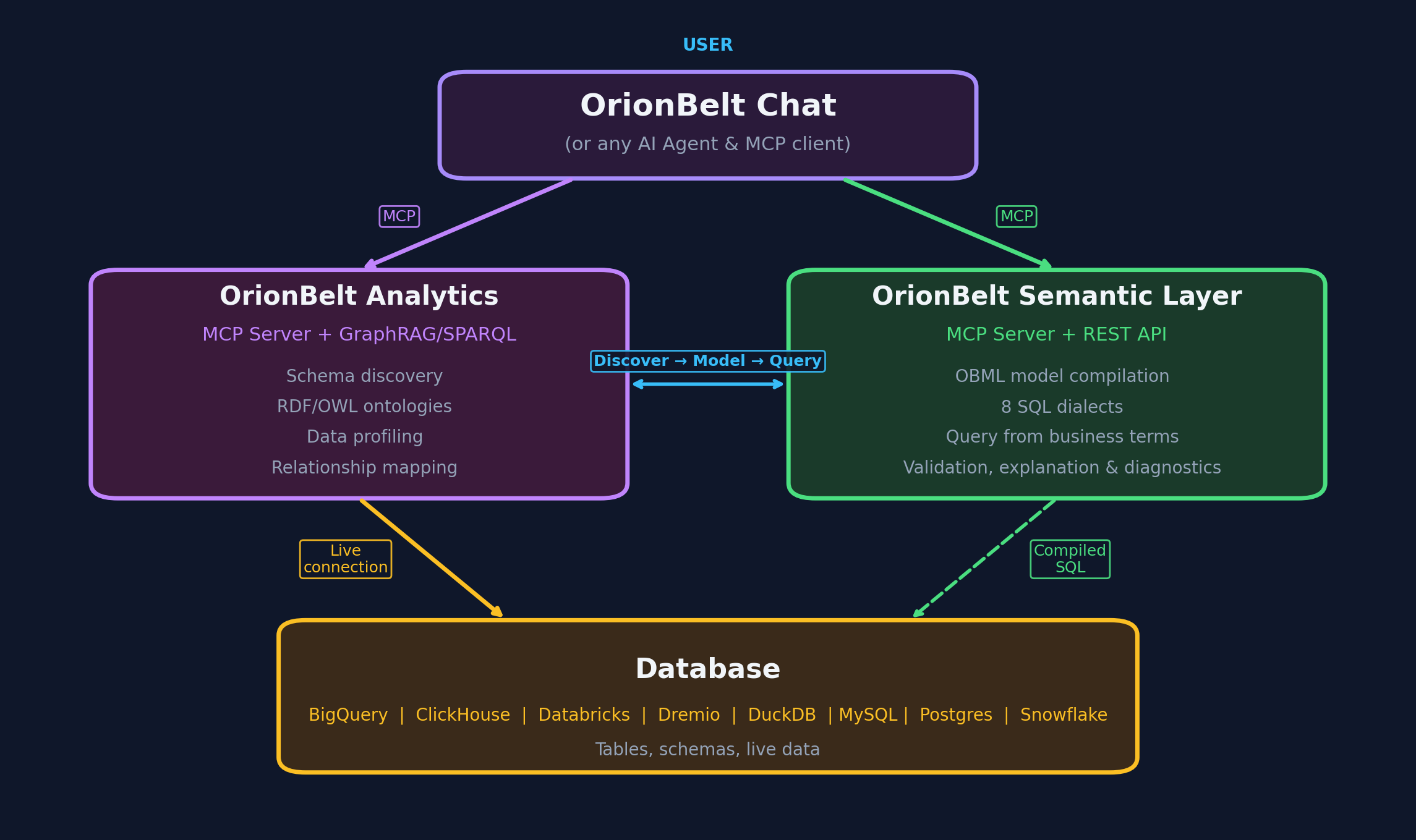
Live Demo
A public demo of the OrionBelt® Semantic Layer API is available at:
API endpoint:
https://orionbelt.ralforion.com— Swagger UI | ReDoc | Gradio UI
Set API_BASE_URL=https://orionbelt.ralforion.com in your .env file to use it (see .env.example).
Installation
uv sync
For development (includes pytest, respx, ruff):
uv sync --all-groups
Usage
stdio (default)
uv run server.py
HTTP transport
MCP_TRANSPORT=http uv run python server.py
The HTTP transport runs stateless by default (MCP_STATELESS_HTTP=true):
every request is self-contained, with no Mcp-Session-Id, no stream
resumability, and no server-initiated messages. Nothing here needs that state —
the tool phase is derived from explicit loaded-model state rather than from the
connection, and no tool sends progress, sampling, or elicitation requests — so
instances can sit behind a load balancer without session affinity. Set
MCP_STATELESS_HTTP=false to restore per-connection sessions; sse always runs
stateful, since it is a long-lived per-connection stream.
Note this is the transport session only. The upstream API session and the set of loaded models remain process-global and shared by every client of an instance, unchanged by this flag.
Transport security
The HTTP/SSE transport terminates no TLS and authenticates no caller — it expects an ingress in front that does both. These are two separate jobs, and no platform does both for you by default.
On Cloud Run, the intended deployment, TLS is automatic: the service URL is
served over HTTPS and plain HTTP is forwarded to the container. Access control
is not. It is a deploy-time choice, settled any of three ways — IAM invoker
permission, an --ingress restriction, or an authenticating load balancer in
front. With none of them, --allow-unauthenticated leaves the service reachable
by anyone who learns its URL, over HTTPS, with no credential required. Encrypted
is not the same as restricted.
This matters because the two hops have different answers:
| Hop | Security |
|---|---|
| MCP client → this server | stdio: pipes to a child process, no socket at all. http/sse: whatever the ingress in front provides — nothing if there is none |
| This server → the API | TLS whenever API_BASE_URL is https:// (the default), with certificates verified against httpx's default CA bundle (certifi), or against API_CA_CERT for a private CA; API_CLIENT_CERT adds a client certificate for mutual TLS. There is no verify=False and no way to disable it short of an http:// URL |
Exposing the HTTP transport directly is the case to avoid. Anything that can
reach the port can call every registered tool — including execute_query where
the capability is enabled — spending this server's own API_KEY against the
API, over a channel readable in transit. The credential never crosses that hop;
the access it buys does.
The server warns at startup when it detects this: an http/sse transport
bound to a non-loopback address, off Cloud Run, without MCP_BEHIND_PROXY=true.
Bind MCP_SERVER_HOST to loopback, put an authenticating TLS ingress in front,
or set MCP_BEHIND_PROXY=true to acknowledge a proxy the server has no way to
see.
On Cloud Run it logs an informational note instead of that warning, naming the
half that is still yours: TLS is handled, access control is whatever you
deployed with. Silence there is not evidence the service is restricted — the
process cannot read its own IAM policy or ingress setting. Confirm one of the
three above is in place; if one is, MCP_BEHIND_PROXY=true records that and
silences the note.
The API's own
*_TLS_*settings are the server half and none of them is read here.PGWIRE_TLS_*andFLIGHT_TLS_*(2.28.0) secure listeners this server never connects to.API_TLS_*(2.29.0) makes the REST API serve HTTPS itself, andAPI_TLS_CLIENT_CAmakes it require a client certificate — which is what the settings below are for.
TLS to the API
When the API serves HTTPS with a certificate from a private CA, or requires
mutual TLS — API_TLS_CLIENT_CA on the API, or a gateway in front that asks
for a client certificate — point this server at the material:
API_BASE_URL=https://obsl.internal:8000
API_CA_CERT=/certs/ca.crt            # trust this CA instead of the default store
API_CLIENT_CERT=/certs/mcp.crt       # present this certificate…
API_CLIENT_KEY=/certs/mcp.key        # …with this key (omit if it is in the same PEM)
The certificate is loaded when the server starts, on every transport, so a path
that is missing, unreadable, or not what it claims stops startup naming the
setting and the file — rather than surfacing later as an SSL error from inside
the HTTP client. The startup banner's API TLS: line reports what the hop
ended up with.
API_CA_CERTreplaces the default trust store, it does not extend it. Unset, verification uses httpx's default (certifi, orSSL_CERT_FILE/SSL_CERT_DIR), and adding a client certificate does not change that.- These require an
https://API_BASE_URL. Onhttp://there is no handshake, so nothing would be presented or verified; that configuration is refused rather than left to read as TLS. - Password-protected keys are refused, not prompted for. Under
stdio, stdin is the MCP pipe, so OpenSSL's terminal prompt would corrupt the protocol or hang. Provide the key decrypted, protected by file permissions or a secret mount.
MCP client configuration
Add to your MCP client config (e.g. claude_desktop_config.json):
{
  "mcpServers": {
    "orionbelt": {
      "command": "uv",
      "args": ["run", "python", "server.py"],
      "cwd": "/path/to/orionbelt-semantic-layer-mcp"
    }
  }
}
Configuration
Environment variables or .env file (pydantic-settings). See .env.example for defaults.
| Variable | Default | Description |
|---|---|---|
API_BASE_URL |
— (required) | OrionBelt® Semantic Layer REST API URL |
API_KEY |
— (unset) | API credential; required only when the API runs with AUTH_MODE=api_key |
API_KEY_HEADER |
X-API-Key |
Header the credential is sent in; must match the API's API_KEY_HEADER |
API_CA_CERT |
— (unset) | PEM CA bundle to verify the API against, replacing the default trust store; for a private CA. Requires an https:// API_BASE_URL — see TLS to the API |
API_CLIENT_CERT |
— (unset) | PEM client certificate presented to the API, for mutual TLS (API_TLS_CLIENT_CA on the API, or a gateway that asks for one) |
API_CLIENT_KEY |
— (unset) | PEM private key for API_CLIENT_CERT; omit when the key is in the same file. Unencrypted only |
MCP_TRANSPORT |
stdio |
stdio, http, or sse |
MCP_SERVER_HOST |
localhost |
Bind host for HTTP/SSE |
MCP_SERVER_PORT |
9000 |
Bind port for HTTP/SSE |
MCP_BEHIND_PROXY |
false |
Acknowledges an ingress in front of the HTTP transport that terminates TLS and authenticates callers — both, not either. Silences the exposure warning only — it grants the server no capability and changes no behavior |
MCP_STATELESS_HTTP |
true |
Run the HTTP transport without a per-connection MCP session (no Mcp-Session-Id, no stream resumability) so instances scale without session affinity. Ignored for stdio; forced off for sse |
LOG_LEVEL |
INFO |
Logging level |
API_TIMEOUT |
30 |
HTTP timeout in seconds |
Tools
Model lifecycle
| MCP Tool | Description |
|---|---|
get_obml_reference() |
Returns the full OBML format specification |
load_model(model? | osi_yaml?, dedup=True) |
Parse, validate, and store a model (returns health + model_load). Pass model (OBML JSON) or osi_yaml (OSI YAML, converted to OBML server-side) |
validate_model(model? | model_yaml?, extends?, inherits?, online=False, dialect?) |
Validate a model without loading it. online=True additionally probes the configured datasource for every declared table and column, reporting drift a structural check cannot see (DATASOURCE_*). extends / inherits are multi-model only — the stateless route single-model mode uses ignores both, so they are refused there rather than silently dropped |
describe_model(model_id) |
Inspect data objects, dimensions, measures, metrics |
remove_model(model_id) |
Remove a model from the current session |
list_models() |
List all models loaded in the current session |
export_model_to_osi(model_id, ...) |
Export a loaded model as OSI YAML |
Model discovery
| MCP Tool | Description |
|---|---|
find_artefacts(model_id, query?, kind?, name?) |
Look up artefacts. With query → fuzzy, ranked search (resolve a vague term: exact / synonym / fuzzy). Without query → exact, deterministic lookup (all artefacts, one kind, or one named artefact, full records) |
explain_artefact(model_id, name) |
Explain lineage of a dimension, measure, or metric |
get_lineage(name? | query_json?, kind?, dialect?, output_format="text", model_id) |
Lineage graph of a dimension, measure, metric or business rule — or of a whole query, with the joins the planner chose (pathName and role joins included) — down to the tables it reads. kind is optional (every kind is tried; a rule named like a measure returns both). output_format: text, mermaid, turtle (prov:wasDerivedFrom over the OBSL graph's IRIs, merges with get_model_graph) or json |
list_examples(model_id, intent?) |
List authored example queries (filterable by intent tag) |
get_example(model_id, name) |
Get one example with query + compiled SQL preview |
get_join_graph(model_id) |
Return the join graph as an adjacency list |
find_composables(query_json?, anchors?, anchor_type?, model_id?) |
ACR — given an in-progress query or named anchor(s), return the dimensions/measures/metrics that still compose into a valid, fanout-free result (plus CFL candidates). Guaranteed to compile |
Query, execution & diagrams
| MCP Tool | Description |
|---|---|
execute_query(...) |
Compile and execute a QueryObject, returning SQL + rows |
run_batch(queries, ...) |
One-shot: load a model + run N queries in parallel |
get_model_diagram(model_id) |
Generate a Mermaid ER diagram for a loaded model |
Semantic graph (RDF / SPARQL)
| MCP Tool | Description |
|---|---|
get_model_graph(model_id) |
Return the model as OBSL-Core RDF (Turtle) |
query_model_graph_by_sparql(query, ...) |
Run a read-only SPARQL query (SELECT / ASK) |
Business rules
| MCP Tool | Description |
|---|---|
list_rules(model_id) |
The model's rules: with statistics by type, level (row-level / aggregate), severity and executability |
explain_rule(name, model_id) |
One rule in full: definition, what it reads, the tables behind it, dependencies, ontology links, and the SQL it compiles to |
evaluate_rule(name, limit?, dialect?, format_values?, model_id) |
Run one rule and list its findings: members for classification / eligibility, violations for validation / constraint. Needs query execution enabled |
evaluate_rules(types?, severities?, executable_only?, max_rules?, limit=5, dry_run?, dialect?, model_id) |
Run every rule (or a subset) into a report with per-rule status, counts, sample findings and errors; dry_run=True compiles only and works with execution disabled |
Ontology links (external concept mappings)
| MCP Tool | Description |
|---|---|
find_concept_mappings(concept?, namespace?, relation?, types?, model_id) |
Every externalConceptMappings entry with its artefact, SKOS relation, expanded IRI and provenance; filter by concept, namespace, relation or artefact type |
list_concept_namespaces(model_id) |
Which external ontologies the model links into, most used first, plus declared prefixes no mapping uses |
list_unmapped_artefacts(types?, model_id) |
The artefacts in the mappable scope still without a link |
References
| MCP Tool | Description |
|---|---|
get_obml_reference() |
OBML (model authoring) grammar reference |
get_function_catalog() |
Portable scalar functions usable in OBML expressions, with their pinned cross-dialect semantics |
get_json_schema(name) |
JSON Schema for obml (model) or query (QueryObject) |
Utilities
| MCP Tool | Description |
|---|---|
list_dialects() |
List available SQL dialects and capabilities |
Design-time vs run-time tool switching
The server presents a phase-scoped tool surface: instead of listing all
all tools at once, it shows only the tools that make sense for where you are in
the model lifecycle. About half the tools are meaningless until a model is
loaded (execute_query, describe_model, find_artefacts, …) and the rest are
about authoring or reference (get_obml_reference, get_function_catalog,
get_json_schema, validate_model, list_dialects). Splitting them keeps the surface small and prevents a
whole class of error — calling a query tool with no model loaded.
Three buckets, swapped by phase
Tools fall into three buckets. The visible surface is a swap at the load/unload transition, not additive — the run phase does not show the design/reference tools:
| Bucket | Listed when | Tools |
|---|---|---|
| Always | always (both phases) | load_model, remove_model (transition verbs — stay available in the run phase so a second model can be loaded mid-session, up to max_models_per_session); run_batch and validate_model (self-contained — each takes its model inline, so neither needs prior session state); get_json_schema (QueryObject/OBML schemas — needed in both phases) |
| Design-only | only when no model loaded | get_obml_reference, get_function_catalog, list_dialects |
| Run-only | only when a model is loaded | describe_model, get_model_diagram, find_artefacts, explain_artefact, get_lineage, execute_query, list_examples, get_example, get_model_graph, get_join_graph, find_composables, query_model_graph_by_sparql, list_rules, explain_rule, evaluate_rule, evaluate_rules, find_concept_mappings, list_concept_namespaces, list_unmapped_artefacts, list_models, export_model_to_osi |
                       load_model  (returns "re-list" signal)
   ┌─────────────────┐ ────────────────────────────────▶ ┌───────────────┐
   │ design phase    │                                   │ run phase     │
   │ always + design │ ◀───────────────────────────────  │ always + run  │
   └─────────────────┘  remove_model (last model) / TTL  └───────────────┘
                        expiry — back to design phase
So design phase → always + design-only, run phase → always + run-only. Design/reference tools are hidden once a model is loaded, keeping the run surface focused on querying.
Re-listing
The MCP tools/list response is filtered to the active phase. Because the
stateless MCP spec makes push notifications (notifications/tools/list_changed)
unreliable, transitions are pull-based: load_model (design → run) and
remove_model (run → design, once no models remain) return a short signal
telling the client to re-list its tools and pick up the swapped surface.
Guard against premature calls
If a client calls a run-only verb while still in the design phase (e.g. a stale host that hasn't re-listed yet), the server returns a structured error rather than an opaque failure:
No model loaded — '
execute_query' is a run-time tool and is not available yet. Callload_modelfirst, then re-list tools.
Capability gating (orthogonal to phase)
Separately from lifecycle phase, a tool can be hidden because the server is
configured not to support it. The execution tool execute_query is gated on
the API's query_execute capability: when the server runs compile-only it is
dropped from tools/list and calling it returns a structured error. This
composes with phase — a verb is listed only if its phase is active and its
capability is enabled. The mechanism is a general capability registry, so
future "the server can't do X here" flags hide their tools the same way.
Single-model mode
When the API runs in single-model mode a model is pre-loaded at startup, so
the server is permanently in the run-time phase — every applicable tool is
listed from the first request and there is no load_model step.
Note on caching hints. The
2026-07-28MCP spec addsttlMs/cacheScopehints ontools/list(SEP-2549). These are intentionally not set yet — the fields are a release candidate, and FastMCP's list-tools hook exposes only the tool list, not the result envelope. The explicit re-list signal above is the primary (and spec-recommended) transition mechanism in the meantime.
Supported SQL Dialects
postgres, snowflake, clickhouse, databricks, dremio, bigquery, duckdb
Workflow
- Get reference — call
get_obml_reference()to learn OBML syntax - Load model — call
load_model(model_yaml)to get amodel_id - Explore — call
describe_model(model_id)or use discovery tools (find_artefacts,explain_artefact,get_lineage) - Execute — call
execute_query(model_id, query_json='{"select": {"dimensions": [...], "measures": [...]}}')to compile and run SQL, returning rows (requiresQUERY_EXECUTE=trueon the API; seeget_json_schema("query")for the QueryObject shape)
Integration Guides
Use the OrionBelt® Semantic Layer MCP server with popular AI agent frameworks and automation platforms:
| Framework | Transport | Guide |
|---|---|---|
| OpenAI Agents SDK | stdio, HTTP, SSE | docs/integrations/openai-agents-sdk.md |
| LangChain | stdio, HTTP | docs/integrations/langchain.md |
| Google ADK | stdio, HTTP, SSE | docs/integrations/google-adk.md |
| n8n | HTTP, SSE | docs/integrations/n8n.md |
| CrewAI | stdio, HTTP | docs/integrations/crewai.md |
Each guide includes quick-start examples, multi-agent patterns, and connection options for both the hosted demo and self-hosted deployments.
Development
# Run tests
uv run pytest

# Lint and format
uv run ruff check server.py
uv run ruff format server.py tests/

# Set up pre-commit hooks (recommended)
./scripts/setup-hooks.sh
GitHub Actions pinning
Every uses: in .github/workflows is pinned to a 40-character commit SHA with
a comment naming the exact patch release it was cut from:
- uses: actions/checkout@3d3c42e5aac5ba805825da76410c181273ba90b1 # v7.0.1
A tag such as v7 is a movable label — the action's owner can repoint it at any
time, so @v7 runs whatever commit it happens to name when the job starts. A
SHA cannot move. Every workflow also starts read-only (permissions: contents: read), with write scopes granted on the single job that needs them (only
id-token: write, on the PyPI publish job).
Pinning makes each reference unreadable, though, and nothing inherently keeps a
SHA and the comment beside it in agreement: a pull request could swap the hash
for one taken from a fork, leave # v7.0.1 untouched, and the diff would look
like a routine dependency bump. scripts/check-action-pins.sh closes that gap.
It requires a real SHA, an owner on its ALLOWED_OWNERS allowlist, and a
version comment naming an exact patch release, then resolves that tag upstream
with git ls-remote and fails if the commit it names is not the one pinned.
./scripts/check-action-pins.sh            # every check, including upstream lookups
./scripts/check-action-pins.sh --offline  # skip the network; SHA and comment format only
It runs as the pins job in CI, and again as the first step after checkout in
both tag-triggered publish workflows, so no release ships artifacts built by
steps whose pins were never verified. Bumping an action means updating the SHA
and its comment together; add a new action's owner to ALLOWED_OWNERS
deliberately, since a pin verifies against its own tag no matter who published
it.
Release Process
The release script (scripts/release.sh) includes comprehensive pre-flight checks to prevent issues like the v2.8.2 formatting problem:
- Code formatting check - Ensures
ruff formatpasses - Linting check - Ensures
ruff checkpasses - CI status check - Warns if CI is not green
- Test suite - Runs all tests
- Version consistency - Verifies version across files
- Changelog - Ensures changelog entry exists
Pre-commit hooks are available to catch issues early. Run ./scripts/setup-hooks.sh to install them.
Hosted MCP Server
A public hosted instance of this MCP server runs on Google Cloud Run, connected to the live OrionBelt® Semantic Layer demo API. No local install, no API key.
Endpoint
https://orionbelt.ralforion.com/mcp
Streamable HTTP (MCP spec 2025-03-26). Stateful — clients should send the
initialize handshake and reuse the returned Mcp-Session-Id header.
Quick start with Claude Desktop
Claude Desktop's config schema accepts only stdio launchers — for a remote
MCP server, use the mcp-remote
stdio↔HTTP bridge (auto-fetched by npx, no manual install).
Edit ~/Library/Application Support/Claude/claude_desktop_config.json (macOS)
or %APPDATA%\Claude\claude_desktop_config.json (Windows) and add:
{
  "mcpServers": {
    "orionbelt": {
      "command": "npx",
      "args": [
        "mcp-remote",
        "https://orionbelt.ralforion.com/mcp",
        "--transport",
        "http"
      ]
    }
  }
}
Fully quit Claude Desktop (⌘Q on macOS — closing the window isn't enough) and reopen. The OrionBelt® tools then appear in the tools menu.
Alternatively, in newer Claude Desktop builds: Settings → Connectors → Add
custom connector, paste the URL above. No file editing or npx required.
Why
mcp-remote? Claude Desktop'sclaude_desktop_config.jsonschema currently only validates stdio entries (command+args). A bare{"url": "…"}entry is rejected with "not valid MCP server configurations and were skipped".mcp-remoteruns a local stdio bridge that forwards to the HTTPS endpoint, so Claude Desktop sees a normal stdio server. Claude Code does support{"type": "url", "url": "…"}natively — see below.
Quick start with Claude Code
Add to .mcp.json in any repo (or ~/.config/claude-code/.mcp.json globally):
{
  "mcpServers": {
    "orionbelt": {
      "type": "url",
      "url": "https://orionbelt.ralforion.com/mcp"
    }
  }
}
Other MCP clients
Any client that supports Streamable HTTP transport (MCP spec 2025-03-26) can
point at the URL above. The endpoint accepts POST /mcp with
Accept: application/json, text/event-stream. See
tests/cloudrun/test_mcp_cloudrun.sh
for a stdlib-only Python smoke test that walks the full handshake.
Notes
- The hosted instance scales to zero when idle, so the first request after a cold period takes ~1–2 seconds longer.
- It connects to the public demo API at
https://orionbelt.ralforion.com— same data, same dialects, no authentication. Don't load production data through it. - For self-hosting, see the Installation section above and
the
Dockerfile.
License
Copyright 2026 RALFORION d.o.o.
Licensed under the Apache License, Version 2.0. See LICENSE for details.
Third-party licenses
The PyPI package ships only server.py — its dependencies are declared, not
bundled, so it redistributes no third-party code.
The Docker image does bundle them, and carries their licenses in three places:
| In the image | Covers |
|---|---|
/app/.venv/lib/*/site-packages/*.dist-info/licenses/ |
each Python package, as its author shipped it |
/app/THIRD_PARTY_NOTICES.md |
the same texts aggregated into one file |
/usr/share/doc/*/copyright |
the Debian base packages inherited from python:3.14-slim |
The aggregate is committed as
THIRD_PARTY_NOTICES.md and copied into the image,
so it is readable without pulling anything and is reviewed in the same diff as
the dependency change that altered it. CI regenerates it from the locked set on
every PR and fails if the committed copy differs, which is what keeps it from
drifting. To read the one an image actually carries — the ground truth for any
given tag:
docker run --rm --entrypoint cat ralforion/orionbelt-semantic-layer-mcp:latest \
    /app/THIRD_PARTY_NOTICES.md
Regenerate it with scripts/third_party_notices.py, on Linux. It resolves for
the image's target rather than for your host, and a host-resolved run on macOS
would silently omit jeepney and SecretStorage.
The Python dependencies are permissive with two exceptions, both recorded
in ACKNOWLEDGED in scripts/third_party_notices.py rather than left to a
reader's inference: certifi is MPL-2.0, and docutils offers a choice that
includes the GPL. MPL-2.0 is file-level copyleft and reaches the files
themselves, not the program importing them, so shipping it unmodified alongside
this notice satisfies it. The docutils choice has to be made in writing before
a release, and the generator fails until it is. Everything else is MIT, BSD,
Apache-2.0, ISC, Unlicense or PSF-2.0, and none of it reaches the server's own
code.
The Debian base is a separate matter. python:3.14-slim brings ~87 system
packages, many of them GPL/LGPL (coreutils, libc6, bash, …), exactly as
every Debian-based image does. They are unmodified upstream packages invoked as
ordinary OS components, not linked into or derived from this server, and their
licenses and written-offer text ship in the image under /usr/share/doc/ and
/usr/share/common-licenses/. If your distribution policy needs to avoid them
entirely, rebuild FROM a distroless or Alpine base.

Copyright © 2026 RALFORION d.o.o.
OrionBelt® is a registered trademark of RALFORION d.o.o.
1 maintainer

Metadata
1 maintainer
Release files for orionbelt-semantic-layer-mcp 2.34.0
For a detailed explanation of source distributions (sdists) and built distributions (wheels), please see the package formats documentation.
Source distribution (sdist)
| File | Size | Uploaded | |
|---|---|---|---|
| orionbelt_semantic_layer_mcp-2.34.0.tar.gz | 519.2 kB | Details |
Built distribution (wheel)
| File | Interpreter | ABI | Platform | Reset |
|---|---|---|---|---|
| orionbelt_semantic_layer_mcp-2.34.0-py3-none-any.whl | Python 3 | none | any | Details |
Total release size: 595.8 kB
Release files / orionbelt_semantic_layer_mcp-2.34.0.tar.gz
| Download URL | orionbelt_semantic_layer_mcp-2.34.0.tar.gz |
|---|---|
| Size | 519.2 kB |
| Tags | Source |
|
SHA-256 checksum How to use checksums |
0e4c7670861ea250745cb924ad4e61426b25f8dff77a0605021b33d9f2951d3b
|
|
BLAKE2b-256 checksum How to use checksums |
c7eb7c11fc2d7768c34d13b2624c9db4dd631f1de77079f8f2ccb1e2530d088a
|
| Upload date | |
|
Uploaded using Trusted Publishing? What is trusted publishing? |
Yes |
| Uploaded via |
twine/7.0.0 CPython/3.13.14
|
Provenance
Provenance describes where a file came from. On PyPI, provenance is shared via attestations, which provide a verifiable record of the build or publishing details. View details, limitations and caveats.


PyPI Publish Attestation
PyPI verified that this artifact, at this checksum, originated from the publisher listed below.
Signed by GitHub Actions, verified by PyPI on Oct 8, 2026.
Transparency logRelease files / orionbelt_semantic_layer_mcp-2.34.0-py3-none-any.whl
| Download URL | orionbelt_semantic_layer_mcp-2.34.0-py3-none-any.whl |
|---|---|
| Size | 76.6 kB |
| Tags | Python 3 |
|
SHA-256 checksum How to use checksums |
a7ff24c56b23356dfdff12d75e7da42471745670003d2aedfc08095bc544c6eb
|
|
BLAKE2b-256 checksum How to use checksums |
83df3e22eea5e9b24e1a4bb0b311dfd5c82f9654880e736125d7eb05754d08d8
|
| Upload date | |
|
Uploaded using Trusted Publishing? What is trusted publishing? |
Yes |
| Uploaded via |
twine/7.0.0 CPython/3.13.14
|
Provenance
Provenance describes where a file came from. On PyPI, provenance is shared via attestations, which provide a verifiable record of the build or publishing details. View details, limitations and caveats.
PyPI Publish Attestation
PyPI verified that this artifact, at this checksum, originated from the publisher listed below.
Signed by GitHub Actions, verified by PyPI on Oct 8, 2026.
Transparency log













