
Thin MCP server for OrionBelt Semantic Layer — delegates to REST API

Project description

OrionBelt Semantic Layer MCP
Thin MCP server that delegates to the OrionBelt Semantic Layer REST API






A thin MCP server that delegates all business logic to the OrionBelt Semantic Layer REST API via HTTP. No embedded engine — pure API pass-through.
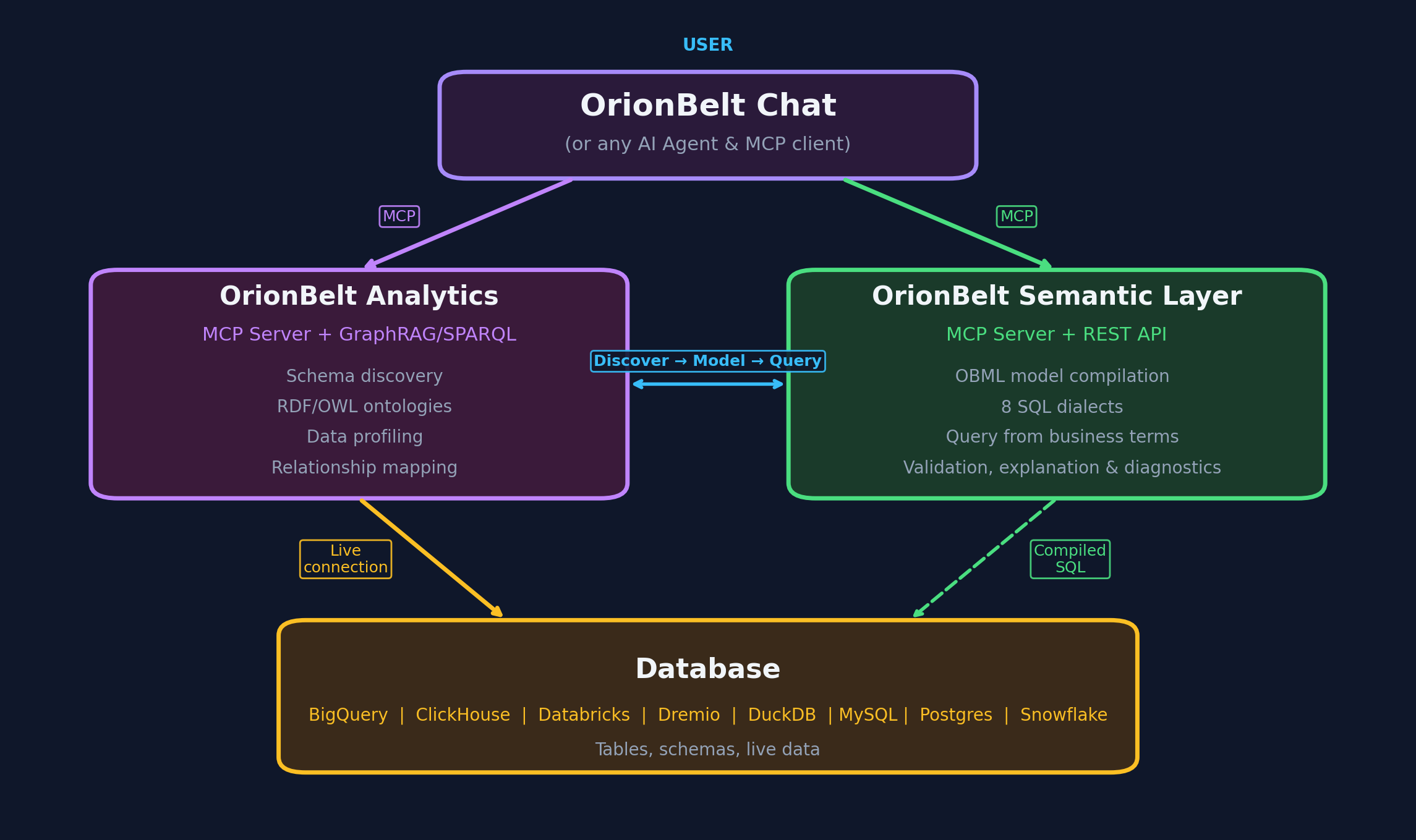
Architecture
The OrionBelt Semantic Layer platform has two deployment modes. This MCP server supports both:
- Standalone — Deploy the OrionBelt Semantic Layer API anywhere (Cloud Run, Docker, localhost) and point this MCP server at it via
API_BASE_URL. - Hosted — Use the managed deployment on Prefect Horizon with zero local setup (see Live Demo Hosting below).
┌────────────┐       ┌──────────────────────────────────────────────────────┐
│ LLM Client │       │                OrionBelt Platform                    │
│            │       │                                                      │
│  Claude,   │──MCP──│──> server.py  ──HTTP /v1──>  Semantic Layer REST API │
│  Cursor,   │       │    (FastMCP                   (FastAPI: parse OBML,  │
│  any MCP   │       │     + httpx)                   validate, compile     │
│  client    │       │                                to SQL)               │
└────────────┘       └──────────────────────────────────────────────────────┘
- No business logic — all tool calls delegate to the REST API (v1 endpoints)
- Dual-mode — auto-detects single-model or multi-model API mode at startup
- Auto-session management — creates an API session on first tool call, caches the ID (multi-model mode)
- 22 tools (single-model mode) or 25 tools (multi-model mode) for querying, execution, discovery, diagrams, RDF/SPARQL, and format conversion
- 3 prompts + 1 resource for OBML reference and usage guidance
Live Demo
A public demo of the OrionBelt Semantic Layer API is available at:
API endpoint:
http://35.187.174.102— Swagger UI | ReDoc | Gradio UI
Set API_BASE_URL=http://35.187.174.102 in your .env file to use it (see .env.example).
Installation
uv sync
For development (includes pytest, respx, ruff):
uv sync --all-groups
Usage
stdio (default)
uv run server.py
HTTP transport
MCP_TRANSPORT=http uv run python server.py
MCP client configuration
Add to your MCP client config (e.g. claude_desktop_config.json):
{
  "mcpServers": {
    "orionbelt": {
      "command": "uv",
      "args": ["run", "python", "server.py"],
      "cwd": "/path/to/orionbelt-semantic-layer-mcp"
    }
  }
}
Configuration
Environment variables or .env file (pydantic-settings). See .env.example for defaults.
| Variable | Default | Description |
|---|---|---|
API_BASE_URL |
— (required) | OrionBelt Semantic Layer REST API URL |
MCP_TRANSPORT |
stdio |
stdio, http, or sse |
MCP_SERVER_HOST |
localhost |
Bind host for HTTP/SSE |
MCP_SERVER_PORT |
9000 |
Bind port for HTTP/SSE |
LOG_LEVEL |
INFO |
Logging level |
API_TIMEOUT |
30 |
HTTP timeout in seconds |
Tools
Model lifecycle
| MCP Tool | Description |
|---|---|
get_obml_reference() |
Returns the full OBML format specification |
load_model(model_yaml) |
Parse, validate, and store a semantic model |
validate_model(model_yaml) |
Validate a model without storing it |
describe_model(model_id) |
Inspect data objects, dimensions, measures, metrics |
remove_model(model_id) |
Remove a model from the current session |
list_models() |
List all models loaded in the current session |
Model discovery
| MCP Tool | Description |
|---|---|
get_model_schema(model_id) |
Full model structure as JSON (detailed) |
list_dimensions(model_id) |
List all dimensions in a model |
get_dimension(model_id, name) |
Get a single dimension by name |
list_measures(model_id) |
List all measures in a model |
get_measure(model_id, name) |
Get a single measure by name |
list_metrics(model_id) |
List all metrics in a model |
get_metric(model_id, name) |
Get a single metric by name |
explain_artefact(model_id, name) |
Explain lineage of a dimension, measure, or metric |
find_artefacts(model_id, query) |
Search artefacts by name or synonym |
get_join_graph(model_id) |
Return the join graph as an adjacency list |
Query, execution & diagrams
| MCP Tool | Description |
|---|---|
compile_query(...) |
Compile a semantic query to SQL (with explain plan) |
execute_query(...) |
Compile and execute a query, returning SQL + result data |
get_model_diagram(model_id) |
Generate a Mermaid ER diagram for a loaded model |
Semantic graph (RDF / SPARQL)
| MCP Tool | Description |
|---|---|
get_graph(model_id) |
Return the model as OBSL-Core RDF (Turtle) |
sparql_query(model_id, query) |
Run a read-only SPARQL query (SELECT / ASK) |
Utilities
| MCP Tool | Description |
|---|---|
list_dialects() |
List available SQL dialects and capabilities |
get_settings() |
Get API config (single-model mode, TTL, Flight SQL) |
convert_osi_to_obml(input_yaml) |
Convert OSI YAML to OBML format |
convert_obml_to_osi(input_yaml) |
Convert OBML YAML to OSI format |
Supported SQL Dialects
postgres, snowflake, clickhouse, databricks, dremio, bigquery, duckdb
Workflow
- Get reference — call
get_obml_reference()to learn OBML syntax - Load model — call
load_model(model_yaml)to get amodel_id - Explore — call
describe_model(model_id)or use discovery tools (list_dimensions,find_artefacts,explain_artefact, etc.) - Query — call
compile_query(model_id, dimensions=[...], measures=[...])to generate SQL - Execute — call
execute_query(model_id, dimensions=[...], measures=[...])to run SQL and get results (requiresFLIGHT_ENABLED=trueon the API)
Integration Guides
Use the OrionBelt Semantic Layer MCP server with popular AI agent frameworks and automation platforms:
| Framework | Transport | Guide |
|---|---|---|
| OpenAI Agents SDK | stdio, HTTP, SSE | docs/integrations/openai-agents-sdk.md |
| LangChain | stdio, HTTP | docs/integrations/langchain.md |
| Google ADK | stdio, HTTP, SSE | docs/integrations/google-adk.md |
| n8n | HTTP, SSE | docs/integrations/n8n.md |
| CrewAI | stdio, HTTP | docs/integrations/crewai.md |
Each guide includes quick-start examples, multi-agent patterns, and connection options for both the hosted demo and self-hosted deployments.
Development
# Run tests
uv run pytest

# Lint
uv run ruff check server.py
uv run ruff format server.py tests/
MCP Live Demo Hosting at Prefect Horizon
The OrionBelt Semantic Layer MCP server is available as a hosted live demo on Prefect Horizon, a managed platform for deploying MCP servers.
MCP URL
Use this URL to connect any MCP-compatible client to the hosted server (no authentication required):
https://orionbelt-semantic-layer.fastmcp.app/mcp
Quick start with Claude Desktop
- Download the Desktop Extension: orionbelt-semantic-layer.dxt
- Open the
.dxtfile in Claude Desktop (requires Claude Desktop with MCP support)
No local setup or API key needed — the hosted server connects to the live demo API.
License
Copyright 2025 RALFORION d.o.o.
Licensed under the Apache License, Version 2.0. See LICENSE for details.

Release history Release notifications | RSS feed


Download files
Download the file for your platform. If you're not sure which to choose, learn more about installing packages.
Source Distribution
Built Distribution
Filter files by name, interpreter, ABI, and platform.
If you're not sure about the file name format, learn more about wheel file names.
Copy a direct link to the current filters
File details
Details for the file orionbelt_semantic_layer_mcp-1.5.3.tar.gz.
File metadata
- Download URL: orionbelt_semantic_layer_mcp-1.5.3.tar.gz
- Upload date:
- Size: 319.3 kB
- Tags: Source
- Uploaded using Trusted Publishing? No
- Uploaded via: uv/0.8.15
File hashes
| Algorithm | Hash digest | |
|---|---|---|
| SHA256 |
b94aa92c266c9591bc975685c7fec82255b38a0dd902810bc925a27ee8be7b35
|
|
| MD5 |
45c5cb710f690113c3b3b2301650c9c6
|
|
| BLAKE2b-256 |
19ee974c14b17fea866fccf4b49d864000419a9e8228d4c5223b526974e28855
|
File details
Details for the file orionbelt_semantic_layer_mcp-1.5.3-py3-none-any.whl.
File metadata
- Download URL: orionbelt_semantic_layer_mcp-1.5.3-py3-none-any.whl
- Upload date:
- Size: 24.8 kB
- Tags: Python 3
- Uploaded using Trusted Publishing? No
- Uploaded via: uv/0.8.15
File hashes
| Algorithm | Hash digest | |
|---|---|---|
| SHA256 |
43ac3025a9e626642d86909d51c1c6c884a45fa45df8fb755ece4c2b21033489
|
|
| MD5 |
35e380a25ee45cf826eda30ce533a4bf
|
|
| BLAKE2b-256 |
dae8e50cd58dbe1b5799dfdbb233aece1180142974134221da44fc722cd5131e
|






