
orze.ai

Project description
orze



A GPU experiment orchestrator for ML research.
Orze runs experiments on GPUs: schedule ideas → train → evaluate → report → repeat. It coordinates GPUs via filesystem locks, works across machines, and gives you a complete leaderboard, notifications, and analysis — out of the box.
Website: orze.ai
Install
curl -sL https://orze.ai/install | bash
That's it. It installs orze, detects your GPUs and codebase, generates training scripts and experiment ideas, and starts running — all in one command.
Pass environment variables for additional options:
# LLM-powered setup
ANTHROPIC_API_KEY=sk-ant-... curl -sL https://orze.ai/install | bash

# With pro (autopilot)
ORZE_PRO_KEY=ORZE-PRO-xxx curl -sL https://orze.ai/install | bash

# Custom project path
curl -sL https://orze.ai/install | bash -s /nfs/my-project
orze vs orze-pro
orze is a complete, production-ready tool. orze-pro adds autopilot — so experiments run while you sleep.
| Feature | orze (free) | + orze-pro |
|---|---|---|
| GPU scheduling & multi-node | ✓ | ✓ |
| Idea queue (ideas.md + SQLite) | ✓ | ✓ |
| Hyperparameter sweep (auto-expand grid) | ✓ | ✓ |
| Leaderboard report | ✓ | ✓ |
| Telegram/Slack notifications (rich) | ✓ | ✓ |
| Admin dashboard & MCP server | ✓ | ✓ |
| Retrospection (plateau detection) | ✓ | ✓ |
| Cross-experiment regression analysis | ✓ | ✓ |
| Failure analysis & categorization | ✓ | ✓ |
| Checkpoint GC | ✓ | ✓ |
| Sealed eval protection | ✓ | ✓ |
| Service watchdog (auto-restart) | ✓ | ✓ |
| Autonomous research agents (Gemini/GPT/Claude) | ✓ | |
| Auto-fix failed experiments | ✓ | |
| Code evolution on plateau | ✓ | |
| Meta-research (strategy adjustment) | ✓ | |
| Interactive Telegram/Slack bot | ✓ |
Research Loop Comparison
| orze free | + orze-pro | |
|---|---|---|
| How ideas are generated | Smart Suggestions — rule-based: detects regressions, generates scale sweeps, perturbations | Research Agents — LLM-driven: reads all results, forms hypotheses, designs novel experiments |
| How failures are handled | You read the failure log | Auto-fix: LLM diagnoses and patches the error |
| How plateaus are handled | Smart Suggestions tries parameter variations | Code Evolution: LLM modifies your train script |
| Does research stop? | Never — Smart Suggestions keeps GPUs busy | Never — agents run indefinitely |
| Requires API key? | No | Yes (Gemini/OpenAI/Anthropic) |
Compatibility
| orze | orze-pro | Notes |
|---|---|---|
| 4.1.x | 0.8.x | Current release |
Quick Start
AI CLI users (Claude Code, Cursor, Codex):
do @ORZE-AGENT.md
Everyone else:
orze init # set up project — detects codebase, generates files, starts orze
That's it. Orze auto-detects GPUs and starts running experiments.
CLI Reference
# Project lifecycle
orze init [path]              # initialize a new project
orze start                    # start as background daemon
orze stop                     # stop gracefully
orze restart                  # stop + start
orze --check                  # validate config, files, GPUs, API keys
orze --uninstall              # full cleanup, preserves research results

# Operations
orze upgrade                  # reinstall from source + restart daemon
orze admin migrate            # migrate legacy layout to .orze/
orze service install          # auto-restart on crash (systemd)

# Pro
orze pro activate <key>       # activate license
orze pro status               # check license info
orze pro deactivate           # remove license
orze sop list                 # list available SOPs
File Layout
your-project/
├── orze.yaml                 # Project config (single source of truth)
├── train.py                  # Your training script
├── ideas.md                  # Experiment queue
├── GOAL.md                   # Research objective
├── RESEARCH_RULES.md         # Agent constraints
├── configs/base.yaml         # Default hyperparameters
├── .env                      # API keys (gitignored)
├── ORZE-AGENT.md             # AI CLI instructions
├── ORZE-RULES.md             # Agent guardrails
├── venv/                     # Training dependencies
├── .orze/                    # Runtime state (gitignored)
│   ├── state/version.json    # Layout version
│   ├── logs/                 # Role logs
│   ├── locks/                # Filesystem locks
│   ├── rules/                # Migrated rule files
│   ├── mcp/                  # MCP server configs
│   ├── receipts/             # Execution evidence
│   ├── triggers/             # One-shot role triggers
│   ├── heartbeats/           # Per-host liveness
│   ├── backups/              # ideas.md backups
│   └── feedback/             # Failure feedback
├── procedures/               # User procedure overrides (pro)
├── fsm/runner.py             # FSM orchestrator (pro)
└── orze_results/             # Research outputs
    ├── idea-0001/metrics.json
    ├── methods/              # Generated code
    └── knowledge/            # Analysis insights
Multi-node
Start orze in the same shared folder on any machine — nodes auto-join the research pool.
# Node 1
ssh node1 "cd /nfs/project && orze start"

# Node 2
ssh node2 "cd /nfs/project && orze start"
Key Features
- Scales to 1M+ Experiments — SQLite-backed job queue with O(log N) scheduling
- Config Inheritance — Child ideas inherit parent configs; specify only what changes
- HP Sweep —
lr: [1e-4, 3e-4]auto-expands into all combinations - Failure Protection — Stops automatically when failure rates spike
- Cross-Experiment Analysis — Detects regressions, tradeoffs, and suggests actions
- Rich Notifications — GPU VRAM, per-dataset breakdown, verified results, target/gap tracking
- Admin Panel — Real-time web dashboard at
http://localhost:8787 - Clean Uninstall —
orze --uninstallremoves runtime files, preserves results
The Contract
Your training script receives:
python train.py --idea-id idea-001 --results-dir orze_results --ideas-md ideas.md --config base.yaml
Required output: orze_results/{idea_id}/metrics.json:
{"status": "COMPLETED", "test_accuracy": 0.92, "training_time": 142.5}
See SKILL.md for the full technical specification.
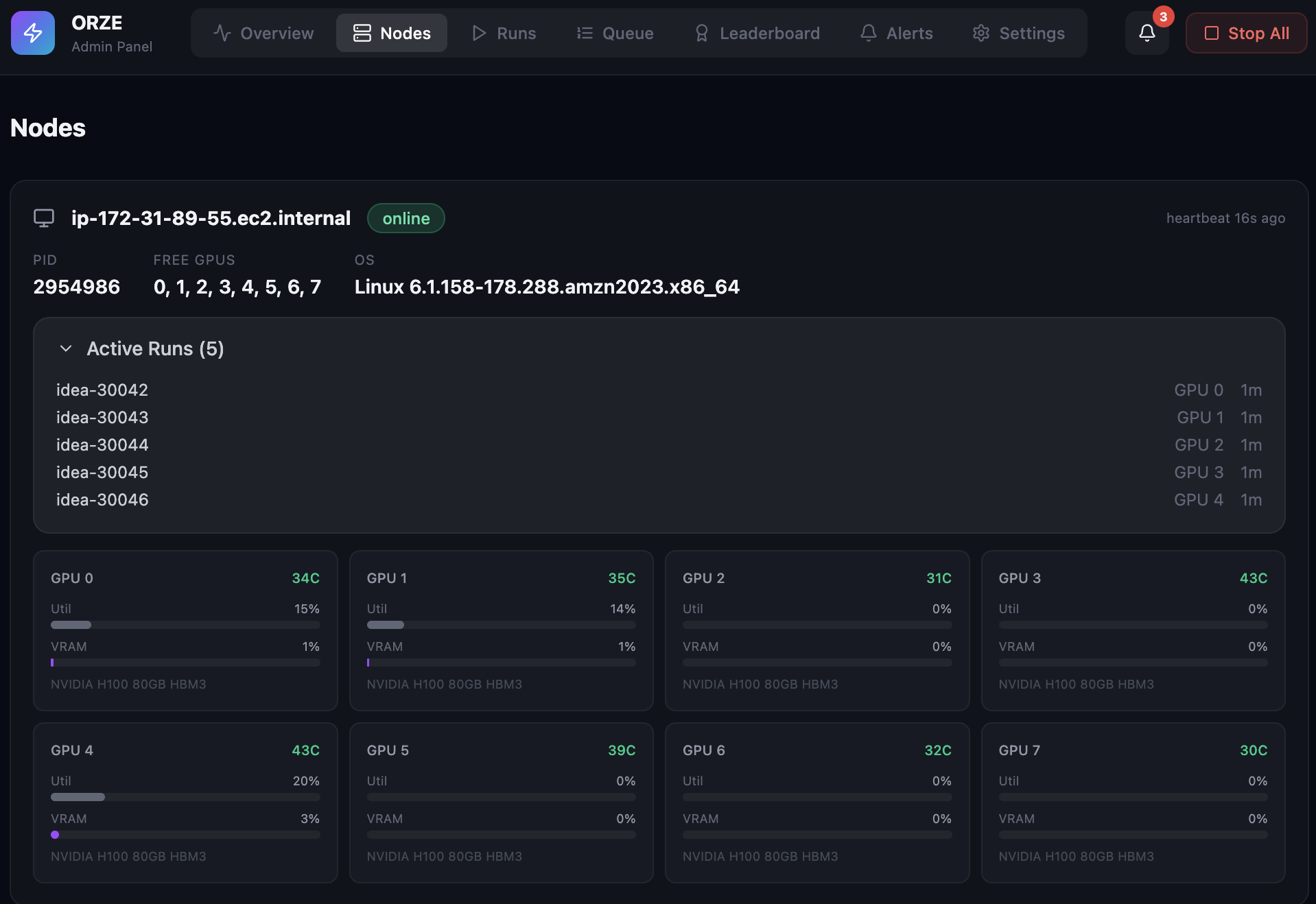
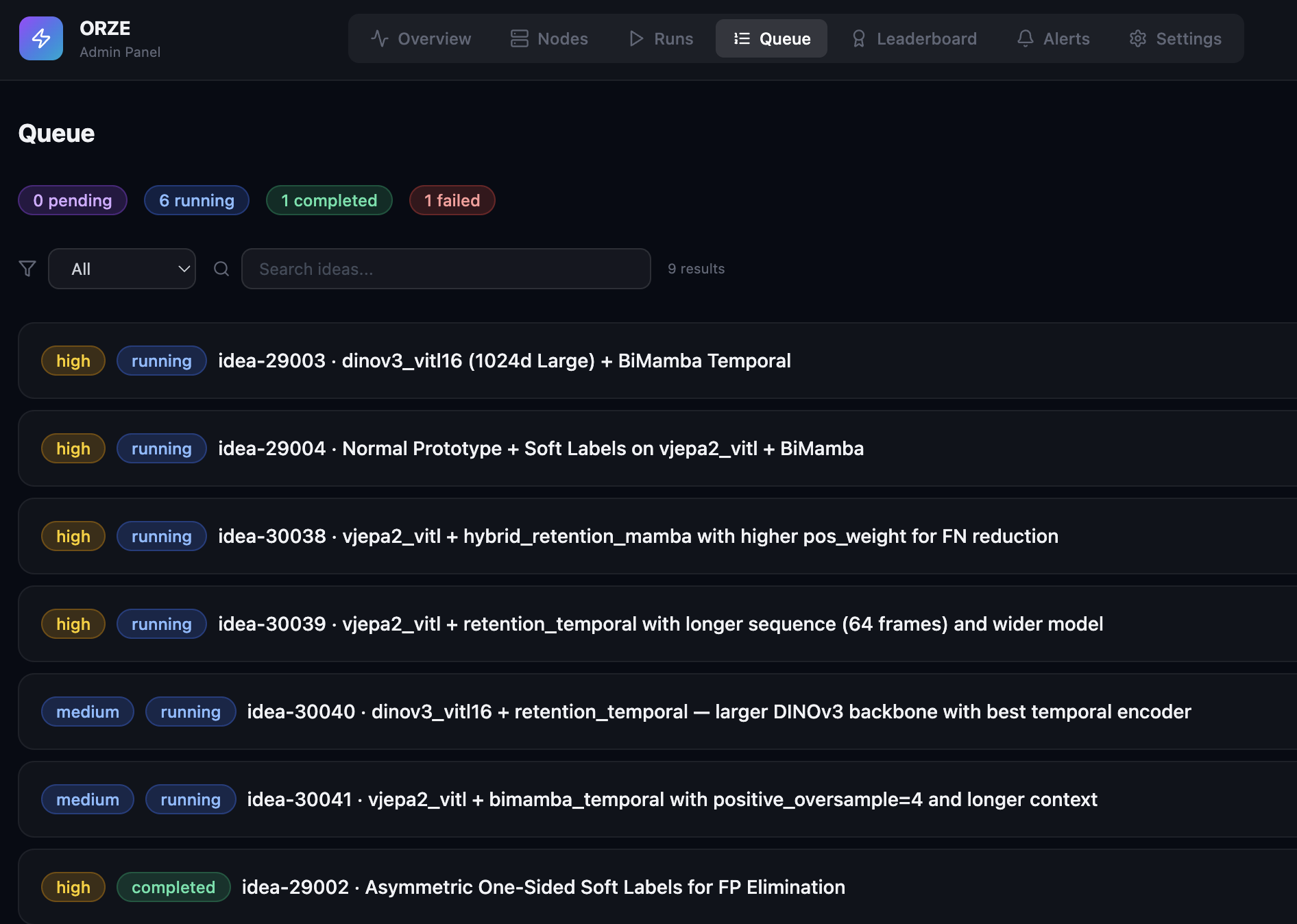
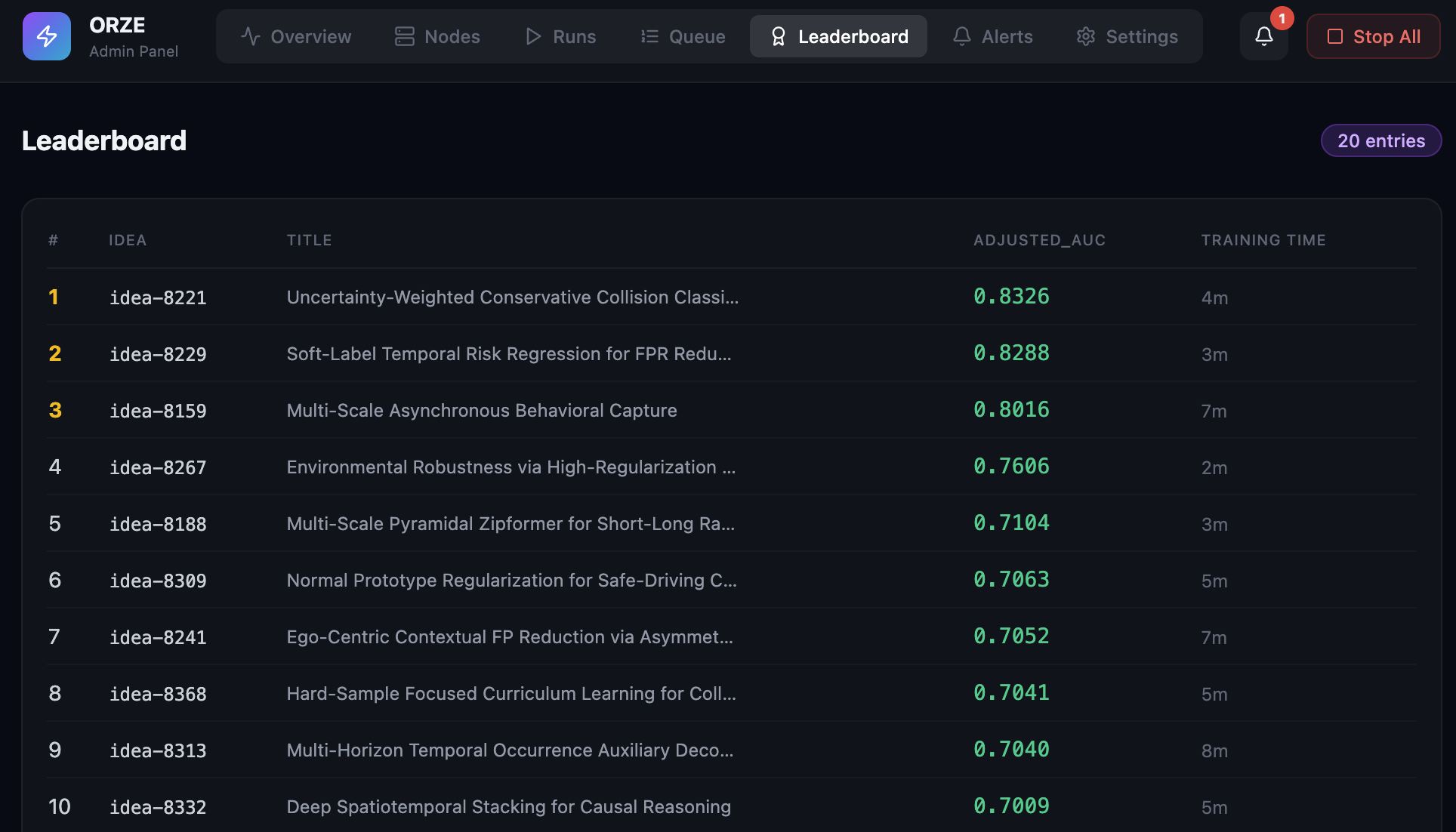
Admin Panel
Auto-launches at http://localhost:8787. No extra install needed.
Telegram Notifications
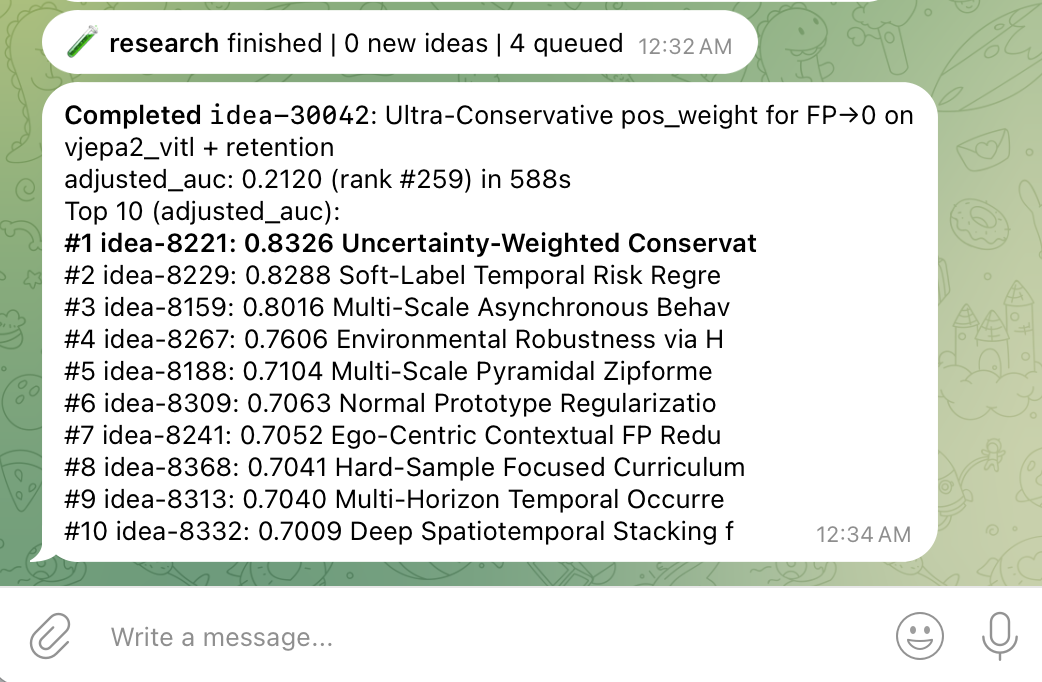
notifications:
  enabled: true
  on: [completed, failed, new_best]
  channels:
    - type: telegram
      bot_token: "YOUR_BOT_TOKEN"
      chat_id: "YOUR_CHAT_ID"
Service Management
orze service install -c orze.yaml    # auto-restart on crash
orze service status                  # check health
orze service uninstall               # remove
Citation
@article{li2026autoresearching,
  title={Auto Researching, not hyperparameter tuning: Convergence Analysis of 10,000 Experiments},
  author={Li, Xiaoyi},
  journal={arXiv preprint arXiv:2603.15916},
  year={2026}
}
License
Apache 2.0 — orze is and will always be free and open source.
orze-pro (autopilot features) is commercially licensed.
Release history Release notifications | RSS feed


Download files
Download the file for your platform. If you're not sure which to choose, learn more about installing packages.
Source Distribution
Built Distribution
Filter files by name, interpreter, ABI, and platform.
If you're not sure about the file name format, learn more about wheel file names.
Copy a direct link to the current filters
File details
Details for the file orze-4.1.0.tar.gz.
File metadata
- Download URL: orze-4.1.0.tar.gz
- Upload date:
- Size: 391.5 kB
- Tags: Source
- Uploaded using Trusted Publishing? No
- Uploaded via: twine/6.2.0 CPython/3.9.24
File hashes
| Algorithm | Hash digest | |
|---|---|---|
| SHA256 |
a2b706898545b3dff871e37edfefb41ff4c3edf38d65103ac3fba367ed6a71f4
|
|
| MD5 |
d88267a403a0f1e4ca42d8fa12ecedd1
|
|
| BLAKE2b-256 |
c8a7fd5e6d388dbea600b154a56b4b31be6334b8dee170092bf11121a4cd1647
|
File details
Details for the file orze-4.1.0-py3-none-any.whl.
File metadata
- Download URL: orze-4.1.0-py3-none-any.whl
- Upload date:
- Size: 394.4 kB
- Tags: Python 3
- Uploaded using Trusted Publishing? No
- Uploaded via: twine/6.2.0 CPython/3.9.24
File hashes
| Algorithm | Hash digest | |
|---|---|---|
| SHA256 |
e763784baba7fd12b59e83915e3996d8ae59652782a8e7b51495150d9f98f7fe
|
|
| MD5 |
7fbc922ed6a027584ac6bb3b9ae162da
|
|
| BLAKE2b-256 |
8ee9c2211c72be5cd9d45191e09aca1c892a5f100deb57937b310578e5edf69b
|






