
OSS IQ



Make better dependency decisions - before and after installation.
OSS IQ helps developers and code agents answer:
Should I add it? Update it? Refactor it out?
Before you add a new dependency, OSS IQ checks whether the package and version is healthy, maintained and appropriate for your project - helping to avoid deprecated, outdated or too fresh dependencies getting in.
OSS IQ helps you understand when and how to upgrade your existing dependencies, verifies that they're compatible with your project, and supplies coding agents such as Claude and Codex with the validated context they need to safely make the upgrade.
You can run OSS IQ from the command line, or hook it up to coding agents with both SKILL.md and local MCP server.
Free and open source (AGPL v3), for npm, uv, and pip.
Start where you are:
| You want to | Go to |
|---|---|
| Stop your coding agent from adding a risky package | Coding agents |
| Check, plan, and apply updates yourself | The CLI workflow |
| Give your team a report to prioritize from | Reports and exports |
Quick start
No install required - run it from your project directory:
uvx ossiq status          # Python toolchain
npx @ossiq/cli status     # Node toolchain - ships a binary, no Python needed
OSS IQ detects the manifest (package.json, pyproject.toml, requirements.txt) in the target directory. A full scan makes hundreds of GitHub API calls, so add a token before you rely on the results.
If you prefer a persistent install:
| Channel | Install | Notes |
|---|---|---|
| PyPI | uv tool install ossiq (or pipx install ossiq) |
Needs Python 3.11+ |
| npm | npm install -g @ossiq/cli |
Self-contained binary, no Python |
| Docker | docker pull ossiq/ossiq-cli |
See Docker |
ossiq status
The npm packages ship prebuilt binaries for macOS, Linux (glibc) and Windows on x64 and arm64. On musl-based Linux (Alpine) or Windows on ARM, install from PyPI instead.
Coding agents
Give Claude Code, Codex, or GitHub Copilot a skill and a local MCP server, so they check dependency health before they edit your manifest:
# Install for all three tools
uvx ossiq install skills

# Or target one: claude, codex, copilot
uvx ossiq install skills claude
This writes SKILL.md and registers ossiq as a local stdio MCP server (ossiq mcp) for Claude Code (~/.claude/) and Codex (~/.codex/), and adds the skill to Copilot's ~/.copilot/copilot-instructions.md. Re-running is safe — existing config is merged, not overwritten.
The agent gets two read-only tools:
| Tool | Answers |
|---|---|
ossiq_evaluate_dependency |
Should I add this package, and at which version? |
ossiq_evaluate_updates |
Which existing dependencies should I bump, and in what order? |
Both return the same compact decision the CLI produces with --format agent:
ossiq info requests --format agent
{
  "operation": "add",
  "package": "requests",
  "next_action": "install with caution",
  "recommended_version": "2.31.0",
  "reasons": ["recommend 2.31.0 rather than latest 2.32.0", "single maintainer — bus factor risk"],
  "cves": [],
  "warnings": ["SINGLE_MAINTAINER"]
}
The install command prompts for a GitHub token (or takes --github-token; blank skips) and stores it in ~/.ossiq/config and in each tool's MCP entry, so agent scans get the higher rate limit too. Files written, token handling, and running from a local checkout with --dev: Reference → install skills.
The CLI workflow
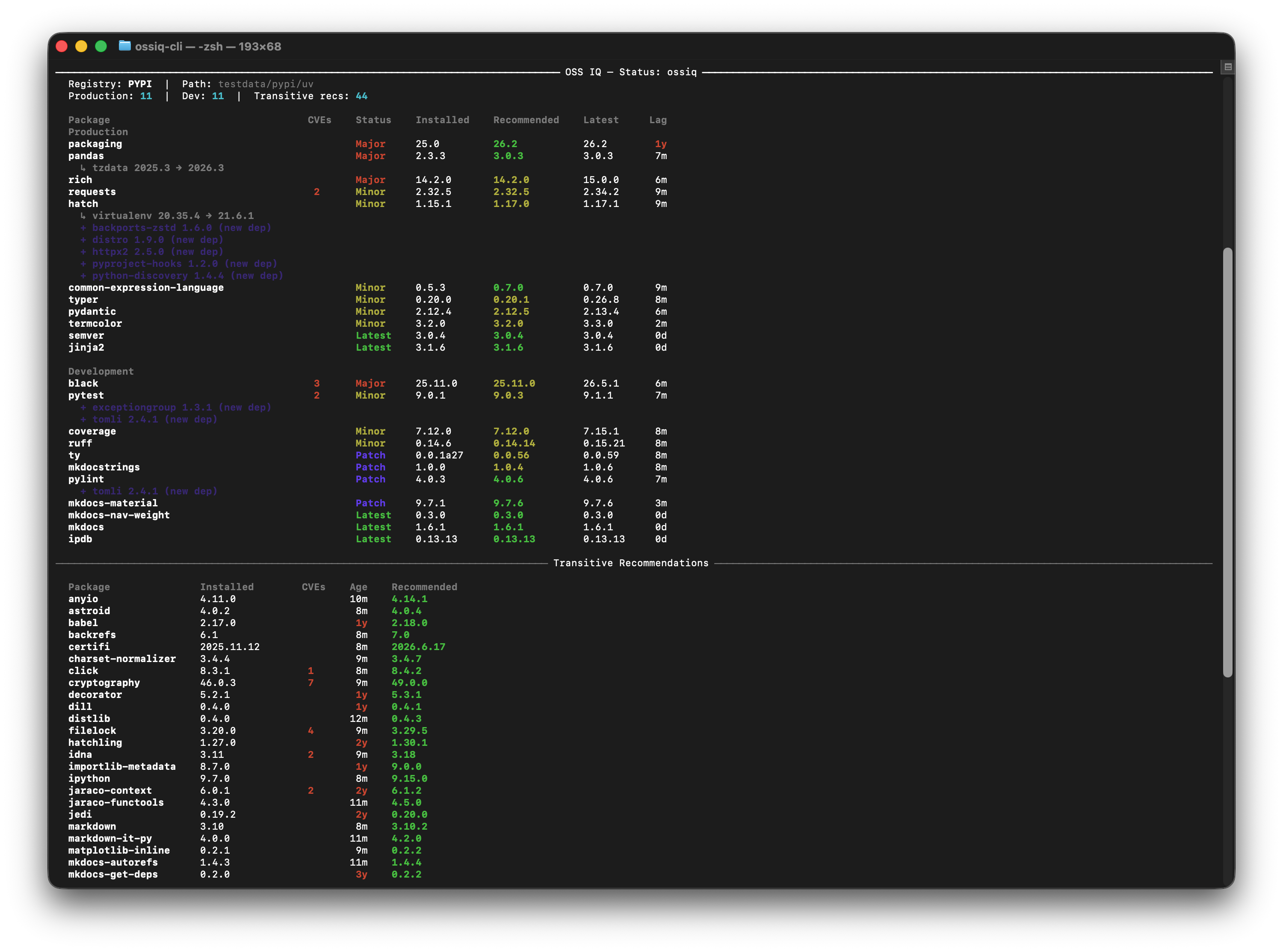
ossiq status              # dependency health for the whole project
ossiq status --full       # every package, every column (EPSS, update mode, lag, maintenance state)
ossiq status --security   # CVE-affected packages only
ossiq info requests       # one package: drift, CVEs, tree path, peer requirements
ossiq add requests        # quality-gated install of the recommended version
ossiq plan                # what the solver would change — read-only
ossiq apply               # execute the plan, with rollback on failure
Each takes an optional project path (default: .) and --registry-type npm|pypi to disambiguate a polyglot repo. info prints drift status, the dependency tree trace, policy compliance, direct and transitive CVEs, and peer requirements — one section per concern, documented here.
add — a gate in front of uv add and npm install
Package managers install the newest version that satisfies your constraints. ossiq add installs the recommended one: it runs the same analysis as info, shows drift, CVEs, transitive vulnerabilities and maintainer signals before touching a file, blocks critically unhealthy packages unless you pass --force, and confirms the exact spec before installing.
ossiq add lodash --registry-type npm
ossiq add requests --version 2.31.0   # pin yourself, bypassing the recommendation
plan and apply — updates with their transitive cascade
plan is a faithful preview of the matching apply: every flag is accepted by both. The solver simulates the full transitive impact of each recommendation before committing to it — the table shows a ↳ sub-row for each transitive package that would also move, falls back to the next-best version when the top candidate would cause a downstream conflict, and marks non-actionable entries with ✗.
- npm — backs up
package.json, injects all recommended versions asoverridesin one pass, runsnpm install --ignore-scripts, then removes the overrides block. - uv / pip — rewrites specifiers in
pyproject.tomlorrequirements.txtin place, then runsuv lock --upgrade-package/pip install -c <constraints>. Changes are rolled back automatically if the update fails.
The solver resolves in a single pass against your current lockfile, so a second plan can legitimately show more: applying re-resolves the tree, and the new constraints unlock recommendations that were not visible before. Repeat apply → plan until it reports no updates; most projects converge in one or two passes.
All plan / apply flags
| Option | Description |
|---|---|
--production |
Limit to production dependencies only |
--registry-type npm|pypi |
Narrow to a specific ecosystem |
--security |
Include only CVE-affected packages (direct and transitive) |
--allow-prerelease |
Include pre-release versions across all packages |
--allow-prerelease-package <name> |
Allow pre-release for one package (repeatable) |
--ignore <name>, -i |
Exclude a package from the plan entirely (repeatable) |
--override <pkg>==<ver> |
Force an exact version, bypassing the solver and the cooldown (repeatable) |
--pin-all |
Write ==new_version for every updated direct dependency, converting ^, ~=, >= to exact pins |
--rewrite-versions |
Include already-pinned (==x.y.z) dependencies and rewrite their version |
--yes, -y |
(apply only) Skip the confirmation prompt |
Pinning workflow — --pin-all and --rewrite-versions
Packages pinned with an exact specifier (==x.y.z) are frozen by default, so an intentional lock is never upgraded by accident. The two flags together let you run a fully pinned dependency file:
# 1. Migrate all direct deps to exact pins
ossiq apply --pin-all

# 2. Later, preview what is available (pinned deps stay hidden)
ossiq plan

# 3. Upgrade and re-pin in one pass — optionally holding some back
ossiq apply --pin-all --rewrite-versions
ossiq apply --pin-all --rewrite-versions --ignore requests --ignore django
| Flags | >=x (declared) |
~=x (narrowed) |
==x (pinned) |
|---|---|---|---|
| (none) | lockfile-only update | rewrite ~=new |
frozen / skipped |
--pin-all |
rewrite ==new |
rewrite ==new |
frozen / skipped |
--rewrite-versions |
lockfile-only update | rewrite ~=new |
rewrite ==new |
--pin-all --rewrite-versions |
rewrite ==new |
rewrite ==new |
rewrite ==new |
Cooldown — freshness as a supply-chain guard
--cooldown-period (default: 7 days) keeps you off releases that were published minutes ago, where supply-chain attacks land. Versions younger than the cooldown are heavily penalized inside the solver, and any recommendation still younger than it after solving is withheld into a "Held for cooldown" section and never applied.
Two deliberate exceptions: a CVE fix bypasses the hold when the installed version is vulnerable (tagged CVE, with a cooldown bypassed note), and brand-new transitive dependencies are resolved by npm/uv at apply time, so the plan projects their version and age and flags fresh ones with ⚠.
When the only version that fixes a CVE is itself still quarantined, you are trading a known risk against a statistical one. Three levers, from automatic to manual:
- Default — the fix is applied regardless of age. For most teams a concrete CVE beats a hypothetical supply-chain risk.
--security—ossiq apply --security --yespatches vulnerabilities and touches nothing else, while your regular cadence stays on cooldown.--override pkg==version— force a version you have vetted yourself:ossiq apply --override urllib3==2.0.7. For a transitive package this writes a persistent entry (overridesinpackage.json,override-dependenciesunder[tool.uv]), andstatuskeeps reporting it with theOVERRIDEconstraint type until you remove it.
Full solver rules: Reference → update solver.
Reports and exports
# Single self-contained HTML file — share it, attach it to a ticket
ossiq html --output report.html

# Machine-readable JSON output for pipelines
ossiq export --output metrics.json
The HTML report is the view for planning work rather than fixing one package: sort by drift or severity, drill into any dependency's tree path, CVEs, peer requirements and recommended version, and decide what to read release notes for before it enters the backlog. Exports use versioned schemas (--schema-version) so a metric you gate on today keeps its meaning tomorrow — see Reference → outputs and the GitHub Actions quality-gate tutorial.
Configuration
GitHub token
OSS IQ mines repository history, which can take hundreds of GitHub API requests per run. Without a token you will be rate-limited at 60 requests/hour.
export OSSIQ_GITHUB_TOKEN=$(gh auth token)

# Or persist it
echo "OSSIQ_GITHUB_TOKEN=$(gh auth token)" >> ~/.ossiq/config
A read-only fine-grained token scoped to public repositories is the safer choice — see Getting started → GitHub token.
Config file
Every OSSIQ_* environment variable can also live in ~/.ossiq/config (dotenv format: KEY=value, # comments):
# ~/.ossiq/config
OSSIQ_GITHUB_TOKEN=ghp_your_token
OSSIQ_COOLDOWN_PERIOD=14
OSSIQ_CACHE_TTL=48
Point at a different file with ossiq --config ./ossiq.conf status. Values resolve highest-wins: CLI flags → environment variables → config file → built-in defaults.
Time controls
Two global options change how OSS IQ perceives time. They apply to status, export, plan, apply, and info, and combine freely.
| Option | Env var | Default | Effect |
|---|---|---|---|
--cutoff-date YYYY-MM-DD |
OSSIQ_CUTOFF_DATE |
today | Treat versions published after this date as invisible (23:59:59 UTC). Reproduces a past state of your dependencies. |
--cooldown-period N |
OSSIQ_COOLDOWN_PERIOD |
7 |
Soft-penalize versions younger than N days in the solver. 0 disables the penalty. |
# Time-travel view with a wider freshness buffer
ossiq --cutoff-date 2025-01-01 --cooldown-period 14 status

# Same thing from the environment, for CI
OSSIQ_CUTOFF_DATE=2025-01-01 OSSIQ_COOLDOWN_PERIOD=14 ossiq status
Supported ecosystems
| Ecosystem | Supported | Not yet |
|---|---|---|
| JavaScript | npm (package.json + package-lock.json) |
Yarn, pnpm — see the issue tracker |
| Python | uv (pyproject.toml + uv.lock), pip lock (pylock.toml), pip classic (requirements.txt, best with pip freeze output) |
Poetry — export to pylock.toml as a workaround (discussion) |
Analysis aggregates public data from OSV (advisories), the npm registry and PyPI (metadata and version history), and GitHub (repository activity and maintainer signals).
Docker
docker pull ossiq/ossiq-cli
export OSSIQ_GITHUB_TOKEN=$(gh auth token)

# Status
docker run --rm -e OSSIQ_GITHUB_TOKEN \
  -v /path/to/your/project:/project:ro \
  ossiq/ossiq-cli status /project

# HTML report or JSON export into ./reports
docker run --rm -e OSSIQ_GITHUB_TOKEN \
  -v /path/to/your/project:/project:ro -v $(pwd)/reports:/output \
  ossiq/ossiq-cli html -o /output/report.html /project
Tags: latest, 0.1 (latest patch in the minor), 0.1.10 (exact version).
GitHub Actions example
jobs:
  dependency-check:
    runs-on: ubuntu-latest
    steps:
      - uses: actions/checkout@v4
      - name: Analyze dependencies
        run: |
          docker run --rm \
            -e OSSIQ_GITHUB_TOKEN=${{ secrets.GITHUB_TOKEN }} \
            -v ${{ github.workspace }}:/project:ro \
            ossiq/ossiq-cli status /project
Contributing
git clone https://github.com/ossiq/ossiq.git
cd ossiq
uv sync

uv run hatch run ossiq status
uv run hatch run ossiq html -o ./test_report.html

# Point the agent skill and MCP server at your checkout instead of PyPI
uv run hatch run ossiq install skills --dev "$(pwd)"
Issues and pull requests are welcome — start with the issue tracker. If OSS IQ saves you a maintenance afternoon, a ⭐ helps other people find it.
FAQ
How is this different from npm audit or pip-audit?
Audit tools find known vulnerabilities. OSS IQ also scores the risks that have no CVE: how far behind you are, whether a package is still maintained, what a version bump would drag in transitively, and which version to move to. It produces stable scores meant for CI gates and platform governance, not one-off alerts.
Is it free? Yes — free and open source under AGPL v3.
Which ecosystems? npm for JavaScript, and uv, pip lock, and classic pip for Python. More are on the roadmap.
Where are the full docs? ossiq.dev — getting started, reference, and tutorials.
License
Licensed under the GNU Affero General Public License v3.0. See LICENSE.
Metadata
Release files for ossiq 0.1.11
For a detailed explanation of source distributions (sdists) and built distributions (wheels), please see the package formats documentation.
Source distribution (sdist)
| File | Size | Uploaded | |
|---|---|---|---|
| ossiq-0.1.11.tar.gz | 480.2 kB | Details |
Built distribution (wheel)
| File | Interpreter | ABI | Platform | Reset |
|---|---|---|---|---|
| ossiq-0.1.11-py3-none-any.whl | Python 3 | none | any | Details |
Total release size: 1.0 MB
Release files / ossiq-0.1.11.tar.gz
| Download URL | ossiq-0.1.11.tar.gz |
|---|---|
| Size | 480.2 kB |
| Tags | Source |
|
SHA-256 checksum How to use checksums |
0d2593cfc3dc947ec032797a822982fdd2d776a9051b30f1380292668ae2f663
|
|
BLAKE2b-256 checksum How to use checksums |
f38f8206592fedd9e7809715a543150fb46f50e261d37a56ae1f5e74fcf73966
|
| Upload date | |
|
Uploaded using Trusted Publishing? What is trusted publishing? |
Yes |
| Uploaded via |
twine/7.0.0 CPython/3.13.14
|
Provenance
Provenance describes where a file came from. On PyPI, provenance is shared via attestations, which provide a verifiable record of the build or publishing details. View details, limitations and caveats.


PyPI Publish Attestation
PyPI verified that this artifact, at this checksum, originated from the publisher listed below.
Signed by GitHub Actions, verified by PyPI on Sep 28, 2026.
Transparency logRelease files / ossiq-0.1.11-py3-none-any.whl
| Download URL | ossiq-0.1.11-py3-none-any.whl |
|---|---|
| Size | 555.1 kB |
| Tags | Python 3 |
|
SHA-256 checksum How to use checksums |
61d30e5d9bf41abaf0f09471623de1fcfdb88ac21cca02d753960e4e0f9e14a8
|
|
BLAKE2b-256 checksum How to use checksums |
de36306365359aae65ec9fcd744ca25e08eca7d5be22ab54ea3dec49e29bebae
|
| Upload date | |
|
Uploaded using Trusted Publishing? What is trusted publishing? |
Yes |
| Uploaded via |
twine/7.0.0 CPython/3.13.14
|
Provenance
Provenance describes where a file came from. On PyPI, provenance is shared via attestations, which provide a verifiable record of the build or publishing details. View details, limitations and caveats.
PyPI Publish Attestation
PyPI verified that this artifact, at this checksum, originated from the publisher listed below.
Signed by GitHub Actions, verified by PyPI on Sep 28, 2026.
Transparency log













