
OumiGo
OumiGo is a vertical-integration toolkit for running and managing GPU fleets. A GPU fleet is a group of computer instances, running locally or on a cloud environment, made up of a manager node and one or more GPU worker nodes coordinated by the manager.
GPU worker nodes work independently as a whole to provide LLM based generation capability, and the manager node exposes a unified data plane interface to calling applications.
Key functions provided by an OumiGo fleet (as of v0.2.0):
- Multiple GPU instance dynamic lifecycle management, supporting vLLM and Transformer backends
- Data and control interfaces unification, runtime request routing
- Performance monitoring
- Vertical integration of administration and programming interfaces:
- Command line interface (CLI) administration
- Python API function with built-in Agent loop, supporting Agent chat, tool call usage
- Python API interface for guardrail extension development
Architecture
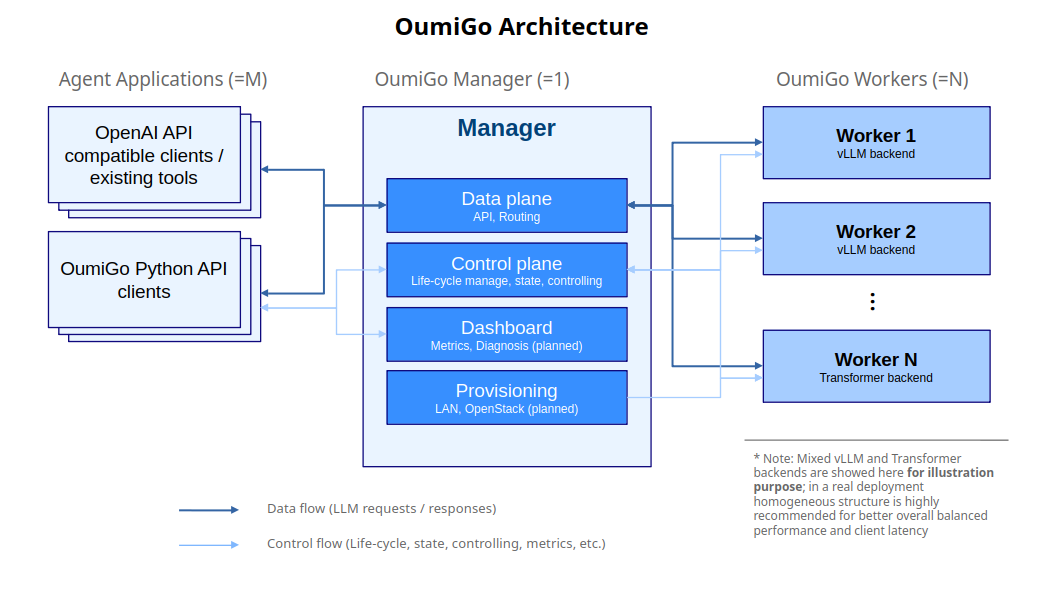
Two roles:
-
Manager (
oumigo.service.manager): coordinates the fleet, split into sub-layers:- data plane / router (
manager.router): forwards client inference calls to healthy workers — on the hot path of every request. Exposes an OpenAI-compatible HTTP surface (/v1/chat/completions,/v1/completions,/v1/models, including SSE streaming), so any OpenAI-API client can talk to the fleet through a single endpoint. - control plane (
manager.control): tracks worker registrations and state, drives worker lifecycle, reconciles desired vs. actual. Low-frequency, correctness-critical. - dashboard (
manager.dashboard): performance & diagnostics — later. - provisioning (
oumigo.providers): how workers come into existence — a minimal, lifecycle-shapedProviderprotocol used by the control plane. Ships withStaticProvider(LAN: workers are hand-started and self-register, no provisioning); cloud backends (e.g. OpenStack-based) are future implementations of the same protocol.
- data plane / router (
-
Worker (
oumigo.service.worker): a long-lived coordinator supervises a LLM server as a child process, monitors health, executes start/stop/restart from the manager, and owns the node state machine + restart-with-give-up policy. Workers self-register with the manager and heartbeat.
Programming interfaces layered on top of the two roles:
- Python API (
oumigo.api): the client-side inference layer.Agent(tools)→Chat→requestdrives a built-in agent loop with callback tools, response parity across streaming/non-streaming, and reasoning-content surfacing. Talks to the manager's data plane so applications never address workers directly. - Guardrails (
oumigo.guard): an agent-layer interceptor chain with a narrow-waistGuardprotocol and tiered rule→model add-ins, for developing guardrail extensions around the API without touching fleet internals.
Shared foundations: oumigo.config (typed settings + precedence resolution) and
oumigo.protocol (the wire contract both roles import so it can't drift).
Using the fleet as an OpenAI-compatible endpoint
Because the data plane speaks the OpenAI API, the manager can drop in wherever an OpenAI-compatible base URL is accepted — no OumiGo client required. Point the tool at the manager's router and it addresses the whole fleet through one endpoint:
Base URL:  http://<manager-host>:<router-port>/v1
Model:     <a model id from GET /v1/models>
API key:   any non-empty string (the data plane does not check it; clients still require one)
This has been verified with other editing or coding assistant agents, and works the same
for any OpenAI-API SDK or tool (e.g. the openai Python client).
Installation
OumiGo is published on PyPI. Install the extra that matches the node's role:
pip install "oumigo[worker]"     # on a GPU worker box (pulls vLLM + Transformers)
pip install "oumigo[manager]"    # on the manager box
oumigo version
On a GPU worker box, do not install
torchseparately — vLLM hard-pins it and pulls the matching CUDA wheel transitively.
To use OumiGo from another project, add it as a dependency (pip install oumigo, or the
[worker] / [manager] extra as needed).
Development
Working on OumiGo itself uses an editable install from a source checkout:
# from oumigo/
python -m venv .venv
source .venv/bin/activate
pip install -e ".[worker,dev]"     # on a GPU worker box
pip install -e ".[manager,dev]"    # on the manager box
oumigo version
Documentation
- docs/api.md — Python API: Agent loop, chat, tool calls, streaming.
- docs/metrics.md — performance monitoring and metrics.
- docs/worker-node-states.md — worker node state machine.
1 maintainer

Release files for oumigo 0.3.1
For a detailed explanation of source distributions (sdists) and built distributions (wheels), please see the package formats documentation.
Source distribution (sdist)
| File | Size | Uploaded | |
|---|---|---|---|
| oumigo-0.3.1.tar.gz | 295.4 kB | Details |
Built distribution (wheel)
| File | Interpreter | ABI | Platform | Reset |
|---|---|---|---|---|
| oumigo-0.3.1-py3-none-any.whl | Python 3 | none | any | Details |
Total release size: 435.0 kB
Release files / oumigo-0.3.1.tar.gz
| Download URL | oumigo-0.3.1.tar.gz |
|---|---|
| Size | 295.4 kB |
| Tags | Source |
|
SHA-256 checksum How to use checksums |
349500e7f15ca7980c91a9504ee8fc83b7b78350b2ac5d6c406ede5dfb5c6fbb
|
|
BLAKE2b-256 checksum How to use checksums |
d7707bb04d03f265f1c02943badaa1f54bb7e82b4e37a02c283a1cb446e8f951
|
| Upload date | |
|
Uploaded using Trusted Publishing? What is trusted publishing? |
No |
| Uploaded via |
twine/7.0.0 CPython/3.12.10
|
Release files / oumigo-0.3.1-py3-none-any.whl
| Download URL | oumigo-0.3.1-py3-none-any.whl |
|---|---|
| Size | 139.6 kB |
| Tags | Python 3 |
|
SHA-256 checksum How to use checksums |
a0d58dfcfa245e60edcb4c4722dbcdd6b7a579df9ae5e35c5d83e1ee2dc448af
|
|
BLAKE2b-256 checksum How to use checksums |
84cd88ee740330b878157e64b48ed65ae0218c9a99e18bea000ba8d2e899abb5
|
| Upload date | |
|
Uploaded using Trusted Publishing? What is trusted publishing? |
No |
| Uploaded via |
twine/7.0.0 CPython/3.12.10
|














