
OumiGo
OumiGo is a vertical-integration toolkit for running and managing GPU fleets. A GPU fleet is a group of computer instances, running locally or on a cloud environment, made up of a manager node and one or more GPU worker nodes coordinated by the manager.
GPU worker nodes work independently as a whole to provide LLM based generation capability, and the manager node exposes a unified data plane interface to calling applications.
Key functions provided by an OumiGo fleet (as of v0.5.3):
- Multiple GPU instance dynamic lifecycle management, supporting vLLM and Transformer backends
- Data and control interfaces unification, runtime request routing
- Several models in one fleet: each worker runs a catalog profile that fits its GPU, and clients choose a model by id
- Performance monitoring
- Remote workers on any vendor or site (RunPod, Vast.ai, other clouds, other on-prem sites) through a worker-initiated tunnel — no inbound ports or VPN on the GPU side; a ready worker image and a script that rents GPUs for workers on RunPod or Vast.ai
- Vertical integration of administration and programming interfaces:
- Command line interface (CLI) administration
- Python API function with built-in Agent loop, supporting Agent chat, tool call usage
- Python API interface for guardrail extension development
Architecture
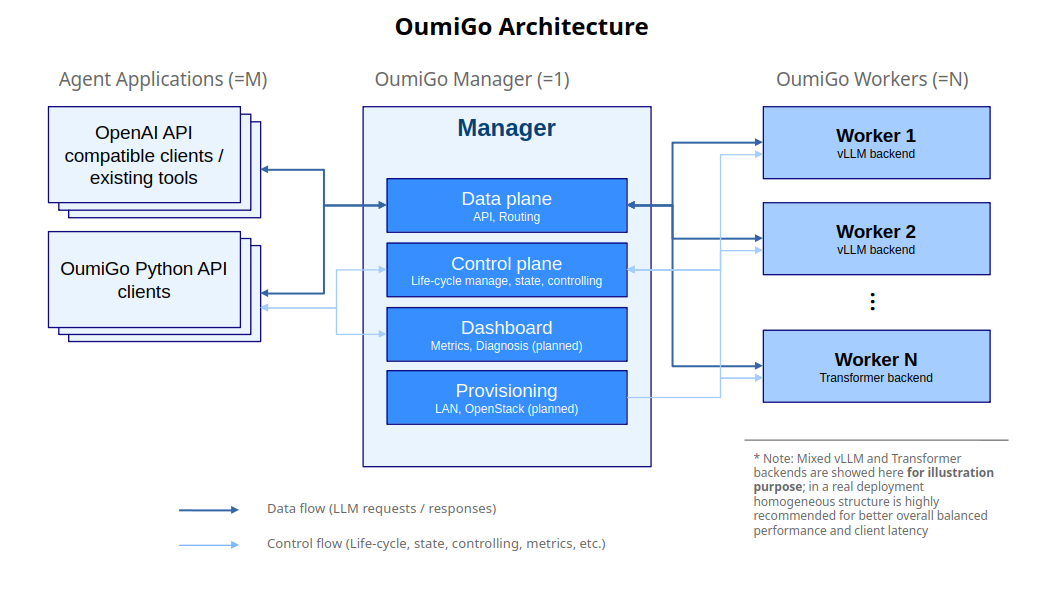
Two roles:
-
Manager (
oumigo.service.manager): coordinates the fleet, split into sub-layers:- data plane / router (
manager.router): forwards client inference calls to healthy workers of the model each request names — on the hot path of every request. Exposes an OpenAI-compatible HTTP surface (/v1/chat/completions,/v1/completions,/v1/models, including SSE streaming), so any OpenAI-API client can talk to the fleet through a single endpoint. - control plane (
manager.control): tracks worker registrations and state, drives worker lifecycle, reconciles desired vs. actual. Low-frequency, correctness-critical. - dashboard (
manager.dashboard): performance & diagnostics — later. - provisioning (
oumigo.providers): how workers come into existence — a minimal, lifecycle-shapedProviderprotocol used by the control plane. Ships withStaticProviderin two postures:LAN(trusted local network) andCUSTOM(workers on any vendor or site, no vendor-specific processing; TLS and worker auth enforced). Workers are hand-started and self-register; cloud backends that provision through a vendor API are future implementations of the same protocol. - transport (per worker):
direct(the router dials the worker) ortunnel(the worker dials out to the manager's/tunneland the router borrows those connections) — see docs/tunnel.md. - model catalog (
oumigo.config.catalog): static profiles, one per model with all its start-time settings; the fleet allows some, each worker runs one — see docs/model-catalog.md.
- data plane / router (
-
Worker (
oumigo.service.worker): a long-lived coordinator supervises a LLM server as a child process, monitors health, executes start/stop/restart from the manager, and owns the node state machine + restart-with-give-up policy. Workers self-register with the manager and heartbeat.
Programming interfaces layered on top of the two roles:
- Python API (
oumigo.api): the client-side inference layer.Agent(tools)→Chat→requestdrives a built-in agent loop with callback tools, response parity across streaming/non-streaming, and reasoning-content surfacing. Talks to the manager's data plane so applications never address workers directly. - Guardrails (
oumigo.guard): an agent-layer interceptor chain with a narrow-waistGuardprotocol and tiered rule→model add-ins, for developing guardrail extensions around the API without touching fleet internals.
Shared foundations: oumigo.config (typed settings + precedence resolution) and
oumigo.protocol (the wire contract both roles import so it can't drift).
Using the fleet as an OpenAI-compatible endpoint
Because the data plane speaks the OpenAI API, the manager can drop in wherever an OpenAI-compatible base URL is accepted — no OumiGo client required. Point the tool at the manager's router and it addresses the whole fleet through one endpoint:
Base URL:  http://<manager-host>:<router-port>/v1
Model:     a model id from GET /v1/models, or any-model
API key:   a client API key (`oumigo manager apikey create`) when client auth is on, which
           it always is under provider CUSTOM; otherwise any non-empty string
This has been verified with other editing or coding assistant agents, and works the same
for any OpenAI-API SDK or tool (e.g. the openai Python client).
Installation
OumiGo is published on PyPI. Install the extra that matches the node's role:
pip install "oumigo[worker]"     # on a GPU worker box (pulls vLLM + Transformers)
pip install "oumigo[manager]"    # on the manager box
oumigo version
On a GPU worker box, do not install
torchseparately — vLLM hard-pins it and pulls the matching CUDA wheel transitively.
To use OumiGo from another project, add it as a dependency (pip install oumigo, or the
[worker] / [manager] extra as needed).
Development
Working on OumiGo itself uses an editable install from a source checkout:
# from oumigo/
python -m venv .venv
source .venv/bin/activate
pip install -e ".[worker,dev]"     # on a GPU worker box
pip install -e ".[manager,dev]"    # on the manager box
oumigo version
Documentation
- docs/api.md — Python API: Agent loop, chat, tool calls, streaming.
- docs/metrics.md — performance monitoring and metrics.
- docs/worker-node-states.md — worker node state machine.
- docs/tunnel.md — remote workers: CUSTOM provider, tunnel transport, nginx deployment, join tokens.
- docs/deploy-custom-providers-with-tunnel.md — step by step: manager on a VPS, GPU workers behind NAT, clients with API keys.
- docs/model-catalog.md — several models in one fleet: profiles, the catalog, choosing a model (worker and client), upgrading from 0.4.
- docs/gpu-pods.md — the worker Docker image and running workers on rented GPUs (RunPod, Vast.ai), by hand or on a schedule.
1 maintainer

Metadata
1 maintainer
Release files for oumigo 0.5.3
For a detailed explanation of source distributions (sdists) and built distributions (wheels), please see the package formats documentation.
Source distribution (sdist)
| File | Size | Uploaded | Provenance | Actions |
|---|---|---|---|---|
| oumigo-0.5.3.tar.gz | 373.5 kB | Without provenance | Details for oumigo-0.5.3.tar.gz |
Built distribution (wheel)
| File | Interpreter | ABI | Platform | Actions Reset |
|---|---|---|---|---|
| oumigo-0.5.3-py3-none-any.whl | Python 3 | none | any | Details for oumigo-0.5.3-py3-none-any.whl |
Total release size: 554.7 kB
Release files / oumigo-0.5.3.tar.gz
| Download URL | oumigo-0.5.3.tar.gz |
|---|---|
| Size | 373.5 kB |
| Tags | Source |
|
SHA-256 checksum How to use checksums |
e4ebd2516d9307875c7b058dbb836692c62893b7b7b3bc2669d1cf755617f483
|
|
BLAKE2b-256 checksum How to use checksums |
9ad2ae961257d255c781d3de17eb5079d49b850fd3c5ab8b6a2e1687c8d8f79e
|
| Upload date | |
|
Uploaded using Trusted Publishing? What is trusted publishing? |
No |
| Uploaded via |
twine/7.0.0 CPython/3.12.10
|
Release files / oumigo-0.5.3-py3-none-any.whl
| Download URL | oumigo-0.5.3-py3-none-any.whl |
|---|---|
| Size | 181.2 kB |
| Tags | Python 3 |
|
SHA-256 checksum How to use checksums |
37e756862db47e39ebd6a935ebabe6bd2f414d9bc459147a270def5bfea26fb5
|
|
BLAKE2b-256 checksum How to use checksums |
35a9b8fed0af258fe64fc9ad2d3a2aad9ec4120ff06b06439f9ebbfebd3aa8f9
|
| Upload date | |
|
Uploaded using Trusted Publishing? What is trusted publishing? |
No |
| Uploaded via |
twine/7.0.0 CPython/3.12.10
|
Security for oumigo 0.5.3
Provenance
Provenance describes where a file came from. On PyPI, provenance is shared via attestations, which provide a verifiable record of the build or publishing details. View details, limitations and caveats.
No provenance found
None of the files in this release were uploaded with provenance metadata.
A note on package security
PyPI is a repository for distributing packages, not a service for auditing them. While third-party security researchers and our staff do their best to detect and remove malicious packages, PyPI cannot guarantee the quality, security or suitability of any given package.
To learn more about protecting yourself from malicious actors, visit our package security documentation.














