
ovos-core configuration module


Project description






OVOS-config
helper package to interact with mycroft config
Command Line usage
A small helper tool is included to quickly show, get or set config values
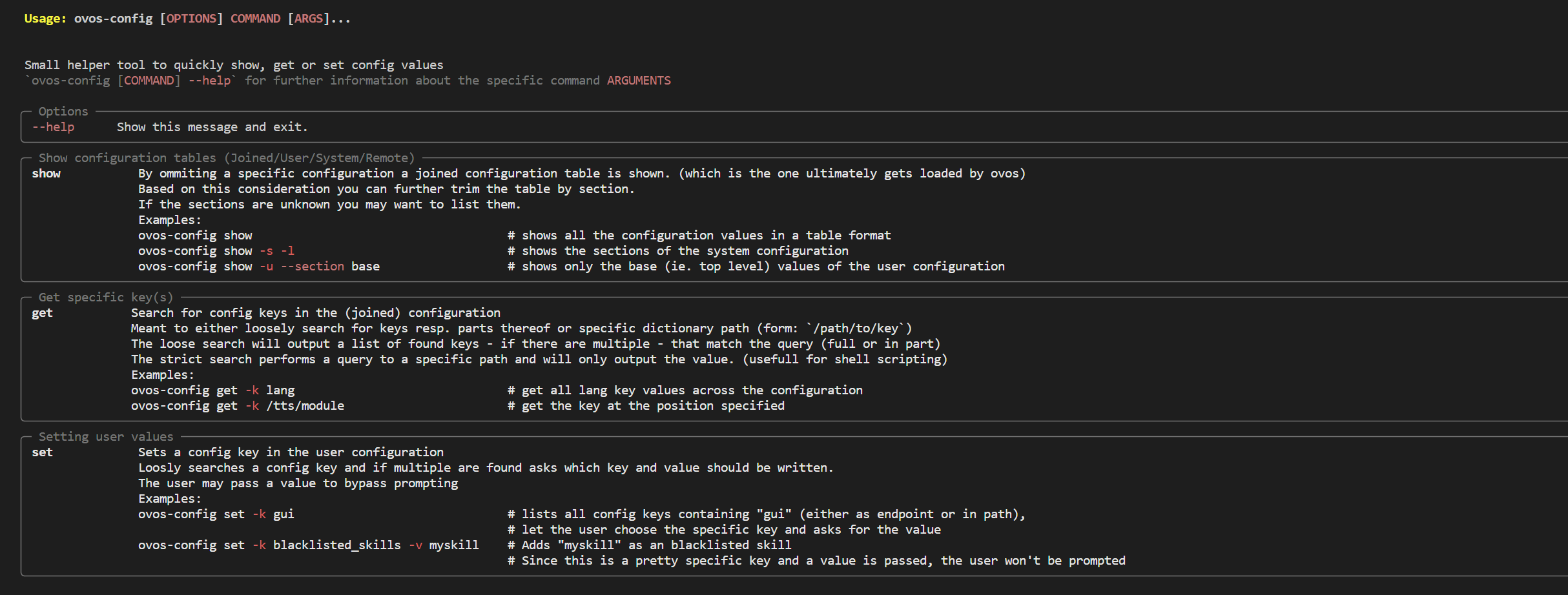
Quick rundown (cli):
-
ovos-config get-
Loose search (search a key or parts therof):
Given an entry of{'PHAL': { 'ovos-PHAL-plugin-system': { 'enabled': True }, 'ovos-PHAL-plugin-connectivity-events': { 'enabled': True }, ... }ovos-config get -k phalwould yield all PHAL entries and present it to the user (and the path where they were found) -
Strict search (search keys in a distinct location):
ovos-config get -k /PHAL/ovos-PHAL-plugin-system/enabledThis will output only the value or exit out if no key is found (root slash indicating a strict search)
-
-
ovos-config set-
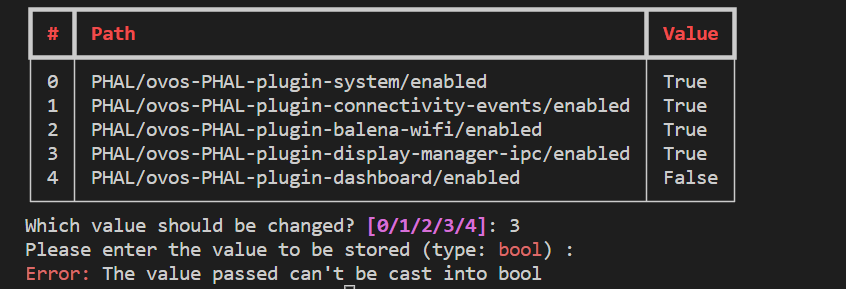
Searches loosely for keys containing the query string and presents a choice to the user to define a value
ovos-config set -k phalThe type is derived from the joined config and thus can be safely cast into the user conf.
Optionally a value (-v) can be sent as an argument.
-
-
ovos-config show- Get a full table of either the joined, user (
-u), system (-s) or remote (-r) configuration. This can be further refined by passing a--section, which can be listed withovos-config show -l
- Get a full table of either the joined, user (
Configuration Structure
ovos.conf
The ovos_config package determines which config files to load based on ovos.conf.
get_ovos_config will return default values that load mycroft.conf unless otherwise configured.
ovos.conf files are loaded in the following order, with later files taking priority over earlier ones in the list:
- /etc/OpenVoiceOS/ovos.conf
- /etc/mycroft/ovos.conf (Deprecated)
XDG_CONFIG_DIRS+ /OpenVoiceOS/ovos.conf- /etc/xdg/OpenVoiceOS/ovos.conf
XDG_CONFIG_HOME(default ~/.config) + /OpenVoiceOS/ovos.conf
A simple ovos_config should have a structure like:
{
"base_folder": "mycroft",
"config_filename": "mycroft.conf",
"default_config_path": "<Absolute Path to Installed Core>/configuration/mycroft.conf",
"module_overrides": {},
"submodule_mappings": {}
}
Note:
default_config_pathshould always be an absolute path. This is generally detected automatically, but any manual override must specify an absolute path to a json or yaml config file.
Non-Mycroft modules may specify alternate config paths. A call to get_ovos_config from
neon_core or neon_messagebus will return a configuration like:
{
  "base_folder": "neon",
  "config_filename": "neon.yaml",
  "default_config_path": "/etc/example/config/neon.yaml",
  "module_overrides": {
    "neon_core": {
      "base_folder": "neon",
      "config_filename": "neon.yaml",
      "default_config_path": "/etc/example/config/neon.yaml"
    }
  },
  "submodule_mappings": {
    "neon_core.skills.skill_manager": "neon_core",
    "neon_messagebus": "neon_core",
    "neon_speech": "neon_core",
    "neon_audio": "neon_core",
    "neon_gui": "neon_core"
  }
}
If get_ovos_config was called from mycroft with the same configuration file as the last example,
the returned configuration would be:
{
  "base_folder": "mycroft",
  "config_filename": "mycroft.conf",
  "default_config_path": "<Path to Installed Core>/configuration/mycroft.conf",
  "module_overrides": {
    "neon_core": {
      "base_folder": "neon",
      "config_filename": "neon.yaml",
      "default_config_path": "/etc/example/config/neon.yaml"
    }
  },
  "submodule_mappings": {
    "neon_core.skills.skill_manager": "neon_core",
    "neon_messagebus": "neon_core",
    "neon_speech": "neon_core",
    "neon_audio": "neon_core",
    "neon_gui": "neon_core"
  }
}
Configuration
ovos_config.config.Configuration is a singleton object that loads a single config
object. The configuration files loaded are determined by ovos.conf as described above.
Using the above example, if Configuration() is called from neon_speech, the
following configs would be loaded in this order:
- /etc/example/config/neon.yaml
os.environ.get('MYCROFT_SYSTEM_CONFIG')or /etc/neon/neon.yamlos.environ.get('MYCROFT_WEB_CACHE')orXDG_CONFIG_PATH/neon/web_cache.json (unlessdisable_remote_config == Truein earlier config)- ~/.neon/neon.yaml (Deprecated)
XDG_CONFIG_DIRS+ /neon/neon.yaml- /etc/xdg/neon/neon.yaml
XDG_CONFIG_HOME(default ~/.config) + /neon/neon.yaml
Configuring Configuration
There are a couple of special configuration keys that change the way the configuration stack loads.
Defaultconfig refers to the config specified atdefault_config_pathinovos.conf(#1/etc/example/config/neon.yamlin the stack above).Systemconfig refers to the config at/etc/{base_folder}/{config_filename}(#2/etc/neon/neon.yamlin the stack above).
protected_keys
A "protected_keys" configuration section may be added to a Default or System Config file
(default /etc/mycroft/mycroft.conf). This configuration section specifies
other configuration keys that may not be specified in remote or user configurations.
Keys may specify nested parameters with . to exclude specific keys within nested dictionaries.
An example config could be:
{
  "protected_keys": {
    "remote": [
      "gui_websocket.host",
      "websocket.host"
    ],
    "user": [
      "gui_websocket.host"
    ]
  }
}
This example specifies that config['gui_websocket']['host'] may be specified in user configuration, but not remote.
config['websocket']['host'] may not be specified in user or remote config, so it will only consider default
and system configurations.
disable_user_config
If this config parameter is set to True in Default or System configuration,
no user configurations will be loaded (no XDG configuration paths).
disable_remote_config
If this config parameter is set to True in Default or System configuration,
the remote configuration (web_cache.json) will not be loaded.
Release history Release notifications | RSS feed


Download files
Download the file for your platform. If you're not sure which to choose, learn more about installing packages.
Source Distribution
Built Distribution
Filter files by name, interpreter, ABI, and platform.
If you're not sure about the file name format, learn more about wheel file names.
Copy a direct link to the current filters
File details
Details for the file ovos-config-0.0.11a15.tar.gz.
File metadata
- Download URL: ovos-config-0.0.11a15.tar.gz
- Upload date:
- Size: 30.9 kB
- Tags: Source
- Uploaded using Trusted Publishing? No
- Uploaded via: twine/4.0.2 CPython/3.11.6
File hashes
| Algorithm | Hash digest | |
|---|---|---|
| SHA256 |
86bb9a152434a6c8b1ebc89a5bab7ecbc1ed840965f2d2017ea2f171cea24c01
|
|
| MD5 |
b305d976673bb75d1ebb6277f6665b86
|
|
| BLAKE2b-256 |
795669cea432f8d248e87167bcaa4140e47644e6fb30257ef95d40c1700c3e6c
|
File details
Details for the file ovos_config-0.0.11a15-py3-none-any.whl.
File metadata
- Download URL: ovos_config-0.0.11a15-py3-none-any.whl
- Upload date:
- Size: 31.9 kB
- Tags: Python 3
- Uploaded using Trusted Publishing? No
- Uploaded via: twine/4.0.2 CPython/3.11.6
File hashes
| Algorithm | Hash digest | |
|---|---|---|
| SHA256 |
6bc9040206dc152e46d1aa051153737652c4d6c520ac5d7d7762157ad8065a97
|
|
| MD5 |
94b67533e0d7fd47b7ea3de45a0320fd
|
|
| BLAKE2b-256 |
cef56b480c9091ff3b0be9c09fd29d110f4179d3fe9bd4200fef972946acf1d9
|






