
This release is a pre-release and may not be stable for production use.
Screenshot Skill
This OVOS skill takes a screenshot when you ask for one by voice. It saves the image as a PNG file and shows a notification with the file location.
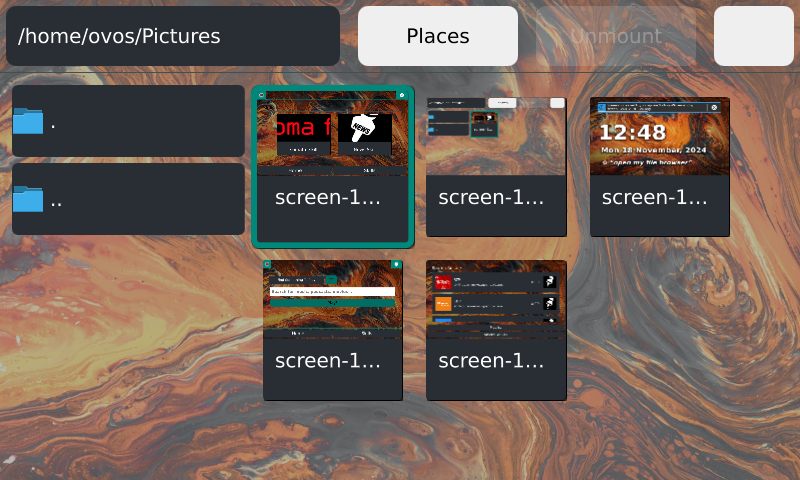
Supported platforms: ovos-shell, Windows, macOS, Linux and OpenBSD
Install
pip install ovos-skill-screenshot
Usage
Say one of these phrases to take a screenshot:
- "take a screenshot"
- "capture the screen"
The skill saves the screenshot to ~/Pictures/Screenshots by default. To use a different folder, set screenshots_path in the skill settings.
On ovos-shell, the skill asks the shell to take the screenshot. On other platforms, it captures the screen with the mss library.
Related projects
- OpenVoiceOS/ovos-core: the assistant this skill runs on
- OpenVoiceOS/ovos-gui-plugin-shell-companion: the shell extension this skill talks to for screenshots on ovos-shell
License
Apache-2.0
1 maintainer

Release files for ovos-skill-screenshot 1.6.1a1
For a detailed explanation of source distributions (sdists) and built distributions (wheels), please see the package formats documentation.
Source distribution (sdist)
| File | Size | Uploaded | |
|---|---|---|---|
| ovos_skill_screenshot-1.6.1a1.tar.gz | 16.1 kB | Details |
Built distribution (wheel)
| File | Interpreter | ABI | Platform | Reset |
|---|---|---|---|---|
| ovos_skill_screenshot-1.6.1a1-py3-none-any.whl | Python 3 | none | any | Details |
Total release size: 55.4 kB
Release files / ovos_skill_screenshot-1.6.1a1.tar.gz
| Download URL | ovos_skill_screenshot-1.6.1a1.tar.gz |
|---|---|
| Size | 16.1 kB |
| Tags | Source |
|
SHA-256 checksum How to use checksums |
68d2d4755cbb31a1540905973c2c0f3ba1b473185fc8ca7f51afaf78d8b13b2d
|
|
BLAKE2b-256 checksum How to use checksums |
c2ce084a487bd5d258d36fd214d73f25f42d068d2442f6b7ff5da5326e0bc80d
|
| Upload date | |
|
Uploaded using Trusted Publishing? What is trusted publishing? |
No |
| Uploaded via |
twine/7.0.0 CPython/3.13.14
|
Release files / ovos_skill_screenshot-1.6.1a1-py3-none-any.whl
| Download URL | ovos_skill_screenshot-1.6.1a1-py3-none-any.whl |
|---|---|
| Size | 39.3 kB |
| Tags | Python 3 |
|
SHA-256 checksum How to use checksums |
ee8f06c4958e9be3d08ec912e568aac35349a0226909395936ed9fd4654ffc41
|
|
BLAKE2b-256 checksum How to use checksums |
fa54de58ef3249ff12b5ca2edc52bc99efcdc550c5a404713fe1794b0247ce2c
|
| Upload date | |
|
Uploaded using Trusted Publishing? What is trusted publishing? |
No |
| Uploaded via |
twine/7.0.0 CPython/3.13.14
|














