
ovos-tui-client
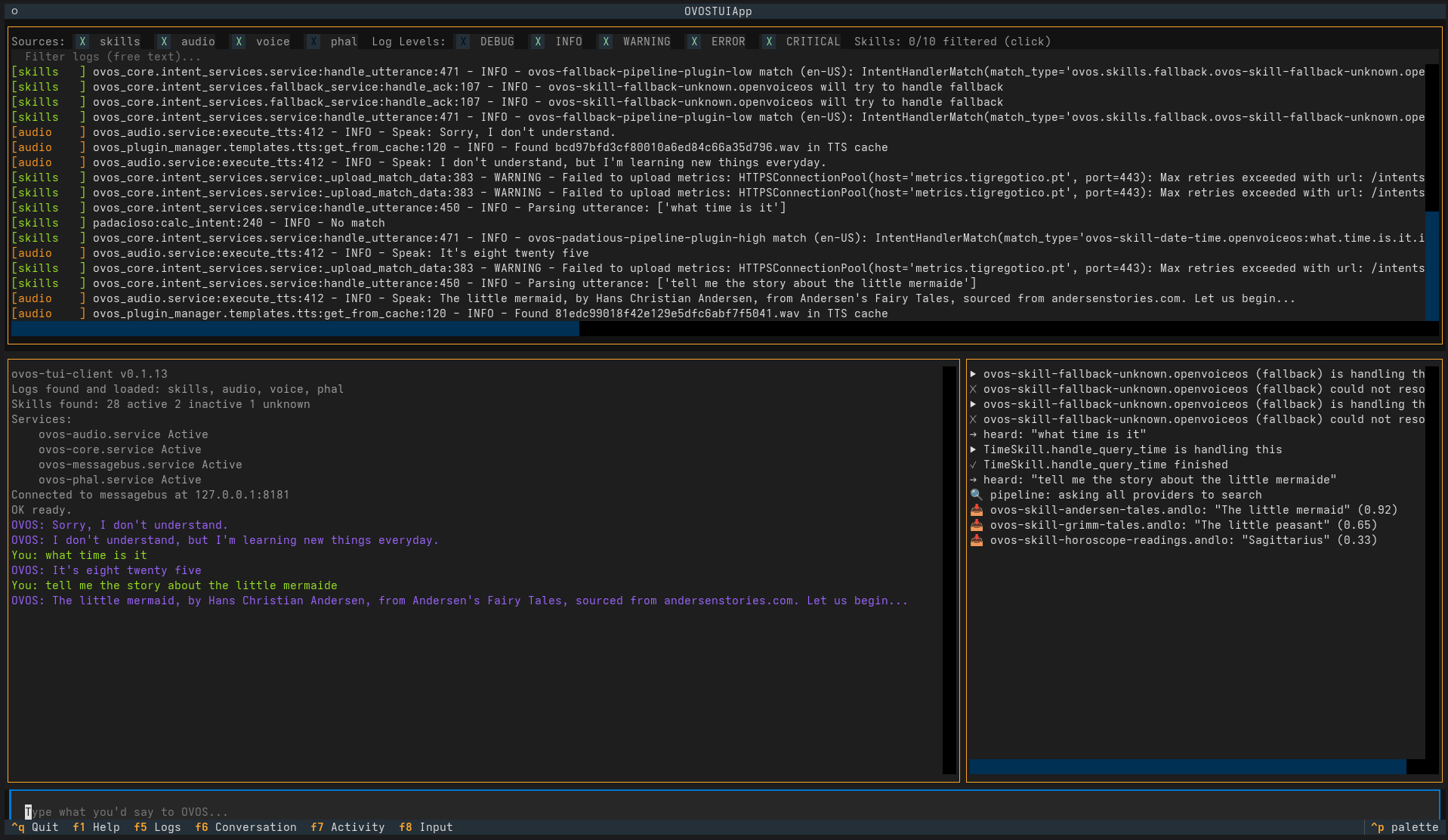
A split-pane terminal UI for talking to, debugging and testing OpenVoiceOS without a microphone or speaker - type what you'd say, read what OVOS says back, and watch exactly what's happening on the message bus while it happens.
📖 Manual: https://andlo.github.io/ovos-tui-client/ - with screenshots and examples.



Actively maintained, and a working replacement for the old CLI clients - see below.
Install
pip install ovos-tui-client
ovos-tui                                  # connects to 127.0.0.1:8181
ovos-tui --host 192.168.1.50 --lang da-dk
A container image is published on every release: docker run -it --rm --network host ghcr.io/andlo/ovos-tui-client:latest. pip install ovos-tui-client[web] and ovos-tui --web serve it in a browser. See Web and Docker.
What it does
- Logs - every OVOS service log it can find, colour-coded, filterable by source, level, skill and free text, live.
- Conversation - what you typed and what OVOS said, plus what anyone else said to OVOS: the microphone, HiveMind clients, other ovos-tui-clients - including their test runs.
- Activity - a readable feed of what happens behind the scenes: which skill is handling it, which fallback caught it, which answers came back.
- Command palette (
Ctrl+P) - restart services, activate/deactivate skills, show the intent pipeline, send example phrases, filter logs, clear panes - all searchable by typing. - Scripted test runs - replay a skill's own golden test utterances (
Test: <Skill> - All, or pick some with- Choose), or your own scripts, against your live OVOS, with a ✓/✗ per step and a summary. Catches the intent collisions an isolated skill test never sees. Testing skills - Headless runs and reports -
ovos-tui --run all|<skill>|<script>runs the same tests from the command line (cron, CI) and can write a shareable, store-agnostic JSON report of exactly what was tested against. Headless runs - About windows - a skill's description, examples, version, source and test coverage, with test and activate/deactivate buttons; a checklist of all installed skills.
Everything is in the manual: getting started, testing, scripts, skills, troubleshooting.
Why this is worth having
Testing OVOS by voice means dealing with wake-word misfires, STT mistakes, and no visibility into why something did or didn't happen. Typing directly and watching the activity feed skips all of that: see which skill actually answered and which ones gave up, catch vocabulary gaps as you find them, understand fallback behaviour, check the pipeline order without digging through config files, and re-run the same tests after every change.
Contributing
Tests: pip install -r requirements-test.txt && pytest. The manual lives in docs/ and is built with MkDocs; screenshots are generated, not hand-made - see Maintaining these docs.
Why not just fix ovos-cli-client / neon-cli-client?
ovos-cli-client (last released March 2022) installs cleanly via pip,
but crashes immediately on launch on a fresh install:
ModuleNotFoundError: No module named 'ovos_utils.configuration' -
its ovos_utils dependency is unpinned, and the module it imports
from has since been removed/relocated in current ovos_utils
releases. It was never updated to match. Confirmed directly (pip install ovos-cli-client && ovos-cli-client) rather than assumed.
neon-cli-client pulls in neon-utils, which pins pyyaml~=5.4 - a
version with no prebuilt wheel for modern Python and a build script
incompatible with current setuptools (workaround: pin
setuptools<58 first).
Building this tool instead avoids both dependency chains, and adds genuinely useful features - toggleable/filterable logs, service restart, a simplified activity feed - neither of the above has.
No existing project fills this specific niche as of writing (checked the OpenVoiceOS GitHub org's repositories and general TUI project listings) - if that's changed by the time you're reading this, please open an issue and point at it.
Category
Development Tools
Tags
#ovos #tui #testing #cli #development
1 maintainer

Metadata
1 maintainer
Release files for ovos-tui-client 0.2.0
For a detailed explanation of source distributions (sdists) and built distributions (wheels), please see the package formats documentation.
Source distribution (sdist)
| File | Size | Uploaded | |
|---|---|---|---|
| ovos_tui_client-0.2.0.tar.gz | 172.0 kB | Details |
Built distribution (wheel)
| File | Interpreter | ABI | Platform | Reset |
|---|---|---|---|---|
| ovos_tui_client-0.2.0-py3-none-any.whl | Python 3 | none | any | Details |
Total release size: 295.1 kB
Release files / ovos_tui_client-0.2.0.tar.gz
| Download URL | ovos_tui_client-0.2.0.tar.gz |
|---|---|
| Size | 172.0 kB |
| Tags | Source |
|
SHA-256 checksum How to use checksums |
df65688170e97849959e7ec8caf7c56b17f4bc3281379fe3d6038281342090df
|
|
BLAKE2b-256 checksum How to use checksums |
c8df0497850c4c6c040094aa51abd70d3efb915c7f429242f2c2a17003b5ea6e
|
| Upload date | |
|
Uploaded using Trusted Publishing? What is trusted publishing? |
Yes |
| Uploaded via |
twine/7.0.0 CPython/3.13.14
|
Provenance
Provenance describes where a file came from. On PyPI, provenance is shared via attestations, which provide a verifiable record of the build or publishing details. View details, limitations and caveats.


PyPI Publish Attestation
PyPI verified that this artifact, at this checksum, originated from the publisher listed below.
Signed by GitHub Actions, verified by PyPI on Oct 1, 2026.
Transparency logRelease files / ovos_tui_client-0.2.0-py3-none-any.whl
| Download URL | ovos_tui_client-0.2.0-py3-none-any.whl |
|---|---|
| Size | 123.1 kB |
| Tags | Python 3 |
|
SHA-256 checksum How to use checksums |
92da071814d9de4d4ca5ddc3beac65fbce7bbc29d0af25bc95968543849cf7d1
|
|
BLAKE2b-256 checksum How to use checksums |
04a8dbb3589f092601422e2e05e6f057b2df448463b95b0e907026c509b07169
|
| Upload date | |
|
Uploaded using Trusted Publishing? What is trusted publishing? |
Yes |
| Uploaded via |
twine/7.0.0 CPython/3.13.14
|
Provenance
Provenance describes where a file came from. On PyPI, provenance is shared via attestations, which provide a verifiable record of the build or publishing details. View details, limitations and caveats.
PyPI Publish Attestation
PyPI verified that this artifact, at this checksum, originated from the publisher listed below.
Signed by GitHub Actions, verified by PyPI on Oct 1, 2026.
Transparency log













