
This release is a pre-release and may not be stable for production use.
ovos-ww-plugin-wakeforge
An OpenVoiceOS wake-word plugin that runs models made with
wakeforge. It runs ready models for
"alexa", "android", "computer", "hello nabu", "hey chatterbox", "hey computer", "hey floyd", "hey jarvis", "hey k9",
"hey marvin", "hey mycroft", "hey rhasspy", "hey robin", "hey scout", "home assistant", "jarvis", "marvin",
"okay nabu", "sheila", "stop" and "wake up". The models are downloaded from the Hugging Face repository
OpenVoiceOS/wakehubert-wakewords, and the feature
extractor they run on from TigreGotico/wakehubert-tiny. The
runtime needs onnxruntime, numpy and huggingface_hub.
This plugin only runs models. To train a model for your own wake word, use wakeforge, a wake-word research framework.
Install
pip install --pre ovos-ww-plugin-wakeforge
Try it on your laptop
You don't need OpenVoiceOS to try the models. The demo listens to your microphone and runs the ready model beside openWakeWord, microWakeWord and Precise, so you can compare them with your own voice:
pip install --pre "ovos-ww-plugin-wakeforge[demo]"
ovos-wakeforge-demo --wakeword hey_mycroft
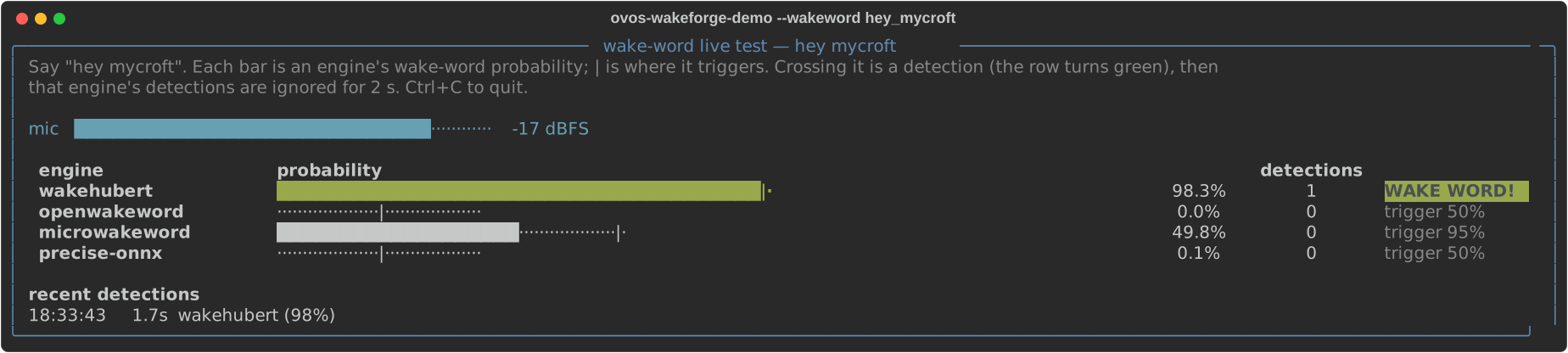
Say the wake word. Each bar shows one engine's wake-word probability, and | marks where that engine
triggers. See Compare against other engines for the options.
Use a ready model
Put this in mycroft.conf:
{
  "listener": {
    "wake_word": "hey_mycroft"
  },
  "hotwords": {
    "hey_mycroft": {
      "module": "ovos-ww-plugin-wakeforge",
      "model": "wakehubert_hey_mycroft",
      "listen": true
    }
  }
}
Each ready model is named wakehubert_<word>. The first time a model is used, the plugin downloads it from the
Hugging Face repository OpenVoiceOS/wakehubert-wakewords into the shared Hugging Face cache, checks it against the
SHA-256 in the repository's models.json, and reuses the cached file afterwards. The repository revision is pinned
in the plugin; models_revision sets another. The model names are wakehubert_alexa, wakehubert_android,
wakehubert_computer, wakehubert_hello_nabu, wakehubert_hey_chatterbox, wakehubert_hey_computer,
wakehubert_hey_floyd, wakehubert_hey_jarvis, wakehubert_hey_k9, wakehubert_hey_marvin,
wakehubert_hey_mycroft, wakehubert_hey_rhasspy, wakehubert_hey_robin, wakehubert_hey_scout,
wakehubert_home_assistant, wakehubert_jarvis, wakehubert_marvin, wakehubert_okay_nabu, wakehubert_sheila,
wakehubert_stop and wakehubert_wake_up. Name the hotword
to match the model.
wakehubert_hey_mycroft was trained on human recordings; every other ready model was trained on synthetic speech
only.
Each ready model is a small GRU classifier on features from
WakeHuBERT tiny, a 0.64M-parameter
speech feature extractor distilled from HuBERT-base. The score is the probability
that the last 1.5 s holds the wake word. Each model fires at its own default threshold, read from models.json,
and after a detection it stays quiet for 2 s. With a microphone whose gain is far too high or too low,
"agc": true levels the audio before scoring. Each model's licence and training data are listed in the
repository's models.json and its model card.
Choosing a threshold
Set "threshold" in the hotword config to trade missed wake words against false activations. A lower value
fires more readily and falsely more often; a higher value misses more wake words and fires falsely less often.
On a calibrated model the score is mapped so that a threshold of 0.5 targets about one false activation per hour, fitted on the calibration audio (LibriSpeech development speech, babble and AudioSet noise); on other audio the rate at 0.5 differs from word to word, so the measured figures below are the guide. The default threshold is the point that maximises F2, which weighs recall above precision. Raising the threshold toward 0.8 or 0.9 trades recall for fewer false activations, and lowering it does the opposite. The calibrated models run on the int8 WakeHuBERT featurizer.
The uncalibrated models (wakehubert_computer and wakehubert_hey_mycroft) output a probability too, but their
score is not mapped to a false-activation rate, so their
threshold is not a calibrated knob: the same number gives a different trade-off on each of them, and useful values
sit close to 1. They run on the float32 featurizer.
Measured through this plugin at the default threshold and at 0.8. Recall is the share of test clips detected; false activations are counted per hour of negative audio.
| model | calibrated | default threshold | recall at default | false activations/h at default | recall at 0.8 | false activations/h at 0.8 | recall test set |
|---|---|---|---|---|---|---|---|
wakehubert_jarvis |
yes | 0.57 | 98.4% | 0.69 | 93.8% | 0.15 | 384 Picovoice recordings of real speakers |
wakehubert_alexa |
yes | 0.40 | 86.7% | 0.69 | 73.3% | 0.13 | 315 Picovoice recordings of real speakers |
wakehubert_hey_jarvis |
yes | 0.16 | 94.5% | 0.09 | 86.2% | 0.02 | 384 clips in held-out synthetic voices |
wakehubert_hey_marvin |
yes | 0.34 | 97.4% | 0.95 | 90.7% | 0.24 | 386 clips in held-out synthetic voices |
wakehubert_home_assistant |
yes | 0.19 | 91.1% | 0.30 | 84.2% | 0.15 | 380 clips in held-out synthetic voices |
wakehubert_okay_nabu |
yes | 0.45 | 92.0% | 0.26 | 75.4% | 0.02 | 386 clips in held-out synthetic voices |
wakehubert_hello_nabu |
yes | 0.49 | 80.9% | 0.39 | 65.2% | 0.02 | 382 clips in held-out synthetic voices |
wakehubert_hey_chatterbox |
yes | 0.13 | 82.8% | 0.09 | 61.2% | 0.00 | 116 OVOS community recordings of real speakers |
wakehubert_hey_floyd |
yes | 0.43 | 91.7% | 0.47 | 82.3% | 0.02 | 96 OVOS community recordings of real speakers |
wakehubert_hey_rhasspy |
yes | 0.40 | 100.0% | 0.60 | 97.6% | 0.11 | 374 clips in held-out synthetic voices |
wakehubert_hey_robin |
yes | 0.05 | 99.5% | 0.39 | 97.9% | 0.06 | 380 clips in held-out synthetic voices |
wakehubert_marvin |
yes | 0.06 | 73.3% | 0.77 | 71.8% | 0.67 | 195 Speech Commands test recordings of real speakers |
wakehubert_sheila |
yes | 0.47 | 88.7% | 2.08 | 84.4% | 0.54 | 212 Speech Commands test recordings of real speakers |
wakehubert_stop |
yes | 0.14 | 86.6% | 2.06 | 76.9% | 0.45 | 411 Speech Commands test recordings of real speakers |
wakehubert_android |
yes | 0.42 | 98.7% | 0.95 | 96.4% | 0.11 | 390 clips in held-out synthetic voices |
wakehubert_hey_computer |
yes | 0.31 | 96.4% | 0.47 | 93.3% | 0.04 | 390 clips in held-out synthetic voices |
wakehubert_hey_k9 |
yes | 0.06 | 99.4% | 0.19 | 93.5% | 0.04 | 338 clips in held-out synthetic voices |
wakehubert_hey_scout |
yes | 0.36 | 95.9% | 0.09 | 93.8% | 0.04 | 390 clips in held-out synthetic voices |
wakehubert_wake_up |
yes | 0.36 | 98.1% | 1.10 | 96.8% | 0.19 | 378 clips in held-out synthetic voices |
wakehubert_computer |
no | 0.99 | |||||
wakehubert_hey_mycroft |
no | 0.965 |
The false activations are counted over 46.5 h of negative audio (speech, non-speech and household audio). The
held-out synthetic voices are voices that no model was trained on, but they are still synthetic speech, so recall
on real speakers can be lower for those words. wakehubert_sheila and wakehubert_stop give about two false
activations per hour at their default threshold; raise it toward 0.8 for fewer. wakehubert_marvin has a steep
calibration, so its recall and false-activation rate change little between its 0.06 default and 0.8.
Similar-sounding words can trigger each other's model. At the default thresholds, wakehubert_jarvis fires on
"hey jarvis", wakehubert_marvin on "hey marvin", and wakehubert_hey_jarvis on "hey chatterbox".
wakehubert_hello_nabu, wakehubert_hey_marvin and wakehubert_okay_nabu can fire on each other's words,
wakehubert_hey_marvin also on "hey rhasspy", "hey robin" and "marvin", wakehubert_okay_nabu on "hey rhasspy",
wakehubert_hey_robin on "hey marvin", "hey rhasspy" and "okay nabu", wakehubert_okay_nabu sometimes on
"hey k9", wakehubert_android sometimes on "hey floyd", wakehubert_computer and wakehubert_hey_computer on each
other's words, and wakehubert_sheila on "computer". Raise the threshold when two of these models run side by side.
WakePhoneHuBERT
WakePhoneHuBERT is a second pretrained featurizer, named
wakephonehubert-int8. It is the WakeHuBERT tiny trunk with an active-speaker VAD head and an IPA phoneme head
added, 3.5 MB in all. Each frame is 521 numbers at 50 frames per second: the 128 WakeHuBERT features, one
speech-activity probability and 392 phoneme posteriors. The phoneme posteriors run 100 ms behind the audio, and a
frame depends on the last 2.6 s of audio at most, so it streams like WakeHuBERT. Wake-word models trained on it are
named wakephonehubert_<word>. They name the featurizer in their own metadata, so a model path is all that
model needs, and the plugin downloads the featurizer on first use into the shared Hugging Face cache.
Use your own model
Point model at the classifier ONNX that wakeforge exported, and featurizer at its feature
extractor. Both can be local paths or URLs. A model trained on a pretrained featurizer names
that featurizer in its own metadata, so featurizer can be left out. A model whose metadata
carries a calibrated default_threshold uses it, together with the ready-model smoothing.
{
  "listener": {
    "wake_word": "hey_jarvis"
  },
  "hotwords": {
    "hey_jarvis": {
      "module": "ovos-ww-plugin-wakeforge",
      "listen": true,
      "featurizer": "~/hey_jarvis/featurizer.onnx",
      "model": "~/hey_jarvis/model.onnx"
    }
  }
}
Config keys
| key | default | description |
|---|---|---|
featurizer |
— (required) | feature-extractor ONNX (path or URL), or a pretrained featurizer name such as wakehubert; optional when the model names its featurizer |
featurizer_revision |
pinned per featurizer | Hugging Face revision (branch, tag or commit) of a pretrained featurizer |
models_revision |
pinned in the plugin | Hugging Face revision of the OpenVoiceOS/wakehubert-wakewords repository that a ready model is downloaded from |
model |
— (required) | classifier-head ONNX (path or URL), or a ready model: wakehubert_alexa, wakehubert_android, wakehubert_computer, wakehubert_hello_nabu, wakehubert_hey_chatterbox, wakehubert_hey_computer, wakehubert_hey_floyd, wakehubert_hey_jarvis, wakehubert_hey_k9, wakehubert_hey_marvin, wakehubert_hey_mycroft, wakehubert_hey_rhasspy, wakehubert_hey_robin, wakehubert_hey_scout, wakehubert_home_assistant, wakehubert_jarvis, wakehubert_marvin, wakehubert_okay_nabu, wakehubert_sheila, wakehubert_stop, wakehubert_wake_up |
vad |
none | optional VAD ONNX for an extra channel |
threshold |
0.5 |
detection threshold; a ready model or any head whose ONNX metadata carries default_threshold uses that instead (see Choosing a threshold) |
smoothing |
ema |
ema | mean | max (a calibrated head: max) |
patience |
3 |
consecutive above-threshold frames to fire (a calibrated head: 1) |
debounce_sec |
1.0 |
minimum seconds between detections (a calibrated head: 2.0) |
window_size |
5 |
smoother rolling window (mean/max) (a calibrated head: 1) |
ema_alpha |
0.3 |
EMA responsiveness |
block_ms |
80 |
audio is scored in blocks of this length whatever chunk size the listener sends, so patience counts time and the featurizer always gets a full block |
onnx_threads |
1 |
intra-op threads per ONNX session; sessions never spin-wait |
streaming |
false |
use the stateful streaming (GRU) head; with a pretrained featurizer the head type is read from the model |
gru_window |
100 |
frames the head averages over; with a pretrained featurizer it is read from a streaming head, or from a batch head's window_frames metadata, else 1.5 s of frames |
isolated_windows |
true |
pretrained featurizer with a batch head: featurize each window on its own, as training clips were; false featurizes with the past audio each frame depends on |
agc |
false |
with isolated windows, level each window (peak to 0.5, gain 0.25–4x) before scoring |
hidden_dim |
128 |
GRU hidden size of the streaming head |
URL models are cached under ${XDG_DATA_HOME}/wakeforge/.
Pretrained featurizers, wakehubert and wakehubert-int8 included, are downloaded from the Hugging Face Hub on first use. A featurizer that depends on future audio, or on unbounded history, cannot run on a live stream and is refused at load time.
Compare against other engines
ovos-wakeforge-demo listens to the microphone and runs the ready model next to the other
wake-word engines that have a model for the word, each fed the same 80 ms chunks:
pip install --pre "ovos-ww-plugin-wakeforge[demo]"
ovos-wakeforge-demo --wakeword hey_mycroft
| engine | what runs |
|---|---|
wakehubert |
this plugin with its ready model for the word (wakehubert_<word>) |
openwakeword |
the openwakeword library with its pretrained model for the word |
microwakeword |
the pymicro-wakeword library with its v2 model for the word |
precise-onnx |
the OVOS precise-onnx plugin with its hey mycroft model (it has no model for the other words) |
An engine with no model for the chosen word is listed in the red "not loaded" row. microWakeWord
has an okay_nabu model, which runs for --wakeword okay_nabu. No other engine has a computer or
wake_up model, so for those words wakehubert is the only bar on the panel.
Each engine has a row with a bar showing its wake-word probability and a | where it
triggers. When a bar crosses its marker the row turns green with "WAKE WORD!", the
detection is counted and logged under "recent detections", and that engine's detections
are ignored for 2 s. A meter shows the microphone level and warns when the input clips.
An engine that fails to load is listed in a red "not loaded" row with the reason, and an
engine that fails while running shows the error in its own row.
Options: --wakeword alexa|android|computer|hello_nabu|hey_chatterbox|hey_computer|hey_floyd|hey_jarvis|hey_k9|hey_marvin|hey_mycroft|hey_rhasspy|hey_robin|hey_scout|home_assistant|jarvis|marvin|okay_nabu|sheila|stop|wake_up, --threshold (WakeHuBERT trigger probability),
--oww-threshold (default 0.5), --mww-cutoff (default: the model's shipped cutoff),
--precise-sensitivity (default 0.5), --only wakehubert,openwakeword,..., --device
(see python -m sounddevice), --agc (level each WakeHuBERT window) and --file clip.wav,
which scores a 16 kHz recording instead of the microphone and prints each engine's
detection times.
Related projects
- TigreGotico/wakeforge is the wake-word research framework that trains the models this plugin runs.
- OpenVoiceOS/ovos-plugin-manager loads this plugin alongside other speech-to-text, text-to-speech and wake-word plugins.
- OpenVoiceOS/ovos-ww-plugin-precise-onnx is a sibling wake-word plugin that runs Precise models through ONNX.
Credits
Developed by TigreGótico for OpenVoiceOS.

This project was funded through the NGI0 Commons Fund, a fund established by NLnet with financial support from the European Commission's Next Generation Internet programme, under the aegis of DG Communications Networks, Content and Technology under grant agreement No 101135429.
License
Apache-2.0
1 maintainer

Metadata
1 maintainer
Release files for ovos-ww-plugin-wakeforge 0.10.0a1
For a detailed explanation of source distributions (sdists) and built distributions (wheels), please see the package formats documentation.
Source distribution (sdist)
| File | Size | Uploaded | |
|---|---|---|---|
| ovos_ww_plugin_wakeforge-0.10.0a1.tar.gz | 47.5 kB | Details |
Built distribution (wheel)
| File | Interpreter | ABI | Platform | Reset |
|---|---|---|---|---|
| ovos_ww_plugin_wakeforge-0.10.0a1-py3-none-any.whl | Python 3 | none | any | Details |
Total release size: 80.7 kB
Release files / ovos_ww_plugin_wakeforge-0.10.0a1.tar.gz
| Download URL | ovos_ww_plugin_wakeforge-0.10.0a1.tar.gz |
|---|---|
| Size | 47.5 kB |
| Tags | Source |
|
SHA-256 checksum How to use checksums |
ae6c3bf8cb05314f81950122e4cd5ad7fe6976602fecf7810d444b7057fbbb27
|
|
BLAKE2b-256 checksum How to use checksums |
7fa3c80c7fd3aede756d647f4b5f470f701ddcb4d10cfcef6635a7a2542d12f6
|
| Upload date | |
|
Uploaded using Trusted Publishing? What is trusted publishing? |
No |
| Uploaded via |
twine/7.0.0 CPython/3.13.14
|
Release files / ovos_ww_plugin_wakeforge-0.10.0a1-py3-none-any.whl
| Download URL | ovos_ww_plugin_wakeforge-0.10.0a1-py3-none-any.whl |
|---|---|
| Size | 33.1 kB |
| Tags | Python 3 |
|
SHA-256 checksum How to use checksums |
522dae4ff459535de2010da33ceab334edf4b7bc707182f7236d84010979922f
|
|
BLAKE2b-256 checksum How to use checksums |
295c3c5f928e702d0a28e506a683684b6263f760b255d7977d02251d41a0af30
|
| Upload date | |
|
Uploaded using Trusted Publishing? What is trusted publishing? |
No |
| Uploaded via |
twine/7.0.0 CPython/3.13.14
|














