
This release is a pre-release and may not be stable for production use.
ovos-ww-plugin-wakeforge
An OpenVoiceOS wake-word plugin. It runs wake-word models made with wakeforge. The models download from Hugging Face on first use.
Install
pip install --pre ovos-ww-plugin-wakeforge
Try it in your browser
Everything runs locally on your machine.
- WakeHuBERT wake words: every ready model, on your microphone or an uploaded file.
- WakePhoneHuBERT: spot a keyword you type, with no trained model.
Try it on your laptop
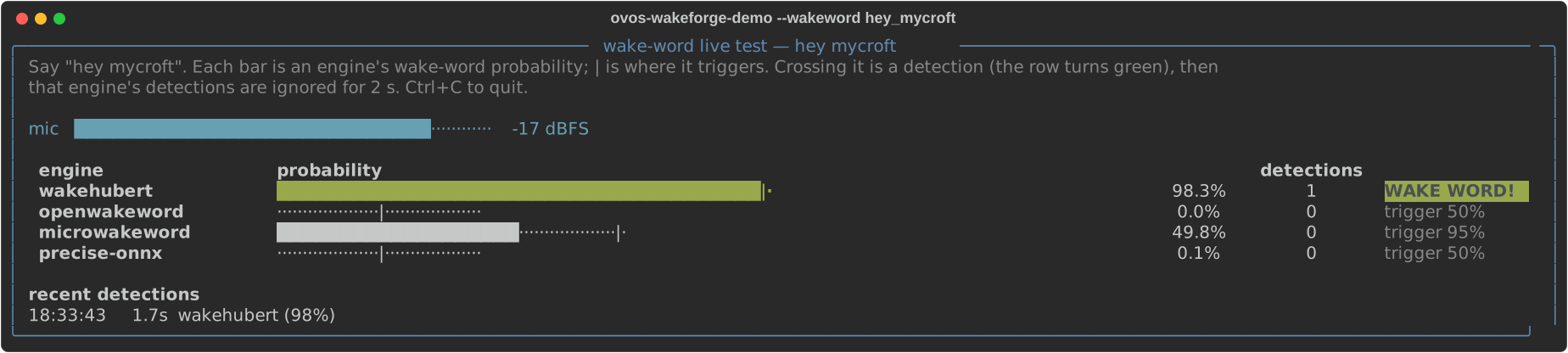
The demo listens to your microphone. It runs a ready model next to openWakeWord, microWakeWord and Precise, so you can compare them. Use --help for the options.
pip install --pre "ovos-ww-plugin-wakeforge[demo]"
ovos-wakeforge-demo --wakeword hey_mycroft
Use a ready model
Add this to mycroft.conf:
{
  "listener": {
    "wake_word": "hey_mycroft"
  },
  "hotwords": {
    "hey_mycroft": {
      "module": "ovos-ww-plugin-wakeforge",
      "model": "wakehubert_hey_mycroft",
      "listen": true
    }
  }
}
Each ready model is named wakehubert_<word>. The model card lists all words, thresholds, test results and training data: https://huggingface.co/OpenVoiceOS/wakehubert-wakewords.
Streaming models
A model named wakehubert_<word>_streaming was trained on streamed features. The plugin runs the featurizer as a stateful graph. The graph carries each layer's past between 80 ms blocks and computes only the new frames, instead of featurizing the last 1.5 s again on every block. Streaming models exist for alexa, hey_jarvis and hey_mycroft.
"hotwords": {
  "hey_mycroft": {"module": "ovos-ww-plugin-wakeforge", "model": "wakehubert_hey_mycroft_streaming", "listen": true}
}
The model's metadata selects streamed features, so model is the only key you need. The model card lists their results.
Threshold
Calibrated models make threshold a sensitivity setting. A higher value gives fewer false activations and fewer detections. A lower value gives more of both. Each model has its own default threshold. Set "threshold" in the hotword config to change it.
WakePhoneHuBERT
WakePhoneHuBERT is a second featurizer, named wakephonehubert-int8. It adds a voice-activity head and an IPA phoneme head to the WakeHuBERT trunk. Models trained on it are named wakephonehubert_<word>. They name their featurizer in their own metadata, so model is the only key you need. The plugin downloads the featurizer on first use.
Zero-shot wake words
The ovos-ww-plugin-wakeforge-zeroshot engine detects a wake word from its IPA phones alone, with no recordings and no trained model. It scores WakePhoneHuBERT's phoneme output for the phones in ipa, every 80 ms over the last 1.5 s of audio. The word fires when two consecutive windows both reach the threshold (confirm_blocks, default 2), which removes single-window matches inside ordinary speech.
"hotwords": {
  "hey_jarvis": {"module": "ovos-ww-plugin-wakeforge-zeroshot", "ipa": "h eɪ dʒ ɑːɹ v ɪ s"}
}
ipa can be a list of pronunciations. Get the phones once with eSpeak NG, which the default thresholds were calibrated with: espeak-ng -q --ipa -v en-us "hey jarvis". The plugin needs no phonemiser. The default threshold depends on the number of phones and is a starting point: set "threshold" (0 is a perfect match) to tune it. Use a phrase of at least six phones, ideally two words. Short single words are unreliable: train a model for them.
Use your own model
Set model to the classifier ONNX that wakeforge exported. Set featurizer to its feature-extractor ONNX. Both can be local paths or URLs. A model trained on a pretrained featurizer names it in its metadata, so you can leave featurizer out. Train models with wakeforge.
{
  "listener": {
    "wake_word": "hey_jarvis"
  },
  "hotwords": {
    "hey_jarvis": {
      "module": "ovos-ww-plugin-wakeforge",
      "listen": true,
      "featurizer": "~/hey_jarvis/featurizer.onnx",
      "model": "~/hey_jarvis/model.onnx"
    }
  }
}
Config keys
| key | default | meaning |
|---|---|---|
model |
required | classifier ONNX (path or URL), or a ready model name |
featurizer |
none | feature-extractor ONNX (path or URL), or a pretrained name such as wakehubert; optional when the model names one |
threshold |
0.5 |
detection threshold; a ready model or calibrated head uses its own default |
debounce_sec |
1.0 |
minimum seconds between detections (2.0 for a calibrated head) |
agc |
false |
level each audio window before scoring; helps when the microphone gain is far too high or low; not available with streamed features |
streaming_features |
from the model | stream the featurizer instead of featurizing each window on its own; on for a model trained on streamed features |
models_revision |
pinned | Hugging Face revision of the ready-model repository |
featurizer_revision |
pinned | Hugging Face revision of a pretrained featurizer |
onnx_threads |
1 |
threads per ONNX session |
The source documents the other keys (smoothing, patience, window_size, ema_alpha, block_ms, streaming, gru_window, isolated_windows, hidden_dim, vad) in ovos_ww_plugin_wakeforge/__init__.py. URL models are cached under ${XDG_DATA_HOME}/wakeforge/.
Credits
Developed by TigreGótico for OpenVoiceOS.

This project was funded through the NGI0 Commons Fund, a fund established by NLnet with financial support from the European Commission's Next Generation Internet programme, under the aegis of DG Communications Networks, Content and Technology under grant agreement No 101135429.
License
Apache-2.0
1 maintainer

Metadata
1 maintainer
Release files for ovos-ww-plugin-wakeforge 0.18.0a1
For a detailed explanation of source distributions (sdists) and built distributions (wheels), please see the package formats documentation.
Source distribution (sdist)
| File | Size | Uploaded | |
|---|---|---|---|
| ovos_ww_plugin_wakeforge-0.18.0a1.tar.gz | 58.3 kB | Details |
Built distribution (wheel)
| File | Interpreter | ABI | Platform | Reset |
|---|---|---|---|---|
| ovos_ww_plugin_wakeforge-0.18.0a1-py3-none-any.whl | Python 3 | none | any | Details |
Total release size: 97.7 kB
Release files / ovos_ww_plugin_wakeforge-0.18.0a1.tar.gz
| Download URL | ovos_ww_plugin_wakeforge-0.18.0a1.tar.gz |
|---|---|
| Size | 58.3 kB |
| Tags | Source |
|
SHA-256 checksum How to use checksums |
c3be8b8618d92b76344e85d46cd9d9c6b89cdef309b023bcfdae30ce40d37a24
|
|
BLAKE2b-256 checksum How to use checksums |
8974e6c5540bd53e502b255f52fed8457bf782f38a3b85397cc7449e768751c1
|
| Upload date | |
|
Uploaded using Trusted Publishing? What is trusted publishing? |
No |
| Uploaded via |
twine/7.0.0 CPython/3.13.14
|
Release files / ovos_ww_plugin_wakeforge-0.18.0a1-py3-none-any.whl
| Download URL | ovos_ww_plugin_wakeforge-0.18.0a1-py3-none-any.whl |
|---|---|
| Size | 39.4 kB |
| Tags | Python 3 |
|
SHA-256 checksum How to use checksums |
d434882e7fb2dbf7fe7bcaa04bce7721e90228281cae0f823d6b8b7673671c83
|
|
BLAKE2b-256 checksum How to use checksums |
62b393e02cd88302285319eadfc8244b22fbcf79e2c8beec44b2d10e47b72e6d
|
| Upload date | |
|
Uploaded using Trusted Publishing? What is trusted publishing? |
No |
| Uploaded via |
twine/7.0.0 CPython/3.13.14
|














