
Handy graphical user interface library for daily use

Project description
PancakeKit
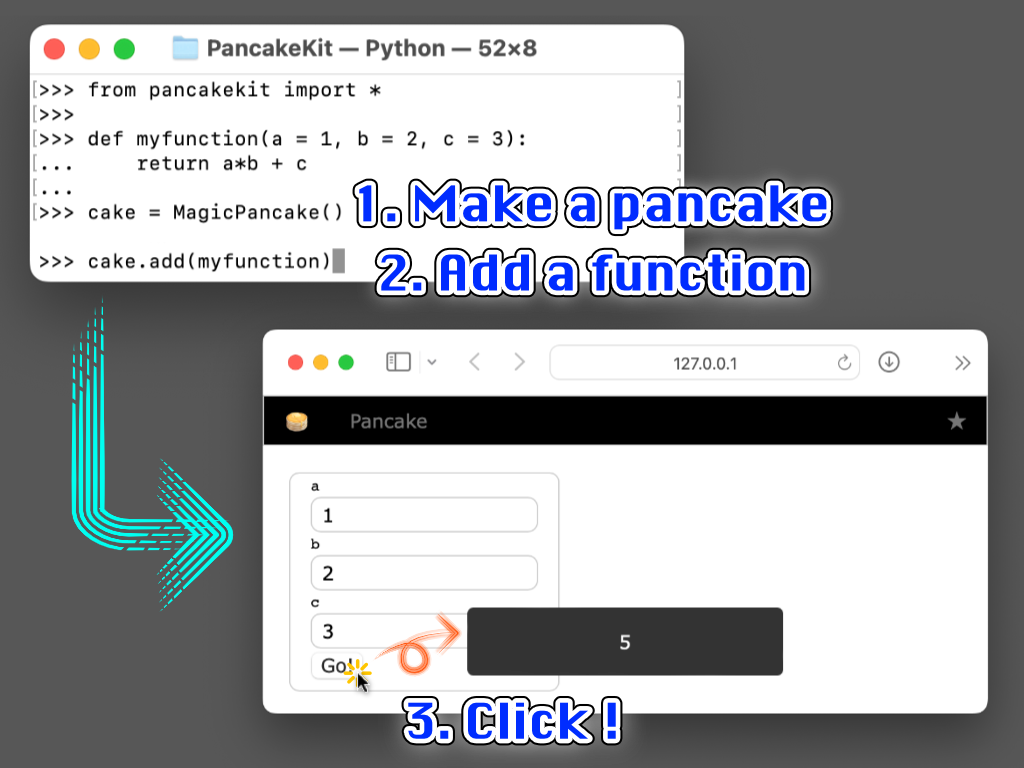
PancakeKit is a lightweight browser UI for Python scripts. Add small UI components (“toppings”) to a page (Pancake), then serve it locally.
Installation
pip install pancakekit
Quick start
from pancakekit import Pancake

def fibonacci(n=10):
    return (fibonacci(n - 1) + fibonacci(n - 2)) if n >= 2 else n

cake = Pancake()     # 1) create a page
cake.add(fibonacci)  # 2) add a function (auto UI)
cake.serve()         # 3) start the server
Open http://127.0.0.1:8000/.
Interactive mode
In interactive environments (REPL/IPython), Pancake() starts the server automatically by default.
from pancakekit import *

cake = Pancake()  # auto-serve in interactive mode

# To opt out:
# cake = Pancake(auto_serve_in_interactive_mode=False)
# cake.serve()
You can also start a ready-to-use interactive session from the command line:
python -m pancakekit
Or load an existing script and auto-register callables:
python -m pancakekit path/to/your_script.py
Values and events
Most toppings expose their state through .value.
from pancakekit import *

cake = Pancake()
age = cake.add(Input("Age", default=20), name="age")
age.value_changed = lambda v: cake.show_message({"age": v})
You can access toppings by name:
from pancakekit import *

cake = Pancake()
cake.add(Input("Count", default=0), name="count")
cake["count"].value += 1
Buttons: clicked and long-press pressed
from pancakekit import *

cake = Pancake()
btn = cake.add(Button("Hold me"))

btn.clicked = lambda _v: cake.show_message("clicked")
btn.pressed = lambda _v: cake.show_message("pressed")
Long-press behavior:
pressedstarts after ~0.5s hold, then repeats while held down- repeats after the previous handler finishes, with ~0.1s delay
- if
clickedis not set butpressedis set,pressedfires immediately on pointer down
Honeycomb (script editor)
Each Pancake has a built-in Honeycomb card.
- Toggle:
Shift + Enter - Run:
Cmd/Ctrl + Enter - Recall saved scripts:
Cmd/Ctrl + ↑ / ↓(when Honeycomb is open)
Inside Honeycomb, the current page is available as the reserved name cake.
Built-in toppings
Inputs
Input(label, default=None, placeholder=None)DictInput(default: dict, horizontal: bool = False)Slider(label, range_min, range_max, value=None, step=1.0)Select(label, options, value=None, placeholder=None, with_clear=False, allow_none=None, disabled=False)Switch(label="", value=False, disabled=False)RadioGroup(label, options, value=None, orientation="vertical", appearance=None, allow_none=False, disabled=False)
Display
Label(text=""),Text(text=""),Paragraph(text="")ImageView(image: PIL.Image | str),ImageCard(image: PIL.Image | str)Table(df: pandas.DataFrame | dict)ProgressBar(value=0, label=None, max_value=100, show_value=True)
Layout / containers
Row(),Column(),Group(...)Card(...),FloatingCard(...)(floating draggable cards)GridPanel(size=(rows, cols), status_dict=None, style=None)
Multiple pages with Plate
from pancakekit import *

plate = Plate()

class Crape(Pancake):
    def decorate(self):
        b = self.add(Button("Go to Waffle"))
        b.clicked = lambda _v: plate.go_to("Waffle")

class Waffle(Pancake):
    def decorate(self):
        b = self.add(Button("Go to Crape"))
        b.clicked = lambda _v: plate.go_to("Crape")

Crape(plate)
Waffle(plate)
plate.serve()
Making a custom topping
from pancakekit import Topping, Tag

class MyLabel(Topping):
    def prepare(self, text):
        self.value = text
        self.label = Tag("label", style={"text-shadow": "1px 1px 1px #bbb"}, value_ref=self)

    def html(self):
        return self.label.render()
Useful hooks:
prepare(self, *args, **kwargs)(one-time setup)html(self)(render HTML)value_getter(self)/value_preprocessor(self, value)/web_value_proprocessor(self, tag, value)event_preprocessor(self, event)
Release history Release notifications | RSS feed


Download files
Download the file for your platform. If you're not sure which to choose, learn more about installing packages.
Source Distribution
File details
Details for the file pancakekit-0.3.0.tar.gz.
File metadata
- Download URL: pancakekit-0.3.0.tar.gz
- Upload date:
- Size: 120.8 kB
- Tags: Source
- Uploaded using Trusted Publishing? No
- Uploaded via: twine/6.2.0 CPython/3.12.9
File hashes
| Algorithm | Hash digest | |
|---|---|---|
| SHA256 |
617e40a04deb633be86c68c73834a345814c6e86886860581c8837b6c5ac4edf
|
|
| MD5 |
134fba154075b9770dc2169560fbf9bd
|
|
| BLAKE2b-256 |
bd9262d425507383af44d54997a5e0f492ee587f250c85de2b9d0df8f38c2d1a
|






