
Technical Analysis Indicators - Pandas TA Classic is an easy to use Python 3 Pandas Extension with a comprehensive collection of indicators and TA-Lib patterns.

Project description
Pandas TA Classic - Technical Analysis Library










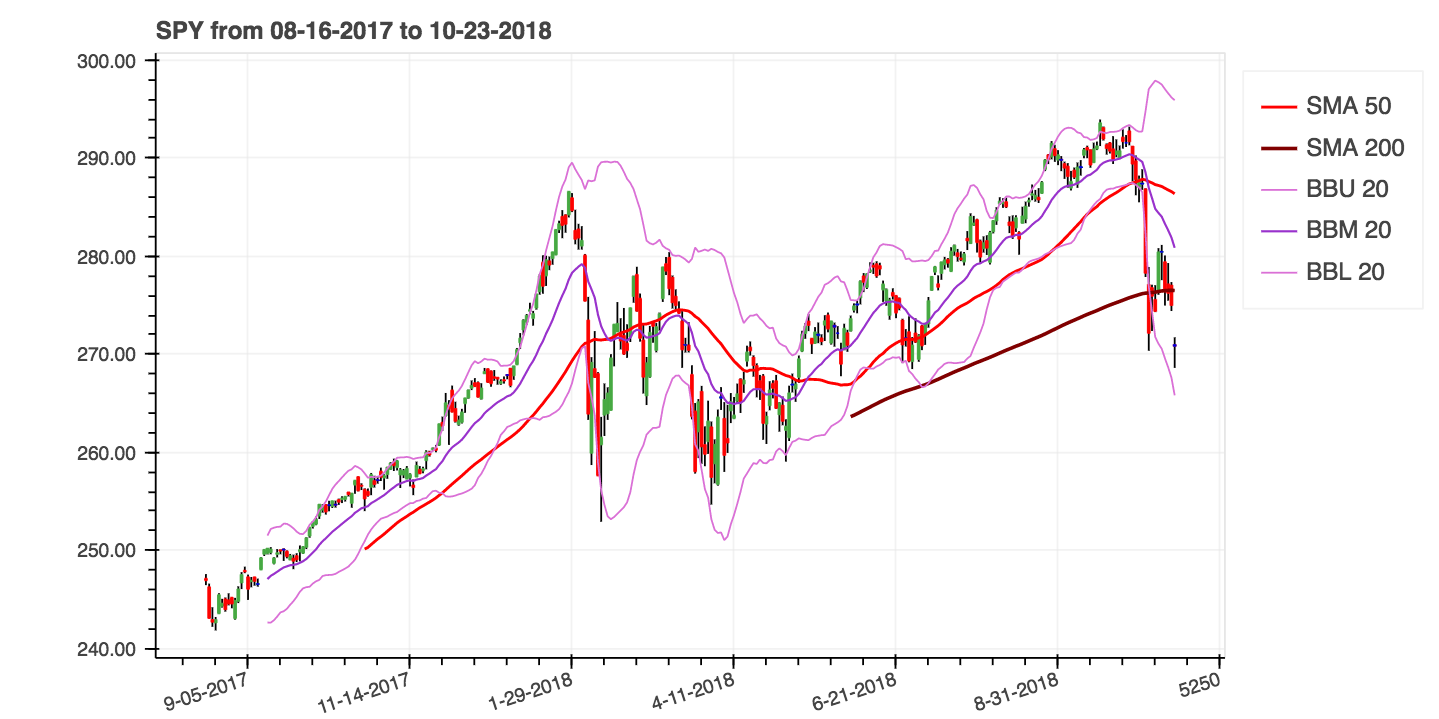
Pandas TA Classic is an easy-to-use library that leverages the Pandas package with 192 indicators and utility functions and 62 native candlestick patterns (252 total unique — no TA-Lib required). Many commonly used indicators are included, such as: Simple Moving Average (sma), Moving Average Convergence Divergence (macd), Hull Exponential Moving Average (hma), Bollinger Bands (bbands), On-Balance Volume (obv), Aroon & Aroon Oscillator (aroon), Squeeze (squeeze) and many more.
This is the classic/community maintained version of the popular pandas-ta library.
New to Pandas TA Classic?
Get started quickly with our comprehensive guides:
- Quickstart Guide - Installation, your first indicators, and common workflows
- Tutorials - Step-by-step tutorials for real-world use cases:
- Moving Average Crossover Strategy
- Building Custom Indicator Strategies
- Backtesting with Performance Metrics
- Integrating with VectorBT
- Multi-Timeframe Analysis
- Creating Custom Indicators
- Candlestick Pattern Recognition
Complete documentation: https://xgboosted.github.io/pandas-ta-classic/
Key Features
- 252 Unique Indicators & Patterns: 192 Category indicators + 62 CDL patterns via
cdl_pattern()= 252 unique (doji and inside appear in both counts; all CDL patterns use native Python — no TA-Lib required) - All-Native Candlestick Patterns: All 62 CDL patterns have native Python implementations — TA-Lib is never used for CDL patterns
- Optional TA-Lib Acceleration: 34 core indicators (EMA, SMA, RSI, MACD, OBV, ATR, etc.) automatically use TA-Lib when installed; pass
talib=Falseto force native - Compatibility Scope Is Explicit: Not every TA-Lib/tulipy function has a pandas-ta-classic counterpart. Current mapping includes 67 indicators with TA-Lib counterparts, 71 with tulipy counterparts, and 44 covered by both. Full per-indicator matrix:
docs/indicator_support_matrix.rst - Optional Performance Boost: Install
numbafor 6–230× speedups on hot-loop indicators (QQE, RSX, HWMA, SSF, PSAR, Supertrend, MCGD) - Automatic Versioning: Version management via git tags using setuptools-scm
- Modern Package Management: Full support for both
uvandpip - Production Ready: Stable status with comprehensive test coverage including property-based testing (Hypothesis)
- Active Development: Regular updates with community contributions
Quick Start
Installation
The library supports both modern uv and traditional pip package managers.
Stable Release
Using uv (recommended - faster):
uv pip install pandas-ta-classic
Using pip:
pip install pandas-ta-classic
Latest Version
Using uv:
uv pip install git+https://github.com/xgboosted/pandas-ta-classic
Using pip:
pip install -U git+https://github.com/xgboosted/pandas-ta-classic
Development Installation
Using uv:
# Clone the repository
git clone https://github.com/xgboosted/pandas-ta-classic.git
cd pandas-ta-classic

# Install with all dependencies
uv pip install -e ".[all]"

# Or install specific dependency groups:
uv pip install -e ".[dev]" # Development tools
uv pip install -e ".[optional]" # Optional runtime features
uv pip install -e ".[oracle]" # Oracle parity libs: TA-Lib + tulipy
Using pip:
# Clone the repository
git clone https://github.com/xgboosted/pandas-ta-classic.git
cd pandas-ta-classic

# Install with all dependencies
pip install -e ".[all]"

# Or install specific dependency groups:
pip install -e ".[dev]" # Development tools
pip install -e ".[optional]" # Optional runtime features
pip install -e ".[oracle]" # Oracle parity libs: TA-Lib + tulipy
Basic Usage
import pandas as pd
import pandas_ta_classic as ta

# Load your data
df = pd.read_csv("path/to/symbol.csv")
# OR if you have yfinance installed
df = df.ta.ticker("aapl")

# Calculate indicators
df.ta.sma(length=20, append=True) # Simple Moving Average
df.ta.rsi(append=True) # Relative Strength Index
df.ta.macd(append=True) # MACD
df.ta.bbands(append=True) # Bollinger Bands

# Fluent API chaining (v0.6+)
df.ta.chain().sma(20).ta.rsi(14).ta.macd().ta.bbands(20)

# Or run a strategy with multiple indicators
df.ta.strategy("CommonStrategy") # Runs commonly used indicators
Features
- 192 Technical Indicators & Utilities across 9 categories (Candles, Cycles, Momentum, Overlap, Trend, Volume, etc.)
- 62 Native Candlestick Patterns — all patterns natively implemented, no TA-Lib required
- 252 Unique Indicators & Patterns - 192 category indicators plus 62 CDL patterns via
cdl_pattern() - Dynamic Category Discovery - automatically detects all available indicators from the filesystem
- Optional Numba Acceleration - 6–230× speedups via
pip install pandas-ta-classic[performance] - Strategy System with multiprocessing support for bulk indicator processing
- Fluent API Chaining:
df.ta.chain().sma(20).ta.rsi(14).ta.macd().ta.bbands(20)— chain multiple indicators in a single expression - Pandas DataFrame Extension for seamless integration (
df.ta.indicator()) - TA-Lib Integration (dual-role) - (1) acceleration backend: 34 core indicators auto-use TA-Lib's C implementation when installed; pass
talib=Falseto force native. (2) oracle:test_oracle_talib.pyverifies parity against TA-Lib - tulipy Integration (oracle only) - parity test oracle;
test_oracle_tulipy.pyverifies native output against tulipy; never used as computation backend - Vectorbt Integration - compatible with popular backtesting framework
- Custom Indicators - easily create and chain your own indicators
Documentation
Complete documentation is available at: https://xgboosted.github.io/pandas-ta-classic/
Learning Resources
Start Here:
- Quickstart Guide - Get up and running in minutes
- Tutorials - Step-by-step guides for common workflows
- Examples - Jupyter notebooks with real examples
Reference Documentation:
- Usage Guide - Programming conventions and basic usage
- Strategy System - Multiprocessing and bulk indicator processing
- Indicators Reference - Complete list of 192 indicators plus 62 CDL patterns (252 unique total)
- DataFrame API - Properties and methods reference
- Performance Metrics - Backtesting and performance analysis
Python Version Support
Pandas TA Classic follows a rolling support policy for the latest stable Python version plus 4 preceding minor versions.
Note: Python version support is dynamically managed via CI/CD workflows. When new Python versions are released, the library automatically updates to support the latest 5 minor versions. Check the CI workflow
LATEST_PYTHON_VERSIONfor the current configuration.
TA-Lib and tulipy serve different roles — both are fully optional and skip gracefully when not installed.
| Library | Role | Effect when installed |
|---|---|---|
| TA-Lib | Acceleration backend + oracle | 34 core indicators use TA-Lib's C implementation by default; also used in test_oracle_talib.py for parity checks |
| tulipy | Oracle only | Never used as computation backend; only test_oracle_tulipy.py uses it to verify native output |
| Area | Behaviour without TA-Lib | Behaviour with TA-Lib |
|---|---|---|
| CDL patterns (62) | Native Python — always used | Still native — TA-Lib never used for patterns |
| Core indicators (34) | Native Python | TA-Lib version used by default; pass talib=False to force native |
# CDL patterns — always native, no TA-Lib needed
df.ta.cdl_pattern(name="all") # run all 62 patterns
df.ta.cdl_pattern(name="engulfing") # individual pattern

# Core indicators — TA-Lib used if installed (default)
df.ta.ema(length=20) # TA-Lib EMA when available
df.ta.ema(length=20, talib=False) # force native implementation
Installing oracle libraries:
# uv
uv pip install pandas-ta-classic[oracle] # installs both TA-Lib and tulipy
uv pip install TA-Lib # TA-Lib only (also enables acceleration backend)
uv pip install tulipy # tulipy only (oracle test use only)
# pip
pip install pandas-ta-classic[oracle] # installs both TA-Lib and tulipy
pip install TA-Lib # TA-Lib only (also enables acceleration backend)
pip install tulipy # tulipy only (oracle test use only)
Note: Both oracle test suites (
test_oracle_talib.py,test_oracle_tulipy.py) are guarded with@unittest.skipUnlessand skip automatically when the respective library is not installed. Neither is required for normal use. Installing TA-Lib additionally activates the C-library acceleration backend for 34 indicators.
Performance boost: Install numba for 6–230× speedups on computation-heavy indicators:
- Using
uv:uv pip install pandas-ta-classic[performance] - Using
pip:pip install pandas-ta-classic[performance]
Contributing
We welcome contributions! Please see our contributing guidelines and issues page.
Reporting Issues
- Check existing issues first
- Provide reproducible code examples
- Include relevant error messages and data samples
Changelog
For detailed information about changes, improvements, and new features, please see the CHANGELOG.md file.
Sources
Original TA-LIB | TradingView | Sierra Chart | MQL5 | FM Labs | Pro Real Code | User 42
Support
If you find this library helpful, please consider:

License
This project is licensed under the MIT License - see the LICENSE file for details.
Release history Release notifications | RSS feed


Download files
Download the file for your platform. If you're not sure which to choose, learn more about installing packages.
Source Distributions
Built Distribution
Filter files by name, interpreter, ABI, and platform.
If you're not sure about the file name format, learn more about wheel file names.
Copy a direct link to the current filters
File details
Details for the file pandas_ta_classic-0.6.20-py3-none-any.whl.
File metadata
- Download URL: pandas_ta_classic-0.6.20-py3-none-any.whl
- Upload date:
- Size: 396.0 kB
- Tags: Python 3
- Uploaded using Trusted Publishing? No
- Uploaded via: twine/6.2.0 CPython/3.14.5
File hashes
| Algorithm | Hash digest | |
|---|---|---|
| SHA256 |
68cced5b9b5281b77f8b85dd0afff85505509531206fb7ff967ace85ef5d0630
|
|
| MD5 |
956219d86e4c428a5c9c893408219090
|
|
| BLAKE2b-256 |
1672d31ff71184ec1b75c86b82f2d7b10d9c2a2f3a34049d26153d9462ae07ee
|






