
CLI bringing pandas operations to the command line

Project description
pandas-term
pandas-term is a CLI bringing pandas operations to the command line.
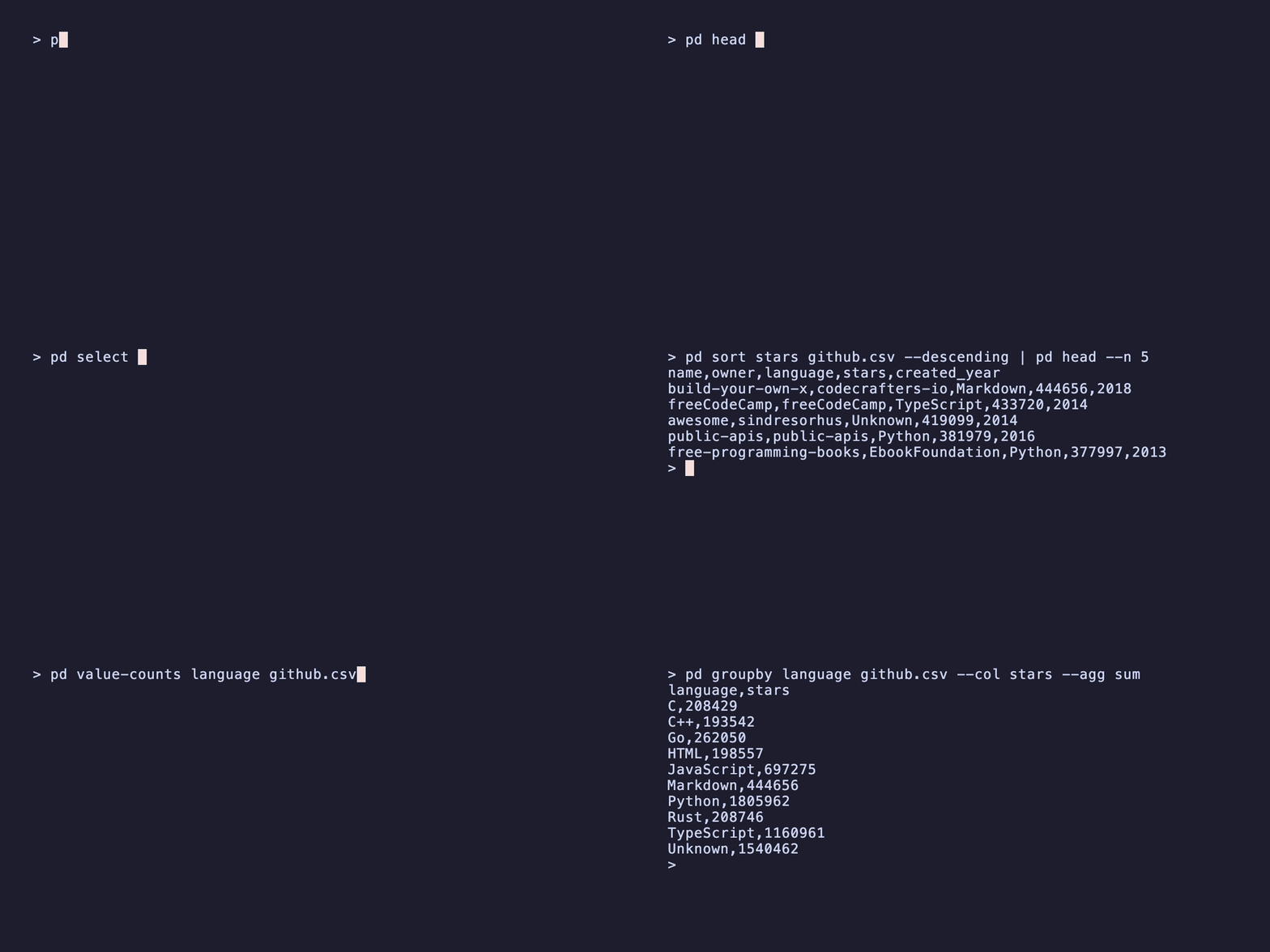
Note: Still in early experimental development and may change
Installation
pipx install pandas-term
Or with pip:
pip install pandas-term
Command Reference
| CLI Command | Pandas Function | Description |
|---|---|---|
pd select |
df[columns] |
Select columns |
pd drop |
df.drop() |
Drop columns |
pd rename |
df.rename() |
Rename columns |
pd sort |
df.sort_values() |
Sort by columns |
pd dedup |
df.drop_duplicates() |
Remove duplicate rows |
pd merge |
pd.merge() |
Merge two dataframes |
pd concat |
pd.concat() |
Concatenate dataframes |
pd batch |
df.iloc[] |
Split dataframe into batches |
pd query |
df.query() |
Filter using query expressions |
pd head |
df.head() |
Get first n rows |
pd tail |
df.tail() |
Get last n rows |
pd dropna |
df.dropna() |
Drop rows with null values |
pd describe |
df.describe() |
Descriptive statistics |
pd unique |
df[col].unique() |
Unique values in column |
pd shape |
df.shape |
Dimensions (rows, columns) |
pd columns |
df.columns |
Column names |
pd value-counts |
df[col].value_counts() |
Count unique values |
pd groupby |
df.groupby().agg() |
Group by and aggregate |
Usage
All commands accept an input file path (or - for stdin) and an optional -o/--output flag for the output file (or - for stdout).
Transform commands
# Select columns (comma-separated)
pd select name,age data.csv

# Drop columns (comma-separated)
pd drop unwanted_column data.csv

# Sort by columns (comma-separated for multiple)
pd sort age data.csv --ascending
pd sort "age,name" data.csv --descending

# Remove duplicate rows
pd dedup data.csv
pd dedup --subset name,email data.csv

# Rename columns
pd rename "name:full_name" data.csv
pd rename "name:full_name,age:years" data.csv

# Merge two dataframes
pd merge left.csv right.csv --on user_id --how inner
pd merge left.csv right.csv --left-on id --right-on user_id --how left

# Concatenate multiple dataframes
pd concat file1.csv file2.csv file3.csv

# Split dataframe into batches
pd batch data.csv --sizes 100 -o "batch_{}.csv"
pd batch data.csv --sizes 1,2,10,50 -o "batch_{}.csv"  # variable sizes, last repeats
Filter commands
# Filter using pandas query expressions
pd query "age > 30 and city == 'NYC'" data.csv

# First N rows
pd head --n 100 data.csv

# Last N rows
pd tail --n 50 data.csv

# Drop rows with null values in any column
pd dropna data.csv

# Drop rows with null values in specific column
pd dropna --column column_name data.csv
Stats commands
# Descriptive statistics
pd describe data.csv

# Unique values in a column
pd unique country data.csv

# Dimensions (rows, columns)
pd shape data.csv

# Column names
pd columns data.csv
Aggregate commands
# Count unique values
pd value-counts city data.csv
pd value-counts department data.csv --normalize

# Group by and aggregate (comma-separated for multiple group columns)
pd groupby department data.csv --col salary --agg sum
pd groupby "city,department" data.csv --col age --agg mean
Piping
All commands support piping through stdin/stdout. When piping, you can omit the input file argument (it defaults to stdin):
cat data.csv | pd head --n 100 | pd select name,age | pd query "age > 30"

# Or chain commands directly
pd sort age data.csv --descending | pd head --n 10 | pd select name,age
Output Formats
When writing to a file, the format is determined by the file extension:
pd select name,age data.csv -o output.xlsx
pd query "age > 30" data.json -o filtered.parquet
For stdout output (default is CSV), use --json to output as JSON:
pd head --n 10 data.csv --json
pd query "age > 30" data.csv --json | jq '.[] | .name'
Supported formats: CSV, XLSX, JSON, Parquet (file output) / CSV, JSON (stdout)
Development
Requires uv
Create virtual environment and install dependencies:
uv sync
Dev commands
| Command | Description |
|---|---|
make format |
Format code with ruff |
make lint |
Run linting checks (ruff + type checking) |
make test |
Run pytest tests |
make check |
Format, lint, and run tests |
make coverage |
Run tests with coverage report |
Release history Release notifications | RSS feed


Download files
Download the file for your platform. If you're not sure which to choose, learn more about installing packages.
Source Distribution
Built Distribution
Filter files by name, interpreter, ABI, and platform.
If you're not sure about the file name format, learn more about wheel file names.
Copy a direct link to the current filters
File details
Details for the file pandas_term-0.0.2.tar.gz.
File metadata
- Download URL: pandas_term-0.0.2.tar.gz
- Upload date:
- Size: 10.5 kB
- Tags: Source
- Uploaded using Trusted Publishing? No
- Uploaded via: uv/0.9.6
File hashes
| Algorithm | Hash digest | |
|---|---|---|
| SHA256 |
094a7698831b0ee79266b77378c51295f63e4006dc6493b3a5bda2f2d4badcb4
|
|
| MD5 |
5b85b680c5714ebd58645f9bf4678df7
|
|
| BLAKE2b-256 |
e2aadf0d57becefb73895b483f39ab6e09414a494fea5e4007f9758823ab4b70
|
File details
Details for the file pandas_term-0.0.2-py3-none-any.whl.
File metadata
- Download URL: pandas_term-0.0.2-py3-none-any.whl
- Upload date:
- Size: 11.7 kB
- Tags: Python 3
- Uploaded using Trusted Publishing? No
- Uploaded via: uv/0.9.6
File hashes
| Algorithm | Hash digest | |
|---|---|---|
| SHA256 |
bdba6618bc1d61c12d67346447f3e82d3be33f19abe05c755b730002215214aa
|
|
| MD5 |
19629b640cf9bbcf8fca9afdec414218
|
|
| BLAKE2b-256 |
15c950cd6550d7e8bae68fbe554a5dc7f53cda24acf57890f3ca76ae69604984
|






