
All-in-one pandoc filter for numbering and cross referencing multi-line equations, sections, figures and tables in TeX.

Project description
pandoc-tex-numbering
This is an all-in-one pandoc filter especially for LaTeX files to keep numbering, hyperlinks, caption prefixs and cross references in (maybe multi-line) equations, sections, figures, and tables.
With pandoc-tex-numbering, you can convert your LaTeX source codes to any format pandoc supported, especially .docx, while keep all your auto-numberings and cross references.
Contents
- pandoc-tex-numbering
- Contents
- What do we support?
- Installation
- Quick Start
- Customization
- Details
- Examples
- Development
- FAQ
- TODO
What do we support?
- Multi-line Equations: Multi-line equations in LaTeX math block such as
align,casescan be numbered line by line.\nonumbercommands are supported to turn off the numbering of a specific line. cleverefPackage:crefandCrefcommands are supported. You can customize the prefix of the references.- Subfigures:
subcaptionpackage is supported. Subfigures can be numbered with customized symbols and formats. - Non-Arabic Numbers: Chinese numbers "第一章", "第二节" etc. are supported. You can customize the numbering format.
- Custom List of Figures and Tables: Short captions as well as custom lof/lot titles are supported for figures and tables.
Installation
First, install pandoc and python3 if you haven't.
pandoc-tex-numbering can be installed via pip:
pip install pandoc-tex-numbering
You can also download the source code manually and put it in the same directory as your source file. In this case, when using the filter, you should specify the filter file via -F pandoc-tex-numbering.py instead of -F pandoc-tex-numbering.
Quick Start
Take .docx as an example:
pandoc -F pandoc-tex-numbering -o output.docx input.tex
Customization
You can set the following variables in the metadata of your LaTeX file to customize the behavior of the filter:
General
number-figures: Whether to number the figures. Default istrue.number-tables: Whether to number the tables. Default istrue.number-equations: Whether to number the equations. Default istrue.number-sections: Whether to number the sections. Default istrue.number-reset-level: The level of the section that will reset the numbering. Default is 1. For example, if the value is 2, the numbering will be reset at every second-level section and shown as "1.1.1", "3.2.1" etc.data-export-path: Where to export the filter data. Default isNone, which means no data will be exported. If set, the data will be exported to the specified path in the JSON format. This is useful for further usage of the filter data in other scripts or filter-debugging.auto-labelling: Whether to automatically add identifiers (labels) to figures and tables without labels. Default istrue. This has no effect on the output appearance but can be useful for cross-referencing in the future (for example, in the.docxoutput this will ensure that all your figures and tables have a unique auto-generated bookmark).
Equations
multiline-environments: Possible multiline environment names separated by commas. Default is "cases,align,aligned,gather,multline,flalign". The equations under these environments will be numbered line by line.
cleveref Support
Currently, pandoc's default LaTeX reader does not support \crefname and \Crefname commands (they are not visible in the AST for filters). To support cleveref package, you can set the following metadata:
figure-prefix: The prefix of the figure reference. Default is "Figure".table-prefix: The prefix of the table reference. Default is "Table".equation-prefix: The prefix of the equation reference. Default is "Equation".section-prefix: The prefix of the section reference. Default is "Section".prefix-space: Whether to add a space between the prefix and the number. Default istrue(for some languages, the space may not be needed).
Note: multiple references are not supported currently. Try to use Figures \ref{fig:1} and \ref{fig:2} instead of \cref{fig:1,fig:2} for now.
Custom Section Numbering Format
For the section numbering, you can customize the format of the section numbering added at the beginning of the section titles and used in the references. The following metadata are used. For more details, see the Details of Sections section.
section-format-source-1,section-format-source-2,...: The format of the section numbering at each level. Default is"{h1}","{h1}.{h2}"etc.section-format-ref-1,section-format-ref-2,...: The format of the section numbering used in the references. If set, this will override thesection-prefixmetadata. Default is"{h1}","{h1}.{h2}", etc. combined with thesection-prefixandprefix-spacemetadata.
Subfigure Support
You can use the subcaption package to create subfigures. The filter will automatically number the subfigures. You can customize the subfigure numbering by setting the following metadata:
subfigure-symbols: The symbols used for subfigure numbering. Default is"abcdefghijklmnopqrstuvwxyz". The symbols will be used in the order specified. You must ensure that the number of symbols is greater than or equal to the number of subfigures in a figure.subfigure-format: The format of the subfigures used in captions and references. This is a python f-string format similar to the section numbering format. Default is"{sym}". The available fields aresymandnum.symis the symbol of the subfigure andnumis the number of the subfigure. For example, if you setsubfigure-format="({sym})"(i.e. parentheses around the symbol), the subfigures will be shown as "(a)", "(b)" etc. in the captions and references.
List of Figures and Tables
To support short captions and custom titles in the list of figures and tables, you can set the following metadata to turn on the custom list of figures and tables:
custom-lof: Whether to use a custom list of figures. Default isfalse.custom-lot: Whether to use a custom list of tables. Default isfalse.
NOTE: pass -f latex+raw_tex to the pandoc command if you want to put the lists at the correct position. This is because the filter cannot get access to the position of the lists in the LaTeX source code unless the raw_tex extension is enabled. If raw_tex is not enabled or the \listoffigures and \listoftables commands are not found, the lists will be put at the beginning of the document.
You can customize the list of figures and tables by setting the following metadata:
lof-title: The title of the list of figures. Default is "List of Figures".lot-title: The title of the list of tables. Default is "List of Tables".list-leader-type: The type of leader used in the list of figures and tables (placeholders between the caption and the page number). Default is "dots". Possible values are "dot", "hyphen", "underscore", "middleDot" and "none".
Caption Renaming
The figure-prefix and table-prefix metadata are also used to rename the captions of figures and tables (but they are not used in subfigures and subtables).
Details
Equations
If metadata number-equations is set to true, all the equations will be numbered. The numbers are added at the end of the equations and the references to the equations are replaced by their numbers.
Equations under multiline environments (specified by metadata multiline-environments ) such as align, cases etc. are numbered line by line, and the others are numbered as a whole block.
That is to say, if you want the filter to number multiline equations line by line, use align, cases etc. environments directly. If you want the filter to number the whole block as a whole, use split, aligned etc. environments in the equation environment. In multiline environments, \nonumber commands are supported to turn off the numbering of a specific line.
For example, as shown in test_data/test.tex:
\begin{equation}
    \begin{aligned}
        f(x) &= x^2 + 2x + 1 \\
        g(x) &= \sin(x)
    \end{aligned}
    \label{eq:quadratic}
\end{equation}
This equation will be numbered as a whole block, say, (1.1), while:
\begin{align}
    a &= b + c \label{eq:align1} \\
    d &= e - f \label{eq:align2} \\
    g &= h \nonumber \\
    i &= j + k \label{eq:align3}
\end{align}
This equation will be numbered line by line, say, (1.2), (1.3) and (1.4), while the third line will not be numbered.
NOTE: the pandoc filters have no access to the difference of align and align* environments. Therefore, you CANNOT turn off the numbering of a specific align environment via the * mark. If you do want to turn off the numbering of a specific align environment, a temporary solution is to manually add \nonumber commands to every line of the environment. This may be fixed by a custom lua reader to keep those information in the future.
Sections
If metadata number-sections is set to true, all the sections will be numbered. The numbers are added at the beginning of the section titles and the references to the sections are replaced by their numbers.
You can customize the format of the section numbering added at the beginning of the section titles and used in the references by setting the metadata section-format-source-1, section-format-source-2, etc. and section-format-ref-1, section-format-ref-2, etc. All of these metadata accept a python f-string format with fields h1, h2, ..., h10 representing the numbers of each level headers.
For example, to add a prefix "Chapter" and a suffix "." to the first-level section, you can set section-format-source-1 to "Chapter {h1}.". At the beginning of the first-level section, it will be shown as "Chapter 1.". And if you also want to add the prefix "Chapter" to the references, but without the suffix ".", you can set section-format-ref-1 to "Chapter {h1}". Then, when a first-level section is referred to, it will be shown as "Chapter 1".
The default values of section-format-source-1, section-format-source-2, etc. are in fact {h1}, {h1}.{h2}, etc. respectively, and the default values of section-format-ref-1, section-format-ref-2, etc. are in fact {h1}, {h1}.{h2} combined with the section-prefix and prefix-space metadata respectively.
Sometimes, non arabic numberings are needed. For example, in Chinese, with section-format-source-1="第{h1}章", the users get "第1章", "第2章" etc. However, sometimes the users may need "第一章", "第二章" etc. To achieve this, we also support non arabic numbers by series of non-arabic fields. For example, when {h1} is 12, the Chinese number field {h1_zh} will be "十二".
Note that: The current version only supports simplified Chinese numbers. If you need other languages, you can modify the lang_num.py file. See the Custom Non-Arabic Numbers Support section for more details.
Figures and Tables
All the figures and tables are supported. All references to figures and tables are replaced by their numbers, and all the captions are added prefixs such as "Figure 1.1: ".
You can determine the prefix of figures and tables by changing the variables figure-prefix and table-prefix in the metadata, default values are "Figure" and "Table" respectively.
All figures and captions without captions will be also added a caption like "Figure 1.1" or "Table 1.1" (without the colon).
Data Export
If you set the metadata data-export-path to a path, the filter will export the filter data to the specified path in the JSON format. This is useful for further usage of the filter data in other scripts or filter debugging. The output data is a dictionary with identifiers (labels) as keys and the corresponding data as values.
All kinds of identifiers have the following common keys: num: str and type: Literal["fig", "tab", "eq", "sec"]. For sections, there is an additional key level: int representing the level of the section. For tables and figures, there is additional keys caption: str and short_caption: str representing the full caption and the short caption defined in the LaTeX source code.
Note: currently, short captions defined via \caption[short caption]{full caption} are not supported for docx output, but the filter will export them for your further usage.
Log
Some warning message will be shown in the log file named pandoc-tex-numbering.log in the same directory as the output file. You can check this file if you encounter any problems or report those messages in the issues.
org file support
org files are supported by adding an additional lua filter src\org_helper.lua to the pandoc command. The usage is as follows:
pandoc --lua-filter org_helper.lua --filter pandoc-tex-numbering.py input.org -o output.docx
Be sure to use --lua-filter org_helper.lua before --filter pandoc-tex-numbering.py.
Reason for this is the default org reader of pandoc does not parse LaTeX codes by default, for example, LaTeX equations in equation environments and cross references via \ref{} macros are parsed as RawBlock and RawInline nodes, while we desire Math nodes and Link nodes respectively. The org_helper.lua filter helps read these blocks via latex reader and after that, the pandoc-tex-numbering.py filter can work as expected.
Related discussions can also be found in pandoc issue #1764 (codes in org_helper.lua are based on comments from @tarleb in this issue) and pandoc-tex-numbering issue #1.
Examples
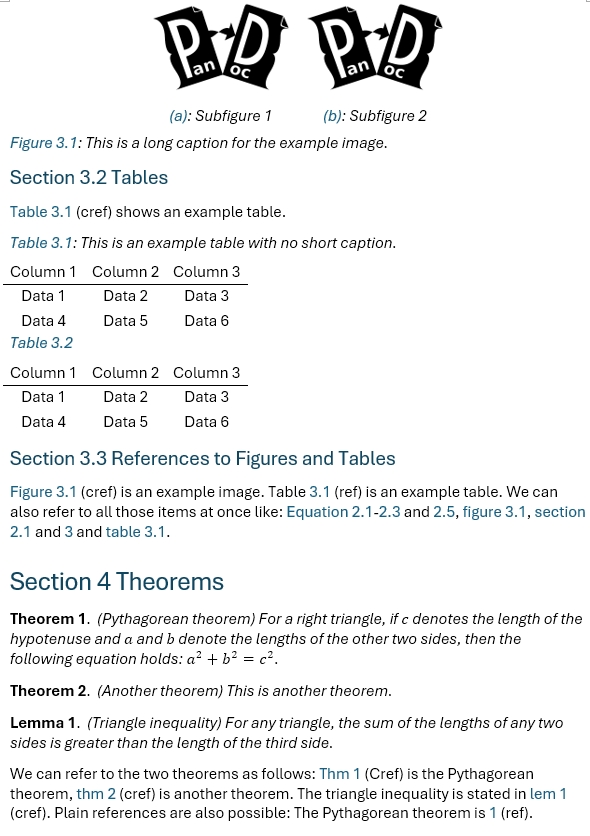
With the testing file tests/test.tex:
Default Metadata
pandoc -o output.docx -F pandoc-tex-numbering test.tex
The results are shown as follows:

Customized Metadata
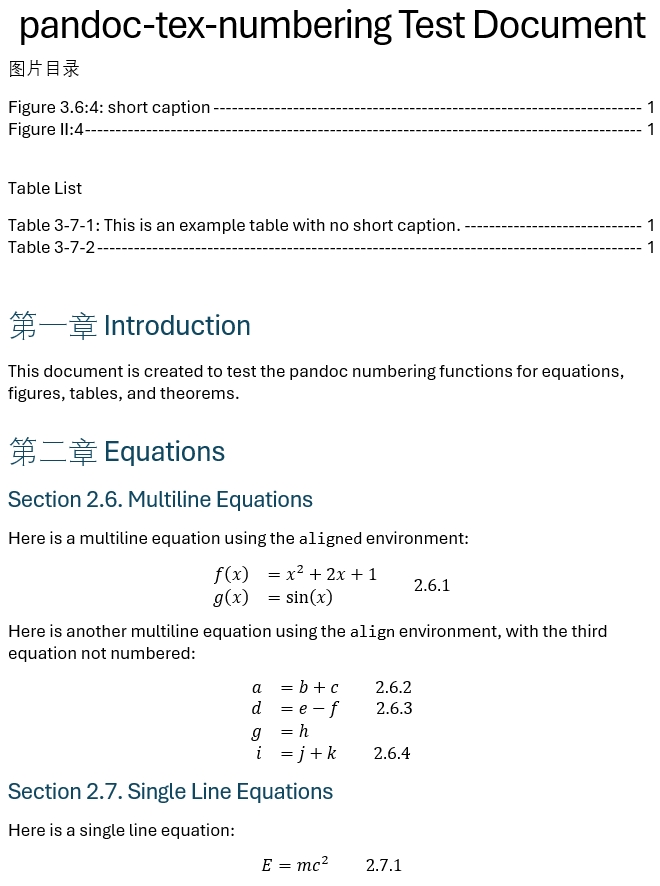
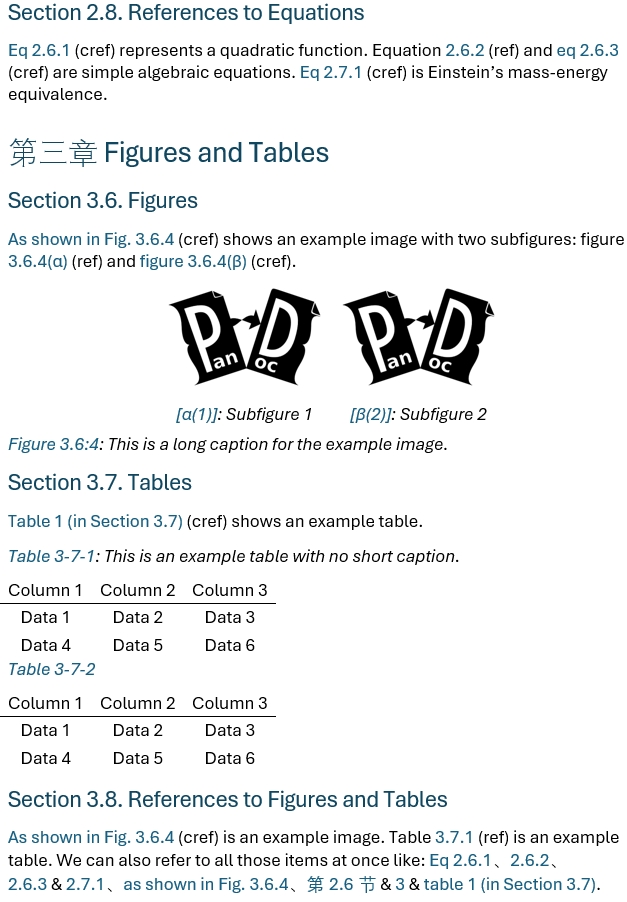
In the following example, we custom the following (maybe silly) items only for the purpose of demonstration:
- Use all prefixes as "Fig", "Tab", "Eq" respectively.
- Reset the numbering at the second level sections, such that the numbering will be shown as "1.1.1", "3.2.1" etc.
- At the beginning of sections, use Chinese numbers "第一章" for the first level sections and English numbers "Section 1.1" for the second level sections.
- When referred to, use, in turn, "Chapter 1", "第1.1节" etc.
- For subfigures, use greek letters combined with arabic numbers and replace the parentheses with square brackets, such that the subfigures will be shown as "[α1]", "[β2]" etc.
- Turn on custom list of figures and tables and:
- Use custom titles as "图片目录" and "Table Lists" respectively.
- Use hyphens as the leader in the lists.
Run the following command with corresponding metadata in a metadata.yaml file (recommended):
pandoc -o output.docx -F pandoc-tex-numbering --metadata-file test.yaml -f latex+raw_tex test.tex
# test.yaml
figure-prefix: Fig
table-prefix: Tab
equation-prefix: Eq
number-reset-level: 2
non-arabic-numbers: true
section-format-source-1: "第{h1_zh}章"
section-format-source-2: "Section {h1}.{h2}."
section-format-ref-1: "Chapter {h1}"
section-format-ref-2: "第{h1}.{h2}节"
subfigure-format: "[{sym}({num})]"
subfigure-symbols: "αβγδεζηθικλμνξοπρστυφχψω"
custom-lot: true
custom-lof: true
lot-title: "Table List"
lof-title: "图片目录"
list-leader-type: "hyphen"
The results are shown as follows:
Development
Custom Non-Arabic Numbers Support
Currently, the filter supports only Chinese non-arabic numbers. If you want to support other languages, you can modify the lang_num.py file. For example, if you want to support the non-arabic numbers in the language foo, you can:
- Define a new function
arabic2foo(num:int)->strthat converts the arabic number to the corresponding non-arabic number. - Add the function to the
language_functionsdictionary with the corresponding language name as the key, for example{"foo":arabic2foo}.
Then you can set the metadata section-format-1="Chapter {h1_foo}." to enable the non-arabic numbers in the filter.
Custom Numbering Format
To keep the design of the filter simple and easy to use, the filter only supports a limited number of numbering formats. However, complex formats can easily be extended by modifying the logic in the action_replace_refs function.
Extend the Filter
The logical structure of the filter is quiet straightforward. You can see this filter as a scaffold for your own filter. For example, _parse_multiline_environment function receives a latex math node and the doc object and returns a new modified math string with the numbering and respective labels. You can add your customized latex syntax analysis logic to support more complicated circumstances.
It is recommended to decalre all your possible variables in the prepare function, and save them in the doc.pandoc_tex_numbering:dict object. This object will be automatically destroyed after the filter is executed.
Advanced docx Support
In oxml.py, I added a built-in framework to support high-level OOXML operations. If you're familiar with OOXML, you can utilize this framework to embed OOXML codes directly into the output (into RawBlock nodes with openxml format).
FAQ
- Q: Can the filter work with xxx package?
- A: It depends. If the package is supported by pandoc, then it should work. If not, you may need to a custom filter or reader to parse the LaTeX codes correctly. In the latter case, this is out of the scope of this filter. For example, the macro
\cein themhchempackage is not supported by pandoc, so we cannot parse the chemical equations correctly. - Q: Can the filter support complex caption macros such as
\bicaption? - A: No for now. Caption macros such as
\bicaptionare not supported by the defaultlatexreader of pandoc. Therefore, we cannot parse them correctly. You may need a custom reader to parse them correctly or modify the source code before using this filter. - Q: Can
docxoutput support the short captions in the list of figures and tables? - A: Now supported.
That said, however, functionalities mentioned above can never be supported easily since they are not, and maybe never will be, supported by native pandoc framework.
TODO
There are some known issues and possible improvements:
- Support multiple references in
cleverefpackage. - Add empty caption for figures and tables without captions (currently, they have no caption and therefore links to them cannot be located).
- Directly support
align*and other non-numbered environments. - Subfigure support.
- Support short captions in
docxoutput.
Release history Release notifications | RSS feed


Download files
Download the file for your platform. If you're not sure which to choose, learn more about installing packages.
Source Distribution
Built Distribution
Filter files by name, interpreter, ABI, and platform.
If you're not sure about the file name format, learn more about wheel file names.
Copy a direct link to the current filters
File details
Details for the file pandoc_tex_numbering-1.1.1.tar.gz.
File metadata
- Download URL: pandoc_tex_numbering-1.1.1.tar.gz
- Upload date:
- Size: 815.0 kB
- Tags: Source
- Uploaded using Trusted Publishing? No
- Uploaded via: twine/6.0.1 CPython/3.13.1
File hashes
| Algorithm | Hash digest | |
|---|---|---|
| SHA256 |
afad88d1986f567439ce39e8df0ab4a272dfee644be80313df57a871735da49f
|
|
| MD5 |
e208dba40617209a84dc17bb2afd0896
|
|
| BLAKE2b-256 |
1b4be1e36f87d8b46d8b24a234065895b11320ecd59af43565b76f7bbd14d490
|
File details
Details for the file pandoc_tex_numbering-1.1.1-py3-none-any.whl.
File metadata
- Download URL: pandoc_tex_numbering-1.1.1-py3-none-any.whl
- Upload date:
- Size: 41.9 kB
- Tags: Python 3
- Uploaded using Trusted Publishing? No
- Uploaded via: twine/6.0.1 CPython/3.13.1
File hashes
| Algorithm | Hash digest | |
|---|---|---|
| SHA256 |
703dd8250232c3ecb87cddf5a2a21b30db32a8c22ca9b98a0328b0076b00a6df
|
|
| MD5 |
4c8f2a194ae5074d25b2c259f43fc3a0
|
|
| BLAKE2b-256 |
9d5a583ba326a57c39fbec87fc89ae2d7d382ad283b11c0810939ef4a5a09ed7
|






