
panoptes: monitor computational workflows in real time


Project description

Bioinformaticians and data scientists, rely on computational frameworks (e.g. snakemake, nextflow, CWL, WDL) to process, analyze and integrate data of various types. Such frameworks allow scientists to combine software and custom tools of different origin in a unified way, which lets them reproduce the results of others, or reuse the same pipeline on different datasets. One of the fundamental issues is that the majority of the users execute multiple pipelines at the same time, or execute a multistep pipeline for a big number of datasets, or both, making it hard to track the execution of the individual steps or monitor which of the processed datasets are complete. panoptes is a tool that monitors the execution of such workflows.
panoptes is a service that can be used by:
- Data scientists, bioinformaticians, etc. that want to have a general overview of the progress of their pipelines and the status of their jobs
- Administrations that want to monitor their servers
- Web developers that want to integrate the service in bigger web applications
Note: panoptes currently supports workflows written in snakemake.
Snakemake 9 users: the legacy
--wms-monitorflag was removed upstream. Monitoring is now delivered via a logger plugin — see Snakemake 9 support below.
Installation
Requirements:
- Python>=3.11
- virtualenv
- sqlite3
Local
pypi
Create virtual environment
python3 -m venv venv
Activate virtual environment
source venv/bin/activate
Install via pypi
pip install panoptes-ui
conda
Create conda environment
conda create --name panoptes -c conda-forge -c bioconda panoptes-ui
Activate conda environment
conda activate panoptes
Source code
Clone repo
git clone https://github.com/panoptes-organization/panoptes.git
Enter repo
cd panoptes
Create virtual environment
python3 -m venv venv
Activate virtual environment
source venv/bin/activate
Install all requirements
pip install .
Run the server
By default, server should run on 127.0.0.1:5000, and generate the sqlite database .panoptes.db.
Using the development server
panoptes
Using a WSGI server
Install all necessary packages (see above), plus a WSGI server (e.g. gunicorn or waitress), and run the server:
gunicorn --access-logfile logs/access.log --error-logfile logs/error.log --timeout 120 --bind :5000 panoptes.app:app
Containers
Docker
Requirements:
- docker
Pull image that is automatically built from bioconda. You can find the latest tag in the following url: https://quay.io/repository/biocontainers/panoptes-ui?tab=tags. For example:
docker pull quay.io/biocontainers/panoptes-ui:1.0.0--pyhdfd78af_0
Then run the container with:
docker run -p 5000:5000 -it <image-id> panoptes
Note: In this case the database is stored within the docker image, so every time you restart the server the database will be empty. You would need to mount the volumes to make the database persistent.
Docker compose
Requirements:
- docker
- docker-compose
Build
docker-compose build
Run
docker-compose up -d
Server should run on: http://127.0.0.1:8000
Stop
docker-compose down
Singularity
You can also deploy the server with singularity. To do so pull the image with singularity. For example:
singularity pull docker://quay.io/biocontainers/panoptes-ui:1.0.0--pyhdfd78af_0
And then we can start the server by running:
singularity exec panoptes-ui:1.0.0--pyhdfd78af_0
Run an example workflow
A small reference pipeline (samtools sort/index → htseq-count → merge across
four samples) that already wires up --logger panoptes lives at
snakemake_example_workflow.
Follow the instructions there to exercise this server end-to-end.
Snakemake 9 support
Starting with Snakemake 9, the --wms-monitor flag that older panoptes versions
relied on has been removed. Monitoring is instead delivered through
logger plugins.
To stream events from a Snakemake 9 workflow to panoptes, install the companion logger plugin with either pip or conda:
pip install snakemake-logger-plugin-panoptes
# or
conda install -c conda-forge -c bioconda snakemake-logger-plugin-panoptes
Then pass --logger panoptes to Snakemake:
snakemake \
    --cores 1 \
    --logger panoptes \
    --logger-panoptes-address http://127.0.0.1:5000
The plugin lives in its own repository:
panoptes-organization/snakemake-logger-plugin-panoptes.
It registers a workflow with panoptes via GET /create_workflow on the first
event and then translates Snakemake's LogEvent records (JOB_INFO,
JOB_STARTED, JOB_FINISHED, JOB_ERROR, SHELLCMD, PROGRESS, ERROR,
RUN_INFO) into the JSON payloads that panoptes' /update_workflow_status
endpoint already understands.
Workflows orchestrated by Snakemake < 9 continue to work unchanged via the
legacy --wms-monitor http://<host>:<port> flag.
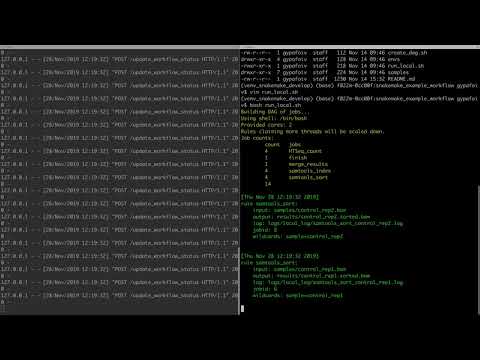
panoptes in action
panoptes API
Panoptes provides the following API endpoints:
| Endpoint | Method | Description |
|---|---|---|
/api/service-info |
GET |
Server status |
/api/workflows |
GET |
Get all workflows |
/api/workflow/<workflow-id> |
GET |
Get workflow status |
/api/workflow/<workflow-id>/jobs |
GET |
Get all jobs of a workflow |
/api/workflow/<workflow-id>/job/<job-id> |
GET |
Get job status |
/api/workflow/<workflow-id> |
PUT |
Rename a workflow Expects a dictionary with new name (e.g. {'name': 'my new workflow name'}) |
/api/workflow/<workflow-id> |
DELETE |
Delete a workflow |
/api/workflows/all |
DELETE |
Clean up database |
To communicate with panoptes the following endpoints are used by snakemake:
| Endpoint | Method | Description |
|---|---|---|
/api/service-info |
GET |
Server status (same as above) |
/create_workflow |
GET |
Get a unique id/name str(uuid.uuid4()) for each workflow |
/update_workflow_status |
POST |
Panoptes receives a dictionary from snakemake that contains: - A log message dictionary (JSON-encoded) - The current timestamp - The unique id/name of the workflow. (e.g. {'msg': json.dumps(message), 'timestamp': time.asctime(), 'id': id}) |
Contribute
Please see the Contributing instructions.
CI server
Changes on master (and pull requests against it) trigger a GitHub Actions build that runs the test suite and a live end-to-end run of the example workflow.
Contact
In case the issues section is not enough for you, you can also contact us via discord
Release history Release notifications | RSS feed


Download files
Download the file for your platform. If you're not sure which to choose, learn more about installing packages.
Source Distribution
Built Distribution
Filter files by name, interpreter, ABI, and platform.
If you're not sure about the file name format, learn more about wheel file names.
Copy a direct link to the current filters
File details
Details for the file panoptes_ui-1.1.0.tar.gz.
File metadata
- Download URL: panoptes_ui-1.1.0.tar.gz
- Upload date:
- Size: 1.4 MB
- Tags: Source
- Uploaded using Trusted Publishing? No
- Uploaded via: twine/6.2.0 CPython/3.9.25
File hashes
| Algorithm | Hash digest | |
|---|---|---|
| SHA256 |
6bff3f4d3949009209838a175cd85a2400dd63e319f8c6f085b1e22e3c0dff76
|
|
| MD5 |
ce505c4a37b73d9464f25c55d0d47cf4
|
|
| BLAKE2b-256 |
8c8ced7acb5d5a20dd2d51b20a5241408af592a674ec5daa45d3e219d2234b7f
|
File details
Details for the file panoptes_ui-1.1.0-py3-none-any.whl.
File metadata
- Download URL: panoptes_ui-1.1.0-py3-none-any.whl
- Upload date:
- Size: 1.4 MB
- Tags: Python 3
- Uploaded using Trusted Publishing? No
- Uploaded via: twine/6.2.0 CPython/3.9.25
File hashes
| Algorithm | Hash digest | |
|---|---|---|
| SHA256 |
c47836e2be1182bd1e5db88b6d6d96ff6b09e3fdf801889e65f2a6396288df06
|
|
| MD5 |
18efa65b7c26c3170e695c01053d5784
|
|
| BLAKE2b-256 |
eee05f3ea38f6797a19e50302195e43fb823074cc09cde45e7e871e2f2a300ec
|






