
📄 PAPER-CODE
The AI-Native Documentation Generator






Stop writing boilerplate docs. Automatically generate AI Context, Architecture Guides, and Governance Files optimized for Cursor, Windsurf, and Copilot.
🎬 Demo
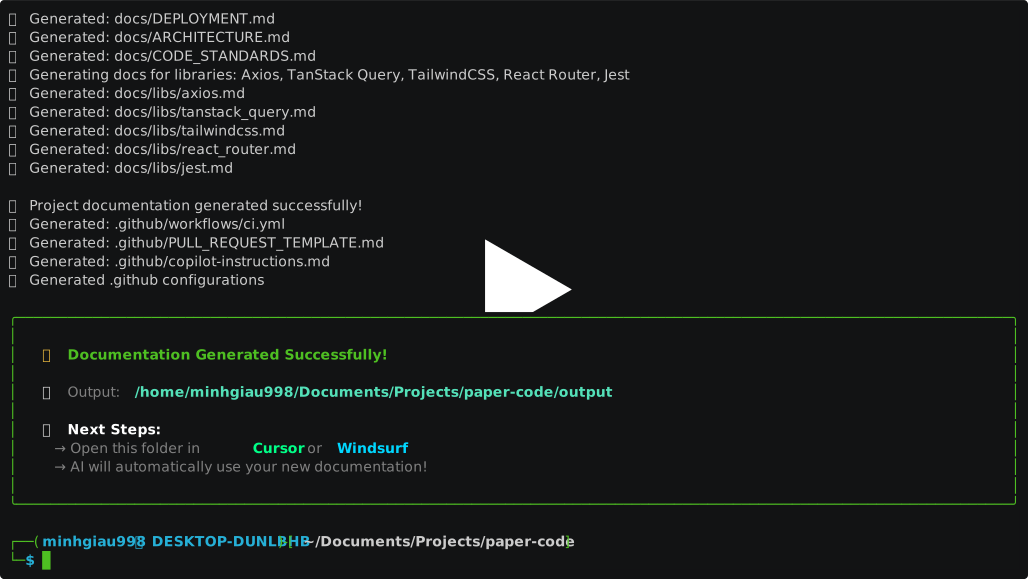
Watch PAPER-CODE generate AI-ready documentation in seconds
🧐 Why PAPER-CODE?
In the era of AI coding, Context is King. If you ask an AI to "build a feature" without context, it generates generic, legacy code.
PAPER-CODE solves this by bootstrapping a robust documentation structure that serves two masters:
- For AI Agents: Generates
.cursorrules,AI_RULES.md, and strict coding standards to keep your AI (Cursor/Copilot) from hallucinating or using deprecated syntax. - For Humans: Creates professional
ARCHITECTURE.md,CONTRIBUTING.md, and tech stack guides so your team stays on the same page.
✨ Features
- 🤖 AI-First Context: Auto-generates
.cursorrulesand prompt instructions tailored to your specific stack (e.g., "Use Next.js App Router, not Pages"). - 🧠 AI-Powered Descriptions: Generate intelligent project descriptions using OpenAI API with context-aware analysis of your tech stack and libraries.
- 🎯 Multi-Stack Support: Specialized templates for Frontend, Backend, Mobile, Game Dev, ML, DevOps, and CLI applications.
- 📚 Library Awareness: Smart docs for 30+ libraries (Tailwind, Prisma, Redux, Zod, Docker, Kubernetes, etc.).
- 🛡️ Governance Ready: Generates
LICENSE,CHANGELOG.md,SECURITY.md, and GitHub Issue Templates. - 🔄 Safe Update Mode: Intelligently update existing documentation without overwriting custom changes.
- 📁 Custom Templates: Support for custom template directories to match your organization's standards.
- 💻 Interactive & Batch: Use the beautiful CLI wizard or a JSON config file for automation.
🚀 Installation
Requires Python 3.10+.
1. Via PyPI (Recommended)
You can install PAPER-CODE directly from PyPI:
pip install paper-code
Upgrade (From PyPI)
To upgrade an existing system-wide or virtualenv installation of paper-code from PyPI to the latest released version:
# Upgrade to the latest version
pip install --upgrade paper-code

# Or to install a specific version (e.g., 0.1.0)
pip install paper-code==0.1.0
2. From Source (For Development)
If you want to contribute or use the latest development version:
# Clone the repository
git clone https://github.com/minhgiau998/paper-code.git
cd paper-code

# Install as an editable tool
pip install -e .
📖 Usage
1. Interactive Mode (Recommended)
Just run the command and follow the wizard.
paper-code
2. AI-Powered Description Generation
For enhanced project descriptions, set up your OpenAI API key:
# Copy the example environment file
cp .env.example .env

# Edit .env and add your OpenAI API key
# OPENAI_API_KEY=your_actual_api_key_here

# Generate docs with AI-powered descriptions
paper-code --ai-generate

# Or provide additional context for better AI descriptions
paper-code --ai-generate --ai-hint "This is an e-commerce platform with real-time inventory"
Terminal Output Preview:
🚀 Initializing documentation for: My Awesome Project
[?] Select Project Type: Frontend
[?] Select Frontend Stack: Next.js
[?] Select Modules/Libraries: [x] TailwindCSS, [x] Prisma, [x] NextAuth.js, [x] Zod
🤖 Generating AI-powered project description...
✅ AI description generated successfully!

✨ Done! Generated AI-ready docs in ./output
3. Custom Templates
Use your own template directory:
paper-code --template-dir ./my-custom-templates
Your custom templates should follow the same structure as the default templates:
my-custom-templates/
├── core/
│   ├── README.md.j2
│   ├── LICENSE.j2
│   └── ...
├── ai/
│   ├── AI_RULES.md.j2
│   └── ...
└── stacks/
    └── frontend/
        └── nextjs_arch.md.j2
4. Update Mode
Update existing documentation without losing custom changes:
paper-code --update --template Frontend --tech-stack Next.js
Update mode:
- ✅ Preserves custom sections in
AI_RULES.md - ✅ Merges existing
ARCHITECTURE.mdcontent - ✅ Skips user-modified files (README.md, CONTRIBUTING.md, etc.)
5. Quick Start (Templates)
Skip the questions if you know what you want.
paper-code --template "Next.js" --output ./my-app
paper-code --template "FastAPI" --output ./my-api
6. Batch Mode (For CI/CD)
Generate docs based on a configuration file.
paper-code --config paper.config.json --batch
🧩 Supported Stacks
PAPER-CODE isn't just generic markdown. It contains deep, opinionated knowledge for:
| Category | Supported Stacks |
|---|---|
| Frontend | React, Vue, Next.js, Nuxt.js, Angular, Svelte |
| Backend | Node.js (Express/NestJS/Fastify), FastAPI, Django, Go (Gin) |
| Mobile | React Native (Expo/CLI), Flutter, Kotlin (Android), Swift (iOS) |
| Desktop | Electron, Tauri |
| Data & ML | PyTorch, TensorFlow, Scikit-learn |
| Game Dev | Godot, Unity |
| CLI | Node.js (Commander), Python (Click), Go (Cobra), Rust (Clap) |
| Libraries | TypeScript Lib, Python Lib, Go Lib, Rust Lib |
| DevOps | Docker, Kubernetes, Terraform |
📂 Generated Structure
A typical Next.js + Prisma project generated by PAPER-CODE:
my-project/
├── .cursorrules             # 👈 Critical for AI Editors
├── .github/
│   ├── copilot-instructions.md
│   └── workflows/ci.yml
├── docs/
│   ├── ai/
│   │   ├── AI_RULES.md      # The "Constitution" for your AI
│   │   ├── AI_WORKFLOWS.md  # SOPs for common tasks
│   │   └── AI_CONTEXT.md    # Project map
│   ├── libs/                # Specific guides for libraries
│   │   ├── prisma.md
│   │   └── tailwindcss.md
│   ├── ARCHITECTURE.md
│   ├── CODE_STANDARDS.md    # "Do's and Don'ts"
│   ├── CONTRIBUTING.md
│   └── TESTING.md
├── CHANGELOG.md
└── README.md
🤝 Contributing
We love contributions! Whether it's adding a new Tech Stack template or fixing a typo. Please read our CONTRIBUTING.md to get started.
- Fork the repo.
- Create your feature branch (
git checkout -b feature/amazing-stack). - Commit your changes (
git commit -m 'feat: add Astro support'). - Push to the branch.
- Open a Pull Request.
📄 License
Distributed under the MIT License. See LICENSE for more information.
1 maintainer

Metadata
1 maintainer
Release files for paper-code 0.5.0
For a detailed explanation of source distributions (sdists) and built distributions (wheels), please see the package formats documentation.
Source distribution (sdist)
| File | Size | Uploaded | Provenance | |
|---|---|---|---|---|
| paper_code-0.5.0.tar.gz | 20.6 kB | Without provenance | Details |
Built distribution (wheel)
| File | Interpreter | ABI | Platform | Reset |
|---|---|---|---|---|
| paper_code-0.5.0-py3-none-any.whl | Python 3 | none | any | Details |
Total release size: 43.3 kB
Release files / paper_code-0.5.0.tar.gz
| Download URL | paper_code-0.5.0.tar.gz |
|---|---|
| Size | 20.6 kB |
| Tags | Source |
|
SHA-256 checksum How to use checksums |
e42315f6819dcbed629c0338ad7a374a9b249c275f7113d9b6987ac1c50e810c
|
|
BLAKE2b-256 checksum How to use checksums |
236ec266ac2a001c14a0394b0bfd86c3f6f9a46d275c629ff36d44f8d63d9f56
|
| Upload date | |
|
Uploaded using Trusted Publishing? What is trusted publishing? |
No |
| Uploaded via |
twine/6.2.0 CPython/3.14.0
|
Release files / paper_code-0.5.0-py3-none-any.whl
| Download URL | paper_code-0.5.0-py3-none-any.whl |
|---|---|
| Size | 22.7 kB |
| Tags | Python 3 |
|
SHA-256 checksum How to use checksums |
5ba1c2df58a2d13c33ef75e091e4cda7be069768f0cb28230d7c98dcc094df86
|
|
BLAKE2b-256 checksum How to use checksums |
f391007c27c6cb13bcb62a735bbbf2d6f0fa46cff32fe563acb6ae5efd74df9e
|
| Upload date | |
|
Uploaded using Trusted Publishing? What is trusted publishing? |
No |
| Uploaded via |
twine/6.2.0 CPython/3.14.0
|
Security for paper-code 0.5.0
Provenance
Provenance describes where a file came from. On PyPI, provenance is shared via attestations, which provide a verifiable record of the build or publishing details. View details, limitations and caveats.
No provenance found
None of the files in this release were uploaded with provenance metadata.
A note on package security
PyPI is a repository for distributing packages, not a service for auditing them. While third-party security researchers and our staff do their best to detect and remove malicious packages, PyPI cannot guarantee the quality, security or suitability of any given package.
To learn more about protecting yourself from malicious actors, visit our package security documentation.














