
Interactive Project Documentation Generator for AI-Native Development

Project description
📄 PAPER-CODE
The AI-Native Documentation Generator





Stop writing boilerplate docs. Automatically generate AI Context, Architecture Guides, and Governance Files optimized for Cursor, Windsurf, and Copilot.
🎬 Demo
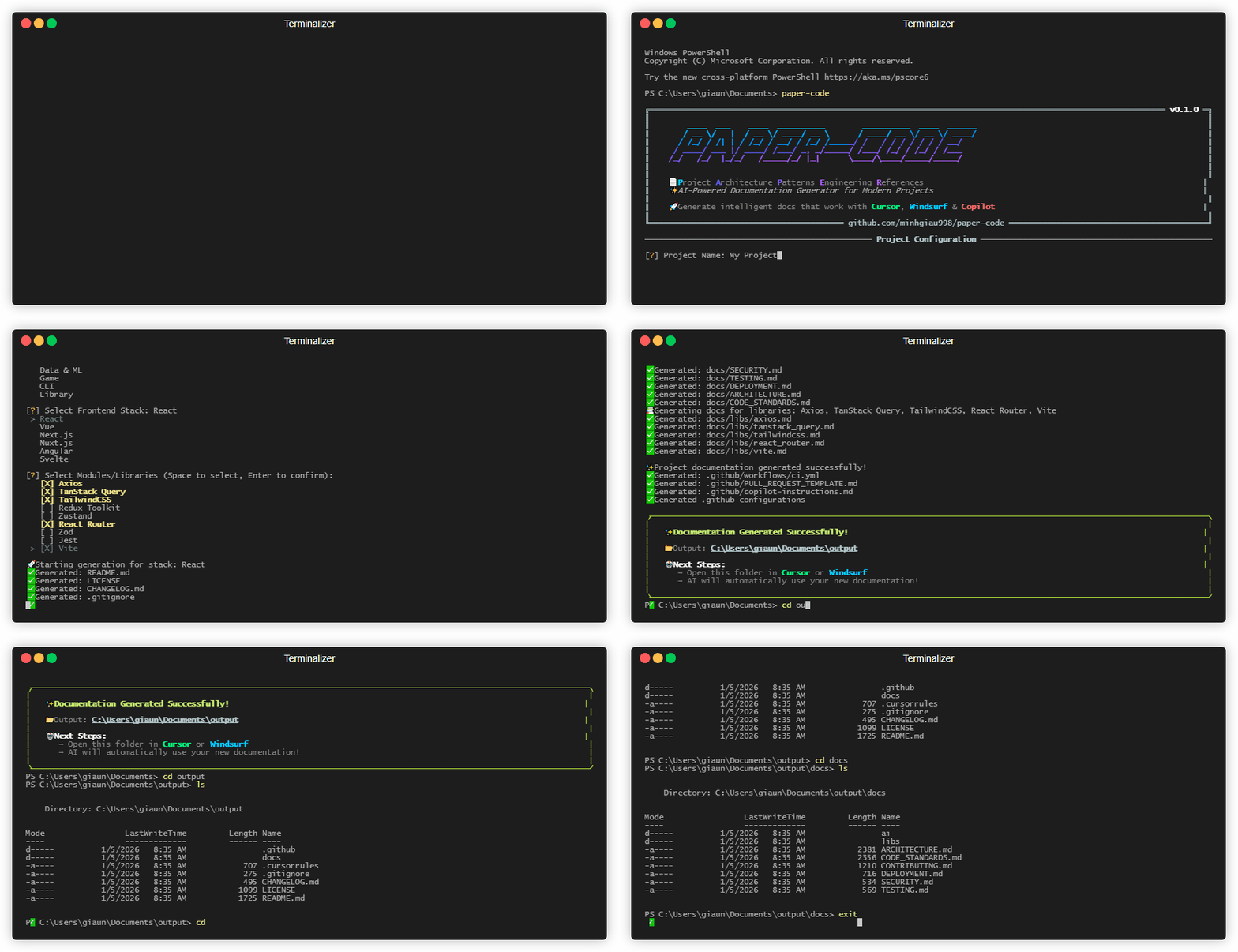
Watch PAPER-CODE generate AI-ready documentation in seconds
🧐 Why PAPER-CODE?
In the era of AI coding, Context is King. If you ask an AI to "build a feature" without context, it generates generic, legacy code.
PAPER-CODE solves this by bootstrapping a robust documentation structure that serves two masters:
- For AI Agents: Generates
.cursorrules,AI_RULES.md, and strict coding standards to keep your AI (Cursor/Copilot) from hallucinating or using deprecated syntax. - For Humans: Creates professional
ARCHITECTURE.md,CONTRIBUTING.md, and tech stack guides so your team stays on the same page.
✨ Features
- 🤖 AI-First Context: Auto-generates
.cursorrulesand prompt instructions tailored to your specific stack (e.g., "Use Next.js App Router, not Pages"). - 🎯 Multi-Stack Support: Specialized templates for Frontend, Backend, Mobile, Game Dev, and ML.
- 📚 Library Awareness: Smart docs for 30+ libraries (Tailwind, Prisma, Redux, Zod...).
- 🛡️ Governance Ready: Generates
LICENSE,CHANGELOG.md,SECURITY.md, and GitHub Issue Templates. - 💻 Interactive & Batch: Use the beautiful CLI wizard or a JSON config file for automation.
🚀 Installation
Requires Python 3.10+.
1. Via PyPI (Recommended)
You can install PAPER-CODE directly from PyPI:
pip install paper-code
2. From Source (For Development)
If you want to contribute or use the latest development version:
# Clone the repository
git clone https://github.com/minhgiau998/paper-code.git
cd paper-code

# Install as an editable tool
pip install -e .
📖 Usage
1. Interactive Mode (Recommended)
Just run the command and follow the wizard.
paper-code
Terminal Output Preview:
🚀 Initializing documentation for: My Awesome Project
[?] Select Project Type: Frontend
[?] Select Frontend Stack: Next.js
[?] Select Modules/Libraries: [x] TailwindCSS, [x] Prisma, [x] NextAuth.js, [x] Zod

✨ Done! Generated AI-ready docs in ./docs
2. Quick Start (Templates)
Skip the questions if you know what you want.
paper-code --template "Next.js" --output ./my-app
paper-code --template "FastAPI" --output ./my-api
3. Batch Mode (For CI/CD)
Generate docs based on a configuration file.
paper-code --config paper.config.json --batch
🧩 Supported Stacks
PAPER-CODE isn't just generic markdown. It contains deep, opinionated knowledge for:
| Category | Supported Stacks |
|---|---|
| Frontend | React, Vue, Next.js, Nuxt.js, Angular, SvelteKit |
| Backend | Node.js (Express/NestJS/Fastify), FastAPI, Django, Go (Gin) |
| Mobile | React Native (Expo/CLI), Flutter |
| Desktop | Electron, Tauri v2 |
| Data & ML | PyTorch, TensorFlow, Scikit-learn |
| Game Dev | Godot 4, Unity |
| CLI | Node.js (Commander), Python (Click), Go (Cobra), Rust (Clap) |
| Libraries | TypeScript Lib, Python Lib, Go Lib, Rust Lib |
📂 Generated Structure
A typical Next.js + Prisma project generated by PAPER-CODE:
my-project/
├── .cursorrules             # 👈 Critical for AI Editors
├── .github/
│   ├── copilot-instructions.md
│   └── workflows/ci.yml
├── docs/
│   ├── ai/
│   │   ├── AI_RULES.md      # The "Constitution" for your AI
│   │   ├── AI_WORKFLOWS.md  # SOPs for common tasks
│   │   └── AI_CONTEXT.md    # Project map
│   ├── libs/                # Specific guides for libraries
│   │   ├── prisma.md
│   │   └── tailwindcss.md
│   ├── ARCHITECTURE.md
│   ├── CODE_STANDARDS.md    # "Do's and Don'ts"
│   ├── CONTRIBUTING.md
│   └── TESTING.md
├── CHANGELOG.md
└── README.md
🤝 Contributing
We love contributions! Whether it's adding a new Tech Stack template or fixing a typo. Please read our CONTRIBUTING.md to get started.
- Fork the repo.
- Create your feature branch (
git checkout -b feature/amazing-stack). - Commit your changes (
git commit -m 'feat: add Astro support'). - Push to the branch.
- Open a Pull Request.
📄 License
Distributed under the MIT License. See LICENSE for more information.


Download files
Download the file for your platform. If you're not sure which to choose, learn more about installing packages.
Source Distribution
Built Distribution
Filter files by name, interpreter, ABI, and platform.
If you're not sure about the file name format, learn more about wheel file names.
Copy a direct link to the current filters
File details
Details for the file paper_code-0.3.0.tar.gz.
File metadata
- Download URL: paper_code-0.3.0.tar.gz
- Upload date:
- Size: 16.4 kB
- Tags: Source
- Uploaded using Trusted Publishing? No
- Uploaded via: twine/6.2.0 CPython/3.14.0
File hashes
| Algorithm | Hash digest | |
|---|---|---|
| SHA256 |
5ab0a5794435091898e377f6ad4ac9b67054a2a8999a7252255ed2076a5bd175
|
|
| MD5 |
6e36af618ec63f7ae2acefbd507a22d4
|
|
| BLAKE2b-256 |
01d0e51276d840811b1696bd8c1d1afe7758bface4efe101a0f4ced6c439c03e
|
File details
Details for the file paper_code-0.3.0-py3-none-any.whl.
File metadata
- Download URL: paper_code-0.3.0-py3-none-any.whl
- Upload date:
- Size: 18.1 kB
- Tags: Python 3
- Uploaded using Trusted Publishing? No
- Uploaded via: twine/6.2.0 CPython/3.14.0
File hashes
| Algorithm | Hash digest | |
|---|---|---|
| SHA256 |
f535f89644014abc5611b993c2927b689f80476f351f5393370d0a20ed618aa9
|
|
| MD5 |
058009568215bafdc1b70760e3b4af15
|
|
| BLAKE2b-256 |
f5102da1ef04a77bd00b7decedc02703dff8093b2aa20bb705835068dbb83415
|






