
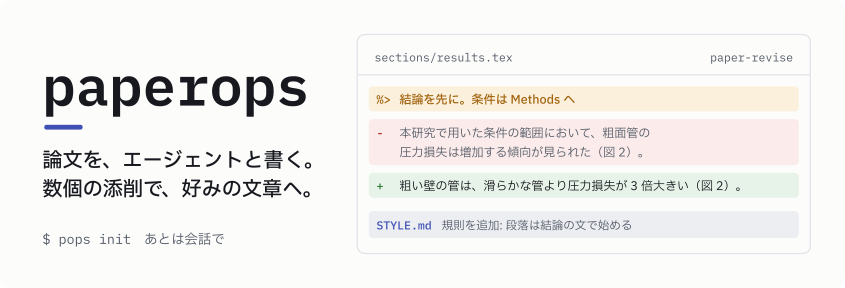



paperops は、AI エージェントと論文を 1 本書くためのツールです。エージェントが主張の設計から
図・本文・PDF までを作り、著者は主張の承認と数個の添削で方向を決めます。添削から読み取った好みは
規則として残り、次の草稿と次の論文に効きます。人が打つコマンドは pops init だけです。
会話から草稿まで
はじめる
uv tool install paper-harness-cli
pops init paper-lunar-cavity --source ~/large1/project_cylindrical_hole
cd paper-lunar-cavity
--source は結果の出どころで、runops project の root などを指します。複数書け、後から足すこともできます。
できた directory で Codex か Claude Code を起動して、書きたい論文について話しかけてください。
英語で書き始めるときは --lang en を付けます。
頼めること
| やりたいこと | 頼み方の例 |
|---|---|
| 主張を決める | project_cylindrical_hole の結果で論文を書きたい。主張の候補を出して |
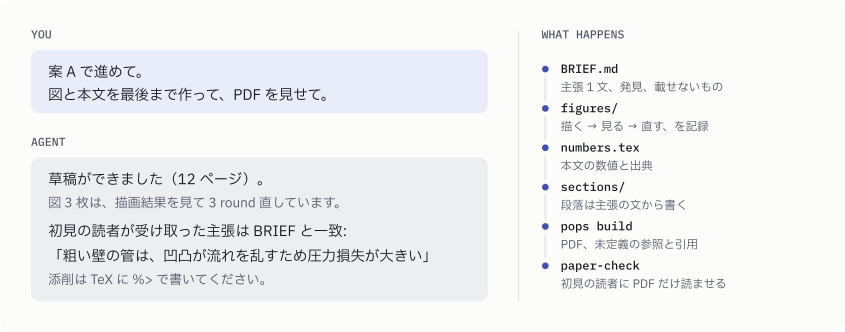
| 通して書かせる | 案 A で進めて。図と本文を最後まで作って、PDF を見せて |
| 骨子を見る | 各段落の第 1 文だけ並べて見せて |
| 図を直す | 図 2 は主役の線が埋もれている。直して、他の図も同じ基準で見直して |
| 添削を反映する | %> でコメントを入れた。反映して、好みは STYLE に残して |
| 伝わるか確かめる | 初見の読者に読ませて、何を言う論文に見えるか確かめて |
| 英語版を作る | 日本語稿が固まったので英語版を作って |
| 更新する | paperops を最新にして |
主張・発見・載せないものを決めるときと、それを変えるときは、エージェントが案を示して確認を取ります。
添削のしかた
TeX に %> で始まるコメントを書きます。段落の上に書くとその段落全体に、行末に書くとその文に付きます。
会話で伝えても同じです。
%> 結論を先に。条件は Methods へ
本研究で用いた条件の範囲において、空洞底部の電位は低下する傾向が見られた(図 2)。
エージェントは指摘箇所を直し、同じ好みが当てはまる他の箇所にも広げ、好みを規則として STYLE に残します。 何を学んだかは毎回報告されるので、違っていれば「その規則は違う」と伝えてください。
project の中身
paper-lunar-cavity/
├── paper.toml              source・言語・build の設定
├── BRIEF.md                何を言う論文か(主張 1 文、発見、載せないもの、段落骨子)
├── STYLE.md                添削から学んだ、この論文での書き方
├── manuscript/
│   ├── main.tex
│   ├── sections/
│   ├── numbers.tex         本文に出す数値と出典
│   └── refs.bib
├── figures/
│   ├── paper.mplstyle      全ての図に共通の見た目
│   └── floor-potential/
│       ├── figure.md       図のメッセージと推敲の記録
│       ├── make.py
│       └── floor-potential.pdf
├── LOG.md                  決めたことと理由
├── build/                  PDF
└── AGENTS.md, .agents/skills/, .claude/skills/
build/ は Git の対象外です。論文をまたいで使う著者の好みは ~/.config/paperops/STYLE.md に溜まります
(pops init --style FILE で場所を変えられます)。
何を言う論文かが伝わるように
エージェントに任せた原稿は、結果を正確に並べただけで、何を言いたいのかが見えなくなりがちです。 paperops は次の順で進めて、それを防ぎます。
| 段階 | すること |
|---|---|
| 書く前 | BRIEF.md に主張 1 文と「載せないもの」を決め、著者が承認する |
| 書くとき | 主張の文は言い切る。成立条件は決めた置き場に一度だけ書き、数値の出典は numbers.tex が持つ |
| 図 | 掲載寸法の描画結果を見て直す round を回し、figure.md に記録する |
| 書いた後 | 主張を知らない別のエージェントに PDF だけを読ませ、受け取った主張を BRIEF.md と比べる |
1.x から移る
2.0 は作り直しで、1.x の _paperops/ や pops change などはありません。1.x の project は
paper-harness-cli==1.0.0 のまま使えます。移すときは、新しい directory で pops init し、原稿の TeX と図を
manuscript/ と figures/ に置いてから、「既存の原稿から BRIEF を起こして」と頼んでください。
1 maintainer

Metadata
1 maintainer
Release files for paper-harness-cli 2.0.0
For a detailed explanation of source distributions (sdists) and built distributions (wheels), please see the package formats documentation.
Source distribution (sdist)
| File | Size | Uploaded | Provenance | Actions |
|---|---|---|---|---|
| paper_harness_cli-2.0.0.tar.gz | 192.7 kB | With provenance | Details for paper_harness_cli-2.0.0.tar.gz |
Built distribution (wheel)
| File | Interpreter | ABI | Platform | Actions Reset |
|---|---|---|---|---|
| paper_harness_cli-2.0.0-py3-none-any.whl | Python 3 | none | any | Details for paper_harness_cli-2.0.0-py3-none-any.whl |
Total release size: 241.3 kB
Release files / paper_harness_cli-2.0.0.tar.gz
| Download URL | paper_harness_cli-2.0.0.tar.gz |
|---|---|
| Size | 192.7 kB |
| Tags | Source |
|
SHA-256 checksum How to use checksums |
ce24e4a2e076e5993d05414494af9ca9c4d199b1be05ba6b3be691a28211f8ac
|
|
BLAKE2b-256 checksum How to use checksums |
6c7b3e216641182b254e0731fb809c6837973f026221155bda87b22d84c3692b
|
| Upload date | |
|
Uploaded using Trusted Publishing? What is trusted publishing? |
Yes |
| Uploaded via |
twine/7.0.0 CPython/3.13.16
|
Provenance
Provenance describes where a file came from. On PyPI, provenance is shared via attestations, which provide a verifiable record of the build or publishing details. View details, limitations and caveats.


PyPI Publish Attestation
PyPI verified that this artifact, at this checksum, originated from the publisher listed below.
Signed by GitHub Actions, verified by PyPI on Nov 5, 2026.
Transparency logRelease files / paper_harness_cli-2.0.0-py3-none-any.whl
| Download URL | paper_harness_cli-2.0.0-py3-none-any.whl |
|---|---|
| Size | 48.6 kB |
| Tags | Python 3 |
|
SHA-256 checksum How to use checksums |
f864ae97e7bd0199313368e195c0ba34d485acf6ddee264b99eab09df2641018
|
|
BLAKE2b-256 checksum How to use checksums |
acbda14eb848245dbdcaa4dcf951e7ab12e55c13af51159891bdd1d2b354aec4
|
| Upload date | |
|
Uploaded using Trusted Publishing? What is trusted publishing? |
Yes |
| Uploaded via |
twine/7.0.0 CPython/3.13.16
|
Provenance
Provenance describes where a file came from. On PyPI, provenance is shared via attestations, which provide a verifiable record of the build or publishing details. View details, limitations and caveats.
PyPI Publish Attestation
PyPI verified that this artifact, at this checksum, originated from the publisher listed below.
Signed by GitHub Actions, verified by PyPI on Nov 5, 2026.
Transparency logSecurity for paper-harness-cli 2.0.0
Provenance
Provenance describes where a file came from. On PyPI, provenance is shared via attestations, which provide a verifiable record of the build or publishing details. View details, limitations and caveats.
Full provenance
Both files in this release have been uploaded with provenance metadata.
Attestation for paper_harness_cli-2.0.0.tar.gz
PyPI Publish Attestation
PyPI verified that this artifact, at this checksum, originated from the publisher listed below.
Signed by GitHub Actions, verified by PyPI on Nov 5, 2026.
Transparency logA note on package security
PyPI is a repository for distributing packages, not a service for auditing them. While third-party security researchers and our staff do their best to detect and remove malicious packages, PyPI cannot guarantee the quality, security or suitability of any given package.
To learn more about protecting yourself from malicious actors, visit our package security documentation.














