





Papis is a powerful and highly extensible CLI document and bibliography manager.

With Papis, you can search your library for books and papers, add documents and notes, import and export to and from other formats, and much much more. Papis uses a human-readable and easily hackable .yaml file to store each entry’s bibliographical data. It strives to be easy to use while providing a wide range of features. And for those who still want more, Papis makes it easy to write scripts that extend its features even further.
Features
Add documents and automatically fetch their metadata.
Search by author, title, tags, and so on.
Synchronize your library with whatever software you’re already using.
Share your documents with colleagues without having to force some proprietary service onto them.
Import your data from other bibliography managers.
Export to BibTeX and other formats.
Integrate with your editor with plugins for (Neo)vim and Emacs.
TUIs make it easy to get a quick overview of your library.
Use the web app when the CLI doesn’t quite cut it (for example on your tablet).
Hacking Papis is easy! Use the API to easily create your own custom Python scripts.
Quick tour
Install Papis with pip (or one of the alternatives):
pip install papisLet’s download a couple of documents:
wget https://www.gnu.org/s/libc/manual/pdf/libc.pdf
wget https://www.ams.org/notices/201304/rnoti-p434.pdf
We can now add these to the (default) library. This will automatically query for the metadata associated with the doi.
papis add --from doi 10.1090/noti963 rnoti-p434.pdf
You can also use --set to add information:
papis add libc.pdf --set author "Sandra Loosemore" \
                   --set title "GNU C reference manual" \
                   --set year 2018 \
                   --set tags programming \
                   --confirm
Now open an attached file or edit an entry:
papis open
papis edit
The Papis picker (set using the picktool configuration option) has helpful shortcuts to call other functionality as well (press F1 for a complete list). It can be used to open (Ctrl-o), browse (Ctrl-b) or edit (Ctrl-e) selected documents (marked with Ctrl-t).
Import your bibliography into Papis from BibTeX:
papis bibtex read mylib.bib import --allOr export it to BibTeX:
papis export --all --format bibtex > mylib.bib
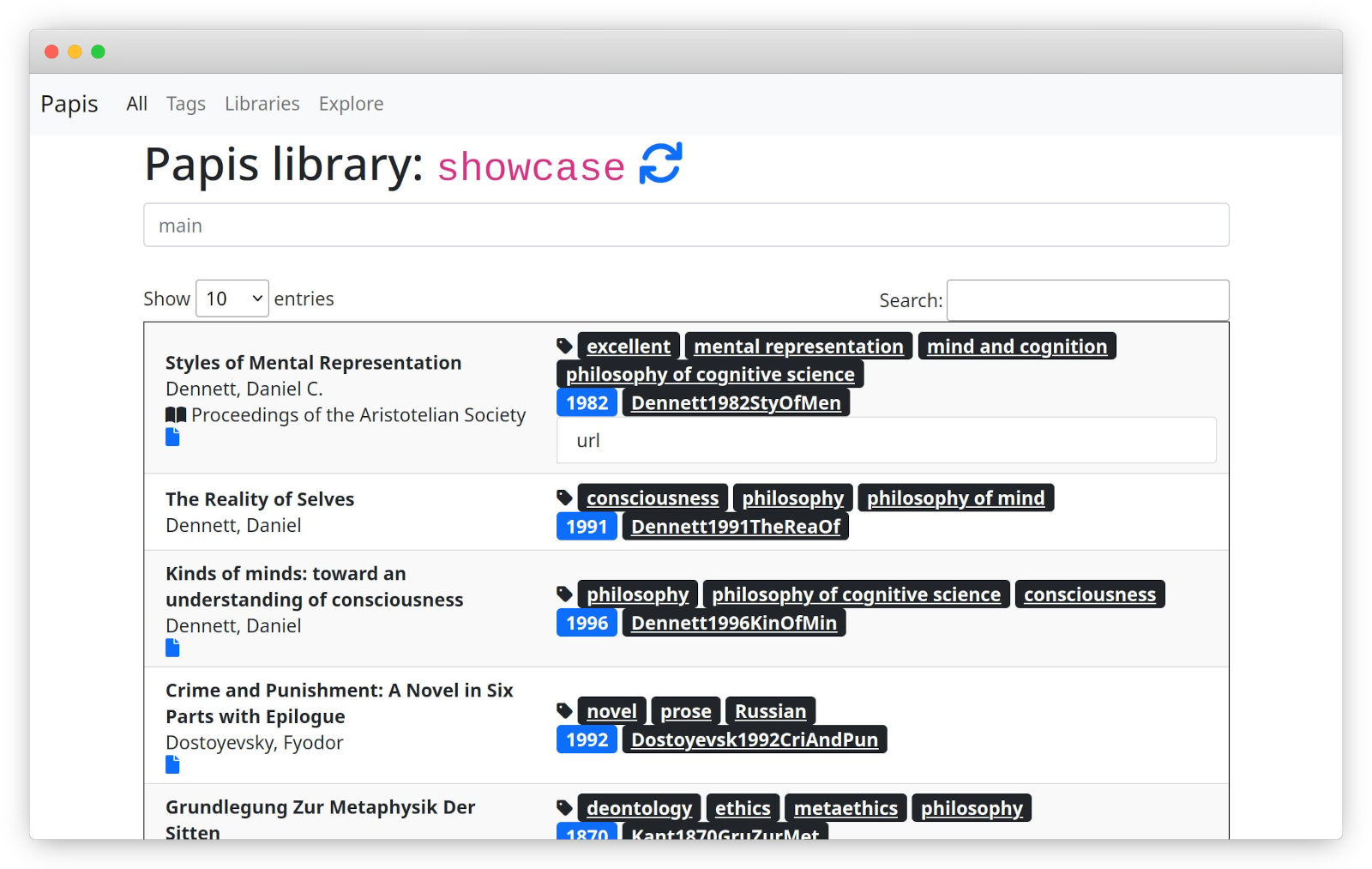
Papis also includes a web app that you can start with:
papis serveYou can then open the indicated address (http://localhost:8888) in your browser.
All papis commands come with help messages:
papis -h      # General help
papis add -h  # Help with a specific command
Installation & setup
Information about installation and setup can be found in the docs, for example in the these sections:
Questions?
The docs cover Papis’ features and discuss possible work flows. If you still have questions, head to our GitHub discussions — we’re more than happy to help. If you’ve found a bug, please open an issue and help make Papis even better!
If you’re not finding a command or configuration value that shows up in the documentation in your local installation, you may just be looking at the wrong docs. You can find the documentation for the latest released version here and the documentation for the in-development version here.
Reviews and blog posts
Blog post about getting a paper’s references with papis explore.
Blog post about using Papis with Zotero and Syncthing.
GNU/Linux Switzerland wrote about Papis (in German).
The folks at OSTechNix wrote a review of Papis.
A review of Papis by Ubunlog (in Spanish).
Contributing
Contributions are very welcome! Take a look at CONTRIBUTING.md for general rules and HACKING.md for additional code-related information. We encourage you to also check out, contribute to, or even help maintain the other projects in the Papis ecosystem mentioned below 😉.
The Papis ecosystem
Papis has grown over the years and there are now a number of projects that extend Papis’ features or integrate it with other software.
Project |
Maintained by |
|---|---|
you? |
|
you? |
|
you? |
|
papis-ask (AI for Papis) |
Thanks
We thank Irteza Rehman for generously creating our beautiful logo.
Funding
This project is funded through NGI0 Commons Fund, a fund established by NLnet with financial support from the European Commission’s Next Generation Internet program. Learn more at the NLnet project page.


1 maintainer

Metadata
1 maintainer
Release files for papis 0.16.1
For a detailed explanation of source distributions (sdists) and built distributions (wheels), please see the package formats documentation.
Source distribution (sdist)
| File | Size | Uploaded | |
|---|---|---|---|
| papis-0.16.1.tar.gz | 1.3 MB | Details |
Built distribution (wheel)
| File | Interpreter | ABI | Platform | Reset |
|---|---|---|---|---|
| papis-0.16.1-py3-none-any.whl | Python 3 | none | any | Details |
Total release size: 1.6 MB
Release files / papis-0.16.1.tar.gz
| Download URL | papis-0.16.1.tar.gz |
|---|---|
| Size | 1.3 MB |
| Tags | Source |
|
SHA-256 checksum How to use checksums |
6cc509e8164ac1a9444c77bae4f8ce5cb04056d79dc4a92214474aec09556569
|
|
BLAKE2b-256 checksum How to use checksums |
343991becff2d0b417d2a2b2777a939834df042944ff964c9a9828af3dc58a59
|
| Upload date | |
|
Uploaded using Trusted Publishing? What is trusted publishing? |
Yes |
| Uploaded via |
twine/7.0.0 CPython/3.13.14
|
Provenance
Provenance describes where a file came from. On PyPI, provenance is shared via attestations, which provide a verifiable record of the build or publishing details. View details, limitations and caveats.


PyPI Publish Attestation
PyPI verified that this artifact, at this checksum, originated from the publisher listed below.
Signed by GitHub Actions, verified by PyPI on Sep 13, 2026.
Transparency logRelease files / papis-0.16.1-py3-none-any.whl
| Download URL | papis-0.16.1-py3-none-any.whl |
|---|---|
| Size | 316.8 kB |
| Tags | Python 3 |
|
SHA-256 checksum How to use checksums |
182e424c8e2366ac3d8495513e3d9900f92d1903b00df0245f9b0680d3db6464
|
|
BLAKE2b-256 checksum How to use checksums |
a9a4b4e86ad35a8771b3cc3373acb8e257aaff0d50d23643ff7de707e8bec5a1
|
| Upload date | |
|
Uploaded using Trusted Publishing? What is trusted publishing? |
Yes |
| Uploaded via |
twine/7.0.0 CPython/3.13.14
|
Provenance
Provenance describes where a file came from. On PyPI, provenance is shared via attestations, which provide a verifiable record of the build or publishing details. View details, limitations and caveats.
PyPI Publish Attestation
PyPI verified that this artifact, at this checksum, originated from the publisher listed below.
Signed by GitHub Actions, verified by PyPI on Sep 13, 2026.
Transparency log













