
PAR Scrape







PAR Scrape is a versatile web scraping tool with options for Selenium or Playwright, featuring AI-powered data extraction and formatting.
Table of Contents
- Features
- Known Issues
- Prompt Cache
- How it works
- Site Crawling
- Prerequisites
- Installation
- Usage
- Roadmap
- What's New
- Contributing
- License

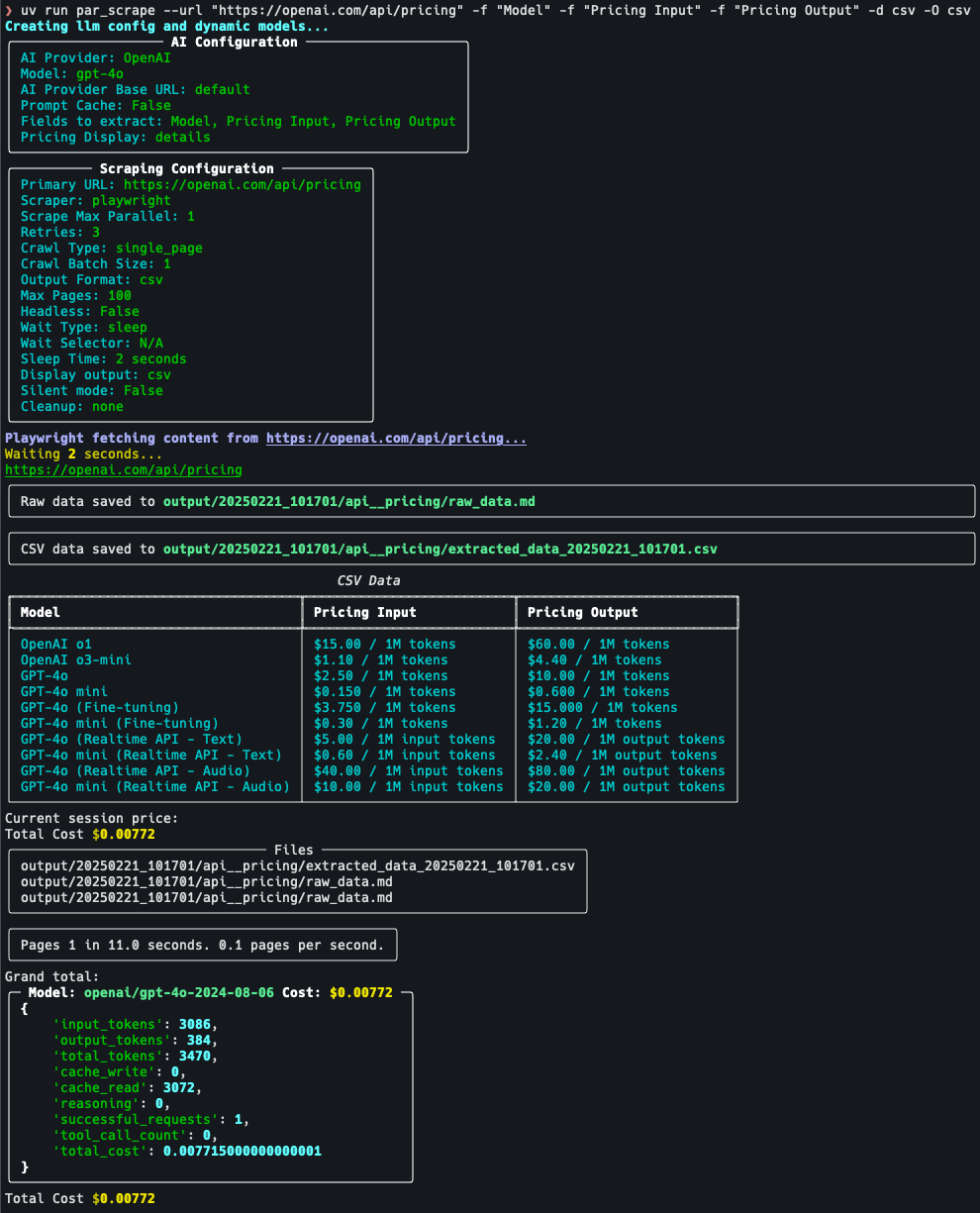
Screenshots
Features
- Web scraping using Playwright or Selenium
- AI-powered data extraction and formatting
- Can be used to crawl and extract clean markdown without AI
- Supports multiple output formats (JSON, Excel, CSV, Markdown)
- Customizable field extraction
- Token usage and cost estimation
- Prompt cache for Anthropic provider
- Uses my PAR AI Core
Known Issues
- Selenium silent mode on windows still shows message about websocket. There is no simple way to get rid of this.
- Providers other than OpenAI are hit-and-miss depending on provider / model / data being extracted.
Prompt Cache
- OpenAI will auto cache prompts that are over 1024 tokens.
- Anthropic will only cache prompts if you specify the --prompt-cache flag. Due to cache writes costing more only enable this if you intend to run multiple scrape jobs against the same url, also the cache will go stale within a couple of minutes so to reduce cost run your jobs as close together as possible.
How it works
- Data is fetched from the site using either Selenium or Playwright
- HTML is converted to clean markdown
- If you specify an output format other than markdown then the following kicks in:
- A pydantic model is constructed from the fields you specify
- The markdown is sent to the AI provider with the pydantic model as the required output
- The structured output is saved in the specified formats
- If crawling mode is enabled this process is repeated for each page in the queue until the specified max number of pages is reached
Site Crawling
Crawling has three implemented modes, with a fourth planned:
- Single page (default): scrape only the specified URL.
- Single level: crawl all links on the first page and add them to the queue. Links from any pages after the first are not added to the queue.
- Domain: crawl all links on all pages as long as they belong to the same host (subdomains are not followed).
- Paginated (planned, not yet implemented): crawl across paginated listings.
Crawling progress is stored in a sqlite database and all pages are tagged with the run name which can be specified with the --run-name / -n flag.
You can resume a crawl by specifying the same run name again.
The options --scrape-max-parallel / -P can be used to increase the scraping speed by running multiple scrapes in parallel.
The options --crawl-batch-size / -B should be set at least as high as the scrape max parallel option to ensure that the queue is always full.
The options --crawl-max-pages / -M can be used to limit the total number of pages crawled in a single run.
--respect-robots defaults to off; when enabled, if robots.txt cannot be fetched the crawler proceeds as if all URLs are allowed (fail-open).
Crawl state
Crawl state is persisted in an SQLite database at ~/.par_scrape/jobs.sqlite, and every page is tagged with its run name (--run-name / -n). Provider and other configuration is read from ~/.par_scrape.env (auto-migrated from the legacy ~/.par-scrape.env on first run). When the database schema is upgraded in a new release, the older database is renamed aside to jobs.sqlite.bak-v<version> (for example jobs.sqlite.bak-v1) rather than deleted, so crawl history survives an upgrade. To reset a stuck run, delete the jobs.sqlite file or start fresh with a new --run-name.
Prerequisites
To install PAR Scrape, make sure you have Python 3.11 or higher. Python 3.14 is the default and recommended version (supports Python 3.11-3.14).
uv is recommended
Linux and Mac
curl -LsSf https://astral.sh/uv/install.sh | sh
Windows
powershell -ExecutionPolicy ByPass -c "irm https://astral.sh/uv/install.ps1 | iex"
Installation
Installation From Source
Then, follow these steps:
-
Clone the repository:
git clone https://github.com/paulrobello/par_scrape.git
cd par_scrape
-
Install the package dependencies using uv:
uv sync
Installation From PyPI
To install PAR Scrape from PyPI, run any of the following commands:
uv tool install par_scrape
pipx install par_scrape
Playwright Installation
To use playwright as a scraper, you must install it and its browsers using the following commands:
uv tool install playwright
playwright install chromium
Usage
To use PAR Scrape, you can run it from the command line with various options. Here's a basic example:
Ensure you have the AI provider api key in your environment.
You can also store your api keys in the file ~/.par_scrape.env as follows:
# AI API KEYS
OPENAI_API_KEY=
ANTHROPIC_API_KEY=
GROQ_API_KEY=
XAI_API_KEY=
GOOGLE_API_KEY=
MISTRAL_API_KEY=
GITHUB_TOKEN=
OPENROUTER_API_KEY=
DEEPSEEK_API_KEY=
# Used by Bedrock
AWS_PROFILE=
AWS_ACCESS_KEY_ID=
AWS_SECRET_ACCESS_KEY=


### Tracing (optional)
LANGCHAIN_TRACING_V2=false
LANGCHAIN_ENDPOINT=https://api.smith.langchain.com
LANGCHAIN_API_KEY=
LANGCHAIN_PROJECT=par_scrape
AI API KEYS
- ANTHROPIC_API_KEY is required for Anthropic. Get a key from https://console.anthropic.com/
- OPENAI_API_KEY is required for OpenAI. Get a key from https://platform.openai.com/account/api-keys
- GITHUB_TOKEN is required for GitHub Models. Get a free key from https://github.com/marketplace/models
- GOOGLE_API_KEY is required for Google Models. Get a free key from https://console.cloud.google.com
- XAI_API_KEY is required for XAI. Get a free key from https://x.ai/api
- GROQ_API_KEY is required for Groq. Get a free key from https://console.groq.com/
- MISTRAL_API_KEY is required for Mistral. Get a free key from https://console.mistral.ai/
- OPENROUTER_API_KEY is required for OpenRouter. Get a key from https://openrouter.ai/
- DEEPSEEK_API_KEY is required for Deepseek. Get a key from https://platform.deepseek.com/
- AWS_PROFILE or AWS_ACCESS_KEY_ID and AWS_SECRET_ACCESS_KEY are used for Bedrock authentication. The environment must already be authenticated with AWS.
- No key required to use with Ollama, LlamaCpp, LiteLLM.
Open AI Compatible Providers
If a specific provider is not listed but has an OpenAI compatible endpoint you can use the following combo of vars:
- PARAI_AI_PROVIDER=OpenAI
- PARAI_MODEL=Your selected model
- PARAI_AI_BASE_URL=The providers OpenAI endpoint URL
Running from source
uv run par_scrape --url "https://openai.com/api/pricing/" -f "Title" -f "Description" -f "Price" -f "Cache Price" --model gpt-4o-mini --display-output md
Running if installed from PyPI
par_scrape --url "https://openai.com/api/pricing/" -f "Title" -f "Description" -f "Price" -f "Cache Price" --model gpt-4o-mini --display-output md
Options
--url                  -u      TEXT                                                                                           URL to scrape [default: https://openai.com/api/pricing/]
--output-format        -O      [md|json|csv|excel]                                                                            Output format for the scraped data [default: md]
--fields               -f      TEXT                                                                                           Fields to extract from the webpage
                                                                                                                              [default: Model, Pricing Input, Pricing Output, Cache Price]
--scraper              -s      [selenium|playwright]                                                                          Scraper to use: 'selenium' or 'playwright' [default: playwright]
--retries              -r      INTEGER                                                                                        Retry attempts for failed scrapes [default: 3]
--scrape-max-parallel  -P      INTEGER                                                                                        Max parallel fetch requests [default: 1]
--wait-type            -w      [none|pause|sleep|idle|selector|text]                                                          Method to use for page content load waiting [default: sleep]
--wait-selector        -i      TEXT                                                                                           Selector or text to use for page content load waiting. [default: None]
--headless             -h                                                                                                     Run in headless mode (for Selenium)
--sleep-time           -t      INTEGER                                                                                        Time to sleep before scrolling (in seconds) [default: 2]
--ai-provider          -a      [Ollama|LlamaCpp|OpenRouter|OpenAI|Gemini|Github|XAI|Anthropic|
                                Groq|Mistral|Deepseek|LiteLLM|Bedrock]                                                        AI provider to use for processing [default: OpenAI]
--model                -m      TEXT                                                                                           AI model to use for processing. If not specified, a default model will be used. [default: None]
--ai-base-url          -b      TEXT                                                                                           Override the base URL for the AI provider. [default: None]
--prompt-cache                                                                                                                Enable prompt cache for Anthropic provider
--reasoning-effort             [low|medium|high]                                                                              Reasoning effort level to use for o1 and o3 models. [default: None]
--reasoning-budget             INTEGER                                                                                        Maximum context size for reasoning. [default: None]
--display-output       -d      [none|plain|md|csv|json]                                                                       Display output in terminal (md, csv, or json) [default: None]
--output-folder        -o      PATH                                                                                           Specify the location of the output folder [default: output]
--silent               -q                                                                                                     Run in silent mode, suppressing output
--run-name             -n      TEXT                                                                                           Specify a name for this run. Can be used to resume a crawl Defaults to YYYYmmdd_HHMMSS
--pricing              -p      [none|price|details]                                                                           Enable pricing summary display [default: details]
--cleanup              -c      [none|before|after|both]                                                                       How to handle cleanup of output folder [default: none]
--extraction-prompt    -e      PATH                                                                                           Path to the extraction prompt file [default: None]
--crawl-type           -C      [single_page|single_level|domain]                                                              Enable crawling mode [default: single_page]
--crawl-max-pages      -M      INTEGER                                                                                        Maximum number of pages to crawl this session [default: 100]
--crawl-batch-size     -B      INTEGER                                                                                        Maximum number of pages to load from the queue at once [default: 1]
--respect-rate-limits                                                                                                         Whether to use domain-specific rate limiting [default: True]
--respect-robots                                                                                                              Whether to respect robots.txt [default: False]
--crawl-delay                  INTEGER                                                                                        Default delay in seconds between requests to the same domain [default: 1]
--version              -v
--help                                                                                                                        Show this message and exit.
Examples
- Basic usage with default options:
par_scrape --url "https://openai.com/api/pricing/" -f "Model" -f "Pricing Input" -f "Pricing Output" -O json -O csv --pricing details --display-output csv
- Using Playwright, displaying JSON output and waiting for text gpt-4o to be in page before continuing:
par_scrape --url "https://openai.com/api/pricing/" -f "Title" -f "Description" -f "Price" --scraper playwright -O json -O csv -d json --pricing details -w text -i gpt-4o
- Specifying a custom model and output folder:
par_scrape --url "https://openai.com/api/pricing/" -f "Title" -f "Description" -f "Price" --model gpt-4 --output-folder ./custom_output -O json -O csv --pricing details -w text -i gpt-4o
- Running in silent mode with a custom run name:
par_scrape --url "https://openai.com/api/pricing/" -f "Title" -f "Description" -f "Price" --silent --run-name my_custom_run --pricing details -O json -O csv -w text -i gpt-4o
- Using the cleanup option to remove the output folder after scraping:
par_scrape --url "https://openai.com/api/pricing/" -f "Title" -f "Description" -f "Price" --cleanup after --pricing details -O json -O csv
- Using the pause option to wait for user input before scrolling:
par_scrape --url "https://openai.com/api/pricing/" -f "Title" -f "Description" -f "Price" --wait-type pause --pricing details -O json -O csv
- Using Anthropic provider with prompt cache enabled and detailed pricing breakdown:
par_scrape --url "https://openai.com/api/pricing/" -a Anthropic --prompt-cache -d csv -p details -f "Title" -f "Description" -f "Price" -f "Cache Price" -O json -O csv
- Crawling single level and only outputting markdown (No LLM or cost):
par_scrape --url "https://openai.com/api/pricing/" -O md --crawl-batch-size 5 --scrape-max-parallel 5 --crawl-type single_level
Custom extraction prompts
By default the AI uses a built-in system prompt. Pass --extraction-prompt / -e with a path to a markdown file to replace it. The file's full contents become the system message sent to the model, so it must instruct the model to emit structured output for the dynamically generated DynamicListingsContainer schema (built from the -f / --fields values you supply).
The bundled default at src/par_scrape/extraction_prompt.md is the recommended starting template:
ROLE: You are an intelligent text extraction and conversion assistant.
TASK: Extract structured information from the user provided text into the format required to call DynamicListingsContainer.
Ensure you include all data points in the output.
If you encounter cases where you can't find the data for a specific field use an empty string "".
You *MUST* call the `DynamicListingsContainer` function with the extracted data.
Roadmap
- API Server
- More crawling options
- Paginated Listing crawling
What's New
- Version 0.10.0
- ⚠️ Breaking:
--url/-uis now required. A barepar_scrapeinvocation no longer defaults to a third-party URL; pass--urlexplicitly. (Existing scripts and examples already pass--url/-uand are unaffected.) - ⚠️ Breaking: An implicit
.envfile in the current working directory is no longer auto-loaded (an untrusted directory could otherwise redirect API traffic and exfiltrate provider keys). Use the new opt-in--env-file PATHoption to load a project-local env file;~/.par_scrape.envand the~/.par-scrape.envmigration are unchanged. - Critical fix: failed LLM extractions are no longer silently recorded as
COMPLETED— they now route to the retry/error path (mark_error) instead of losing data with a success exit code. - Hardened release pipelines (removed a mutable third-party action from privileged jobs), CSV/Excel formula-injection neutralization, scoped
--cleanup, and safer URL/host handling - Decomposed
main()into a testablerunner.py; splitcrawl.pyintoqueue_db/links/robots/paths; non-destructive database migration; test coverage rose from 51% to 80% - See CHANGELOG.md for the full list
- ⚠️ Breaking:
- Version 0.9.3
- Fixed an SQLite connection leak (
ResourceWarning: unclosed database) by wrapping connections incontextlib.closing()acrosscrawl.py,__main__.py, and tests - Updated all dependencies to latest versions
- Fixed an SQLite connection leak (
- Version 0.9.2
- Updated all dependencies to latest versions
- Added
gitleakspre-commit hook for secret detection
See CHANGELOG.md for the full history.
Contributing
Contributions are welcome! See CONTRIBUTING.md for development setup, the make checkall verification gate required before pull requests, pre-commit hooks, code style, and PR expectations. For bugs and feature requests, please open a GitHub issue.
License
This project is licensed under the MIT License - see the LICENSE file for details.
Author
Paul Robello - probello@gmail.com
1 maintainer

Download files
Download the file for your platform. If you're not sure which to choose, learn more about installing packages.
Source Distribution
Built Distribution
Filter files by name, interpreter, ABI, and platform.
If you're not sure about the file name format, learn more about wheel file names.
Copy a direct link to the current filters
File details
Details for the file par_scrape-0.10.0.tar.gz.
File metadata
- Download URL: par_scrape-0.10.0.tar.gz
- Upload date:
- Size: 30.8 kB
- Tags: Source
- Uploaded using Trusted Publishing? Yes
- Uploaded via:
twine/6.1.0 CPython/3.13.12
File hashes
| Algorithm | Hash digest | |
|---|---|---|
| SHA256 |
460a2ca10abde2e7d81fa8716e958be938af6c485239a7e803ee31042348dfa0
|
|
| MD5 |
3097a11de469ebfb46c644595a7d8210
|
|
| BLAKE2b-256 |
901ecbaf82793127ceb614e83eeee107071cca1a1da4de17605e058959b55d99
|
Provenance
The following attestation bundles were made for par_scrape-0.10.0.tar.gz:
Publisher:
publish.yml on paulrobello/par_scrape
-
Statement:
-
Statement type:
https://in-toto.io/Statement/v1 -
Predicate type:
https://docs.pypi.org/attestations/publish/v1 -
Subject name:
par_scrape-0.10.0.tar.gz -
Subject digest:
460a2ca10abde2e7d81fa8716e958be938af6c485239a7e803ee31042348dfa0 - Sigstore transparency entry: 2139920351
- Sigstore integration time:
-
Permalink:
paulrobello/par_scrape@b80c0d5391614072e8381007c71d8cec2feeeba4 -
Branch / Tag:
refs/heads/main - Owner: https://github.com/paulrobello
-
Access:
public
-
Token Issuer:
https://token.actions.githubusercontent.com -
Runner Environment:
github-hosted -
Publication workflow:
publish.yml@b80c0d5391614072e8381007c71d8cec2feeeba4 -
Trigger Event:
workflow_dispatch
-
Statement type:
File details
Details for the file par_scrape-0.10.0-py3-none-any.whl.
File metadata
- Download URL: par_scrape-0.10.0-py3-none-any.whl
- Upload date:
- Size: 35.8 kB
- Tags: Python 3
- Uploaded using Trusted Publishing? Yes
- Uploaded via:
twine/6.1.0 CPython/3.13.12
File hashes
| Algorithm | Hash digest | |
|---|---|---|
| SHA256 |
15466c7702ea1bccfceb0429815c7d1d0a1c35b91e0ce3bb16806521e049a899
|
|
| MD5 |
7e970e47af1a8d0eb3279bacd3ce8e72
|
|
| BLAKE2b-256 |
761f704dffb1a4ddd780a8a4ffc28e847b27c42790f884650a0d006a98fd38a5
|
Provenance
The following attestation bundles were made for par_scrape-0.10.0-py3-none-any.whl:
Publisher:
publish.yml on paulrobello/par_scrape
-
Statement:
-
Statement type:
https://in-toto.io/Statement/v1 -
Predicate type:
https://docs.pypi.org/attestations/publish/v1 -
Subject name:
par_scrape-0.10.0-py3-none-any.whl -
Subject digest:
15466c7702ea1bccfceb0429815c7d1d0a1c35b91e0ce3bb16806521e049a899 - Sigstore transparency entry: 2139920364
- Sigstore integration time:
-
Permalink:
paulrobello/par_scrape@b80c0d5391614072e8381007c71d8cec2feeeba4 -
Branch / Tag:
refs/heads/main - Owner: https://github.com/paulrobello
-
Access:
public
-
Token Issuer:
https://token.actions.githubusercontent.com -
Runner Environment:
github-hosted -
Publication workflow:
publish.yml@b80c0d5391614072e8381007c71d8cec2feeeba4 -
Trigger Event:
workflow_dispatch
-
Statement type:







