
Par Term Emu Core Rust








A comprehensive terminal emulator library written in Rust with Python bindings for Python 3.12+. Provides VT100/VT220/VT320/VT420/VT520 compatibility with PTY support, matching iTerm2's feature set.

What's New
Note: This section covers unreleased work on
mainand the last three releases. The complete release history is in CHANGELOG.md.
Unreleased on main: par-mux attach render mode moves the agent roster from the status bar into the side panel. The panel gains an agents section under the workspace rows, with one {workspace} · {agent} ({state}) row per agent, grouped by workspace and inverted for the focused pane, and clicking a row lands on that agent's pane. The grouping key is a new ws=+N key=value token on every list-agents and client-snapshot agent row, which consumers that ignore unknown keys skip unchanged. The render client also re-asserts the host cursor placement once a second while a pane cursor is shown, so a host terminal that lost the cursor state heals on its own, and PAR_MUX_CURSOR_TRACE=1 logs every placement decision to stderr for diagnosing an invisible cursor. See CHANGELOG.md for complete release notes.
Version 0.60.0 makes par-mux own its agent-state integrations: par-mux --install-skill installs the par-mux agent skill from an include_str! copy embedded in the binary — always overwriting, so the skill can never drift from the CLI it documents — and the one-shot flags --install-agent-hooks / --uninstall-agent-hooks / --agent-hooks-status / --install-agent-extensions / --uninstall-agent-extensions (plus --heal-agent-hooks) move the claude/codex/grok session hooks and pi/omp extensions from the par-term config directory into par-mux's own. Every flag runs without starting or contacting a daemon, hook writes merge into agent settings without disturbing user bytes, and every hook failure is swallowed so an agent session start never blocks. par-term invokes these flags after installing par-mux instead of embedding its own copies. See CHANGELOG.md for complete release notes.
Version 0.59.0 hardens par-mux passthrough (attach in any terminal, no TUI): the status refresh adopts the single-round-trip client-snapshot read (refresh_status) with automatic fallback to the legacy per-fact queries against older daemons, the attach client probes the host's real cell pixel size with XTWINOPS CSI 16 t so panes are sized for the actual grid instead of the 10x20 default, and two byte-loss bugs on O_NONBLOCK host ttys are fixed — a blocked stdout write is retried until the terminal takes every byte instead of dropping the rest of the chunk, and the stdin reader no longer ends the session at the first idle poll. Render mode's no-gutter scroll cue no longer paints outside its pane, and scheduled fuzz runs stop OOMing at the RSS limit (bounded ASAN quarantine). The standalone par-term-emu-core and par-mux crates are now published on crates.io alongside the root crate (the publish train first ran with 0.58.1): install the daemon with cargo install par-mux --features mux-bin,attach. See CHANGELOG.md for complete release notes.
Version 0.58.1 ships the par-mux attach client behind the new attach cargo feature (off by default; --features mux-bin,attach builds the daemon with the subcommand): par-mux attach passthrough puts one pane fullscreen in any terminal (byte pump, C-b prefix router, status row), --mode render is a full ratatui TUI — per-pane layout-aware rendering with dividers and focus highlight, DECCKM-aware key re-encoding, pane-relative mouse forwarding, client-side wheel scrollback, a status bar with sessions/windows/agent-roster chips, and prefix-[ keyboard scrollback. Supporting daemon work: list-windows/-panes -t targeted tree queries with a targeted capability token, a -t-less refresh-client -C/-p size report, and a PtySession reader fix so quiet child deaths advance the generation counter and a dead pty can no longer spin the reader. It also ships mux workspaces — a first-class level above sessions (daemon > workspace > session > window > pane): new-workspace/list-workspaces/select-workspace/rename-workspace/kill-workspace, workspace-targeted new-session -t/list-sessions -t, the argument-less %workspaces-changed broadcast, and persistence format v3 — plus the split into the par-term-emu-core and par-mux crates (every par_term_emu_core_rust::… re-export path unchanged) and the per-pane chrome declaration (refresh-client -I) so render-mode panes no longer lose a TUI's bottom row under the pane-border ring. See CHANGELOG.md for complete release notes.
Every other release is documented in CHANGELOG.md.
Features
Core Terminal Emulation
- VT100/VT220/VT320/VT420/VT520 Support - Comprehensive terminal emulation matching iTerm2
- Rich Color Support - 16 ANSI colors, 256-color palette, 24-bit RGB (true color)
- Text Attributes - Bold, italic, underline (5 styles), strikethrough, blink, reverse, dim, hidden
- Advanced Cursor Control - Full VT cursor movement and positioning
- Line/Character Editing - VT220 insert/delete operations
- Rectangle Operations - VT420 fill/copy/erase/modify rectangular regions (DECFRA, DECCRA, etc.)
- Scrolling Regions - DECSTBM for restricted scrolling areas
- Tab Stops - Configurable tab stops (HTS, TBC, CHT, CBT)
- Unicode Support - Full Unicode including complex emoji sequences and grapheme clusters
- Variation selectors (emoji vs text presentation)
- Skin tone modifiers (Fitzpatrick scale U+1F3FB-U+1F3FF)
- Zero Width Joiner (ZWJ) sequences for multi-emoji glyphs
- Regional indicators for flag emoji
- Combining characters and diacritical marks
Modern Features
- Alternate Screen Buffer - Full support with automatic cleanup
- Mouse Support - Multiple tracking modes and encodings (X10, Normal, Button, Any, SGR, URXVT)
- Bracketed Paste Mode - Safe paste handling
- Focus Tracking - Focus in/out events
- OSC 8 Hyperlinks - Clickable URLs in terminal (full TUI support)
- OSC 52 Clipboard - Copy/paste over SSH without X11
- OSC 9/777/99 Notifications - Desktop-style alerts and notifications, including Kitty's OSC 99 protocol (chunked payloads, urgency levels, actions) via
take_notifications_detailed() - Terminal Capability Queries - XTGETTCAP (
DCS + q) capability lookup and DECRQSS (DCS $ q) SGR/cursor-style/scroll-margin introspection - Expanded XTWINOPS Reporting -
CSI 11/13/19 treport window state, position, and screen size in characters - Shell Integration - OSC 133 (iTerm2/VSCode compatible), OSC 1337 RemoteHost for remote host detection
- Semantic Buffer Zones - OSC 133 FinalTerm markers partition scrollback into prompt, command, and output zones
- Command Output Capture - Extract text from specific command execution blocks via
get_command_output()andget_command_outputs() - Semantic Snapshot API - Structured terminal state extraction via
get_semantic_snapshot()for AI/LLM consumption, with configurable scope (visible, recent, full) and JSON output - Kitty Keyboard Protocol - Progressive keyboard enhancement with auto-reset on alternate screen exit
- Synchronized Updates (DEC 2026) - Flicker-free rendering
- Tmux Control Protocol - Control mode integration support
- Observer API - Push-based event delivery with sync callbacks and async queues; convenience wrappers for common patterns (bell, title, CWD, command completion, zone changes)
- General-purpose File Transfer - OSC 1337
File=withinline=0for host-to-terminal downloads,RequestUploadfor terminal-to-host uploads, with progress tracking and lifecycle events - Instant Replay - Cell-level terminal snapshots with input-stream delta recording, size-based eviction, and timeline navigation via
SnapshotManagerandReplaySession - C-Compatible FFI - embedding API in
include/terminal_core.h(ptec_terminal_create/feed/dirty_ranges/read_rowrender loop, key encoding, snapshots, observers;SharedState/SharedCell) for C/C++ and Swift apps — see the FFI Guide andmake xcframeworkfor iOS
Graphics Support
- Sixel Graphics - DEC VT340 compatible bitmap graphics with half-block rendering
- iTerm2 Inline Images - OSC 1337 protocol for PNG, JPEG, GIF images
- Kitty Graphics Protocol - APC G protocol with image reuse, animations, zlib compression (
o=z), and advanced placement; thet=f/t=tfile media is security-gated (set_allow_file_media, default allows only spec-named*tty-graphics-protocol*temp files, deleted only after decoding) - Unicode Placeholders - Virtual placements insert U+10EEEE characters for inline image display
- Unified Graphics Store - Protocol-agnostic storage with scrollback support
- Animation Support - Frame-based animations with timing and composition control
- Resource Management - Configurable memory limits and graphics dropped tracking
PTY Support
- Interactive Shell Sessions - Spawn and control shell processes
- Bidirectional I/O - Send input and receive output
- Process Management - Start, stop, and monitor child processes
- Dynamic Resizing - Resize with SIGWINCH signal
- Environment Control - Custom environment variables and working directory
- Event Loop Integration - Non-blocking update detection
- Cross-Platform - Linux, macOS, and Windows via portable-pty
Terminal Streaming (WebSocket)
- Standalone Server - Pure Rust streaming server binary (no Python required)
- Real-time Streaming - Sub-100ms latency terminal streaming over WebSocket
- Multiple Clients - Support for concurrent viewers per session
- Authentication - Optional API key authentication (header or URL param)
- Configurable Themes - Multiple built-in color themes (iTerm2, Monokai, Dracula, Solarized)
- Auto-resize - Client-initiated terminal resizing with SIGWINCH support
- Browser Compatible - Works with any WebSocket client (xterm.js recommended)
- Modern Web Frontend - Next.js/React application with Tailwind CSS v4 and xterm.js
Terminal Multiplexer (par-mux)
- tmux Control Mode - Sessions, windows, and split panes served over a local socket, attachable by tmux control-mode clients
- Real-Time Push - Pane output streams to clients as bytes arrive; no polling
- Agent Awareness - Panes report agent state over the same socket (JSON hook reports), with a scrape fallback for agents without hooks and an agent roster query
- Session Resume - Agent session identity persists across daemon restarts; agent panes respawn through their resume invocations
- Attach Client -
par-mux attachrenders sessions in your terminal (render mode, the default) or byte-pumps one pane (passthrough), with workspaces, a sidebar, and a config file; see docs/MUX.md - Crash-Safe State - Atomic saves with quarantine of unreadable state files; a clean SIGTERM never loses the last window
Screenshots and Export
- Multiple Formats - PNG, JPEG, BMP, SVG (vector); HTML via
export_html() - Embedded Font - JetBrains Mono bundled - no installation required
- Programming Ligatures - =>, !=, >=, and other code ligatures
- True Font Rendering - High-quality antialiasing for raster formats
- Color Emoji Support - Full emoji rendering with automatic font fallback
- Session Recording - Record/replay sessions (asciicast v2, JSON)
- Export Functions - Plain text, ANSI styled, HTML export
Macro Recording and Playback
- YAML Format - Human-readable macro storage format
- Friendly Key Names - Intuitive key combinations (
ctrl+shift+s,enter,f1, etc.) - Keyboard Events - Record and replay keyboard input with precise timing
- Delays - Control timing between events
- Screenshot Triggers - Trigger screenshots during playback
- Playback Controls - Play, pause, resume, stop, and speed control
- Macro Library - Store and manage multiple macros
- Recording Conversion - Convert terminal recording sessions to macros
Utility Functions
- Text Extraction - Smart word/URL detection, selection boundaries, bracket matching
- Content Search - Find text with case-sensitive/insensitive matching
- Buffer Statistics - Memory usage, cell counts, graphics count and memory tracking
- Color Utilities - 18+ color manipulation functions (iTerm2-compatible)
- NTSC brightness, contrast adjustment, WCAG accessibility checks
- Color space conversions (RGB, HSL, Hex, ANSI 256)
- Saturation/hue adjustment, color mixing
Documentation
- Quick Start Guide - Get running in minutes
- API Reference - Complete Python API documentation
- VT Sequences - Comprehensive ANSI/VT sequence reference
- Advanced Features - Detailed feature guides
- Architecture - Internal architecture details
- Security - PTY security best practices
- Building - Build instructions and requirements
- Troubleshooting - Common build, test, streaming, and par-mux failures in one place
- Configuration Reference - Configuration options and the environment variable reference
- Cross-Platform Notes - Platform-specific information
- VT Technical Reference - Detailed VT compatibility and implementation
- Fonts - Font configuration and rendering
- Macros - Macro recording and playback system
- Streaming - WebSocket terminal streaming
- Multiplexer - par-mux terminal multiplexer daemon
- Manual Pass Checklist - Human pass over the par-mux attach client in real terminal emulators (the attach ship gate)
- Rust Usage - Using the library in pure Rust projects
- Observers - Push-based event delivery (callbacks and asyncio queues)
- Instant Replay - Cell-level snapshots and timeline navigation
- FFI Guide - C-compatible embedding API for Swift/JNI/C/C++
- Graphics Testing - Testing graphics protocol implementations
- Benchmarking - Criterion throughput benches and interleaved A/B comparison
- Testing Kitty Animations - Testing Kitty graphics animation support
- Regional Flag Limitation - Why regional-indicator flag emoji may not render as one glyph in some frontends
- Maturin Best Practices - Wheel build and packaging compliance review
- par-mux Design Pointer - Where the par-mux design plan lives
- par-mux Design Decisions - One-line summaries of the D-numbered decisions cited in code
- Documentation Style Guide - Standards for writing project documentation
Installation
From PyPI
uv add par-term-emu-core-rust
# or
pip install par-term-emu-core-rust
Wheels ship with the streaming server compiled in (StreamingServer works out of the box; check par_term_emu_core_rust._native.HAS_STREAMING to detect a build without it).
From Source
Requires Rust 1.99+ and Python 3.12+:
# Install maturin (build tool)
uv tool install maturin

# Build and install
maturin develop --release
Building a Wheel
# streaming is included: pyproject.toml [tool.maturin] features apply to every maturin build
maturin build --release
uv add --find-links target/wheels par-term-emu-core-rust
# or
pip install target/wheels/par_term_emu_core_rust-*.whl
Using as a Rust Library
The library can be used in pure Rust projects without Python. Choose your feature combination:
| Use Case | Command | What's Included |
|---|---|---|
| Rust Only | cargo add par-term-emu-core-rust --no-default-features --features pty_session |
Terminal, PTY, Macros |
| Rust + Streaming | cargo add par-term-emu-core-rust --no-default-features --features streaming,pty_session |
+ WebSocket/HTTP server |
| Python Only | cargo add par-term-emu-core-rust |
+ Python bindings |
| Everything | cargo add par-term-emu-core-rust --features full |
All features |
Note: Since v0.46.0 the
pty_sessionmodule (real PTY backend) is a separate feature. Omit it only for headless use withoutPtySession. See docs/RUST_USAGE.md for details.
Download pre-built streaming server (recommended):
Pre-built binaries and web frontend packages are available from GitHub Releases:
# Download binary (Linux example)
wget https://github.com/paulrobello/par-term-emu-core-rust/releases/latest/download/par-term-streamer-linux-x86_64
chmod +x par-term-streamer-linux-x86_64

# Download web frontend (asset named par-term-web-frontend-v<version>.tar.gz from
# https://github.com/paulrobello/par-term-emu-core-rust/releases/latest)
mkdir -p ./web_term
tar -xzf par-term-web-frontend-v*.tar.gz -C ./web_term

# Run
./par-term-streamer-linux-x86_64 --web-root ./web_term
Available binaries: Linux (x86_64, ARM64), macOS (Intel, Apple Silicon), Windows (x86_64)
Pre-built par-mux daemon binaries (standalone: no Python, no par-term
installation) are attached to the same GitHub Releases
as par-mux-v<version>-<target>.tar.gz (Unix) / .zip (Windows) archives
with a SHA256SUMS file. Per-platform install steps:
docs/MUX.md.
Or install from crates.io:
# Streaming server (no-default-features is required: the default python feature
# links libpython and fails at link time for a standalone binary)
cargo install par-term-emu-core-rust --no-default-features --features streaming-bin --bin par-term-streamer

# Terminal multiplexer daemon with the attach client (the standalone par-mux crate):
cargo install par-mux --features mux-bin,attach
Or build them from a source checkout (drop ,attach for the daemon alone):
cargo install --path crates/par-mux --features mux-bin,attach --locked
Or build from source:
cargo build --bin par-term-streamer --no-default-features --features streaming-bin --release
./target/release/par-term-streamer --help
See docs/RUST_USAGE.md for detailed Rust API documentation and examples.
Embedding in iOS Apps
The core ships a C API (src/ffi.rs, header include/terminal_core.h) for on-device embedding — the same emulator as par-term, packaged as a static xcframework for iOS device and simulator:
# Requires Xcode + rustup target add aarch64-apple-ios aarch64-apple-ios-sim
make xcframework
# → target/xcframework/TerminalCore.xcframework
TerminalCore.xcframework (device + simulator slices) is attached to GitHub releases from 0.56.0 on; build it locally with make xcframework for unreleased commits. Each slice carries a Modules/module.modulemap, so after adding the xcframework to an Xcode project a Swift file just does import TerminalCore (the C header is re-exported; no bridging header needed).
The C surface is a full embedding API, not just snapshots (contracts and examples in the FFI Guide):
- Version check:
ptec_terminal_abi_version— compare against the header'sTERM_CORE_ABI_VERSIONat startup - Lifecycle/input:
ptec_terminal_create/ptec_terminal_free/ptec_terminal_feed(VT bytes) /ptec_terminal_resize - Damage:
ptec_terminal_dirty_rangesreturns coalesced inclusive dirty-row ranges andptec_terminal_mark_cleanconsumes them; independent renderers useptec_terminal_damage_generation+ptec_terminal_dirty_ranges_since, so one consumer never hides damage from another - Scroll-aware damage (ABI v5):
ptec_terminal_scroll_delta_since+ptec_terminal_content_dirty_ranges_sincereport a region's net scroll plus only the content-changed rows, so a renderer blits on scroll and redraws just the new rows - Pinned readback:
ptec_terminal_read_row/ptec_terminal_read_scrollback_row/ptec_terminal_scrollback_countcopy cells into caller-owned buffers — no allocation, no full-grid copy per frame — with palette-resolved colors and default-color bits (ABI v4);ptec_terminal_read_cell_graphemereturns a cell's full grapheme cluster;ptec_terminal_scrollback_total_scrolledpairs with the count to sync a mirrored scrollback window;ptec_terminal_get_cursor/ptec_terminal_get_modescarry per-frame state - Key encoding:
ptec_terminal_encode_keyturns key events into PTY bytes (xterm legacy, kitty level-1 disambiguate, and modifyOtherKeys, honoring application cursor keys and the negotiated kitty flags);ptec_terminal_encode_key_exadds per-side macOS Option-key modes throughTermKeyOptions - Snapshots and observers:
ptec_terminal_get_state/ptec_terminal_free_state,ptec_terminal_add_observer/ptec_terminal_remove_observer; theon_event_v2slot delivers structuredTermEvents (aTERM_EVENT_*kind plus a JSON payload)
Optional Components
Terminfo Installation
For optimal terminal compatibility, install the par-term terminfo definition:
# Install for current user
./terminfo/install.sh

# Or install system-wide
sudo ./terminfo/install.sh --system

# Then use
export TERM=par-term
export COLORTERM=truecolor
See terminfo/README.md for details.
Shell Integration
Enhances terminal with semantic prompt markers, command status tracking, and smart selection:
cd shell_integration
./install.sh  # Auto-detects bash/zsh/fish
See shell_integration/README.md for details.
Quick Start
Basic Terminal Emulation
from par_term_emu_core_rust import Terminal

# Create terminal
term = Terminal(80, 24)

# Process ANSI sequences
term.process_str("Hello, \x1b[31mWorld\x1b[0m!\n")
term.process_str("\x1b[1;32mBold green text\x1b[0m\n")

# Get content and cursor position
print(term.content())
col, row = term.cursor_position()
print(f"Cursor at: ({col}, {row})")
PTY (Interactive Shell)
from par_term_emu_core_rust import PtyTerminal

# Create PTY terminal and spawn shell
with PtyTerminal(80, 24) as term:
    term.spawn_shell()

    # Send commands
    term.write_str("echo 'Hello from shell!'\n")
    # Block until the output actually lands — no sleep guessing
    term.wait_for_text("Hello from shell!", timeout=3.0)

    # Get output
    print(term.content())

    # Resize terminal
    term.resize(100, 30)

    # Exit shell
    term.write_str("exit\n")
# Automatic cleanup
Environment Variables and Working Directory
Pass environment variables and working directory directly to spawn_shell() without modifying
the parent process environment. This is safe for multi-threaded applications (e.g., Tokio):
from par_term_emu_core_rust import PtyTerminal

# Spawn with custom environment variables
with PtyTerminal(80, 24) as term:
    term.spawn_shell(env={"MY_VAR": "hello", "DEBUG": "1"})
    term.write_str("echo $MY_VAR\n")  # Outputs: hello

# Spawn with custom working directory
with PtyTerminal(80, 24) as term:
    term.spawn_shell(cwd="/tmp")
    term.write_str("pwd\n")  # Outputs: /tmp

# Combine both
with PtyTerminal(80, 24) as term:
    term.spawn_shell(env={"PROJECT": "myapp"}, cwd="/home/user/projects")
The spawn() method also accepts env and cwd parameters:
term.spawn("/bin/bash", ["-c", "echo $MY_VAR"], env={"MY_VAR": "test"}, cwd="/tmp")
Screenshots
term = Terminal(80, 24)
term.process_str("\x1b[1;31mHello, World!\x1b[0m\n")

# Save screenshot
term.screenshot_to_file("output.png")
term.screenshot_to_file("output.svg", format="svg")  # Vector graphics!
open("output.html", "w").write(term.export_html(include_styles=True))  # Styled HTML

# Custom configuration
term.screenshot_to_file(
    "output.png",
    font_size=16.0,
    padding=20,
    include_scrollback=True,
    minimum_contrast=0.5,  # iTerm2-compatible contrast adjustment
)
Color Utilities
from par_term_emu_core_rust import (
    perceived_brightness_rgb,
    adjust_contrast_rgb,
    contrast_ratio,
    meets_wcag_aa,
    rgb_to_hex,
    hex_to_rgb,
    mix_colors,
)

# iTerm2-compatible contrast adjustment
adjusted = adjust_contrast_rgb((64, 64, 64), (0, 0, 0), 0.5)

# WCAG accessibility checks
ratio = contrast_ratio((0, 0, 0), (255, 255, 255))
print(f"Contrast ratio: {ratio:.1f}:1")
print(f"Meets WCAG AA: {meets_wcag_aa((0, 0, 0), (255, 255, 255))}")

# Color conversions
hex_color = rgb_to_hex((255, 128, 64))  # "#FF8040"
rgb = hex_to_rgb("#FF8040")  # (255, 128, 64)
mixed = mix_colors((255, 0, 0), (0, 0, 255), 0.5)  # Purple
Macro Recording and Playback
from par_term_emu_core_rust import Macro, PtyTerminal
import time

# Create a macro manually
macro = Macro("git_status")
macro.set_description("Check git status and show branch")
macro.add_key("g")
macro.add_key("i")
macro.add_key("t")
macro.add_key("space")
macro.add_key("s")
macro.add_key("t")
macro.add_key("a")
macro.add_key("t")
macro.add_key("u")
macro.add_key("s")
macro.add_key("enter")
macro.add_delay(500)  # Wait 500ms
macro.add_screenshot("git_status.png")  # Trigger screenshot

# Save to YAML
macro.save_yaml("git_status.yaml")

# Load and play back
term = PtyTerminal(80, 24)
term.spawn_shell()

# Load macro from file
loaded_macro = Macro.load_yaml("git_status.yaml")
term.load_macro("git_check", loaded_macro)

# Play the macro
term.play_macro("git_check", speed=1.0)  # Normal speed

# Tick to execute macro events
while term.is_macro_playing():
    if term.tick_macro():  # Returns True if event was processed
        time.sleep(0.01)  # Small delay for visual effect

    # Check for screenshot triggers
    triggers = term.get_macro_screenshot_triggers()
    for label in triggers:
        term.screenshot_to_file(label)

# Convert a recording to a macro
term.start_recording("test session")
term.write_str("ls -la\n")
time.sleep(0.5)
session = term.stop_recording()

# Convert and save
macro = term.recording_to_macro(session, "ls_command")
macro.save_yaml("ls_command.yaml")
Examples
See the examples/ directory for comprehensive examples:
Basic Examples
basic_usage_improved.py- Enhanced basic usagecolors_demo.py- Color supportcursor_movement.py- Cursor controltext_attributes.py- Text stylingunicode_emoji.py- Unicode/emoji supportscrollback_demo.py- Scrollback buffer usage
Advanced Features
alt_screen.py- Alternate screen buffermouse_tracking.py- Mouse eventsbracketed_paste.py- Bracketed pastesynchronized_updates.py- Flicker-free renderingshell_integration.py- OSC 133 integrationtest_osc52_clipboard.py- SSH clipboardtest_kitty_keyboard.py- Kitty keyboard protocolhyperlink_demo.py- Clickable URLsnotifications.py- Desktop notificationsrectangle_operations.py- VT420 rectangle ops
Graphics and Export
display_image_sixel.py- Sixel graphicstest_sixel_simple.py- Simple sixel examplestest_sixel_display.py- Advanced sixel displayscreenshot_demo.py- Screenshot featuresfeature_showcase.py- Comprehensive TUI showcase
PTY Examples
pty_basic.py- Basic PTY usagepty_shell.py- Interactive shellspty_resize.py- Dynamic resizingpty_event_loop.py- Event loop integrationpty_mouse_events.py- Mouse in PTYpty_custom_env.py- Custom environment variablespty_multiple.py- Multiple PTY sessionspty_with_par_term.py- Integration with par-term
Terminal Streaming
streaming_demo.py- Python WebSocket streaming serverstreaming_client.html- Browser-based terminal client
Macros and Automation
demo.yaml- Example macro definition
Standalone Rust Server:
# Build and run (default: ws://127.0.0.1:8099)
make streamer-run

# Run with authentication
make streamer-run-auth

# Or use cargo directly
cargo build --bin par-term-streamer --no-default-features --features streaming-bin --release
./target/release/par-term-streamer --port 8099 --theme dracula

# With authentication
./target/release/par-term-streamer --api-key my-secret --theme monokai

# With system resource stats (CPU, memory, disk, network)
./target/release/par-term-streamer --enable-system-stats --system-stats-interval 5

# Install globally
make streamer-install
par-term-streamer --help
Available Themes: iterm2-dark, monokai, dracula, solarized-dark
Diagnostics and Test Scripts
bce_scroll_test.py- Background color erase (BCE) during scrollingchar_test.py- Character-specific rendering testgradient_test.py- Minimal gradient test for terminal wrap behaviorrich_mimic_test.py- Rich-style output rendering testscroll_timing_test.py- Scroll timing teststreaming_debug.py- Streaming server debug tooltest_tui_clipboard.py- TUI clipboard and selection featurestest_underline_styles.py- Underline styles (SGR 4:x)render_utils.py- Rendering helpers imported by the other examples (not run directly)
Web Terminal Frontend
Using Pre-built Package (Recommended):
Download the pre-built static web frontend from GitHub Releases:
# Download and extract (asset named par-term-web-frontend-v<version>.tar.gz from
# https://github.com/paulrobello/par-term-emu-core-rust/releases/latest)
mkdir -p ./web_term
tar -xzf par-term-web-frontend-v*.tar.gz -C ./web_term

# Run streamer with web frontend
par-term-streamer --web-root ./web_term
# Open browser to http://localhost:8099
See web-terminal-frontend/README.md for detailed usage instructions.
Building from Source:
A modern Next.js-based web terminal frontend source is in web-terminal-frontend/:
# Install dependencies (bun)
make web-install

# Development server on http://localhost:3000
make web-dev

# Static build copied to web_term/ for par-term-streamer --web-root
make web-build-static
Features:
- Modern UI with Tailwind CSS v4
- xterm.js terminal emulator
- WebSocket connection to streaming server
- Theme selection and synchronization
- Responsive design
- Terminal resize support
- Customizable UI theme - Edit
theme.cssafter build (no rebuild required)
See web-terminal-frontend/README.md for detailed setup and configuration.
TUI Demo Application
A full-featured TUI (Text User Interface) application is available in the sister project par-term-emu-tui-rust.
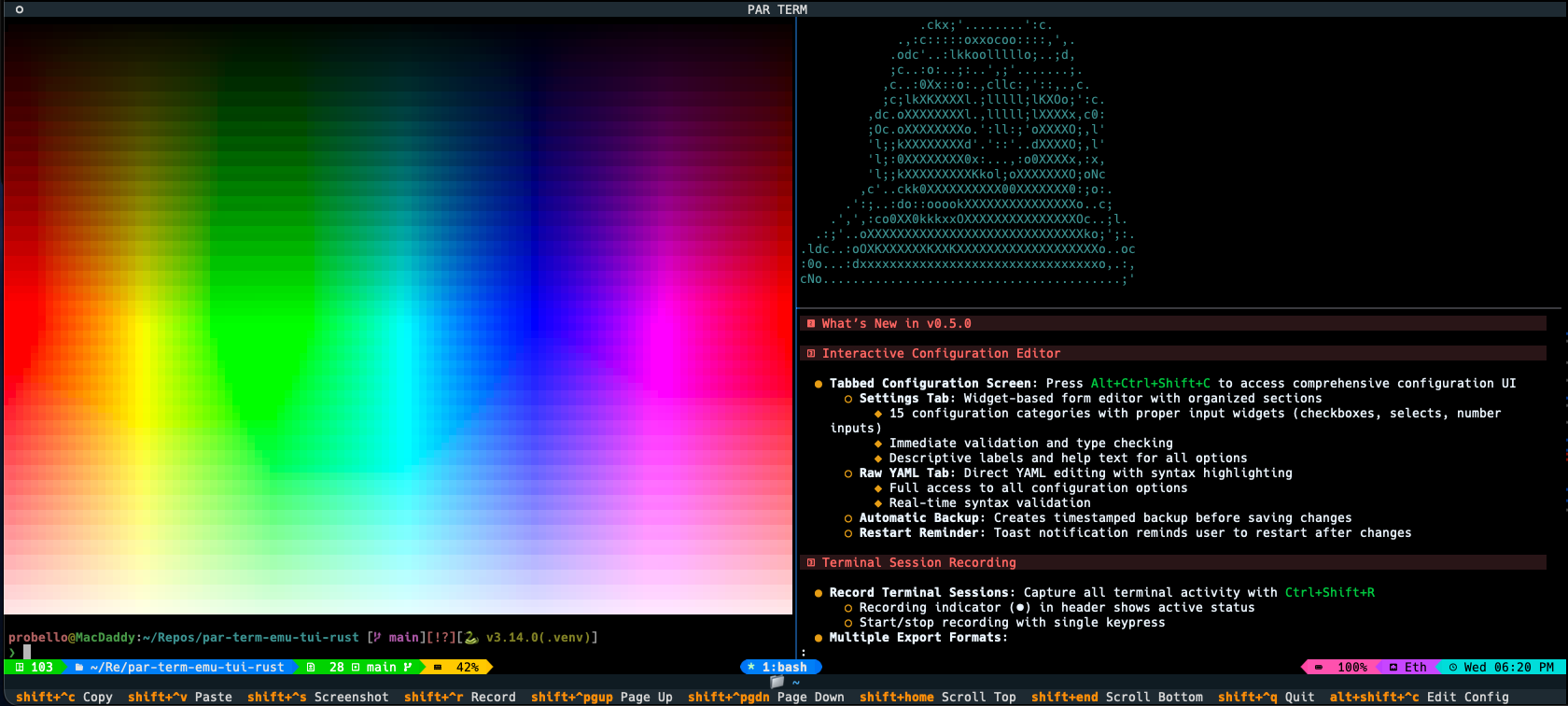
Installation: uv add par-term-emu-tui-rust or pip install par-term-emu-tui-rust
GitHub: https://github.com/paulrobello/par-term-emu-tui-rust
Technology
- Rust (1.99+) - Core library implementation
- Python (3.12+) - Python bindings
- PyO3 - Zero-cost Python/Rust bindings
- VTE - ANSI sequence parsing
- portable-pty - Cross-platform PTY support
Running Tests
# All tests: Rust, Rust streaming, and Python (rebuilds the extension first)
make test

# Rust tests only (plain `cargo test` fails to link under the default `python` feature)
make test-rust

# Python tests only (runs `make dev` first)
make test-python
Performance
- Zero-copy operations where possible
- Efficient grid representation
- Fast ANSI parsing with VTE crate
- Minimal Python/Rust boundary crossings
See docs/ARCHITECTURE.md for implementation details.
Security
When using PTY functionality, follow security best practices to prevent command injection and other vulnerabilities.
See docs/SECURITY.md for comprehensive security guidelines.
Contributing
Contributions are welcome! Please submit issues or pull requests on GitHub.
Development Setup
git clone https://github.com/paulrobello/par-term-emu-core-rust.git
cd par-term-emu-core-rust
make setup-venv  # Create virtual environment
make pre-commit-install  # Install pre-commit hooks (recommended)
make dev  # Build library
make checkall  # Run all quality checks
Code Quality
All contributions must pass:
- Rust formatting (
cargo fmt) - Rust linting (
cargo clippy) - Python formatting (
make fmt-python) - Python linting (
make lint-python) - Type checking (
pyright) - Tests (
make test-python)
TIP: Use make pre-commit-install to automate all checks on every commit!
See CONTRIBUTING.md for the contribution workflow, and CLAUDE.md for detailed development instructions.
License
This project is licensed under the MIT License - see the LICENSE file for details.
Author
Paul Robello - probello@gmail.com
Links
- PyPI: https://pypi.org/project/par-term-emu-core-rust/
- Crates.io: https://crates.io/crates/par-term-emu-core-rust
- GitHub: https://github.com/paulrobello/par-term-emu-core-rust
- TUI Application: https://github.com/paulrobello/par-term-emu-tui-rust
- Documentation: See docs/ directory
- Examples: See examples/ directory
1 maintainer

Metadata
1 maintainer
Release files for par-term-emu-core-rust 0.61.0
For a detailed explanation of source distributions (sdists) and built distributions (wheels), please see the package formats documentation.
Source distribution (sdist)
| File | Size | Uploaded | Provenance | |
|---|---|---|---|---|
| par_term_emu_core_rust-0.61.0.tar.gz | 3.0 MB | With provenance | Details |
Built distributions (wheels)
Total release size: 121.7 MB
Release files / par_term_emu_core_rust-0.61.0.tar.gz
| Download URL | par_term_emu_core_rust-0.61.0.tar.gz |
|---|---|
| Size | 3.0 MB |
| Tags | Source |
|
SHA-256 checksum How to use checksums |
fb350329ba1b59cb69cf7f054f24334427517c4ace1cb0869e5e14c21aeab47f
|
|
BLAKE2b-256 checksum How to use checksums |
581f729ff8b6d17412c317c8a0a1cdad987cb0847797820fa7c998396c9ddf5a
|
| Upload date | |
|
Uploaded using Trusted Publishing? What is trusted publishing? |
Yes |
| Uploaded via |
twine/7.0.0 CPython/3.13.14
|
Provenance
Provenance describes where a file came from. On PyPI, provenance is shared via attestations, which provide a verifiable record of the build or publishing details. View details, limitations and caveats.


PyPI Publish Attestation
PyPI verified that this artifact, at this checksum, originated from the publisher listed below.
Signed by GitHub Actions, verified by PyPI on Oct 17, 2026.
Transparency logRelease files / par_term_emu_core_rust-0.61.0-cp314-cp314-win_amd64.whl
| Download URL | par_term_emu_core_rust-0.61.0-cp314-cp314-win_amd64.whl |
|---|---|
| Size | 6.4 MB |
| Tags | CPython 3.14 Windows x86-64 |
|
SHA-256 checksum How to use checksums |
37e16190719c23e1228b4368e359667ab335763119cdcd99586be8f44b69cacf
|
|
BLAKE2b-256 checksum How to use checksums |
f88710fabe143b98cedfadafee7d6c6588b1f633de7b3b0a9e0f452144fa2cca
|
| Upload date | |
|
Uploaded using Trusted Publishing? What is trusted publishing? |
Yes |
| Uploaded via |
twine/7.0.0 CPython/3.13.14
|
Provenance
Provenance describes where a file came from. On PyPI, provenance is shared via attestations, which provide a verifiable record of the build or publishing details. View details, limitations and caveats.
PyPI Publish Attestation
PyPI verified that this artifact, at this checksum, originated from the publisher listed below.
Signed by GitHub Actions, verified by PyPI on Oct 17, 2026.
Transparency logRelease files / par_term_emu_core_rust-0.61.0-cp314-cp314-manylinux_2_17_x86_64.manylinux2014_x86_64.whl
| Download URL | par_term_emu_core_rust-0.61.0-cp314-cp314-manylinux_2_17_x86_64.manylinux2014_x86_64.whl |
|---|---|
| Size | 6.9 MB |
| Tags | CPython 3.14 Linux glibc 2.17+ x86-64 |
|
SHA-256 checksum How to use checksums |
5b676b55c667247d3b78c06d1326db5c59a9eccbaeb5d36680b634c500b457bd
|
|
BLAKE2b-256 checksum How to use checksums |
affbf3e4b1e8a94b3492429831f0b48d122ffc574bb30e4e57b7f11edbb165f6
|
| Upload date | |
|
Uploaded using Trusted Publishing? What is trusted publishing? |
Yes |
| Uploaded via |
twine/7.0.0 CPython/3.13.14
|
Provenance
Provenance describes where a file came from. On PyPI, provenance is shared via attestations, which provide a verifiable record of the build or publishing details. View details, limitations and caveats.
PyPI Publish Attestation
PyPI verified that this artifact, at this checksum, originated from the publisher listed below.
Signed by GitHub Actions, verified by PyPI on Oct 17, 2026.
Transparency logRelease files / par_term_emu_core_rust-0.61.0-cp314-cp314-manylinux_2_17_aarch64.manylinux2014_aarch64.whl
| Download URL | par_term_emu_core_rust-0.61.0-cp314-cp314-manylinux_2_17_aarch64.manylinux2014_aarch64.whl |
|---|---|
| Size | 6.6 MB |
| Tags | CPython 3.14 Linux glibc 2.17+ ARM64 |
|
SHA-256 checksum How to use checksums |
e1e72b3488121dba916fc550bbbe53c70bffe50c62fcac93962da17879dba0db
|
|
BLAKE2b-256 checksum How to use checksums |
e84f71cad82fb756d90c5369172fe4464cdd8c3bd419dab2ea8551edae606d60
|
| Upload date | |
|
Uploaded using Trusted Publishing? What is trusted publishing? |
Yes |
| Uploaded via |
twine/7.0.0 CPython/3.13.14
|
Provenance
Provenance describes where a file came from. On PyPI, provenance is shared via attestations, which provide a verifiable record of the build or publishing details. View details, limitations and caveats.
PyPI Publish Attestation
PyPI verified that this artifact, at this checksum, originated from the publisher listed below.
Signed by GitHub Actions, verified by PyPI on Oct 17, 2026.
Transparency logRelease files / par_term_emu_core_rust-0.61.0-cp314-cp314-macosx_10_12_x86_64.whl
| Download URL | par_term_emu_core_rust-0.61.0-cp314-cp314-macosx_10_12_x86_64.whl |
|---|---|
| Size | 6.7 MB |
| Tags | CPython 3.14 macOS 10.12+ x86-64 |
|
SHA-256 checksum How to use checksums |
6ac849578f13974ac4d054214a490fd3cfe1448f9860ca748fad4af435623be5
|
|
BLAKE2b-256 checksum How to use checksums |
00e06975e1361c1e0c1aaa3595b33d803320bc22d7112e7298b50a90c73f6239
|
| Upload date | |
|
Uploaded using Trusted Publishing? What is trusted publishing? |
Yes |
| Uploaded via |
twine/7.0.0 CPython/3.13.14
|
Provenance
Provenance describes where a file came from. On PyPI, provenance is shared via attestations, which provide a verifiable record of the build or publishing details. View details, limitations and caveats.
PyPI Publish Attestation
PyPI verified that this artifact, at this checksum, originated from the publisher listed below.
Signed by GitHub Actions, verified by PyPI on Oct 17, 2026.
Transparency logRelease files / par_term_emu_core_rust-0.61.0-cp314-cp314-macosx_10_12_x86_64.macosx_11_0_arm64.macosx_10_12_universal2.whl
| Download URL | par_term_emu_core_rust-0.61.0-cp314-cp314-macosx_10_12_x86_64.macosx_11_0_arm64.macosx_10_12_universal2.whl |
|---|---|
| Size | 12.9 MB |
| Tags | CPython 3.14 macOS 10.12+ universal2 (ARM64, x86-64) macOS 10.12+ x86-64 macOS 11.0+ ARM64 |
|
SHA-256 checksum How to use checksums |
01f92b796010458613775586272f358372fec9d4c63a7a2511249012777db763
|
|
BLAKE2b-256 checksum How to use checksums |
ad788403ed2eabc7d84512189ab96007e8df6e6720d69550185ba9d4d04915ce
|
| Upload date | |
|
Uploaded using Trusted Publishing? What is trusted publishing? |
Yes |
| Uploaded via |
twine/7.0.0 CPython/3.13.14
|
Provenance
Provenance describes where a file came from. On PyPI, provenance is shared via attestations, which provide a verifiable record of the build or publishing details. View details, limitations and caveats.
PyPI Publish Attestation
PyPI verified that this artifact, at this checksum, originated from the publisher listed below.
Signed by GitHub Actions, verified by PyPI on Oct 17, 2026.
Transparency logRelease files / par_term_emu_core_rust-0.61.0-cp313-cp313-win_amd64.whl
| Download URL | par_term_emu_core_rust-0.61.0-cp313-cp313-win_amd64.whl |
|---|---|
| Size | 6.4 MB |
| Tags | CPython 3.13 Windows x86-64 |
|
SHA-256 checksum How to use checksums |
0ee0f2b6e3c9b8a5397c445af0f707d436a33a6afd95a7f2fbc6f1153a21618e
|
|
BLAKE2b-256 checksum How to use checksums |
e28d7ea986a8cb1bf03e721b2cf5491eded03b6444d20f496495dbad161036a5
|
| Upload date | |
|
Uploaded using Trusted Publishing? What is trusted publishing? |
Yes |
| Uploaded via |
twine/7.0.0 CPython/3.13.14
|
Provenance
Provenance describes where a file came from. On PyPI, provenance is shared via attestations, which provide a verifiable record of the build or publishing details. View details, limitations and caveats.
PyPI Publish Attestation
PyPI verified that this artifact, at this checksum, originated from the publisher listed below.
Signed by GitHub Actions, verified by PyPI on Oct 17, 2026.
Transparency logRelease files / par_term_emu_core_rust-0.61.0-cp313-cp313-manylinux_2_17_x86_64.manylinux2014_x86_64.whl
| Download URL | par_term_emu_core_rust-0.61.0-cp313-cp313-manylinux_2_17_x86_64.manylinux2014_x86_64.whl |
|---|---|
| Size | 6.9 MB |
| Tags | CPython 3.13 Linux glibc 2.17+ x86-64 |
|
SHA-256 checksum How to use checksums |
9cb558e92bdb0dd7ff3ea514a80fe192cb05466148b165af029aaebb556a58e5
|
|
BLAKE2b-256 checksum How to use checksums |
3f536b76c368028a1c63b30f3435496eb54a33270633dbee482053e0cd558dcb
|
| Upload date | |
|
Uploaded using Trusted Publishing? What is trusted publishing? |
Yes |
| Uploaded via |
twine/7.0.0 CPython/3.13.14
|
Provenance
Provenance describes where a file came from. On PyPI, provenance is shared via attestations, which provide a verifiable record of the build or publishing details. View details, limitations and caveats.
PyPI Publish Attestation
PyPI verified that this artifact, at this checksum, originated from the publisher listed below.
Signed by GitHub Actions, verified by PyPI on Oct 17, 2026.
Transparency logRelease files / par_term_emu_core_rust-0.61.0-cp313-cp313-manylinux_2_17_aarch64.manylinux2014_aarch64.whl
| Download URL | par_term_emu_core_rust-0.61.0-cp313-cp313-manylinux_2_17_aarch64.manylinux2014_aarch64.whl |
|---|---|
| Size | 6.6 MB |
| Tags | CPython 3.13 Linux glibc 2.17+ ARM64 |
|
SHA-256 checksum How to use checksums |
11ca166961a0feb5eed0efb3524ad5b37eaed0a0dbff7ec57a360644a4b56c89
|
|
BLAKE2b-256 checksum How to use checksums |
199924b8be00f603f051632e5cd9cce2a6bf62a46f72a38923ccb6188a37b578
|
| Upload date | |
|
Uploaded using Trusted Publishing? What is trusted publishing? |
Yes |
| Uploaded via |
twine/7.0.0 CPython/3.13.14
|
Provenance
Provenance describes where a file came from. On PyPI, provenance is shared via attestations, which provide a verifiable record of the build or publishing details. View details, limitations and caveats.
PyPI Publish Attestation
PyPI verified that this artifact, at this checksum, originated from the publisher listed below.
Signed by GitHub Actions, verified by PyPI on Oct 17, 2026.
Transparency logRelease files / par_term_emu_core_rust-0.61.0-cp313-cp313-macosx_10_12_x86_64.whl
| Download URL | par_term_emu_core_rust-0.61.0-cp313-cp313-macosx_10_12_x86_64.whl |
|---|---|
| Size | 6.7 MB |
| Tags | CPython 3.13 macOS 10.12+ x86-64 |
|
SHA-256 checksum How to use checksums |
bdd3cfc2c36e93eaef7c0ac12e02f2d01720279763c9d5330723186c4b6153d5
|
|
BLAKE2b-256 checksum How to use checksums |
15c2ec8431f6f64ecfa72828c532e654ce2b84dc02428718bc4376aec438f36b
|
| Upload date | |
|
Uploaded using Trusted Publishing? What is trusted publishing? |
Yes |
| Uploaded via |
twine/7.0.0 CPython/3.13.14
|
Provenance
Provenance describes where a file came from. On PyPI, provenance is shared via attestations, which provide a verifiable record of the build or publishing details. View details, limitations and caveats.
PyPI Publish Attestation
PyPI verified that this artifact, at this checksum, originated from the publisher listed below.
Signed by GitHub Actions, verified by PyPI on Oct 17, 2026.
Transparency logRelease files / par_term_emu_core_rust-0.61.0-cp313-cp313-macosx_10_12_x86_64.macosx_11_0_arm64.macosx_10_12_universal2.whl
| Download URL | par_term_emu_core_rust-0.61.0-cp313-cp313-macosx_10_12_x86_64.macosx_11_0_arm64.macosx_10_12_universal2.whl |
|---|---|
| Size | 12.9 MB |
| Tags | CPython 3.13 macOS 10.12+ universal2 (ARM64, x86-64) macOS 10.12+ x86-64 macOS 11.0+ ARM64 |
|
SHA-256 checksum How to use checksums |
3e38dc01d952b1450ecdf7d7f86c799c31095b2621803a685c48195f2e5b1590
|
|
BLAKE2b-256 checksum How to use checksums |
66a66ab906f0b77984eef8856f74b28eae534c4f6b8aaf53da8ef45c456a2113
|
| Upload date | |
|
Uploaded using Trusted Publishing? What is trusted publishing? |
Yes |
| Uploaded via |
twine/7.0.0 CPython/3.13.14
|
Provenance
Provenance describes where a file came from. On PyPI, provenance is shared via attestations, which provide a verifiable record of the build or publishing details. View details, limitations and caveats.
PyPI Publish Attestation
PyPI verified that this artifact, at this checksum, originated from the publisher listed below.
Signed by GitHub Actions, verified by PyPI on Oct 17, 2026.
Transparency logRelease files / par_term_emu_core_rust-0.61.0-cp312-cp312-win_amd64.whl
| Download URL | par_term_emu_core_rust-0.61.0-cp312-cp312-win_amd64.whl |
|---|---|
| Size | 6.4 MB |
| Tags | CPython 3.12 Windows x86-64 |
|
SHA-256 checksum How to use checksums |
dd25fa87078189ad3c5e6e1c09390673529d9c5d22bb1950dbc4eeb479968ebc
|
|
BLAKE2b-256 checksum How to use checksums |
74f33bcfffabadeaa34144df9d5b94d9ddb2fd6a92497a96d6919456e3d526c3
|
| Upload date | |
|
Uploaded using Trusted Publishing? What is trusted publishing? |
Yes |
| Uploaded via |
twine/7.0.0 CPython/3.13.14
|
Provenance
Provenance describes where a file came from. On PyPI, provenance is shared via attestations, which provide a verifiable record of the build or publishing details. View details, limitations and caveats.
PyPI Publish Attestation
PyPI verified that this artifact, at this checksum, originated from the publisher listed below.
Signed by GitHub Actions, verified by PyPI on Oct 17, 2026.
Transparency logRelease files / par_term_emu_core_rust-0.61.0-cp312-cp312-manylinux_2_17_x86_64.manylinux2014_x86_64.whl
| Download URL | par_term_emu_core_rust-0.61.0-cp312-cp312-manylinux_2_17_x86_64.manylinux2014_x86_64.whl |
|---|---|
| Size | 6.9 MB |
| Tags | CPython 3.12 Linux glibc 2.17+ x86-64 |
|
SHA-256 checksum How to use checksums |
a9b19ec433571e7cff6f52023b39868aed76cbb7cf3a962f3ea08f335d32fe9e
|
|
BLAKE2b-256 checksum How to use checksums |
c8423b0f9281ce0bfee558fc9549c8a2e91fb5d08e3ac22d0e2f89273e907554
|
| Upload date | |
|
Uploaded using Trusted Publishing? What is trusted publishing? |
Yes |
| Uploaded via |
twine/7.0.0 CPython/3.13.14
|
Provenance
Provenance describes where a file came from. On PyPI, provenance is shared via attestations, which provide a verifiable record of the build or publishing details. View details, limitations and caveats.
PyPI Publish Attestation
PyPI verified that this artifact, at this checksum, originated from the publisher listed below.
Signed by GitHub Actions, verified by PyPI on Oct 17, 2026.
Transparency logRelease files / par_term_emu_core_rust-0.61.0-cp312-cp312-manylinux_2_17_aarch64.manylinux2014_aarch64.whl
| Download URL | par_term_emu_core_rust-0.61.0-cp312-cp312-manylinux_2_17_aarch64.manylinux2014_aarch64.whl |
|---|---|
| Size | 6.6 MB |
| Tags | CPython 3.12 Linux glibc 2.17+ ARM64 |
|
SHA-256 checksum How to use checksums |
a13006369c044bebf8bee3d638c02d111d29b1f6dff8e8f412086569e6082050
|
|
BLAKE2b-256 checksum How to use checksums |
9b31197e90856732bde0b5d24cb5c0b80772faede480a80d72193439ba3c3f2c
|
| Upload date | |
|
Uploaded using Trusted Publishing? What is trusted publishing? |
Yes |
| Uploaded via |
twine/7.0.0 CPython/3.13.14
|
Provenance
Provenance describes where a file came from. On PyPI, provenance is shared via attestations, which provide a verifiable record of the build or publishing details. View details, limitations and caveats.
PyPI Publish Attestation
PyPI verified that this artifact, at this checksum, originated from the publisher listed below.
Signed by GitHub Actions, verified by PyPI on Oct 17, 2026.
Transparency logRelease files / par_term_emu_core_rust-0.61.0-cp312-cp312-macosx_10_12_x86_64.whl
| Download URL | par_term_emu_core_rust-0.61.0-cp312-cp312-macosx_10_12_x86_64.whl |
|---|---|
| Size | 6.7 MB |
| Tags | CPython 3.12 macOS 10.12+ x86-64 |
|
SHA-256 checksum How to use checksums |
f2c535c27892fe1ef714f856fbc8a3b880667bc9150c1ae5116f188452dd8662
|
|
BLAKE2b-256 checksum How to use checksums |
5d98ce791e3977b6a3cea333d9201d82a68965cdaaa78e73ce23e52f73e1fcb4
|
| Upload date | |
|
Uploaded using Trusted Publishing? What is trusted publishing? |
Yes |
| Uploaded via |
twine/7.0.0 CPython/3.13.14
|
Provenance
Provenance describes where a file came from. On PyPI, provenance is shared via attestations, which provide a verifiable record of the build or publishing details. View details, limitations and caveats.
PyPI Publish Attestation
PyPI verified that this artifact, at this checksum, originated from the publisher listed below.
Signed by GitHub Actions, verified by PyPI on Oct 17, 2026.
Transparency logRelease files / par_term_emu_core_rust-0.61.0-cp312-cp312-macosx_10_12_x86_64.macosx_11_0_arm64.macosx_10_12_universal2.whl
| Download URL | par_term_emu_core_rust-0.61.0-cp312-cp312-macosx_10_12_x86_64.macosx_11_0_arm64.macosx_10_12_universal2.whl |
|---|---|
| Size | 12.9 MB |
| Tags | CPython 3.12 macOS 10.12+ universal2 (ARM64, x86-64) macOS 10.12+ x86-64 macOS 11.0+ ARM64 |
|
SHA-256 checksum How to use checksums |
80456d49123c803bdf472dbb90b3fbc84d7e3ccab3dc9ba879f830396d6d916b
|
|
BLAKE2b-256 checksum How to use checksums |
89609fa76136df8da5627eee9634a86e69b3e37ae505ce77ff36d0faeadb5d0e
|
| Upload date | |
|
Uploaded using Trusted Publishing? What is trusted publishing? |
Yes |
| Uploaded via |
twine/7.0.0 CPython/3.13.14
|
Provenance
Provenance describes where a file came from. On PyPI, provenance is shared via attestations, which provide a verifiable record of the build or publishing details. View details, limitations and caveats.
PyPI Publish Attestation
PyPI verified that this artifact, at this checksum, originated from the publisher listed below.
Signed by GitHub Actions, verified by PyPI on Oct 17, 2026.
Transparency logSecurity for par-term-emu-core-rust 0.61.0
Provenance
Provenance describes where a file came from. On PyPI, provenance is shared via attestations, which provide a verifiable record of the build or publishing details. View details, limitations and caveats.
Full provenance
All 16 files in this release have been uploaded with provenance metadata.
Attestation for par_term_emu_core_rust-0.61.0.tar.gz
PyPI Publish Attestation
PyPI verified that this artifact, at this checksum, originated from the publisher listed below.
Signed by GitHub Actions, verified by PyPI on Oct 17, 2026.
Transparency logA note on package security
PyPI is a repository for distributing packages, not a service for auditing them. While third-party security researchers and our staff do their best to detect and remove malicious packages, PyPI cannot guarantee the quality, security or suitability of any given package.
To learn more about protecting yourself from malicious actors, visit our package security documentation.














