
Paramify

Paramify is a lightweight Python library for dynamic parameter management. Define, validate, and manage parameters from a YAML or JSON schema with optional CLI integration and a web-based configuration UI.
Key Features
- Dynamic Parameter Management — define parameters in YAML/JSON or as plain Python dicts
- Groups & Nesting — organise parameters hierarchically with
type: group - YAML Includes — split large configs across multiple files with
include: - Typed Lists —
list[bool],list[int],list[float],list[double],list[str],list[string] - C++-compatible type names —
double(alias forfloat) andstring(alias forstr) value:keyword — preferred overdefault:for setting parameter values (both accepted)- Scope-Based Control —
scope: all | cli | runtime;runtimeparams are never exposed to CLI - CLI Integration — auto-generate CLI arguments from the schema; bool params get
--flag/--no-flag - Custom Callbacks —
on_<param>_set(self, value)triggered on every update - Persistence — changes written back to the source YAML/JSON file automatically
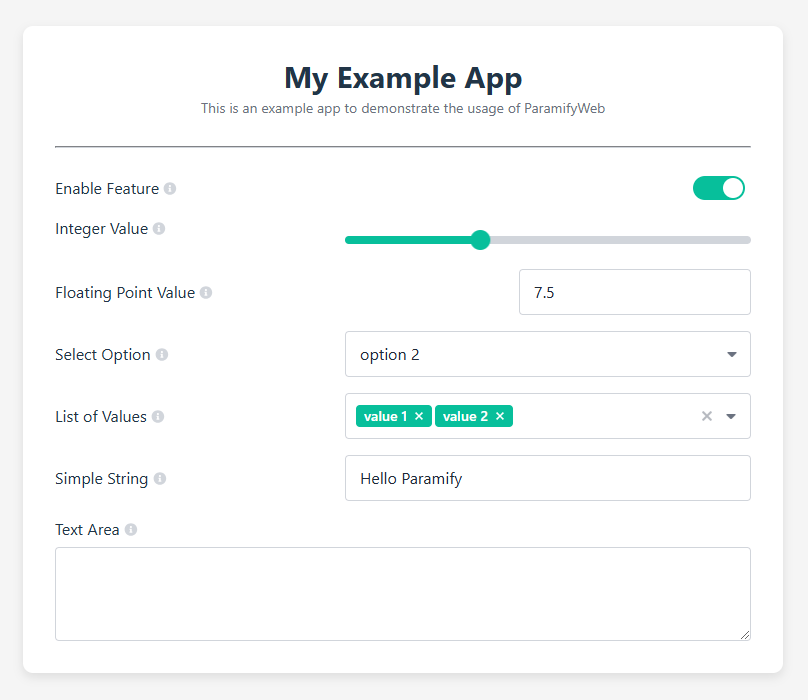
save_as(path)— export current state to a new YAML file- Web Interface — optional Bottle-based UI for runtime configuration (
pip install paramify[web])
Installation
# Core (parameter management + CLI)
pip install paramify

# With web interface
pip install paramify[web]
Quick Start
Basic usage
from paramify import Paramify

class MyApp(Paramify):
    def on_speed_set(self, value):
        print(f"speed updated to {value}")

params = {
    "parameters": [
        {"name": "enabled", "type": "bool",   "default": True},
        {"name": "speed",   "type": "int",    "default": 10},
        {"name": "label",   "type": "string", "default": "robot"},
    ]
}

app = MyApp(params, enable_cli=False)
print(app.parameters.enabled)   # True
print(app.parameters.speed)     # 10

app.set_speed(42)               # triggers on_speed_set
print(app.get_parameters())     # {'enabled': True, 'speed': 42, 'label': 'robot'}
Groups and nested parameters
Parameters can be organised into groups. Nested params are accessed with dot notation
(params.camera.enabled) and their setters/callbacks use underscores (set_camera_enabled,
on_camera_enabled_set).
# config.yaml
name: "My Robot App"
parameters:

  - name: "enabled"
    type: "bool"
    value: true
    scope: "all"

  - name: "camera"
    type: "group"
    parameters:
      - name: "enabled"
        type: "bool"
        value: true
      - name: "fps"
        type: "int"
        value: 30
      - name: "gain"
        type: "double"       # alias for float
        value: 1.0
from paramify import Paramify

class MyApp(Paramify):
    def on_camera_enabled_set(self, value):   # dots → underscores
        print(f"camera.enabled → {value}")

app = MyApp("config.yaml")

print(app.parameters.camera.enabled)   # True
print(app.parameters.camera.fps)       # 30

app.set_camera_enabled(False)          # triggers callback + saves file
app.set_camera_gain(2.5)
YAML includes
Large configs can be split across files. Use include: inside a group to load parameters
from one or more external YAML files.
# main.yaml
parameters:
  - name: "camera"
    type: "group"
    include: "camera_params.yaml"      # single file

  - name: "audio"
    type: "group"
    include:                           # list of files
      - "audio_base.yaml"
      - "audio_advanced.yaml"
# camera_params.yaml
parameters:
  - name: "enabled"
    type: "bool"
    value: true
  - name: "resolution"
    type: "string"
    value: "1080p"
Included files are saved independently when their parameters change. Circular includes are
detected and raise a ValueError.
Typed lists
parameters:
  - name: "channels"
    type: "list[int]"
    value: [1, 2]

  - name: "labels"
    type: "list[string]"
    value: ["cat", "dog"]

  - name: "weights"
    type: "list[double]"
    value: [0.1, 0.9]
Supported list types: list[bool], list[int], list[float], list[double],
list[str], list[string], and untyped list.
value: vs default:
Both keywords are accepted. value: takes precedence if both are present (matches
paramify-cpp behaviour).
- name: "gain"
  type: "double"
  value: 2.0      # preferred
  default: 1.0    # fallback if value: is absent
Scope
| Scope | CLI | Runtime |
|---|---|---|
all (default) |
✅ | ✅ |
cli |
✅ | ❌ |
runtime |
❌ | ✅ |
- name: "debug"
  type: "bool"
  value: false
  scope: "runtime"   # never shown in --help, never parsed from argv
save_as
Export the current parameter state to a new YAML file:
app.save_as("/tmp/config_snapshot.yaml")
YAML Configuration Reference
name: "My App"                    # optional app name
description: "..."                # optional description shown in --help

parameters:

  # Scalar types
  - name: "flag"
    type: "bool"                  # bool | int | float | double | str | string
    value: true                   # 'value:' preferred; 'default:' also accepted
    scope: "all"                  # all | cli | runtime  (default: all)
    label: "Enable flag"          # display label (used in web UI)
    description: "..."            # shown in --help

  # Typed list
  - name: "ids"
    type: "list[int]"             # list[bool|int|float|double|str|string] or plain list
    value: [1, 2, 3]

  # Inline group
  - name: "camera"
    type: "group"
    parameters:
      - name: "enabled"
        type: "bool"
        value: true
      - name: "fps"
        type: "int"
        value: 30

  # Group loaded from external file(s)
  - name: "audio"
    type: "group"
    include: "audio_params.yaml"  # string or list of strings
JSON Configuration
JSON configs support all scalar types and typed lists but not type: group or
include:. Use "default" as the value key in JSON.
{
    "name": "My App",
    "parameters": [
        {"name": "enabled", "type": "bool",   "default": true},
        {"name": "speed",   "type": "int",    "default": 10},
        {"name": "labels",  "type": "list[string]", "default": ["a", "b"]}
    ]
}
CLI Integration
Parameters with scope: all or scope: cli are automatically exposed as CLI arguments.
python my_app.py --speed 99 --camera-enabled --no-camera-mute
- Dot-notation keys become kebab-case flags:
camera.enabled→--camera-enabled - Bool params get both
--flagand--no-flag - List params accept multiple values:
--channels 1 2 3 - CLI values override file defaults but are not persisted
Web Interface
pip install paramify[web]
from paramify.web import ParamifyWeb

class MyApp(ParamifyWeb):
    def on_speed_set(self, value):
        print(f"speed → {value}")

app = MyApp("config.yaml", host="0.0.0.0", port=5000)
input("Press Enter to stop...")
Open http://localhost:5000 to adjust parameters in the browser. All groups (including
those loaded via include:) appear as a flat list in the UI.
Callbacks and Setters
For a parameter with key camera.enabled:
| What | Name |
|---|---|
| Setter method | set_camera_enabled(value) |
| Callback method | on_camera_enabled_set(self, value) |
| Namespace access | app.parameters.camera.enabled |
| Dict access | app.get_parameters()["camera.enabled"] |
Dots in parameter keys are replaced by underscores in method names.
Contributing
Contributions are welcome! Feel free to open issues or submit pull requests.
License
This project is licensed under the MIT License. See the LICENSE file for details.
1 maintainer

Metadata
1 maintainer
Release files for paramify 0.2.0
For a detailed explanation of source distributions (sdists) and built distributions (wheels), please see the package formats documentation.
Source distribution (sdist)
| File | Size | Uploaded | |
|---|---|---|---|
| paramify-0.2.0.tar.gz | 421.9 kB | Details |
Built distribution (wheel)
| File | Interpreter | ABI | Platform | Reset |
|---|---|---|---|---|
| paramify-0.2.0-py3-none-any.whl | Python 3 | none | any | Details |
Total release size: 829.8 kB
Release files / paramify-0.2.0.tar.gz
| Download URL | paramify-0.2.0.tar.gz |
|---|---|
| Size | 421.9 kB |
| Tags | Source |
|
SHA-256 checksum How to use checksums |
629dff3641e480229f0deb088f2baf4729905681cd16c41c266d26312c17b1e0
|
|
BLAKE2b-256 checksum How to use checksums |
8b350c08b84fd6e12817fa77a0627f49ba23884810f329f6dbc9d5b5b127578c
|
| Upload date | |
|
Uploaded using Trusted Publishing? What is trusted publishing? |
No |
| Uploaded via |
twine/6.2.0 CPython/3.12.3
|
Release files / paramify-0.2.0-py3-none-any.whl
| Download URL | paramify-0.2.0-py3-none-any.whl |
|---|---|
| Size | 407.9 kB |
| Tags | Python 3 |
|
SHA-256 checksum How to use checksums |
00094ce3b7e23da465b81e9e78e6595f1ed7de70d9ff80568c896ffaaa373b11
|
|
BLAKE2b-256 checksum How to use checksums |
b8e09c2b1c0c73a610d53685584263d72a45f00e9e05f049c1235999b9fab8e9
|
| Upload date | |
|
Uploaded using Trusted Publishing? What is trusted publishing? |
No |
| Uploaded via |
twine/6.2.0 CPython/3.12.3
|














