
General Information
Advanced multichannel file sharing web server.
See also:
Parrot-feeder is an all-in-one combination of the following tools:
- https://github.com/cyberhexe/ngflask
- https://github.com/mtalimanchuk/flask-filebox
- https://github.com/mtalimanchuk/file-squire-bot
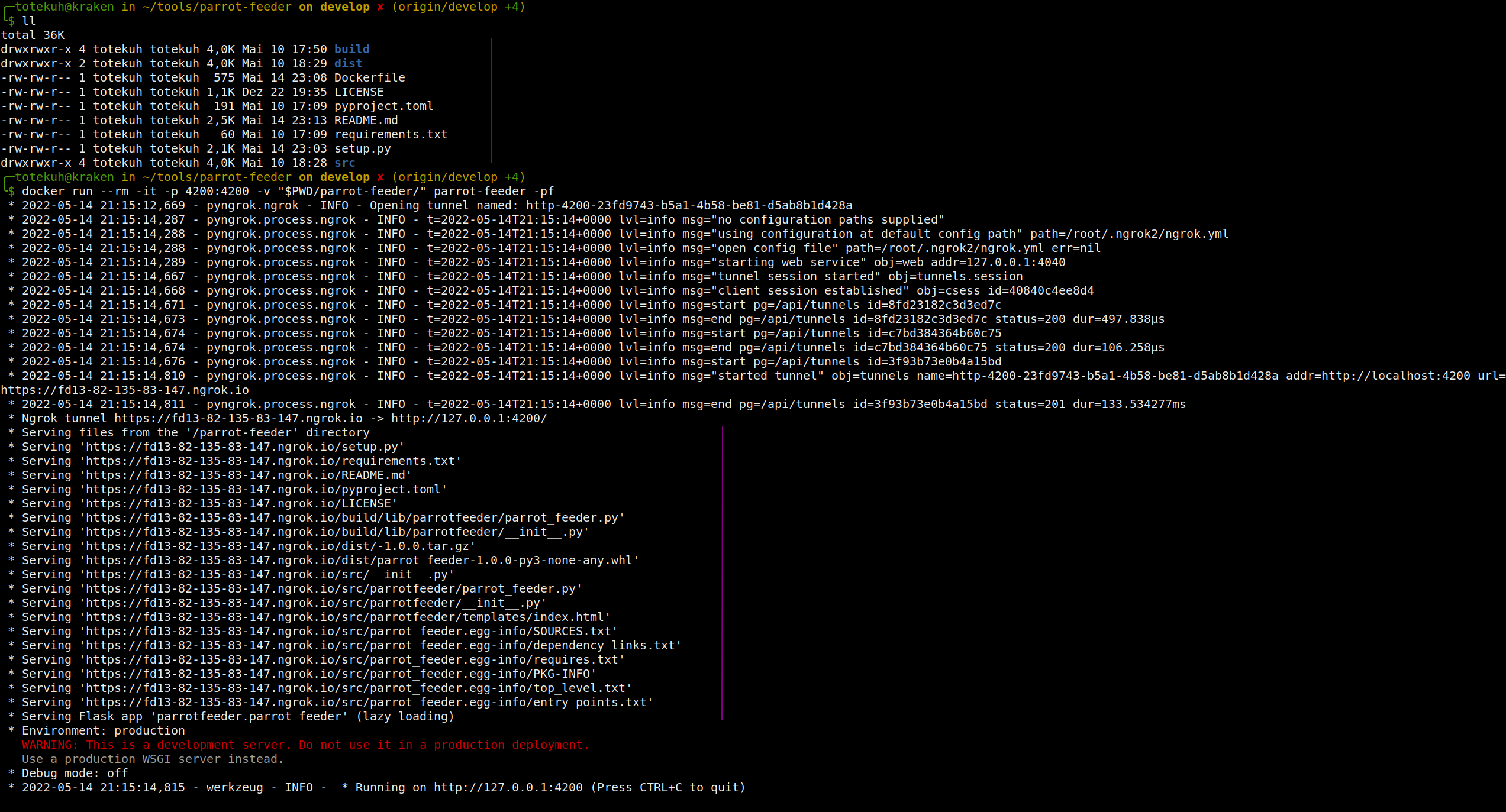
It makes file transferring over Internet easier by giving you a tool to share a local directory through the Ngrok network. It lists the given directory, creates a local web server with Flask, make this server sharing the listed files and creates an Ngrok tunnel to the port used by the Flask server.
In other words, parrot-feeder temporarily exposes your files for downloading on the Internet. Once you stop parrot-feeder, your files stop being shared over Ngrok.
It also exposes an HTML page under the /api/upload path with a form for uploading files to the remote machine.
If you supply the tool with a telegram bot token via the --telegram-bot-token argument or
via the TELEGRAM_BOT_TOKEN env variable,
you will also activate a telegram bot that will /fetch or /tail files for you from remote.
Note-1: you also need to supply the --telegram-bot-whitelist or TELEGRAM_BOT_WHITELIST
env variable to specify the users allowed to interact with the bot.
Note-2: you may need to sign up for Ngrok for tunneling HTML pages.
Screenshots or it didn't happen.
Installation
Download the Docker image:
docker pull lep0puglabs/parrot-feeder:latest
or build the Docker image yourself:
docker build -t parrot-feeder -f ./Dockerfile .
Run the Docker image:
docker run --rm -it -p 4200:4200 parrot-feeder
Or install the package using PyPI:
sudo pip3 install parrot-feeder
After starting the server, you can navigate to the following URLs:
- / - for seeing the listing
- /api/upload - for accessing the API for uploading files
Usage
Serve files and folder from the current working directory
parrot-feeder
or
docker run --rm -it -p 4200:4200 parrot-feeder
Serve files and folders from the /tmp directory
parrot-feeder --directory /tmp
Print served files to the console on startup
parrot-feeder --directory /tmp -pf
Bind the server to the given address
parrot-feeder --ip 10.10.10.10 --port 5050
Print help
parrot-feeder -h
On startup print the actual files being shared over Ngrok
parrot-feeder -pf
Use a telegram bot to serve you files from the remote server:
parrot-feeder --telegram-bot-token token --telegram-bot-whitelist username1,username2
1 maintainer

Metadata
1 maintainer
Release files for parrot-feeder 0.12.0
For a detailed explanation of source distributions (sdists) and built distributions (wheels), please see the package formats documentation.
Source distribution (sdist)
| File | Size | Uploaded | |
|---|---|---|---|
| parrot-feeder-0.12.0.tar.gz | 8.2 kB | Details |
Built distribution (wheel)
| File | Interpreter | ABI | Platform | Reset |
|---|---|---|---|---|
| parrot_feeder-0.12.0-py3-none-any.whl | Python 3 | none | any | Details |
Total release size: 16.6 kB
Release files / parrot-feeder-0.12.0.tar.gz
| Download URL | parrot-feeder-0.12.0.tar.gz |
|---|---|
| Size | 8.2 kB |
| Tags | Source |
|
SHA-256 checksum How to use checksums |
1b743542c577f4fc4f4ab49e9da883f973a8b276ab55281c0b7f404ae995f6e3
|
|
BLAKE2b-256 checksum How to use checksums |
7cb157c2b33ec133152501555777643b3a596beb7e9cd3f145f4eecc7bb4518d
|
| Upload date | |
|
Uploaded using Trusted Publishing? What is trusted publishing? |
No |
| Uploaded via |
twine/4.0.0 CPython/3.9.12
|
Release files / parrot_feeder-0.12.0-py3-none-any.whl
| Download URL | parrot_feeder-0.12.0-py3-none-any.whl |
|---|---|
| Size | 8.4 kB |
| Tags | Python 3 |
|
SHA-256 checksum How to use checksums |
c260baa9bb4afc6581a9c12342e0d68a1acdd54a03bb20c7bd9333359a1e8137
|
|
BLAKE2b-256 checksum How to use checksums |
ed4bb6f38f575f47a80883bffd71a36748cb4e0f100c0f848dbe39d61d53e4e3
|
| Upload date | |
|
Uploaded using Trusted Publishing? What is trusted publishing? |
No |
| Uploaded via |
twine/4.0.0 CPython/3.9.12
|














