
Advanced multi-channel file-sharing tool

Project description
General Information
Advanced multichannel file sharing web server.
See also:
Parrot-feeder is an all-in-one combination of the following tools:
- https://github.com/cyberhexe/ngflask
- https://github.com/mtalimanchuk/flask-filebox
- https://github.com/mtalimanchuk/file-squire-bot
It makes file transferring over Internet easier by giving you a tool to share a local directory through the Ngrok network. It lists the given directory, creates a local web server with Flask, make this server sharing the listed files and creates an Ngrok tunnel to the port used by the Flask server.
In other words, parrot-feeder temporarily exposes your files for downloading on the Internet. Once you stop parrot-feeder, your files stop being shared over Ngrok.
It also exposes an HTML page under the /api/upload path with a form for uploading files to the remote machine.
If you supply the tool with a telegram bot token via the --telegram-bot-token argument or
via the TELEGRAM_BOT_TOKEN env variable,
you will also activate a telegram bot that will /fetch or /tail files for you from remote.
Note-1: you also need to supply the --telegram-bot-whitelist or TELEGRAM_BOT_WHITELIST
env variable to specify the users allowed to interact with the bot.
Note-2: you may need to sign up for Ngrok for tunneling HTML pages.
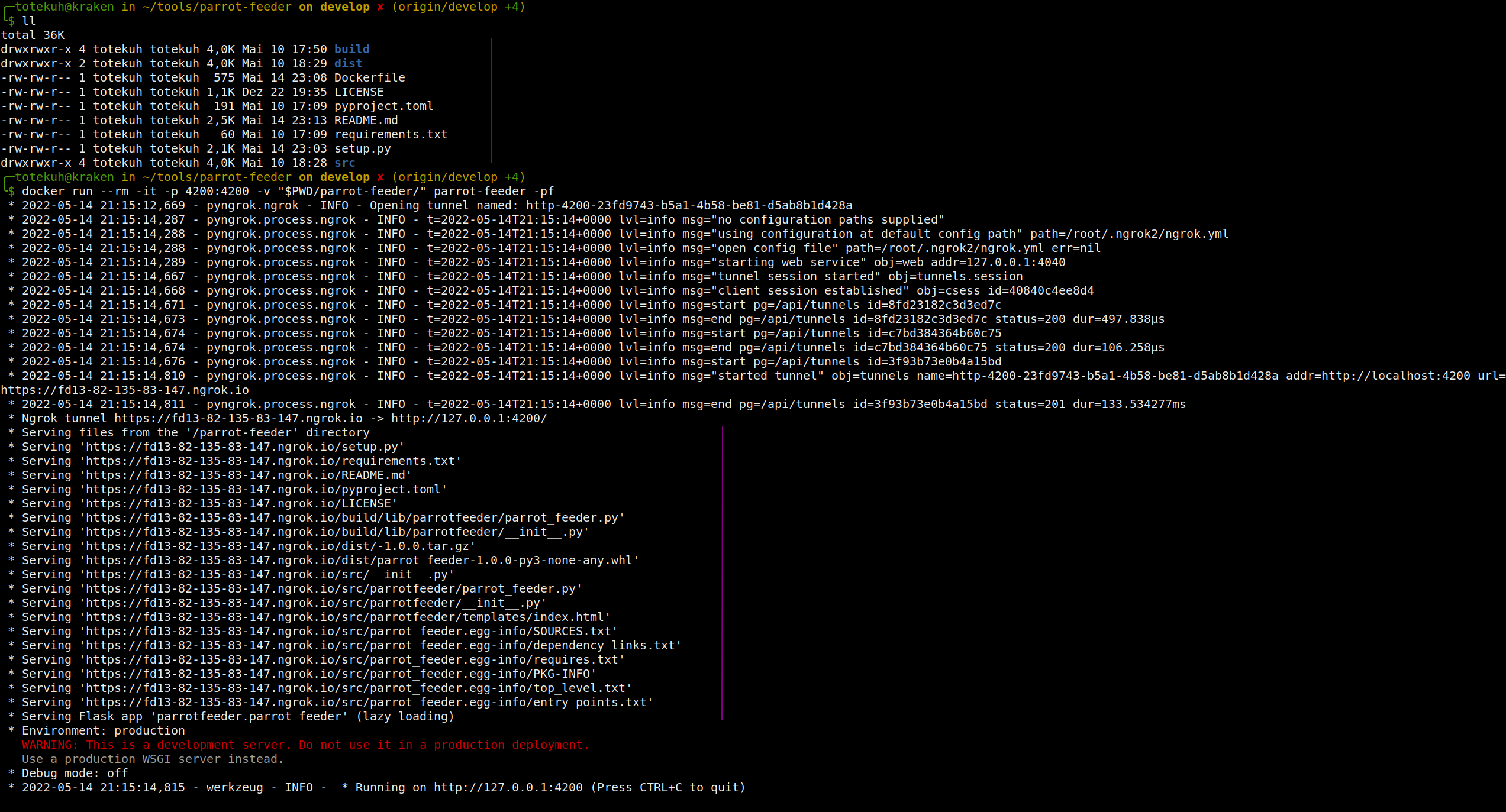
Screenshots or it didn't happen.
Installation
Download the Docker image:
docker pull lep0puglabs/parrot-feeder:latest
or build the Docker image yourself:
docker build -t parrot-feeder -f ./Dockerfile .
Run the Docker image:
docker run --rm -it -p 4200:4200 parrot-feeder
Or install the package using PyPI:
sudo pip3 install parrot-feeder
After starting the server, you can navigate to the following URLs:
- / - for seeing the listing
- /api/upload - for accessing the API for uploading files
Usage
Serve files and folder from the current working directory
parrot-feeder
or
docker run --rm -it -p 4200:4200 parrot-feeder
Serve files and folders from the /tmp directory
parrot-feeder --directory /tmp
Print served files to the console on startup
parrot-feeder --directory /tmp -pf
Bind the server to the given address
parrot-feeder --ip 10.10.10.10 --port 5050
Print help
parrot-feeder -h
On startup print the actual files being shared over Ngrok
parrot-feeder -pf
Use a telegram bot to serve you files from the remote server:
parrot-feeder --telegram-bot-token token --telegram-bot-whitelist username1,username2


Download files
Download the file for your platform. If you're not sure which to choose, learn more about installing packages.
Source Distribution
Built Distribution
Filter files by name, interpreter, ABI, and platform.
If you're not sure about the file name format, learn more about wheel file names.
Copy a direct link to the current filters
File details
Details for the file parrot-feeder-0.11.0.tar.gz.
File metadata
- Download URL: parrot-feeder-0.11.0.tar.gz
- Upload date:
- Size: 8.2 kB
- Tags: Source
- Uploaded using Trusted Publishing? No
- Uploaded via: twine/4.0.0 CPython/3.9.12
File hashes
| Algorithm | Hash digest | |
|---|---|---|
| SHA256 |
04f35a88db72067dbd7eac7d5675ad3ac5388fd08f91b591baa47502751a47b2
|
|
| MD5 |
e6dbd0f76c7f1a9241d8d412adf025a8
|
|
| BLAKE2b-256 |
0680f2828fa168ff7ec7c7f52acf99d4113ba83df9e78ee0d8890ec6f2a28391
|
File details
Details for the file parrot_feeder-0.11.0-py3-none-any.whl.
File metadata
- Download URL: parrot_feeder-0.11.0-py3-none-any.whl
- Upload date:
- Size: 8.4 kB
- Tags: Python 3
- Uploaded using Trusted Publishing? No
- Uploaded via: twine/4.0.0 CPython/3.9.12
File hashes
| Algorithm | Hash digest | |
|---|---|---|
| SHA256 |
5f18632bb46edca1ee07dbc3b7b568b77206bdd6c48e920a7fd233522cf36175
|
|
| MD5 |
7b1ec8f1586b4ad2f69d5fa0d1f2b285
|
|
| BLAKE2b-256 |
c2d5117bcbb55af5e16d7bfdcdc64c31ddc3bed95d662c4745d566001fda6f88
|






