
A simple Python library to send email confirmations via Gmail using App Passwords, featuring a unique passcode and a provided link.

Project description
Simple Passcode Mailer

- A straightforward Python library to send email confirmations via Gmail using App Passwords.
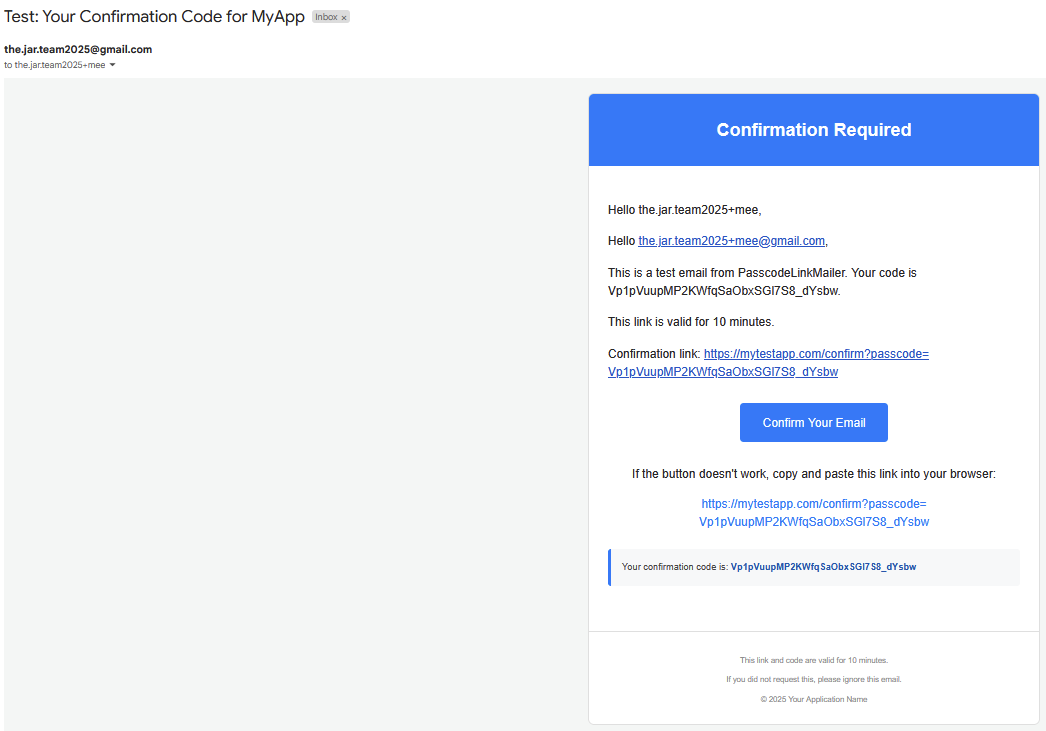
- It generates a unique passcode, embeds it in a customizable HTML email template with a confirmation link, and handles sending the email.
- Ideal for simple email verification flows where you want to manage the email sending process directly.
Key Features
- Gmail Focused: Designed specifically for sending emails through Gmail using Google App Passwords.
- Secure Passcodes: Generates cryptographically strong, URL-safe passcodes using Python's
secretsmodule. - Customizable HTML Emails: Comes with a decent default HTML template, but you provide the main message body and subject, which can include placeholders.
- Timed Validity: Set an expiration duration for how long the generated passcode and link should be considered valid.
- Optional Delayed Sending: Emails can be sent immediately or after a specified delay using a background daemon thread.
- Pure Python: Relies only on Python standard libraries, so no external dependencies to install beyond the library itself.
- Clear Error Handling: Uses custom exceptions to help you pinpoint issues with authentication, connection, or other sending errors.
Installation
You can install simple-passcode-mailer directly from PyPI:
pip install simple-passcode-mailer
(Make sure the package name matches the one you successfully publish on PyPI.)Prerequisites for GmailTo use this library with your Gmail account, you must configure it to use an App Password:Enable 2-Step Verification on the Google Account you intend to send emails from. If it's not enabled, you won't be able to generate App Passwords.Generate an App Password:Go to your Google Account: https://myaccount.google.com/Navigate to the "Security" section.Under "How you sign in to Google," find and click on "App passwords." You might need to sign in again.If you don’t see this option, 2-Step Verification might not be set up correctly, or your account type/organization might restrict it.At the bottom, choose "Select app" and pick "Mail."Choose "Select device" and pick "Other (Custom name)." Give it a descriptive name like "My Python Confirmation App."Click "Generate."The App Password is the 16-character code displayed in the yellow bar. Copy this password (without spaces). This is what you'll use as the gmail_app_password when initializing the mailer. Keep it secure.Usage ExampleHere's how to use PasscodeLinkMailer to send a confirmation email:from simple_passcode_mailer import (
    PasscodeLinkMailer,
    EmailSendingAuthError,
    EmailSendingConnectionError,
    EmailSendingError
)
import time # For the example if testing delayed send

# --- Configuration ---
# IMPORTANT: Replace with your actual credentials and application details.
# It's recommended to load sensitive credentials from environment variables or a secure config.
SENDER_GMAIL_ADDRESS = "the.jar.team2025@gmail.com"  # Your Gmail address
GMAIL_APP_PASSWORD = "abcd efgh ijkl mnop"    # Your 16-character Gmail App Password (no spaces)
TEST_RECIPIENT_EMAIL = "the.jar.team2025+mee@gmail.com" # Email address to send the test to, if you didnt know you can use + in mails and they act as tags in mails

try:
    # Initialize the mailer
    mailer = PasscodeLinkMailer(
            sender_email=SENDER_GMAIL_ADDRESS,
            gmail_app_password=GMAIL_APP_PASSWORD,
            subject="Test: Your Confirmation Code for MyApp",
            message_body_template="<p>Hello {recipient_email},</p><p>This is a test email from PasscodeLinkMailer." + \
"Your code is {passcode}.</p><p>This link is valid for {validity_duration}.</p><p>Confirmation link: {full_confirmation_link}</p>",
            valid_for_duration_seconds=600,  # 10 minutes for testing
            confirmation_link_base="https://mytestapp.com/confirm"
        )

    recipient_to_confirm = "new_user@example.com"

    # --- Send an email immediately ---
    print(f"Sending immediate confirmation to {recipient_to_confirm}...")
    passcode1 = mailer.send(recipient_email=recipient_to_confirm)
    print(f"Immediate email sent. Passcode: {passcode1}. Check {recipient_to_confirm}.")

    # --- Send an email with a delay (e.g., 5 seconds) ---
    # print(f"\nSending delayed confirmation to {recipient_to_confirm} (5s delay)...")
    # passcode2 = mailer.send(recipient_email=recipient_to_confirm, delay_seconds=5)
    # print(f"Delayed email request initiated. Passcode: {passcode2}.")
    # print("Main script will wait for 10s to allow daemon thread to send...")
    # time.sleep(10) # Keep main thread alive for daemon thread to work
    # print("Delayed send process should be complete.")

except ValueError as ve:
    print(f"Configuration or Input Error: {ve}")
except EmailSendingAuthError as auth_err:
    print(f"Authentication Failed: {auth_err}")
    print("Please double-check your SENDER_GMAIL_ADDRESS and GMAIL_APP_PASSWORD, and ensure 2FA/App Password is set up correctly.")
except EmailSendingConnectionError as conn_err:
    print(f"Connection Error: {conn_err}")
    print("Could not connect to Gmail's SMTP server. Check your internet connection or firewall.")
except EmailSendingError as send_err:
    print(f"Email Sending Error: {send_err}")
except Exception as e:
    print(f"An unexpected error occurred: {e}")


Download files
Download the file for your platform. If you're not sure which to choose, learn more about installing packages.
Source Distribution
Built Distribution
Filter files by name, interpreter, ABI, and platform.
If you're not sure about the file name format, learn more about wheel file names.
Copy a direct link to the current filters
File details
Details for the file passcode_link_mailer-0.1.0.tar.gz.
File metadata
- Download URL: passcode_link_mailer-0.1.0.tar.gz
- Upload date:
- Size: 8.6 kB
- Tags: Source
- Uploaded using Trusted Publishing? No
- Uploaded via: twine/6.1.0 CPython/3.11.5
File hashes
| Algorithm | Hash digest | |
|---|---|---|
| SHA256 |
f2c60a802eeddb0d2cd4b90fed5afee9e76e24563f7a7f21c85fd9fb18a9c589
|
|
| MD5 |
1795120948ee9d1b68d43178676cde3e
|
|
| BLAKE2b-256 |
24923561575fd6aa4b131cd192157e60c908f7f285b26bab0a678bb3adbbaa88
|
File details
Details for the file passcode_link_mailer-0.1.0-py3-none-any.whl.
File metadata
- Download URL: passcode_link_mailer-0.1.0-py3-none-any.whl
- Upload date:
- Size: 9.8 kB
- Tags: Python 3
- Uploaded using Trusted Publishing? No
- Uploaded via: twine/6.1.0 CPython/3.11.5
File hashes
| Algorithm | Hash digest | |
|---|---|---|
| SHA256 |
4d4f893b7d44e0c92643e06b144355f218d8920be59c3f00436f366c36c0b5d4
|
|
| MD5 |
47c14ae6235145f1cff762dfd58bb59d
|
|
| BLAKE2b-256 |
2e7a6bbc730402fcaed81178afb3e24dea143661b5b9f98847028c3e083c9828
|






