
A simple Python library to send email confirmations via Gmail using App Passwords, featuring a unique passcode and a provided link.

Project description
Passcode Link Mailer 📧✨


A straightforward Python library for sending email confirmations via Gmail using Google App Passwords.
passcode-link-mailer simplifies the process of sending secure, timed email confirmations. It generates unique passcodes, embeds them in a customizable HTML email template with a confirmation link, and handles the email sending directly through your Gmail account. This library is ideal for developers seeking a direct, uncomplicated solution for email verification flows.
Note: The package is named
passcode-link-mailerbut is imported assimple_mailer:from simple_mailer import PasscodeLinkMailer
🚀 Key Features
- ✅ Gmail Focused: Designed specifically for use with Gmail and Google App Passwords
- 🔑 Secure Passcodes: Leverages Python's
secretsmodule to generate cryptographically strong, URL-safe passcodes - 🎨 Customizable HTML Emails: Includes a clean, responsive default HTML template with easy-to-use placeholders
- ⏱️ Customizable Validity Duration: Allows you to specify how long the passcode should remain valid and displays this information to users
- ⏳ Optional Delayed Sending: Choose to send emails immediately or after a specified delay using a background thread
- 🐍 Pure Python: Built entirely with Python standard libraries - no external dependencies to manage
- 🛠️ Clear Error Handling: Provides custom exceptions to help you easily identify and handle authentication issues, connection problems, or other sending errors
🖼️ What the Email Looks Like
The library sends a responsive HTML email that is highly customizable for your needs, an example:
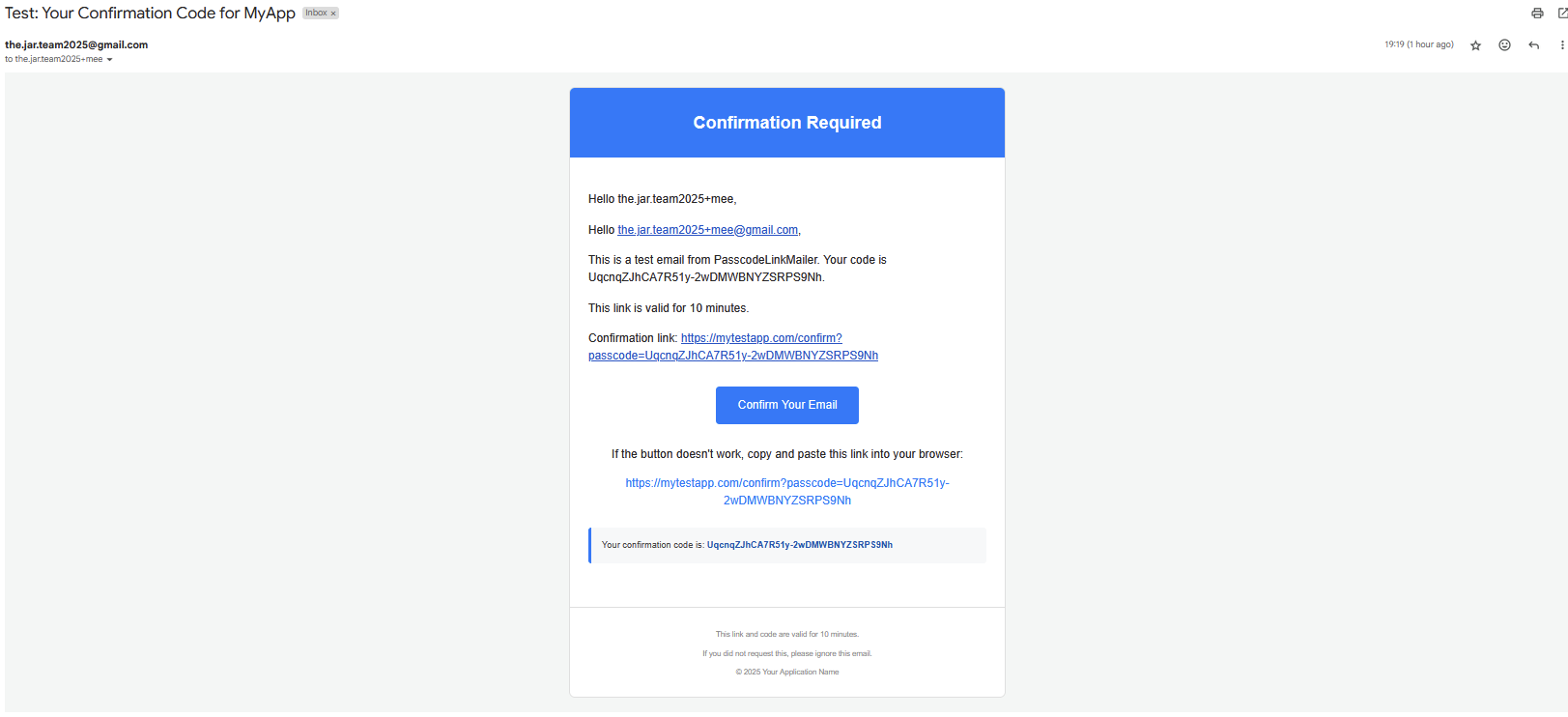
The email features:
- Subject: "Test: Your Confirmation Code for MyApp"
- Blue Header: A prominent blue header reading "Confirmation Required" at the top
- Personalized Greeting: Two greeting lines addressing the recipient: "Hello the.jar.team2025+mee" and "Hello the.jar.team2025+mee@gmail.com"
- Message Body: Text stating "This is a test email from PasscodeLinkMailer. Your code is UqcnqZJhCA7R51y-2wDMWBNYZSRP59Nh."
- Validity Info: "This link is valid for 10 minutes."
- Confirmation Link: Shows the full URL with the passcode
- Call to Action Button: A blue button labeled "Confirm Your Email"
- Fallback Text: "If the button doesn't work, copy and paste this link into your browser:" with the link below
- Highlighted Passcode Box: A blue-bordered section stating "Your confirmation code is: UqcnqZJhCA7R51y-2wDMWBNYZSRP59Nh"
- Footer: Contains validity information, opt-out message, and copyright info
⚙️ Installation
Install passcode-link-mailer directly from PyPI:
pip install passcode-link-mailer
🔑 Prerequisites: Gmail App Password
To use this library, your Gmail account must be configured with an App Password. Standard account passwords will not work for programmatic access via smtplib and are less secure.
Enable 2-Step Verification:
- Go to your Google Account settings: https://myaccount.google.com/
- Navigate to the "Security" section
- Ensure that 2-Step Verification is ON. If it's not, you'll need to set it up before you can generate an App Password
Generate an App Password:
- In the "Security" section of your Google Account, under "How you sign in to Google," find and click on "App passwords." (You may be required to sign in again)
- If you don't see the "App passwords" option, it's likely that 2-Step Verification is not correctly enabled, or your Google Workspace administrator might restrict its use
- At the bottom of the App passwords page, for "Select app," choose "Mail"
- For "Select device," choose "Other (Custom name)"
- Enter a descriptive name (e.g., "My Python Confirmation App" or "PasscodeLinkMailer")
- Click "Generate"
- Google will display a 16-character App Password (typically in a yellow bar). Copy this password (without spaces). This is the password you will use for the
gmail_app_passwordparameter when initializing the mailer. Store this App Password securely, as Google will not show it to you again
⏱️ Time Validity
The valid_for_duration_seconds parameter:
- Is used to generate a human-readable message for the email recipient (e.g., "This link is valid for 10 minutes")
- Does not actually enforce expiration timing - that's handled by your server
Your application is responsible for:
- Recording when the passcode was created (when the
send()method returns the passcode) - Implementing the expiration logic in your confirmation endpoint
- Rejecting passcodes that have exceeded their validity period
The library is intentionally unopinionated about how you store and validate passcodes, giving you flexibility to implement whatever verification strategy makes sense for your application.
📝 Placeholders for Email Templates
You can use the following placeholders in your subject and message_body_template strings:
{recipient_email}: The full email address of the recipient{passcode}: The generated unique passcode{validity_duration}: A user-friendly string indicating how long the link/passcode is valid (e.g., "10 minutes") - this is derived from yourvalid_for_duration_secondsvalue{full_confirmation_link}: The complete confirmation URL (e.g., https://mytestapp.com/confirm?passcode=UqcnqZJhCA7R51y-2wDMWBNYZSRP59Nh)
🛠️ How It Works
-
Initialization: You initialize PasscodeLinkMailer with your Gmail credentials (sender email and App Password), email content templates, the desired validity duration for the confirmation link, and your application's base URL for the confirmation endpoint.
-
Sending a Request: When you call the
send()method with a recipient's email address:- A unique, secure passcode is generated using
secrets.token_urlsafe()(likeUqcnqZJhCA7R51y-2wDMWBNYZSRP59Nhin the example) - The full confirmation link is constructed by appending
?passcode=THE_GENERATED_PASSCODEto your specified base URL - The HTML email body is created by formatting your message_body_template with the recipient's details, the generated passcode, the validity duration string, and the full confirmation link
- The email is then sent via Gmail's SMTP server using Python's smtplib, ensuring a secure TLS connection
- A unique, secure passcode is generated using
-
Passcode Return: The
send()method returns the generated passcode. Your application should:- Store this passcode securely (e.g., in your database), associating it with the user and recording when it was created
- Set up your own server-side expiration logic based on the
valid_for_duration_secondsparameter you provided - When the user clicks the confirmation link in the email, your application's backend endpoint receives the passcode as a query parameter
- Verify the received passcode against the stored one and check if it's still within its validity period to complete the confirmation process
Important: The library itself only generates the passcode and informs the user of the validity duration in the email. Your server is responsible for tracking when the passcode was created and enforcing the expiration time.
💡 Usage Example
Here's how to get started with PasscodeLinkMailer:
import time  # For the example if testing delayed send

# Import the library - note the package name vs the import name
from simple_mailer import (
    PasscodeLinkMailer,
    EmailSendingAuthError,
    EmailSendingConnectionError,
    EmailSendingError
)

# --- Configuration ---
# IMPORTANT: Replace with your actual credentials for real use.
# For production, it's highly recommended to load sensitive credentials
# from environment variables or a secure configuration management system.
SENDER_GMAIL_ADDRESS = "your_test_email@gmail.com"  # Your Gmail address (the one with the App Password)
GMAIL_APP_PASSWORD = "yoursixteenletterapppassword"    # Your 16-character Gmail App Password
YOUR_APP_CONFIRM_URL_BASE = "https://mytestapp.com/confirm"  # Base URL for your app's confirmation endpoint

try:
    # Initialize the mailer
    mailer = PasscodeLinkMailer(
        sender_email=SENDER_GMAIL_ADDRESS,
        gmail_app_password=GMAIL_APP_PASSWORD,
        subject="Test: Your Confirmation Code for MyApp",
        message_body_template=(
            "<p>Hello {recipient_email},</p>"
            "<p>This is a test email from PasscodeLinkMailer. Your code is {passcode}.</p>"
            "<p>This link is valid for {validity_duration}.</p>"
            "<p>Confirmation link: {full_confirmation_link}</p>"
        ),
        valid_for_duration_seconds=600,  # 10 minutes
        confirmation_link_base=YOUR_APP_CONFIRM_URL_BASE
    )
    print("PasscodeLinkMailer initialized successfully.")

    recipient_to_confirm = "the.jar.team2025+mee@gmail.com"  # Replace with your actual recipient

    # --- Send an email immediately ---
    print(f"Sending immediate confirmation to {recipient_to_confirm}...")
    passcode1 = mailer.send(recipient_email=recipient_to_confirm, delay_seconds=0)
    print(f"Immediate email sent! Passcode: {passcode1}")
    print(f"Please check {recipient_to_confirm}'s inbox.")

    # --- Example: Send an email with a 5-second delay ---
    print(f"\nSending delayed confirmation to {recipient_to_confirm} (5s delay)...")
    delayed_passcode = mailer.send(recipient_email=recipient_to_confirm, delay_seconds=5)
    print(f"Delayed email request initiated. Passcode generated: {delayed_passcode}")
    print("Email will be sent by a background thread in approximately 5 seconds.")
    print("Main script will wait for 15 seconds to allow the thread to complete.")
    time.sleep(15)  # Keep main thread alive for daemon thread to work
    print(f"Check {recipient_to_confirm} for the delayed email.")

except ValueError as ve:
    print(f"Configuration or Input Error: {ve}")
except EmailSendingAuthError as auth_err:
    print(f"Authentication Failed: {auth_err}")
    print("ACTION REQUIRED: Double-check your SENDER_GMAIL_ADDRESS and GMAIL_APP_PASSWORD. "
          "Ensure 2-Step Verification and the App Password are correctly set up in your Google Account.")
except EmailSendingConnectionError as conn_err:
    print(f"Connection Error: {conn_err}")
    print("Could not connect to Gmail's SMTP server. Check your internet connection or firewall settings.")
except EmailSendingError as send_err:
    print(f"A general email sending error occurred: {send_err}")
except Exception as e:
    print(f"An unexpected error occurred: {e}")
📝 Full Example Test Script
Here's a complete test script that you can use to verify your configuration:
import time
from simple_mailer import (
    PasscodeLinkMailer,
    EmailSendingAuthError,
    EmailSendingConnectionError,
    EmailSendingError
)

if __name__ == "__main__":
    print("Starting PasscodeLinkMailer Test Script...")

    # --- IMPORTANT: Configuration for Local Testing ---
    # 1. Ensure 2-Step Verification is enabled on your Gmail account.
    # 2. Generate an App Password: https://myaccount.google.com/apppasswords
    #    (Select "Mail" and "Other (Custom name)" for the app, e.g., "My Python Test Script")
    # 3. Replace the placeholders below with your actual credentials and details.

    # --- !!! REPLACE WITH YOUR ACTUAL TEST CREDENTIALS !!! ---
    SENDER_GMAIL_ADDRESS = "your_test_email@gmail.com"  # Your Gmail address for sending
    GMAIL_APP_PASSWORD = "yoursixteenletterapppassword"    # The 16-character App Password (no spaces)
    TEST_RECIPIENT_EMAIL = "recipient_test_email@example.com" # Email address to send the test to
    # --- !!! END OF CREDENTIALS SECTION !!! ---

    if SENDER_GMAIL_ADDRESS == "your_test_email@gmail.com" or \
       GMAIL_APP_PASSWORD == "yoursixteenletterapppassword" or \
       TEST_RECIPIENT_EMAIL == "recipient_test_email@example.com":
        print("\n!!!!!!!!!!!!!!!!!!!!!!!!!!!!!!!!!!!!!!!!!!!!!!!!!!!!!!!!!!!!!!!!!!!!!!!!!!!!!")
        print("!!! WARNING: Please update placeholder credentials in the __main__ block. !!!")
        print("!!! This script will likely fail until you provide real test credentials. !!!")
        print("!!!!!!!!!!!!!!!!!!!!!!!!!!!!!!!!!!!!!!!!!!!!!!!!!!!!!!!!!!!!!!!!!!!!!!!!!!!!!\n")
        # You might want to exit here if placeholders are still present
        # import sys
        # sys.exit("Exiting due to placeholder credentials.")

    print(f"Attempting to initialize PasscodeLinkMailer with sender: {SENDER_GMAIL_ADDRESS}")

    try:
        mailer = PasscodeLinkMailer(
            sender_email=SENDER_GMAIL_ADDRESS,
            gmail_app_password=GMAIL_APP_PASSWORD,
            subject="Test: Your Confirmation Code for MyApp",
            message_body_template="<p>Hello {recipient_email},</p>\
            <p>This is a test email from PasscodeLinkMailer. Your code is {passcode}.</p><p>This link is valid for {validity_duration}.</p><p>Confirmation link: {full_confirmation_link}</p>",
            valid_for_duration_seconds=600,  # 10 minutes for testing
            confirmation_link_base="https://mytestapp.com/confirm"
        )
        print("PasscodeLinkMailer initialized successfully.")

        # --- Test Case 1: Send immediately ---
        print(f"\n--- Test Case 1: Sending immediate email to {TEST_RECIPIENT_EMAIL} ---")
        try:
            immediate_passcode = mailer.send(recipient_email=TEST_RECIPIENT_EMAIL, delay_seconds=0)
            print(f"Immediate email request sent. Passcode generated: {immediate_passcode}")
            print(f"Check {TEST_RECIPIENT_EMAIL} for the email (subject: Test: Your Confirmation Code for MyApp).")
        except EmailSendingAuthError as e_auth:
            print(f"Authentication Error for immediate send: {e_auth}")
        except EmailSendingConnectionError as e_conn:
            print(f"Connection Error for immediate send: {e_conn}")
        except EmailSendingError as e_send:
            print(f"General Sending Error for immediate send: {e_send}")
        except ValueError as ve:
            print(f"ValueError for immediate send: {ve}")
        except Exception as e:
            print(f"An unexpected error occurred during immediate send: {e}")

        # Give Gmail some time if sending multiple emails quickly
        print("\nWaiting for 10 seconds before next test...")
        time.sleep(10)

        # --- Test Case 2: Send with a delay ---
        print(f"\n--- Test Case 2: Sending email to {TEST_RECIPIENT_EMAIL} with a 5-second delay ---")
        try:
            delayed_passcode = mailer.send(recipient_email=TEST_RECIPIENT_EMAIL, delay_seconds=5)
            print(f"Delayed email request initiated. Passcode generated: {delayed_passcode}")
            print("Email will be sent by a background thread in approximately 5 seconds.")
            print("Main script will wait for 15 seconds to allow the thread to complete.")

            # Keep the main thread alive for longer than the delay to see the result
            # (or for the thread to at least attempt sending)
            time.sleep(15)
            print(f"Check {TEST_RECIPIENT_EMAIL} for the delayed email.")

        except EmailSendingAuthError as e_auth: # This won't be caught here if error is in thread
            print(f"Authentication Error for delayed send (initial call): {e_auth}")
        except EmailSendingConnectionError as e_conn: # Same as above
            print(f"Connection Error for delayed send (initial call): {e_conn}")
        except EmailSendingError as e_send: # Same as above
            print(f"General Sending Error for delayed send (initial call): {e_send}")
        except ValueError as ve:
            print(f"ValueError for delayed send: {ve}")
        except Exception as e:
            print(f"An unexpected error occurred during delayed send initiation: {e}")

        print("\n--- Test Script Finished ---")
        print("Remember that errors in the delayed send thread might only print to console")
        print("from the thread itself, depending on its error handling.")

    except ValueError as ve_init:
        print(f"Initialization Error: {ve_init}")
        print("This usually means sender_email or gmail_app_password in __init__ was invalid.")
    except Exception as e_init:
        print(f"An unexpected error occurred during mailer initialization: {e_init}")
🙌 Contributing
Contributions, bug reports, and feature requests are warmly welcome! We encourage you to help improve passcode-link-mailer.
- Found a bug or have an idea? Please open an issue on the GitHub Issues page
📜 License
This project is licensed under the MIT License. You can find the full license text in the LICENSE file in the repository.
This library is intended for simple, direct email confirmation needs. For more complex requirements or enterprise-grade email solutions, consider using dedicated email service providers.


Download files
Download the file for your platform. If you're not sure which to choose, learn more about installing packages.
Source Distribution
Built Distribution
Filter files by name, interpreter, ABI, and platform.
If you're not sure about the file name format, learn more about wheel file names.
Copy a direct link to the current filters
File details
Details for the file passcode_link_mailer-0.1.1.tar.gz.
File metadata
- Download URL: passcode_link_mailer-0.1.1.tar.gz
- Upload date:
- Size: 12.4 kB
- Tags: Source
- Uploaded using Trusted Publishing? No
- Uploaded via: twine/6.1.0 CPython/3.11.5
File hashes
| Algorithm | Hash digest | |
|---|---|---|
| SHA256 |
ca07a4d0fc16eab12691c9db87e9adb9cc23e3a7bfb7c9507e4e9984074c7973
|
|
| MD5 |
5f690f17d31e3df078ef612321068745
|
|
| BLAKE2b-256 |
06b13b89adf57cd2c108b834a647ece93c85c6c7ce747c33f9bebeb05ef45adf
|
File details
Details for the file passcode_link_mailer-0.1.1-py3-none-any.whl.
File metadata
- Download URL: passcode_link_mailer-0.1.1-py3-none-any.whl
- Upload date:
- Size: 12.5 kB
- Tags: Python 3
- Uploaded using Trusted Publishing? No
- Uploaded via: twine/6.1.0 CPython/3.11.5
File hashes
| Algorithm | Hash digest | |
|---|---|---|
| SHA256 |
2994239afbebfbee8b4d64984dc686cc289a4dfa5efcaf03d02c314df8c087b6
|
|
| MD5 |
6cc1d8e5d6878bf3e3c730d9b6d16e6a
|
|
| BLAKE2b-256 |
7a13d328e9d5de673bf11ad9f5d5f2eb213d88b9c12a2ba264488298426424de
|






