





PassTUI
The TUI for pass — the standard Unix password manager.
About
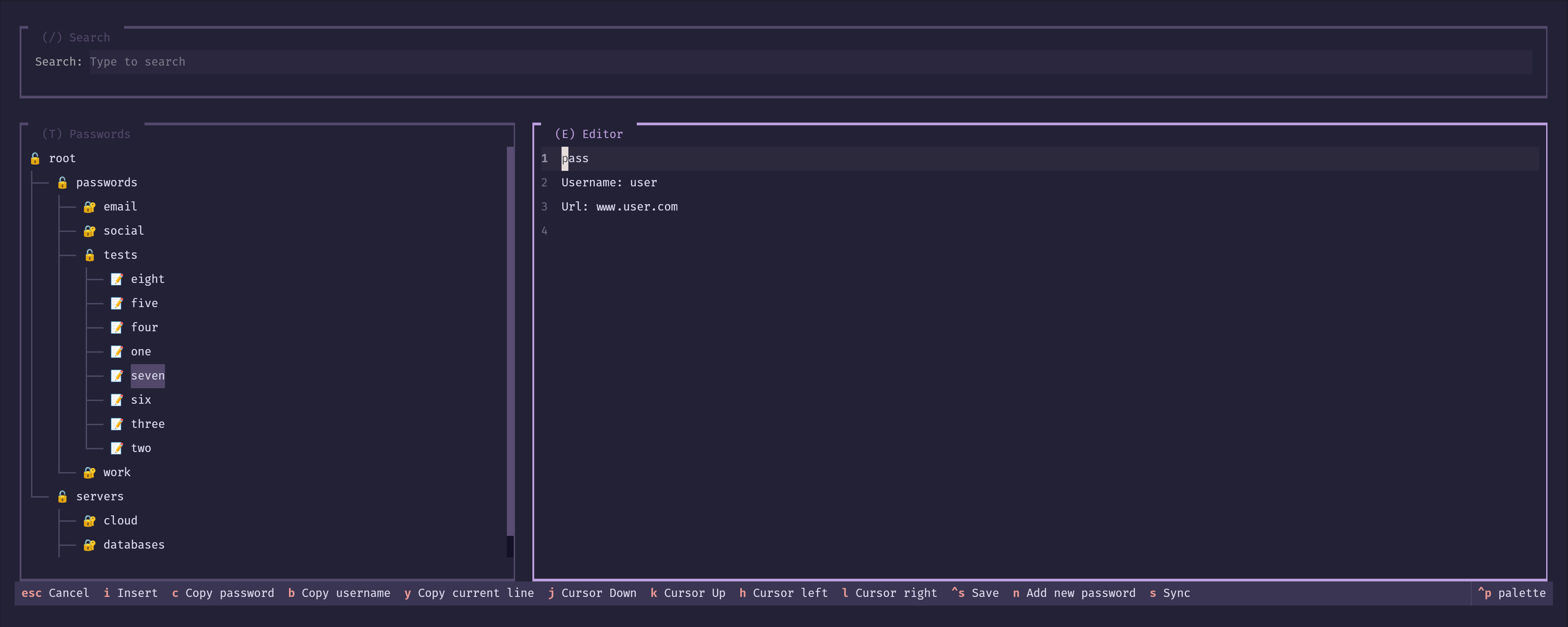
PassTUI is a terminal UI for pass, the standard Unix password manager. Browse and manage your GPG-encrypted password store without leaving the terminal.
Built With



Features
- Tree view for browsing your password store
- Real-time search and filter
- Built-in editor to view and edit entries
- Copy password, username, or any line to clipboard
- Create a GPG key and password store from scratch
- Add new password entries
- Sync with a remote Git repository
- Export and import GPG keys
Getting Started
Installation
Linux
This script handles detection of your distro's package manager and the full setup. If it doesn't cover your case, see the manual steps below.
curl -LsSf https://raw.githubusercontent.com/fjmoralesp/passtui/main/scripts/install-linux.sh | sh
Manual installation
Ubuntu / Debian
sudo apt install gnupg
CentOS / Fedora
sudo dnf install gnupg2
openSUSE
sudo zypper install gpg2
Gentoo
emerge --ask app-crypt/gnupg
Arch
sudo pacman -Syu gnupg
Configure gpg
- Create the keyring folder:
gpg -k - Add GPG terminal detection to your shell config (~/.zshrc or ~/.bashrc):
export GPG_TTY=$(tty)
macOS
macOS doesn't ship with GPG. The following script handles the common setup, but if it doesn't work for your case, see the manual steps below.
curl -LsSf https://raw.githubusercontent.com/fjmoralesp/passtui/main/scripts/install.sh | sh
Manual installation
- Install gnupg and pinentry-mac:
brew install gnupg pinentry-mac - Create the keyring folder:
gpg -k - Configure pinentry:
echo "pinentry-program $(brew --prefix)/bin/pinentry-mac" > "$HOME/.gnupg/gpg-agent.conf" - Add GPG terminal detection to your shell config (~/.zshrc or ~/.bashrc):
export GPG_TTY=$(tty) - Create a gpg2 binary symlink:
ln -s "$(which gpg)" "$(brew --prefix)/bin/gpg2" - Restart the GPG agent:
gpgconf --kill gpg-agent
Installation without GPG
If you prefer to handle GPG yourself and only install PassTUI, make sure you have the following in place first:
gpg2- A
pinentryprogram (e.g.,pinentry-curses,pinentry-gtk2,pinentry-mac)
Then install via uv:
curl -LsSf https://astral.sh/uv/install.sh | sh
uv tool install --python 3.14 passtui
passtui
Usage
Create a GPG Store
No password store yet? PassTUI can generate the GPG key and set everything up in one go.
- Launch PassTUI:
passtui - Press
gto open the Create GPG Store dialog - Fill in your name and email
- Press
Enter
A 4096-bit RSA key is generated and the store is initialised at ~/.password-store (or wherever PASSWORD_STORE_DIR points).
Tip: Set
PASSWORD_STORE_DIRbefore launching if you want the store somewhere else.
Add a New Password
-
Press
nto open a blank entry in the editor -
Fill in your details following this format:
(your password) Username: your-username Url: https://example.com -
Press
Ctrl+Sto save -
Enter the path for the entry when prompted (e.g.,
email/gmail)
Tip: The first line is always treated as the password — that's what
ccopies.
View an Existing Password
- Navigate the tree with
j/k(or arrow keys) - Expand a folder or decrypt an entry with
Enter - The decrypted contents appear in the editor panel on the right
- From there:
c— copy passwordb— copy usernamey— copy current linei— enter edit modeCtrl+S— save
Sync with a Git Repository
First time (new store)
- Press
s - Enter the remote URL (e.g.,
git@github.com:user/passwords.git) - PassTUI initialises a Git repo, adds the remote, and pushes
Already has Git
- Press
s - PassTUI pulls with rebase, then pushes
Note: If your store was cloned from an existing remote, manage the initial Git setup outside PassTUI.
Export a GPG Key
- Press
xto open the Export GPG Key dialog - Optionally enter an output path (defaults to
~/passtui/gpg-export.asc) - Press
Enter
The key is saved as an ASCII-armored .asc file.
Note: The GPG key passphrase will be requested using pinentry. Warning: Keep this file safe — anyone with it and your passphrase can decrypt your passwords.
Import a GPG Key
- Press
zto open the Import GPG Key dialog - Enter the path to the
.ascfile (e.g.,~/passtui/gpg-export.asc) - Press
Enter
PassTUI imports the key and then locally signs it as fully trusted using one of your existing private keys. If you don't have one yet, PassTUI will create a new key first (you'll be asked for a passphrase using pinentry for it) and use that to sign the imported key.
The trust is local-only (a local signature), so it has no effect outside your machine. Once signed, PassTUI updates .gpg-id and re-encrypts all entries with the imported key.
Note: The local signature is what tells GPG the key is trusted for encryption on this machine. It doesn't certify the key for anyone else.
Keybindings
Global
| Key | Action |
|---|---|
/ |
Focus the search bar |
n |
Add a new password entry |
e |
Focus the editor panel |
t |
Focus the password tree |
s |
Sync with Git |
g |
Create a new GPG Store |
x |
Export GPG key |
z |
Import GPG key |
Password Tree (T panel)
| Key | Action |
|---|---|
j / ↓ |
Move cursor down |
k / ↑ |
Move cursor up |
h |
Scroll left |
l |
Scroll right |
Enter |
Expand folder / select entry |
c |
Copy password to clipboard |
b |
Copy username to clipboard |
Editor (E panel)
| Key | Action |
|---|---|
i |
Enter edit mode |
Escape |
Cancel / exit edit mode |
j |
Move cursor down |
k |
Move cursor up |
h |
Move cursor left |
l |
Move cursor right |
c |
Copy password to clipboard |
b |
Copy username to clipboard |
y |
Copy current line to clipboard |
Ctrl+S |
Save changes |
Configuration
PassTUI uses a TOML config file to store your preferences. On first launch, a default config is created at:
| Platform | Path |
|---|---|
| Linux | ~/.config/passtui/config.toml |
| macOS | ~/Library/Application Support/passtui/config.toml |
| Windows | C:\Users\<user>\AppData\Local\passtui\config.toml |
If there's an issue locating the platform directory, PassTUI falls back to
~/.passtui/config.toml.
General settings
[general]
theme = "rose-pine-dawn"
password_store_path = "~/.password-store"
clip_timeout = 10
theme— Textual theme name (see Textual themes).password_store_path— Where your password store lives. The resolution order is:- The
PASSWORD_STORE_DIRenvironment variable (if set). - The
password_store_pathvalue in this config file. - The default
~/.password-store.
- The
clip_timeout— Seconds before the clipboard is cleared after copying a password.
Custom keybindings
You can remap any keybinding by adding a [keymap.<View>] section. The view names are Home, Passwords, Editor, and Search.
[keymap.Home]
add_new_password = "p"
focus_editor = "u"
Roadmap
- Route all passphrase prompts through
pinentryfor better security - Config file
- Vi motions for password editor
- Custom keybindings
- Imports
- 1Password txt or 1pif data
- KeePass KeepassX XML / CSV data
- Figaro's Password Manager XML data
- LastPass CSV data
- Ked Password Manager data
- Revelation Password Manager data
- Password Gorilla data
- PWSafe data
- KWallet data
- Roboform data
- password-exporter data
- pwsafe data
See the open issues for a full list of proposed features and known bugs.
Contributing
Contributions, issues, and pull requests are welcome. See CONTRIBUTING.md for development setup instructions.
License
Distributed under the GNU General Public License v3. See LICENSE for more information.
Contact
Francisco Morales — fjmoralesp@outlook.com
Project Link: https://github.com/fjmoralesp/passtui
1 maintainer

Metadata
1 maintainer
Release files for passtui 0.1.2
For a detailed explanation of source distributions (sdists) and built distributions (wheels), please see the package formats documentation.
Source distribution (sdist)
| File | Size | Uploaded | |
|---|---|---|---|
| passtui-0.1.2.tar.gz | 94.4 kB | Details |
Built distribution (wheel)
| File | Interpreter | ABI | Platform | Reset |
|---|---|---|---|---|
| passtui-0.1.2-py3-none-any.whl | Python 3 | none | any | Details |
Total release size: 140.8 kB
Release files / passtui-0.1.2.tar.gz
| Download URL | passtui-0.1.2.tar.gz |
|---|---|
| Size | 94.4 kB |
| Tags | Source |
|
SHA-256 checksum How to use checksums |
59d88f7e9c1692b8b19ac490683c72ffc80a63e28d31b7471dd533a40ef228fb
|
|
BLAKE2b-256 checksum How to use checksums |
3e3b3d82d8f5e3fce851e6119f200f5af6ca9fb6da56831b46f9bad7aff5d2a8
|
| Upload date | |
|
Uploaded using Trusted Publishing? What is trusted publishing? |
Yes |
| Uploaded via |
uv/0.11.28 {"installer":{"name":"uv","version":"0.11.28","subcommand":["publish"]},"python":null,"implementation":{"name":null,"version":null},"distro":{"name":"Ubuntu","version":"24.04","id":"noble","libc":null},"system":{"name":null,"release":null},"cpu":null,"openssl_version":null,"setuptools_version":null,"rustc_version":null,"ci":true}
|
Release files / passtui-0.1.2-py3-none-any.whl
| Download URL | passtui-0.1.2-py3-none-any.whl |
|---|---|
| Size | 46.4 kB |
| Tags | Python 3 |
|
SHA-256 checksum How to use checksums |
c574771830ba702129989236415389b5f4bc853ba414cb84cee5dc76c39e6b66
|
|
BLAKE2b-256 checksum How to use checksums |
a027eec5ebb16ecfb5051212f9dae50d33d9fa86a939e631381d720d26c27353
|
| Upload date | |
|
Uploaded using Trusted Publishing? What is trusted publishing? |
Yes |
| Uploaded via |
uv/0.11.28 {"installer":{"name":"uv","version":"0.11.28","subcommand":["publish"]},"python":null,"implementation":{"name":null,"version":null},"distro":{"name":"Ubuntu","version":"24.04","id":"noble","libc":null},"system":{"name":null,"release":null},"cpu":null,"openssl_version":null,"setuptools_version":null,"rustc_version":null,"ci":true}
|














