
PatchPal — An Agentic Coding and Automation Assistant
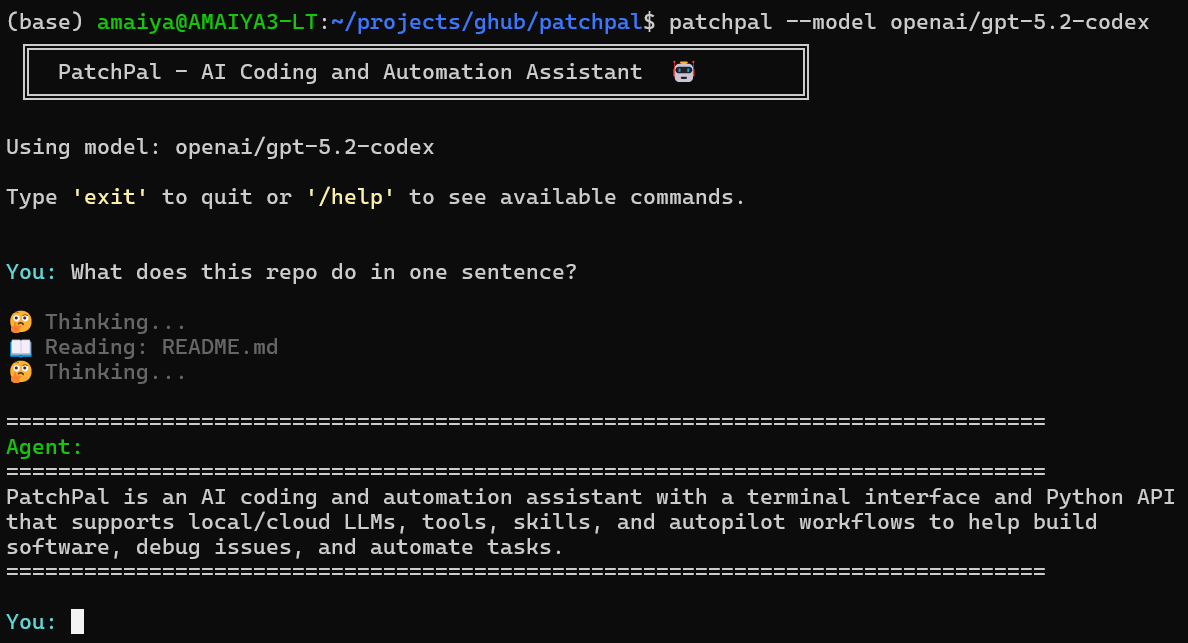
Supporting both local and cloud LLMs, with autopilot mode and extensible tools.
PatchPal is an AI coding agent that helps you build software, debug issues, and automate tasks. It supports agent skills, tool use, and executable Python generation, enabling interactive workflows for tasks such as data analysis, visualization, web scraping, API interactions, and research with synthesized findings.
Most agent frameworks are built in TypeScript. PatchPal is Python-native, designed for developers who want both interactive terminal use (patchpal) and programmatic API access (agent.run("task")) in the same tool—without switching ecosystems.
Key Features
- Terminal Interface for interactive development
- Sandbox Mode for secure container isolation
- Python SDK for flexibility and extensibility
- Built-In and Custom Tools
- Browser Automation for interactive web tasks, form filling, and JavaScript-heavy sites
- Skills System and MCP Integration
- Autopilot Mode using Ralph Wiggum loops
- Project Memory automatically loads project context from
MEMORY.md(repository root or~/.patchpal/repos/<repo-name>/MEMORY.md) at startup.
PatchPal prioritizes customizability: custom tools, custom skills, a flexible Python API, and support for any tool-calling LLM.
Full documentation is here.
Quick Start
$ pip install patchpal          # install
$ patchpal --model <model_id>   # start
Model support: Any LiteLLM-supported model can be used. Platform support: Linux, macOS, and Windows are all supported
Alternative: Run with Docker/Podman (no installation required)
# Using pre-built image with patchpal installed (default model)
docker run -it --rm \
  -v $(pwd):/workspace \
  -e ANTHROPIC_API_KEY=$ANTHROPIC_API_KEY \
  ghcr.io/amaiya/patchpal-sandbox:latest \
  patchpal --model anthropic/claude-sonnet-4-5

# Or with Podman
podman run -it --rm \
  -v $(pwd):/workspace \
  -e ANTHROPIC_API_KEY=$ANTHROPIC_API_KEY \
  ghcr.io/amaiya/patchpal-sandbox:latest \
  patchpal --model anthropic/claude-sonnet-4-5

# Specify a different model
docker run -it --rm \
  -v $(pwd):/workspace \
  -e OPENAI_API_KEY=$OPENAI_API_KEY \
  ghcr.io/amaiya/patchpal-sandbox:latest \
  patchpal --model openai/gpt-5-mini
Setup
-
Install:
pip install patchpal- Optional: For browser automation (13 additional tools):
pip install patchpal[browser] && python -m playwright install chromium
- Optional: For browser automation (13 additional tools):
-
Get an API key or a Local LLM Engine:
- [Cloud] For Anthropic models (default): Sign up at https://console.anthropic.com/
- [Cloud] For OpenAI models: Get a key from https://platform.openai.com/
- [Local] For vLLM: Install from https://docs.vllm.ai/ (free - no API charges) Recommended for Local Use
- [Local] For Ollama: Install from https://ollama.com/ (⚠️ requires
OLLAMA_CONTEXT_LENGTH=32768- see Ollama section below) - For other providers: Check the LiteLLM documentation
-
Set up your API key as environment variable:
# For Anthropic (default)
export ANTHROPIC_API_KEY=your_api_key_here

# For OpenAI
export OPENAI_API_KEY=your_api_key_here

# For vLLM - API key required only if configured
export HOSTED_VLLM_API_BASE=http://localhost:8000 # depends on your vLLM setup
export HOSTED_VLLM_API_KEY=token-abc123           # optional depending on your vLLM setup

# For Ollama, no API key required

# For other providers, check LiteLLM docs
- Run PatchPal:
# Use default model (anthropic/claude-sonnet-4-5)
patchpal

# Use a specific model via command-line argument
patchpal --model openai/gpt-5.2-codex  # or openai/gpt-5-mini, anthropic/claude-opus-4-5, etc.

# Use vLLM (local)
# Note: vLLM server must be started with --tool-call-parser and --enable-auto-tool-choice
export HOSTED_VLLM_API_BASE=http://localhost:8000
export HOSTED_VLLM_API_KEY=token-abc123
patchpal --model hosted_vllm/openai/gpt-oss-120b

# Use Ollama (local - requires OLLAMA_CONTEXT_LENGTH=32768)
export OLLAMA_CONTEXT_LENGTH=32768
patchpal --model ollama_chat/gpt-oss:120b

# Or set the model via environment variable
export PATCHPAL_MODEL=openai/gpt-5.2
patchpal
Tip for Local Models: Local models (i.e., models served by Ollama or vLLM) may work better with these settings:
PATCHPAL_MINIMAL_TOOLS=trueandPATCHPAL_ENABLE_WEB=false- For models with function calling: Provides only essential tools (read_file,read_lines,write_file,edit_file,run_shell), reducing tool confusionPATCHPAL_REACT_MODE=true- For models without function calling: Enables text-based tool invocation (see ReAct mode docs)- For Ollama, additionally setting
PATCHPAL_STREAM_OUTPUT=falsemay help with tool call reliability
Beyond Coding: General Problem-Solving
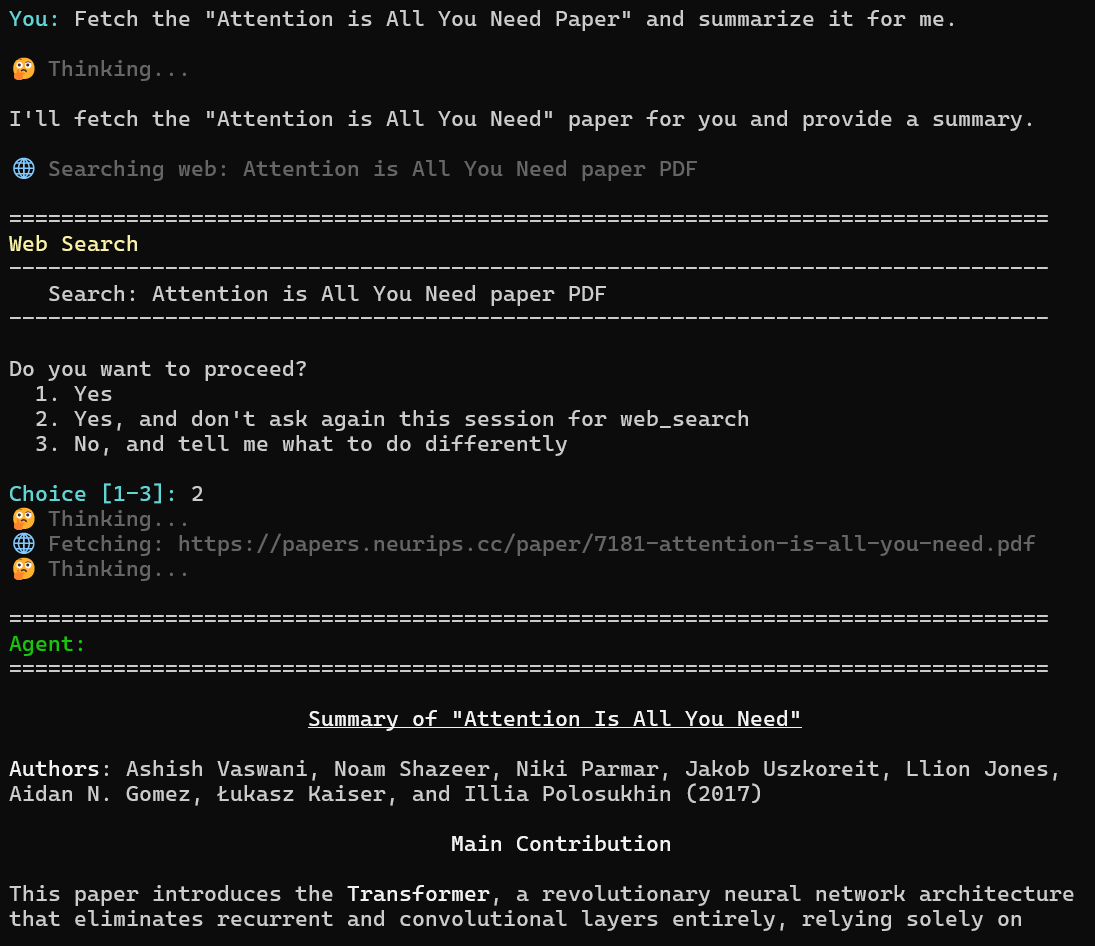
While originally designed for software development, PatchPal is also a general-purpose assistant. With web search, file operations, shell commands, and custom tools/skills, it can help with research, data analysis, document processing, log file analyses, etc.
FAQ
There are so many coding agent harnesses. Why build yet another one?
- Most agent harnesses are in TypeScript. We wanted something in Python that we could easily extend for our custom workflows.
- PatchPal includes a unique guardrails system that is better suited to privacy-conscious use cases involving sensitive data.
- We needed an agent harness that seamlessly works with both local and cloud models, including AWS GovCloud Bedrock models.
I noticed there's another package called PatchPal on GitLab. Are they related?
No, they're separate projects. The project with the same name on GitLab is unrelated to this one.
On Windows Subsystem for Linux (WSL), why is it stalling intermittently at "Thinking..."?
This is a known issue with WSL2.
Try examining and then lowering the mtu:
$ cat /sys/class/net/eth1/mtu
1427

$ sudo ip link set eth1 mtu 1400
Documentation
Full documentation is available here.
1 maintainer

Download files
Download the file for your platform. If you're not sure which to choose, learn more about installing packages.
Source Distribution
Built Distribution
Filter files by name, interpreter, ABI, and platform.
If you're not sure about the file name format, learn more about wheel file names.
Copy a direct link to the current filters
File details
Details for the file patchpal-0.24.0.tar.gz.
File metadata
- Download URL: patchpal-0.24.0.tar.gz
- Upload date:
- Size: 232.2 kB
- Tags: Source
- Uploaded using Trusted Publishing? Yes
- Uploaded via: twine/7.0.0 CPython/3.13.14
File hashes
| Algorithm | Hash digest | |
|---|---|---|
| SHA256 |
787e1826f2b814efbc725b6863f82093b681fbfd54164e45116a1b241436a350
|
|
| MD5 |
988d08b2cb6fdcc4ed43dbf8b8d020f8
|
|
| BLAKE2b-256 |
5d86dd6b94b1e7a418b70849bf6d97aa25f989c75558f9094ea490fc7b85c711
|
Provenance
The following attestation bundles were made for patchpal-0.24.0.tar.gz:
Publisher:
release.yml on amaiya/patchpal
-
Statement:
-
Statement type:
https://in-toto.io/Statement/v1 -
Predicate type:
https://docs.pypi.org/attestations/publish/v1 -
Subject name:
patchpal-0.24.0.tar.gz -
Subject digest:
787e1826f2b814efbc725b6863f82093b681fbfd54164e45116a1b241436a350 - Sigstore transparency entry: 2374383653
- Sigstore integration time:
-
Permalink:
amaiya/patchpal@04651ef0b9da685b9ef8616c1e083a6797296b76 -
Branch / Tag:
refs/tags/0.24.0 - Owner: https://github.com/amaiya
-
Access:
public
-
Token Issuer:
https://token.actions.githubusercontent.com -
Runner Environment:
github-hosted -
Publication workflow:
release.yml@04651ef0b9da685b9ef8616c1e083a6797296b76 -
Trigger Event:
release
-
Statement type:
File details
Details for the file patchpal-0.24.0-py3-none-any.whl.
File metadata
- Download URL: patchpal-0.24.0-py3-none-any.whl
- Upload date:
- Size: 189.1 kB
- Tags: Python 3
- Uploaded using Trusted Publishing? Yes
- Uploaded via: twine/7.0.0 CPython/3.13.14
File hashes
| Algorithm | Hash digest | |
|---|---|---|
| SHA256 |
e95d0869c0c2862e56bab8ee2871f96d023d3fde6b78aea25183df824d79123c
|
|
| MD5 |
7637010a35fdfb9474c4eb88897f79e1
|
|
| BLAKE2b-256 |
7474b69570b060aa3a4d05a1a04a086520d43aef01b32955a6b090ba799d812c
|
Provenance
The following attestation bundles were made for patchpal-0.24.0-py3-none-any.whl:
Publisher:
release.yml on amaiya/patchpal
-
Statement:
-
Statement type:
https://in-toto.io/Statement/v1 -
Predicate type:
https://docs.pypi.org/attestations/publish/v1 -
Subject name:
patchpal-0.24.0-py3-none-any.whl -
Subject digest:
e95d0869c0c2862e56bab8ee2871f96d023d3fde6b78aea25183df824d79123c - Sigstore transparency entry: 2374383772
- Sigstore integration time:
-
Permalink:
amaiya/patchpal@04651ef0b9da685b9ef8616c1e083a6797296b76 -
Branch / Tag:
refs/tags/0.24.0 - Owner: https://github.com/amaiya
-
Access:
public
-
Token Issuer:
https://token.actions.githubusercontent.com -
Runner Environment:
github-hosted -
Publication workflow:
release.yml@04651ef0b9da685b9ef8616c1e083a6797296b76 -
Trigger Event:
release
-
Statement type:







