
Anti-detect browser automation CLI using Patchright (undetected Playwright fork)

Project description
patchright-cli






Anti-detect browser automation CLI. Same command interface as Microsoft's playwright-cli but using Patchright (undetected Playwright fork) to bypass bot detection.
Install · Quick Start · Commands · Snapshots · Agent Integration
Highlights
| Feature | |
|---|---|
| :shield: | Bypasses Akamai, Cloudflare, and other anti-bot systems |
| :rocket: | Same command interface as playwright-cli — zero learning curve |
| :robot: | Built for AI agents (Claude Code, Codex, etc.) with YAML snapshots |
| :zap: | Daemon architecture — browser stays open between commands |
| :package: | pip install / uvx — no Docker, no config files |
| :lock: | Persistent profiles for maintaining login sessions |
Install
[!TIP] Just paste this into your AI coding agent — it will do the rest:
Install and set up patchright-cli by following the instructions here:
https://raw.githubusercontent.com/AhaiMk01/patchright-cli/main/docs/installation.md
Your agent handles the install, browser setup, and skill configuration automatically.
For LLM Agents
curl -s https://raw.githubusercontent.com/AhaiMk01/patchright-cli/main/docs/installation.md
[!IMPORTANT] Requirements: Python 3.10+ and Google Chrome
# Recommended — always runs latest version, no install needed
uvx patchright-cli open https://example.com
Other install methods
# Via pip
pip install patchright-cli
patchright-cli open https://example.com
patchright-cli close

# Update
pip install --upgrade patchright-cli
From source:
git clone https://github.com/AhaiMk01/patchright-cli.git
cd patchright-cli
uv venv && uv pip install -e .
python -m patchright install chromium
Quick Start
# Launch undetected Chrome and navigate
patchright-cli open https://example.com

# Take a snapshot to see interactive elements with refs
patchright-cli snapshot

# Interact using refs from the snapshot
patchright-cli click e2
patchright-cli fill e5 "search query"
patchright-cli press Enter

# Take a screenshot
patchright-cli screenshot

# Close the browser
patchright-cli close
Architecture
graph LR
    A[CLI] -->|TCP:9321| B[Daemon]
    B -->|Patchright| C[Chrome]
| Component | Role |
|---|---|
Daemon (daemon.py) |
Long-running process managing browser sessions via Patchright. Auto-starts on first open. |
CLI (cli.py) |
Thin client — connects, sends command, prints result, disconnects. Browser stays open. |
Snapshot (snapshot.py) |
TreeWalker-based DOM scan assigning data-patchright-ref attributes for element targeting. |
📖 Commands
Core
patchright-cli open [url]              # Launch browser
patchright-cli open --persistent       # With persistent profile
patchright-cli open --headless         # Run headless
patchright-cli open --profile=<path>   # Custom profile directory
patchright-cli goto <url>              # Navigate
patchright-cli click <ref>             # Click element
patchright-cli click <ref> right       # Right-click
patchright-cli click <ref> --modifiers=Alt,Shift
patchright-cli dblclick <ref>          # Double-click
patchright-cli dblclick <ref> --modifiers=Shift
patchright-cli fill <ref> <value>      # Fill text input
patchright-cli fill <ref> <value> --submit  # Fill and press Enter
patchright-cli type <text>             # Type via keyboard
patchright-cli type <text> --submit    # Type and press Enter
patchright-cli hover <ref>             # Hover over element
patchright-cli select <ref> <value>    # Select dropdown option
patchright-cli check <ref>             # Check checkbox
patchright-cli uncheck <ref>           # Uncheck checkbox
patchright-cli drag <from> <to>        # Drag and drop
patchright-cli snapshot                # Accessibility snapshot
patchright-cli snapshot -i             # Interactive elements only (recommended)
patchright-cli snapshot --depth=3      # Limit depth
patchright-cli snapshot <ref>          # Snapshot element subtree
patchright-cli snapshot --filename=f   # Save to custom path
patchright-cli eval <expr>             # Run JavaScript
patchright-cli eval --file=script.js   # Run JS from file
patchright-cli run-code <code>         # Run JS with return value
patchright-cli run-code --file=f.js    # Run JS from file
patchright-cli screenshot              # Page screenshot
patchright-cli screenshot --full-page  # Full scrollable page
patchright-cli screenshot <ref>        # Element screenshot
patchright-cli screenshot --filename=f # Save to custom path
patchright-cli close                   # Close session
Navigation
patchright-cli go-back
patchright-cli go-forward
patchright-cli reload
Keyboard / Mouse
patchright-cli press Enter
patchright-cli keydown Shift
patchright-cli keyup Shift
patchright-cli mousemove 150 300
patchright-cli mousedown [button]
patchright-cli mouseup [button]
patchright-cli mousewheel 0 100
Dialog
patchright-cli dialog-accept [text]    # Accept next alert/confirm/prompt
patchright-cli dialog-dismiss          # Dismiss next dialog
Upload / Resize
patchright-cli upload ./file.pdf       # Upload to first file input
patchright-cli upload ./file.pdf e5    # Upload to specific input
patchright-cli resize 1920 1080        # Resize viewport
Tabs
patchright-cli tab-list
patchright-cli tab-new [url]
patchright-cli tab-select <index>
patchright-cli tab-close [index]
State Persistence
patchright-cli state-save [file]       # Save cookies + localStorage
patchright-cli state-load <file>       # Restore saved state
Storage
# Cookies
patchright-cli cookie-list
patchright-cli cookie-list --domain=example.com
patchright-cli cookie-list --path=/api
patchright-cli cookie-get <name>
patchright-cli cookie-set <name> <value>
patchright-cli cookie-set <name> <value> --domain=example.com --httpOnly --secure
patchright-cli cookie-set <name> <value> --path=/ --sameSite=Lax --expires=1735689600
patchright-cli cookie-delete <name>
patchright-cli cookie-clear

# localStorage
patchright-cli localstorage-list
patchright-cli localstorage-get <key>
patchright-cli localstorage-set <key> <value>
patchright-cli localstorage-delete <key>
patchright-cli localstorage-clear

# sessionStorage
patchright-cli sessionstorage-list
patchright-cli sessionstorage-get <key>
patchright-cli sessionstorage-set <key> <value>
patchright-cli sessionstorage-delete <key>
patchright-cli sessionstorage-clear
Request Mocking
patchright-cli route "**/*.jpg" --status=404
patchright-cli route "https://api.example.com/**" --body='{"mock":true}'
patchright-cli route "**/*" --content-type=application/json --body='{"ok":true}'
patchright-cli route "**/*" --header=X-Custom:value
patchright-cli route "**/*" --remove-header=Content-Type
patchright-cli route-list
patchright-cli unroute "**/*.jpg"
patchright-cli unroute                 # Remove all routes
Tracing / Video / PDF
patchright-cli tracing-start
patchright-cli tracing-stop            # Saves .zip trace file
patchright-cli video-start             # Start video recording (CDP screencast)
patchright-cli video-stop              # Stop and save video (requires ffmpeg for .webm)
patchright-cli video-stop --filename=recording.webm
patchright-cli pdf --filename=page.pdf
Network
patchright-cli network                 # Network request log
patchright-cli network --static        # Include static resources
patchright-cli network --clear         # Clear log after printing
patchright-cli network-state-set offline  # Simulate offline mode
patchright-cli network-state-set online   # Restore connectivity
DevTools
patchright-cli console                 # All console messages
patchright-cli console warning         # Filter by level
patchright-cli console --clear         # Clear after printing
Output
patchright-cli --raw eval --file=s.js  # Raw output (no page/snapshot decoration)
patchright-cli --raw snapshot > p.yml  # Pipe raw snapshot to file
Setup
patchright-cli install --skills # Auto-install skills for detected AI agents
Sessions
patchright-cli -s=mysession open https://example.com --persistent
patchright-cli -s=mysession click e6
patchright-cli -s=mysession close
patchright-cli list                    # List all sessions
patchright-cli close-all
patchright-cli kill-all
patchright-cli delete-data             # Delete persistent profile
patchright-cli --port=9322 open        # Custom daemon port
Snapshots
After each state-changing command, the CLI outputs page info and a YAML snapshot:
### Page
- Page URL: https://example.com/
- Page Title: Example Domain
### Snapshot
[Snapshot](.patchright-cli/page-1774376207818.yml)
The snapshot lists interactive elements with refs you can use in commands:
- ref: e1
  role: heading
  name: Example Domain
  level: 1
- ref: e2
  role: link
  name: Learn more
  url: "https://iana.org/domains/example"
[!NOTE] Use refs directly:
patchright-cli click e2,patchright-cli fill e5 "text"
Anti-Detect Features
[!CAUTION] This tool is for authorized testing, security research, and legitimate automation only.
- :white_check_mark: Real Chrome browser (not Chromium)
- :white_check_mark: Patchright patches
navigator.webdriverand other detection vectors - :white_check_mark: Persistent profiles maintain cookies/sessions across runs
- :white_check_mark: No custom user-agent or headers (natural fingerprint)
- :white_check_mark: Headed by default (headless is more detectable)
Agent Integration
Works with any AI coding agent that supports SKILL.md skills:
| Agent | Install skill |
|---|---|
| Claude Code | mkdir -p ~/.claude/skills/patchright-cli && curl -sL https://raw.githubusercontent.com/AhaiMk01/patchright-cli/main/skills/patchright-cli/SKILL.md -o ~/.claude/skills/patchright-cli/SKILL.md |
| OpenClaw | mkdir -p ~/.openclaw/skills/patchright-cli && curl -sL https://raw.githubusercontent.com/AhaiMk01/patchright-cli/main/skills/patchright-cli/SKILL.md -o ~/.openclaw/skills/patchright-cli/SKILL.md |
| Codex CLI | mkdir -p ~/.codex/skills/patchright-cli && curl -sL https://raw.githubusercontent.com/AhaiMk01/patchright-cli/main/skills/patchright-cli/SKILL.md -o ~/.codex/skills/patchright-cli/SKILL.md |
| Gemini CLI | mkdir -p ~/.gemini/skills/patchright-cli && curl -sL https://raw.githubusercontent.com/AhaiMk01/patchright-cli/main/skills/patchright-cli/SKILL.md -o ~/.gemini/skills/patchright-cli/SKILL.md |
| OpenCode | mkdir -p ~/.opencode/skills/patchright-cli && curl -sL https://raw.githubusercontent.com/AhaiMk01/patchright-cli/main/skills/patchright-cli/SKILL.md -o ~/.opencode/skills/patchright-cli/SKILL.md |
| Cursor | Copy SKILL.md to .cursor/skills/patchright-cli/ in your project |
| Windsurf | Copy SKILL.md to .windsurf/skills/patchright-cli/ in your project |
| Aider | Copy SKILL.md to .aider/skills/patchright-cli/ in your project |
Or auto-install for all detected agents:
pip install patchright-cli
patchright-cli install --skills
Or just tell your agent:
Install patchright-cli skill from https://raw.githubusercontent.com/AhaiMk01/patchright-cli/main/skills/patchright-cli/SKILL.md
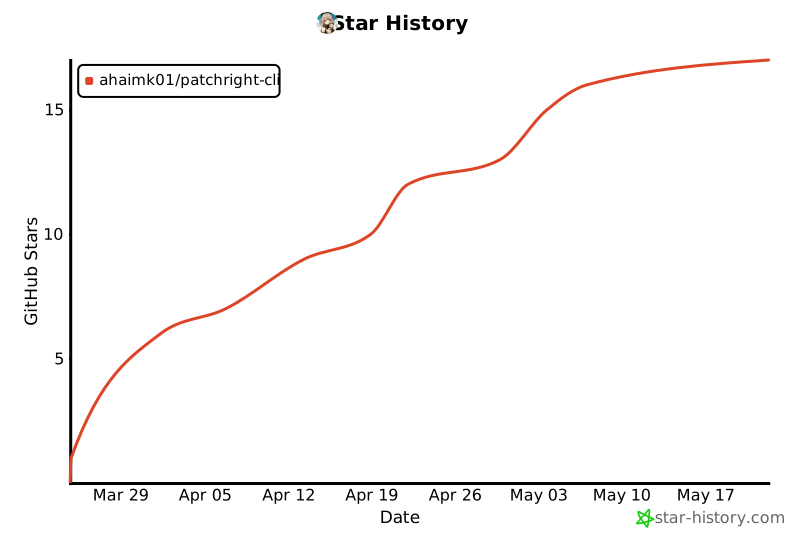
Star History
Differences from playwright-cli
patchright-cli aims for full command parity with Microsoft's playwright-cli. The following playwright-cli features are intentionally not implemented due to Patchright's architecture:
| Feature | Reason |
|---|---|
--browser=firefox/webkit/msedge |
Patchright only supports Chromium/Chrome. Anti-detect patches are Chrome-specific. |
--extension |
Browser extension connection not supported. Patchright uses CDP directly. |
install / install-browser |
Use python -m patchright install chromium instead. |
All other commands and options are fully supported.
Disclaimer
[!WARNING] This tool is provided for authorized security testing, legitimate automation, and educational purposes only. Users are solely responsible for ensuring their use complies with applicable laws and the terms of service of any websites they interact with. The authors do not endorse or encourage any unauthorized access, scraping, or circumvention of security measures. Use at your own risk.
Credits
This project builds on the work of:
- Patchright by @Kaliiiiiiiiii-Vinyzu — the undetected Playwright fork that makes this possible. All anti-detect capabilities come from Patchright.
- playwright-cli by Microsoft — the original CLI that patchright-cli's command interface is modeled after.
- camoufox-cli by @Bin-Huang — inspiration for the CLI-first approach to anti-detect browser automation and the SKILL.md agent integration pattern.
License
Apache 2.0 — same as playwright-cli


Download files
Download the file for your platform. If you're not sure which to choose, learn more about installing packages.
Source Distribution
Built Distribution
Filter files by name, interpreter, ABI, and platform.
If you're not sure about the file name format, learn more about wheel file names.
Copy a direct link to the current filters
File details
Details for the file patchright_cli-0.5.0.tar.gz.
File metadata
- Download URL: patchright_cli-0.5.0.tar.gz
- Upload date:
- Size: 148.0 kB
- Tags: Source
- Uploaded using Trusted Publishing? No
- Uploaded via: uv/0.11.6 {"installer":{"name":"uv","version":"0.11.6","subcommand":["publish"]},"python":null,"implementation":{"name":null,"version":null},"distro":{"name":"Ubuntu","version":"24.04","id":"noble","libc":null},"system":{"name":null,"release":null},"cpu":null,"openssl_version":null,"setuptools_version":null,"rustc_version":null,"ci":true}
File hashes
| Algorithm | Hash digest | |
|---|---|---|
| SHA256 |
b616f1c861bb5a642aee18542aee112eba37c21778cf723fbd8f67691e3e310b
|
|
| MD5 |
ad0c1f902ab3b8badb614979b50e21bc
|
|
| BLAKE2b-256 |
69ccab53ad03551b0fa29e9c3bf3c2b676425c1c275c6821547f5a4d6396dc11
|
File details
Details for the file patchright_cli-0.5.0-py3-none-any.whl.
File metadata
- Download URL: patchright_cli-0.5.0-py3-none-any.whl
- Upload date:
- Size: 49.4 kB
- Tags: Python 3
- Uploaded using Trusted Publishing? No
- Uploaded via: uv/0.11.6 {"installer":{"name":"uv","version":"0.11.6","subcommand":["publish"]},"python":null,"implementation":{"name":null,"version":null},"distro":{"name":"Ubuntu","version":"24.04","id":"noble","libc":null},"system":{"name":null,"release":null},"cpu":null,"openssl_version":null,"setuptools_version":null,"rustc_version":null,"ci":true}
File hashes
| Algorithm | Hash digest | |
|---|---|---|
| SHA256 |
fdf650c80e20cd451c685da3c75adb3d9a09e9a5e0f7c1fccf1e7aa0f49dec8a
|
|
| MD5 |
458ace9a1c472a108721c2a0bae0944d
|
|
| BLAKE2b-256 |
b0cce5cc56aadfea6980d9856cb56e0b747d534cb254dc9372d04a4124cf5854
|






