









| Inspect patterns across models, heads, prompts, etc. | Inspect a single pattern |
 |
 |
pattern-lens
visualization of LLM attention patterns and things computed about them
pattern-lens makes it easy to:
- Generate visualizations of attention patterns, or figures computed from attention patterns, from models supported by TransformerLens
- Compare generated figures across models, layers, and heads in an interactive web interface
Installation
pip install pattern-lens
Usage
The pipeline is as follows:
- Generate attention patterns using
pattern_lens.activations.acitvations_main(), saving them innpzfiles - Generate visualizations using
pattern_lens.figures.figures_main()-- read thenpzfiles, pass each attention pattern to each visualization function, and save the resulting figures - Serve the web interface using
pattern_lens.server-- web interface reads metadata in json/jsonl files, then lets the user select figures to show
Basic CLI
Generate attention patterns and default visualizations:
# generate activations
python -m pattern_lens.activations --model gpt2 --prompts data/pile_1k.jsonl --save-path attn_data
# create visualizations
python -m pattern_lens.figures --model gpt2 --save-path attn_data
serve the web UI:
python -m pattern_lens.server --path attn_data
Web UI
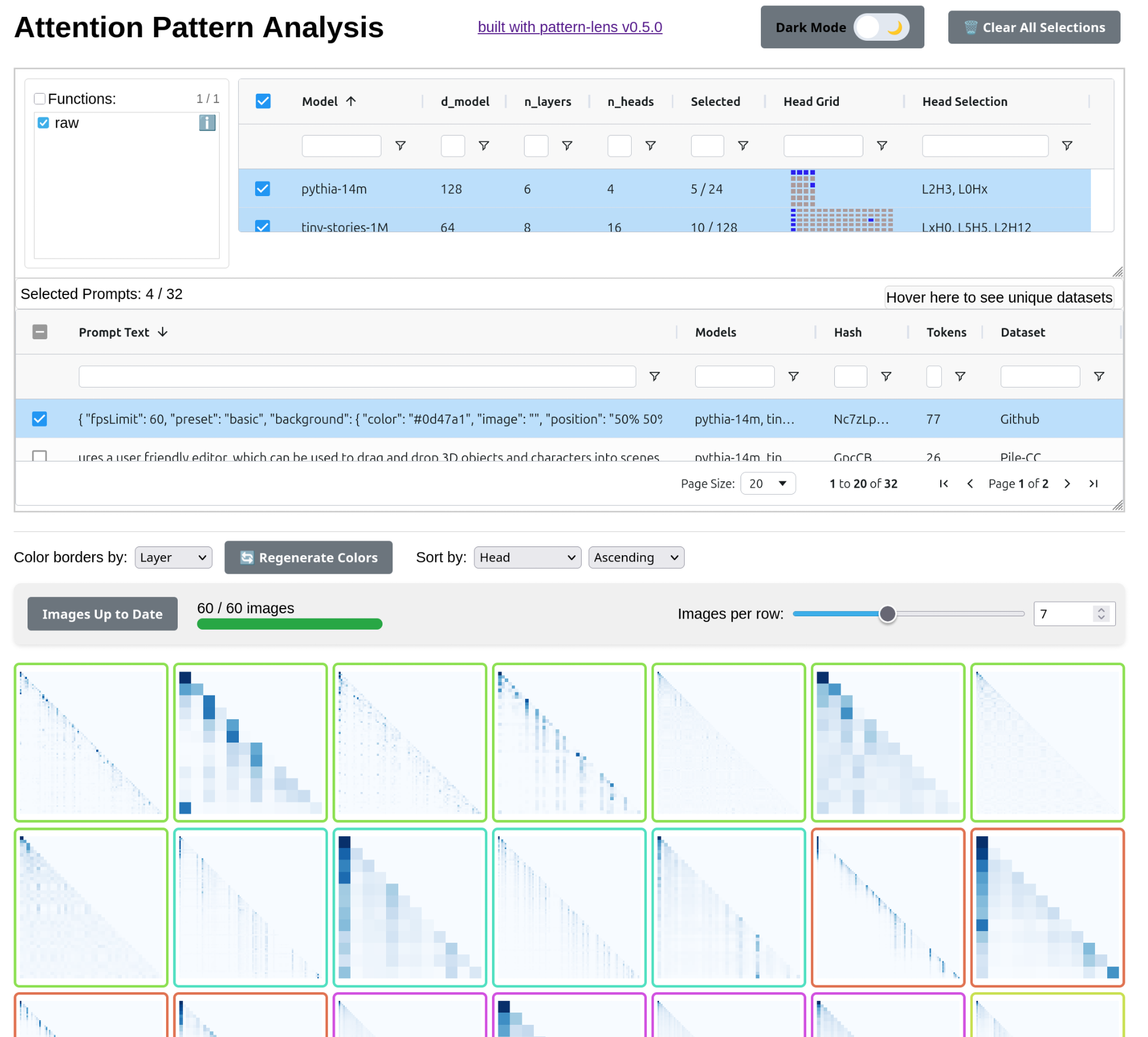
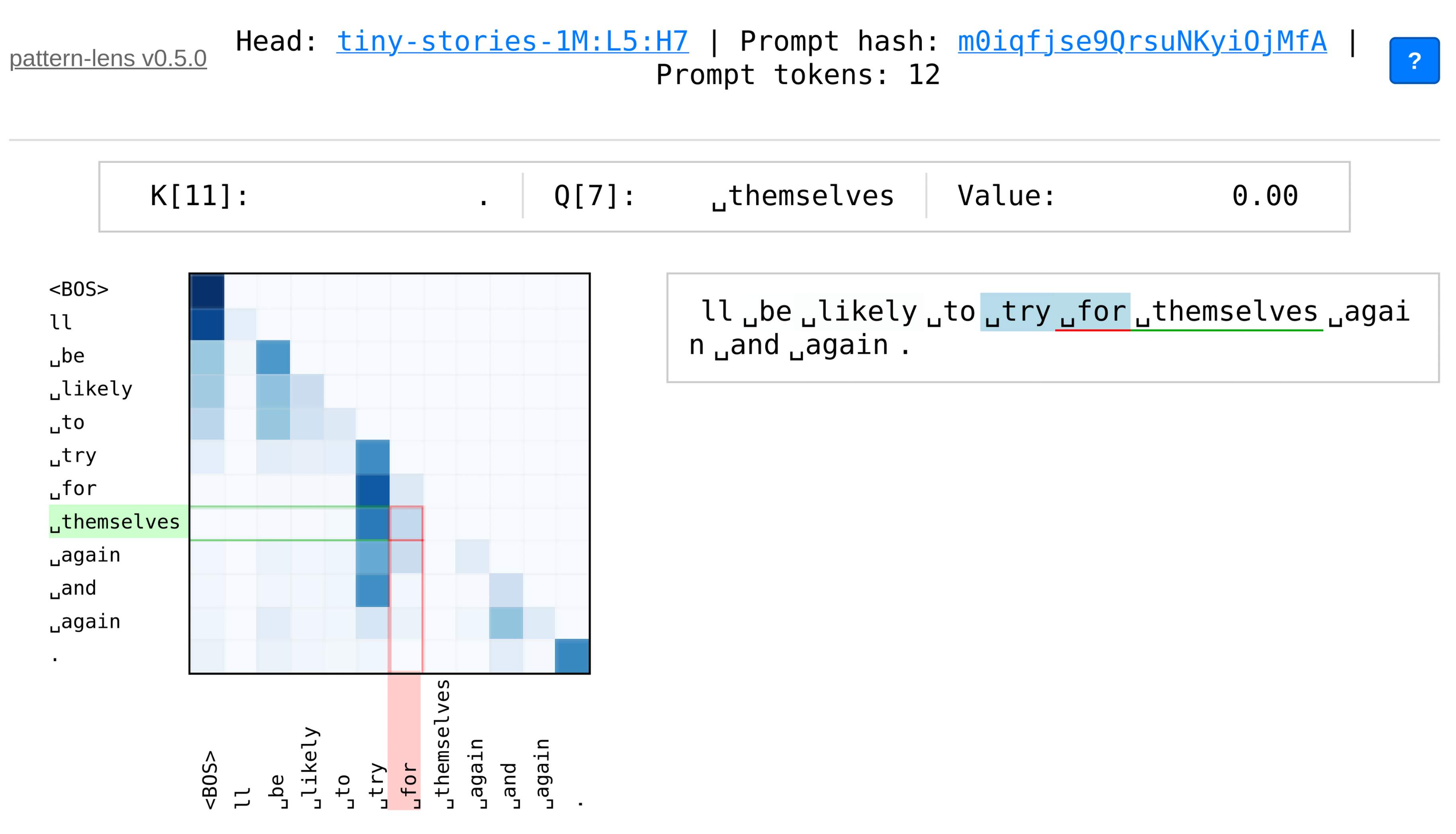
pattern-lens provides two complementary web interfaces for exploring attention patterns:
-
The main interface for comparing attention patterns across models, layers, and heads
- Filter and select patterns by model, layer, head, prompt, etc.
- View multiple patterns simultaneously in a grid layout
- Click patterns to open detailed single-pattern view
-
A focused interface for detailed examination of individual attention patterns
- Interactive heatmap with hover highlights and keyboard navigation
- Token-by-token analysis with Q/K axis highlighting
View a demo of the web UI at miv.name/pattern-lens/demo.
Much of this web UI is inspired by CircuitsVis, but with a focus on just attention patterns and figures computed from them. I have also tried to make the interface a bit simpler, more flexible, and faster.
Custom Figures
Add custom visualization functions by decorating them with @register_attn_figure_func. You should still generate the activations first:
python -m pattern_lens.activations --model gpt2 --prompts data/pile_1k.jsonl --save-path attn_data
and then write+run a script/notebook that looks something like this:
import numpy as np
import matplotlib.pyplot as plt
from scipy.linalg import svd

# these functions simplify writing a function which saves a figure
from pattern_lens.figure_util import matplotlib_figure_saver, save_matrix_wrapper
# decorator to register your function, such that it will be run by `figures_main`
from pattern_lens.attn_figure_funcs import register_attn_figure_func
# runs the actual figure generation pipeline
from pattern_lens.figures import figures_main

# define your own functions
# this one uses `matplotlib_figure_saver` -- define a function that takes matrix and `plt.Axes`, modify the axes
@register_attn_figure_func
@matplotlib_figure_saver(fmt="svgz")
def svd_spectra(attn_matrix: np.ndarray, ax: plt.Axes) -> None:
    # Perform SVD
    U, s, Vh = svd(attn_matrix)

    # Plot singular values
    ax.plot(s, "o-")
    ax.set_yscale("log")
    ax.set_xlabel("Singular Value Index")
    ax.set_ylabel("Singular Value")
    ax.set_title("Singular Value Spectrum of Attention Matrix")


# run the figures pipelne
# run the pipeline
figures_main(
	model_name="pythia-14m",
	save_path=Path("docs/demo/"),
	n_samples=5,
	force=False,
)
See demo.ipynb for a full example.
1 maintainer

Release files for pattern-lens 0.6.0
For a detailed explanation of source distributions (sdists) and built distributions (wheels), please see the package formats documentation.
Source distribution (sdist)
| File | Size | Uploaded | |
|---|---|---|---|
| pattern_lens-0.6.0.tar.gz | 56.1 MB | Details |
Built distribution (wheel)
| File | Interpreter | ABI | Platform | Reset |
|---|---|---|---|---|
| pattern_lens-0.6.0-py3-none-any.whl | Python 3 | none | any | Details |
Total release size: 56.2 MB
Release files / pattern_lens-0.6.0.tar.gz
| Download URL | pattern_lens-0.6.0.tar.gz |
|---|---|
| Size | 56.1 MB |
| Tags | Source |
|
SHA-256 checksum How to use checksums |
0e87aebb00ab4df86f49750ffcc36bd0c5f99787eee4576db7f57f0906f91b28
|
|
BLAKE2b-256 checksum How to use checksums |
58680914a581b2fa00796eca0ea429cea03a71ed1a3f9ee51b03b84f1ee4315e
|
| Upload date | |
|
Uploaded using Trusted Publishing? What is trusted publishing? |
No |
| Uploaded via |
twine/6.2.0 CPython/3.13.2
|
Release files / pattern_lens-0.6.0-py3-none-any.whl
| Download URL | pattern_lens-0.6.0-py3-none-any.whl |
|---|---|
| Size | 108.5 kB |
| Tags | Python 3 |
|
SHA-256 checksum How to use checksums |
0a4425d61ca3a13d711ea2553ff3954a09b213eca80ae7c6fbcda1e7e3b8be7d
|
|
BLAKE2b-256 checksum How to use checksums |
929d9a7cb393b3b5f11f7a8ef9b98dc3a643466a63db4b621151acb5ff0d478e
|
| Upload date | |
|
Uploaded using Trusted Publishing? What is trusted publishing? |
No |
| Uploaded via |
twine/6.2.0 CPython/3.13.2
|














